
1. Уводзіны
Дзякуй за пакупкуasing the Caliber RMD 068-2 Car Radio USB/SD Player. This manual provides detailed instructions for the installation, operation, and maintenance of your new car radio. Please read this manual thoroughly before using the product to ensure proper functionality and safety. Keep this manual for future reference.
2. Інфармацыя па бяспецы
- Ўстаноўка: Ensure the unit is installed by a qualified technician to prevent damage to the vehicle's electrical system. Incorrect wiring can cause fire or electrical shock.
- крыніца харчавання: Connect the unit only to a 12V DC car battery with a negative ground.
- Засцерагальнікі: Always replace fuses with new ones of the specified rating. Using an incorrect fuse can cause damage to the unit or vehicle.
- Узровень гучнасці: Do not operate the unit at excessively high volume levels, as this may impair your ability to hear external traffic sounds and could be dangerous.
- Уборка: Для чысткі выкарыстоўвайце мяккую сухую тканіну. Не выкарыстоўвайце абразіўныя ачышчальнікі або растваральнікі.
- Вільготнасць: Не падвяргайце прыладу ўздзеянню вільгаці або вады.
3. Змесціва ўпакоўкі
Калі ласка, праверце наяўнасць усіх прадметаў:
- Caliber RMD 068-2 Car Radio Unit
- Здымная пярэдняя панэль
- Праводка ISO
- мантажная рама
- Disassembly Keys (2 pcs)
- Кіраўніцтва карыстальніка (гэты дакумент)
4. Прадукт скончыўсяview
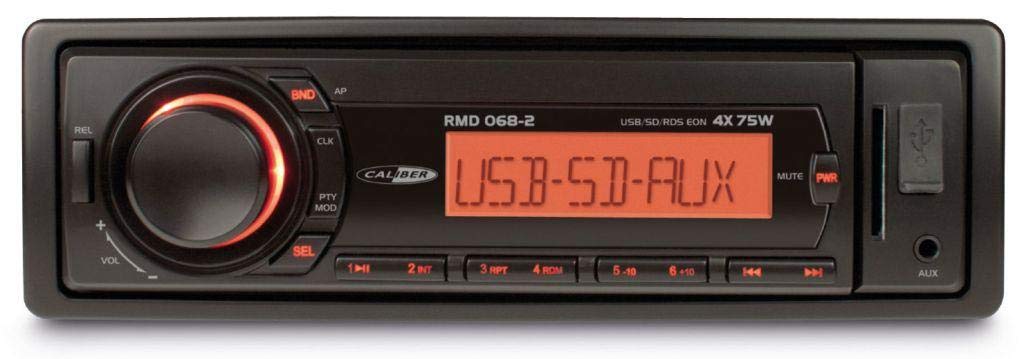
Малюнак 1: Спераду view of the Caliber RMD 068-2 Car Radio. This image shows the main unit with its detachable front panel, including the display, control buttons, USB port, and SD card slot.
4.1 Элементы кіравання пярэдняй панэлі
- POWER/MODE Button: Press to turn on/off. Short press to switch between Radio, USB, SD, AUX modes.
- Ручка гучнасці: Rotate to adjust volume. Press to access audio settings (Bass, Treble, Balance, Fader).
- DISPLAY: Shows current time, radio frequency, track information, etc.
- Порт USB: Падключыце USB-флэш-назапашвальнікі для прайгравання медыяфайлаў.
- Слот для SD-карты: Устаўце SD-карты для прайгравання медыяфайлаў.
- AUX-уваход (раздым 3.5 мм): Падключыце знешнія гукавыя прылады.
- Кнопка BAND/AMS: In radio mode, press to select radio band (FM1, FM2, FM3). Long press for Automatic Memory Store.
- Кнопкі PRESET (1-6): Store and recall radio stations. In USB/SD mode, use for direct track selection.
- Кнопка PLAY/PAUSE: Прайграць або прыпыніць прайграванне мультымедыя.
- FORWARD/BACKWARD Buttons: Skip tracks or tune radio frequency.
- Кнопка ВЫКЛЮЧЭННЯ: Release the detachable front panel.
4.2 Заднія падключэнні
The rear of the unit features standard ISO connectors for power and speakers, along with an antenna input.
- ISO Power Connector: For connecting to the vehicle's power supply (constant 12V, ignition 12V, ground).
- ISO Speaker Connector: For connecting to the vehicle's speakers (Front Left, Front Right, Rear Left, Rear Right).
- Антэнны ўваход: For connecting the car's radio antenna.
5. Настройка
5.1 Ўстаноўка
- Адключыце акумулятар: Before starting, disconnect the negative terminal of your car battery to prevent short circuits.
- Выдаліць стары блок: Асцярожна зніміце існуючую аўтамабільную радыёпрыёмнік з прыборнай панэлі.
- Усталюйце мантажную рамку: Insert the supplied mounting frame into the dashboard opening and bend the tabs to secure it.
- Падключэнне правадоў: Refer to the wiring diagram in section 5.2. Connect the ISO wiring harness to the car's wiring and then to the Caliber RMD 068-2 unit. Connect the antenna cable.
- Slide Unit In: Carefully slide the Caliber RMD 068-2 unit into the mounting frame until it clicks into place.
- Паўторнае падключэнне батарэі: Зноў падключыце адмоўны вывад акумулятара вашага аўтамабіля.
- Прымацаванне пярэдняй панэлі: Attach the detachable front panel to the main unit.
5.2 Электрычная схема
The Caliber RMD 068-2 uses standard ISO connectors. Ensure correct connections as shown below. If your vehicle does not have ISO connectors, an adapter may be required.
| Кантактны нумар | Wire Color (Typical) | Функцыя |
|---|---|---|
| 4 | Жоўты | Пастаяннае напружанне 12 В (батарэя) |
| 7 | Чырвоны | Пераключаны 12В (запальванне) |
| 8 | Чорны | зямля |
| 5 | Сіні | Antenna Remote Out |
| Кантактны нумар | Wire Color (Typical) | Функцыя |
|---|---|---|
| 1 | Фіялетавы | Задні правы (+) |
| 2 | Фіялетавы/Чорны | Задні правы (-) |
| 3 | Зялёны | Задні левы (+) |
| 4 | Зялёны/Чорны | Задні левы (-) |
| 5 | Шэры | Пярэдні справа (+) |
| 6 | Шэры/Чорны | Пярэдні справа (-) |
| 7 | Белы | Пярэдні левы (+) |
| 8 | Белы/Чорны | Пярэдні левы (-) |
Note: Wire colors may vary depending on vehicle manufacturer. Always consult your vehicle's wiring diagram.
6. Інструкцыя па эксплуатацыі
6.1 Асноўныя функцыі
- Уключэнне/выключэнне харчавання: Націсніце МАГУТ / РЭЖЫМ для ўключэння або выключэння прылады.
- Рэгулятар гучнасці: Павярнуць АБ'ЁМ па гадзіннікавай стрэлцы, каб павялічыць гучнасць, супраць гадзіннікавай стрэлкі, каб паменшыць.
- Выбар рэжыму: Кароткае націсканне МАГУТ / РЭЖЫМ button to cycle through available modes: Radio (FM), USB, SD, AUX.
- Налады гуку: Націсніце АБ'ЁМ knob to enter audio settings. Rotate the knob to select settings like BASS, TREBLE, BALANCE, FADER. Press the knob again to confirm or move to the next setting.
6.2 Радыё
- Выбар групы: У рэжыме радыё націсніце кнопку Паласа/AMS кнопка для пераключэння паміж дыяпазонамі FM1, FM2 і FM3.
- Ручная настройка: Кароткае націсканне НАПЕРАД/НАЗАД кнопкі для дакладнай налады частаты.
- Аўтаматычны пошук: Доўгі націск НАПЕРАД/НАЗАД кнопкі для аўтаматычнага пошуку наступнай станцыі з моцным сігналам.
- Налады крамы: Tune to your desired station. Long press one of the PRESET (1-6) buttons until you hear a beep. The station is now stored.
- Адклікаць перадусталёўкі: Short press one of the PRESET (1-6) buttons to recall a stored station.
- Automatic Memory Store (AMS): Доўгі націск Паласа/AMS button to automatically scan and store the strongest stations into the current band's presets.
6.3 Прайграванне з USB/SD-карты
- Уставіць медыяфайл: Устаўце флэш-назапашвальнік USB у порт USB або SD-карту ў слот для SD-карты. Прылада аўтаматычна пераключыцца ў рэжым USB/SD і пачне прайграванне.
- Прайграванне/Паўза: Націсніце ПРАЙГРАЦЬ/Паўза кнопку для прыпынення або аднаўлення прайгравання.
- Прапусціць трэк: Кароткае націсканне НАПЕРАД/НАЗАД кнопкі для пераходу да наступнага або папярэдняга трэка.
- Перамотка наперад/назад: Доўгі націск НАПЕРАД/НАЗАД кнопкі для хуткага перамотвання наперад або назад у межах трэка.
- Навігацыя па папках: Выкарыстоўвайце ПРАДУСТАЎЛІВАННЯ 5 і ПРАДУСТАЎЛІВАННЯ 6 buttons to navigate between folders on your USB/SD media.
6.4 AUX ўваход
- Падключыць прыладу: Падключыце знешнюю аўдыёпрыладу (напрыклад, смартфон, MP3-плэер) да ўваходнага раздыма AUX 3.5 мм на пярэдняй панэлі з дапамогай аўдыёкабеля.
- Выберыце рэжым AUX: Націсніце МАГУТ / РЭЖЫМ button repeatedly until "AUX" is displayed.
- Кіраванне прайграваннем: Control playback (play, pause, skip) directly from your connected external device. The car radio will control the volume.
7. Тэхнічнае абслугоўванне
- Ачыстка прылады: Use a soft, dry cloth to wipe the front panel and display. Do not use harsh chemicals, cleaning sprays, or abrasive cloths, as these can damage the surface.
- Detachable Front Panel: When detaching the front panel, handle it carefully. Store it in a protective case (if supplied) to prevent scratches or damage.
- Парты USB/SD: Keep the USB port and SD card slot free from dust and debris.
8. Выпраўленне непаладак
| праблема | Магчымая прычына | Рашэнне |
|---|---|---|
| Няма ўлады | Перагарэлы засцерагальнік; няправільная праводка; няшчыльнае злучэнне | Check and replace fuse; Verify wiring connections (Yellow to constant 12V, Red to ignition 12V, Black to ground); Ensure front panel is securely attached. |
| Няма гуку | Volume too low; Mute activated; Incorrect speaker wiring; Damaged speakers | Increase volume; Check if mute is active; Verify speaker connections; Test with known good speakers. |
| Слабы прыём радыё | Antenna not connected; Damaged antenna; Weak signal area | Ensure antenna is securely connected; Check antenna for damage; Try tuning to a stronger station or move to a different location. |
| USB/SD не прайграваецца | Не падтрымліваецца file format; Corrupted media; Incorrectly inserted media; Max capacity exceeded | Забяспечыць files are MP3/WMA format; Try a different USB/SD card; Reinsert media correctly; Check media capacity (max 32GB recommended). |
| Front panel cannot be detached | Eject button not fully pressed; Mechanism jammed | Press the EJECT button firmly; Do not force the panel. |
If the problem persists after trying these solutions, please contact your dealer or a qualified service center.
9. Тэхнічныя характарыстыкі
- мадэль: Caliber RMD 068-2
- Выходная магутнасць: 4 x 75 Watts Max
- крыніца харчавання: 12V DC (10.8V-15.6V), Negative Ground
- Засцерагальнік: 10А
- Падтрымліваюцца аўдыяфарматы: MP3, WMA (via USB/SD)
- USB/SD Compatibility: Да 32 ГБ (фармат FAT32)
- FM-цюнэр: RDS, 18 Presets
- Уваход AUX: 3.5 мм стэрэараз'ём
- Detachable Front Panel: так
- Вага: Прыблізна 0.95 кг (2.09 фунта)
10. Гарантыя і падтрымка
This Caliber product is covered by a warranty in accordance with applicable European laws. For detailed warranty terms and conditions, please refer to the warranty card included with your product or visit the official Caliber website. For technical support, troubleshooting assistance, or service inquiries, please contact your authorized Caliber dealer or the customer service department in your region. Please have your product model number (RMD 068-2) and proof of purchase ready when contacting support.
Note: Specifications and design are subject to change without notice for improvement.