Thank you for choosing the AMS Pendule 211/1 wall clock. This manual provides comprehensive instructions for the safe and efficient setup, operation, and maintenance of your new clock. Please read this manual thoroughly before use and retain it for future reference.
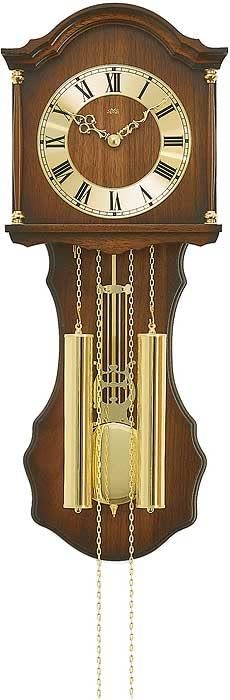
Figure 1: AMS Pendule 211/1 Wall Clock
2. Настройка
2.1 Распакаванне
Асцярожна дастаньце гадзіннік з упакоўкі.
Праверце гадзіннік на наяўнасць пашкоджанняў. Калі ён пашкоджаны, не працягвайце наладу і звярніцеся ў службу падтрымкі кліентаў.
Remove all protective films or packaging materials from the clock face, hands, and pendulum.
Захавайце ўпакоўку для будучай транспарціроўкі або захоўвання.
2.2 Устаноўка батарэі
The AMS Pendule 211/1 requires batteries (not included) for operation. Please use the specified battery type.
Знайдзіце вечка батарэйнага адсека на задняй панэлі гадзінніка.
Remove the cover by sliding or unlatching it.
Insert the required batteries (e.g., 1x AA or 1x C, refer to the compartment label for exact type) according to the polarity indicators (+ and -).
Надзейна заменіце крышку батарэйнага адсека.
2.3 Устаноўка гадзінніка
Ensure the clock is mounted securely on a stable wall surface.
Choose a suitable location on a wall, away from direct sunlight, extreme temperatures, or vibrations.
Use an appropriate wall anchor and screw for your wall type (e.g., drywall, concrete). The mounting point should be strong enough to support the clock's weight.
Hang the clock securely using the keyhole slot on the back. Ensure it is level.
2.4 Настройка часу
Your AMS Pendule 211/1 clock features an analog display. Some models may include a radio-controlled mechanism for automatic time synchronization.
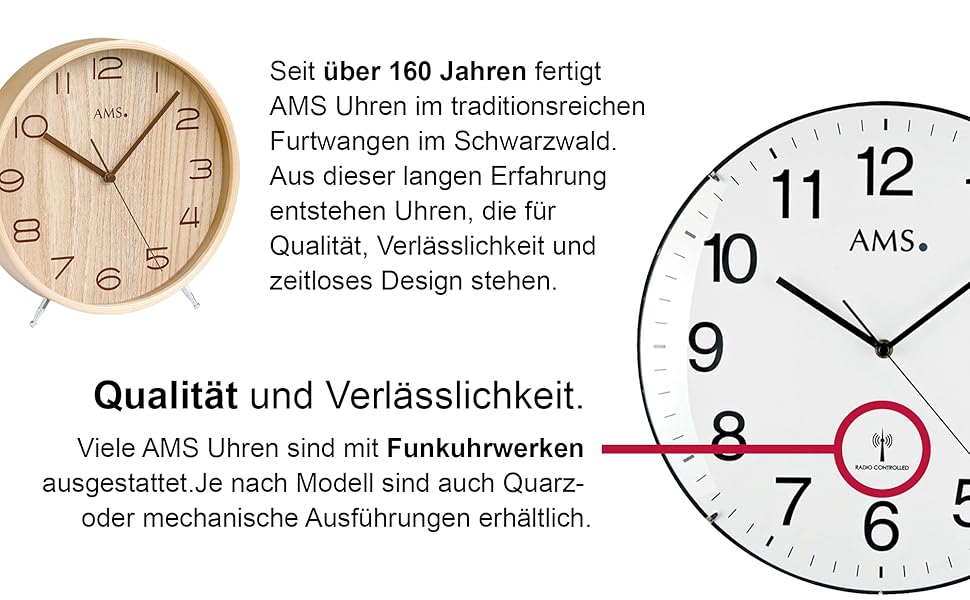
Малюнак 2: Выпample Clock Face with Radio Controlled Symbol
Ручная налада: Locate the time-setting knob or wheel on the back of the clock. Gently turn this knob to move the minute and hour hands clockwise until the correct time is displayed. Avoid turning the hands counter-clockwise.
Radio-Controlled (if applicable): If your clock is radio-controlled, it will attempt to synchronize with a time signal after battery installation. Place the clock near a window for better signal reception. This process may take several minutes or hours. Once synchronized, the clock will automatically display the correct time.
2.5 Pendulum Setup
The pendulum is a decorative and functional element of your clock.
Carefully unpack the pendulum if it was separate from the main clock body.
Attach the pendulum to its hook or hanging mechanism inside the clock case. Ensure it hangs freely and does not touch the sides of the case.
Gently push the pendulum to one side to start its swing. It should swing evenly.
3. Інструкцыя па эксплуатацыі
3.1 Вызначэнне часу
The AMS Pendule 211/1 features a clear analog display with hour, minute, and second hands for precise timekeeping.
The short hand indicates the hour.
The long hand indicates the minute.
The thin sweeping hand indicates the second.
3.2 Функцыя сігналізацыі
Your clock is equipped with an alarm function. Refer to the specific controls on the back or side of your clock for alarm setting.
Усталяваць час будзільніка: Locate the alarm setting knob/dial (often separate from the main time setting). Turn it to set the desired alarm time.
Уключыць будзільнік: Find the alarm ON/OFF switch or button. Move it to the "ON" position to activate the alarm.
Адключыць будзільнік: To turn off the alarm sound, move the alarm switch to the "OFF" position.
3.3 Pendulum Operation
Once the pendulum is installed and started, it should swing continuously. If it stops, gently restart it.
Ensure the clock is level on the wall to allow for an even pendulum swing.
Avoid obstructing the pendulum's movement.
4. Тэхнічнае абслугоўванне
4.1 Ачыстка
Regular cleaning will help maintain the appearance of your clock. The frame is made of Acrylonitrile Butadiene Styrene (ABS).
Wipe the clock's exterior with a soft, dry, lint-free cloth.
Для ўстойлівых плям злёгкуampпрамыйце тканіну вадой. Пазбягайце выкарыстання агрэсіўных хімікатаў, абразіўных ачышчальнікаў або растваральнікаў, бо яны могуць пашкодзіць пакрыццё.
Do not spray cleaning solutions directly onto the clock.
Keep the clock away from excessive dust and moisture.
4.2 Замена батарэі
Replace batteries when the clock starts losing time or stops functioning.
Follow the steps in Section 2.2 "Battery Installation" to replace old batteries with new ones of the correct type.
Утылізуйце выкарыстаныя батарэі адказна ў адпаведнасці з мясцовымі правіламі.
5. Выпраўленне непаладак
If you encounter issues with your AMS Pendule 211/1, refer to the table below for common problems and solutions.
праблема
Магчымая прычына
Рашэнне
Гадзіннік не працуе
Разраджаныя або няправільна ўсталяваныя батарэйкі.
Replace batteries. For radio-controlled, move to a location with better signal. If problem persists, contact support.
Pendulum not swinging
Not properly installed; obstruction; clock not level.
Ensure pendulum is correctly hooked and swings freely. Check if the clock is level. Gently restart the pendulum.
Будзільнік не гучыць
Alarm not activated; incorrect alarm time set; low battery.
Ensure alarm switch is ON. Verify alarm time setting. Replace batteries.
6. Тэхнічныя характарыстыкі
Асаблівасць
Дэталь
Марка
AMS
мадэль
211/1
ASIN
B005DRWNZ0
Тып дысплея
Аналаг
Форма
Прамавугольны
Матэрыял каркаса
Акрыланітрылбутадыенстырол (АБС)
Сігналізацыя
так
Батарэі ўваходзяць у камплект
няма
7. Гарантыя і падтрымка
For warranty information or technical support, please refer to the documentation provided with your purchase or contact the retailer. Keep your proof of purchase for any warranty claims.
For further assistance, you may visit the official AMS webсайт або звярніцеся ў іх аддзел абслугоўвання кліентаў.
Ask a question about this manual
Ask about setup, troubleshooting, compatibility, parts, safety, or missing instructions. Manuals+ will review the question and use this page’s manual context to help answer it.