
Уводзіны
This manual provides comprehensive instructions for the setup, operation, and maintenance of your AT&T 1040 Corded Four-Line Expandable Telephone. This device is designed for small business environments, offering multi-line capabilities, conferencing, and intercom features to enhance communication efficiency.
Асноўныя функцыі ўключаюць у сябе:
- Four-line operation for managing multiple calls simultaneously.
- Integrated speakerphone for hands-free communication.
- 3-party conferencing capability.
- 32-number speed dial for quick access to frequently called numbers.
- Intercom functionality for internal communication.
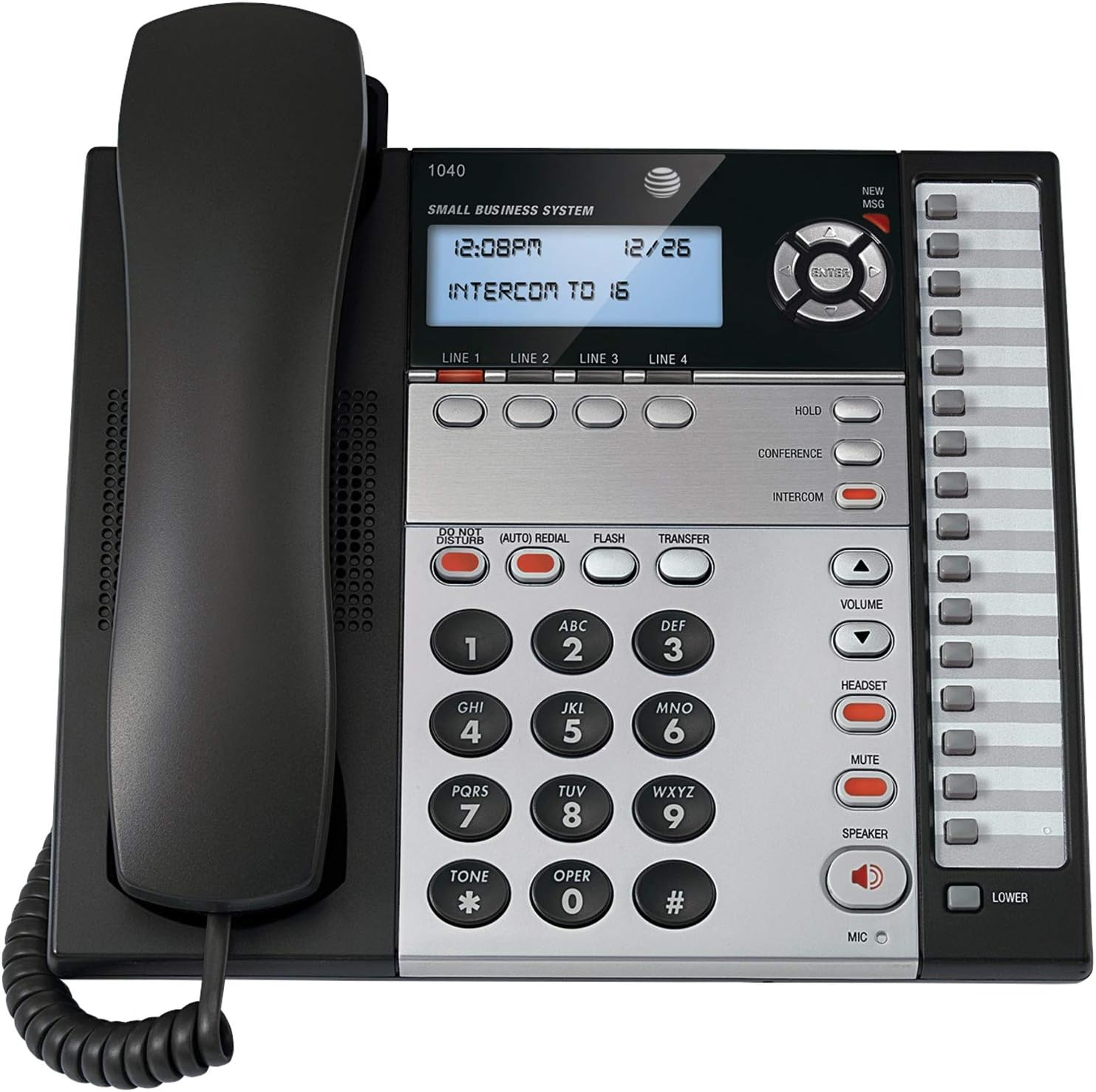
Малюнак 1: The AT&T 1040 Corded Four-Line Expandable Telephone. This image displays the main unit with its handset resting on the cradle, the digital display showing time and intercom status, the four line buttons, and the full keypad with function buttons like HOLD, CONFERENCE, INTERCOM, VOLUME, HEADSET, MUTE, and SPEAKER.
Настройка
1. Распакаванне і праверка кампанентаў
Перад пачаткам усталёўкі пераканайцеся, што ўсе кампаненты наяўныя:
- AT&T 1040 Base Unit
- Трубка
- Скручаны шнур трубкі
- Line Cords (up to 4, depending on configuration)
- Адаптар пераменнага току
- 9V Battery (for backup, typically included or purchased separately)
2. Падключэнне тэлефона
- Падключыце тэлефон: Plug one end of the coiled handset cord into the handset and the other end into the jack labeled Рука on the side of the telephone base.
- Connect the Line Cords: For each telephone line you wish to use, plug one end of a line cord into the jack labeled РАДОК 1, РАДОК 2, РАДОК 3, або РАДОК 4 on the back of the telephone base. Plug the other end of each line cord into a modular wall jack.
- Install the 9V Battery: Open the battery compartment on the bottom of the telephone base. Insert a 9V battery, observing the correct polarity (+/-). This battery provides backup power for settings during power outages. Close the compartment.
- Connect the AC Power Adapter: Plug the small end of the AC power adapter into the УЛАДА jack on the back of the telephone base. Plug the larger end into a standard electrical outlet.
3. Initial Configuration (Date and Time)
Пры першым уключэнні або пасля адключэння электраэнергііtage (if battery backup is not present or depleted), you may need to set the date and time. Refer to the display and use the navigation buttons (up/down arrows and ENTER) to adjust the settings. Press УВОД для пацверджання кожнай налады.
Інструкцыя па эксплуатацыі
1. Асноўныя функцыі выклікаў
- Здзяйсненне званка:
- Падніміце слухаўку або націсніце СПІКЕР кнопка.
- Select an available line by pressing one of the ЛІНІЯ 1-4 кнопкі.
- Набярыце патрэбны нумар тэлефона.
- Адказ на званок:
- Калі тэлефон зазваніць, падніміце слухаўку або націсніце СПІКЕР button. The corresponding line button will flash.
- Завяршэнне выкліку:
- Пастаўце трубку назад у крэсла або націсніце СПІКЕР зноў націсніце кнопку, калі выкарыстоўваецца гучная сувязь.
2. Multi-Line Operation
- Selecting a Line: Націсніце патрэбную ЛІНІЯ 1-4 button to select an available line for making or receiving calls.
- Switching Between Lines: During an active call on one line, press another ЛІНІЯ button to switch to that line or answer an incoming call on it. The first call will automatically be placed on hold.
3. Гучная сувязь
Каб выкарыстоўваць гучную сувязь, націсніце кнопку СПІКЕР button. The indicator light will illuminate. You can then dial or speak hands-free. Press the СПІКЕР button again to end the call or switch to the handset by lifting it.
4. Дамафон
The intercom feature allows internal communication between connected AT&T 1040 units. To initiate an intercom call:
- Націсніце ІНТЭРКОМ кнопка.
- Dial the extension number of the desired internal unit (e.g., "16" as shown on the display).
- The other unit will ring, and you can speak when answered.
5. Функцыя ўтрымання
Каб паставіць актыўны выклік на ўтрыманне, націсніце ТРЫМАЦЬ button. The line indicator light will flash slowly. To retrieve the call, press the flashing ЛІНІЯ кнопка.
6. Канферэнц-сувязь
To establish a 3-party conference call:
- Establish a call on РАДОК 1.
- Націсніце ТРЫМАЦЬ button to place the first call on hold.
- Select an available line (e.g., РАДОК 2) and dial the second party.
- Як толькі другі бок адкажа, націсніце КАНФЕРЭНЦЫЯ button. All three parties will now be connected.
7. Хуткі набор
The AT&T 1040 supports 32-number speed dial entries.
- Праграмаванне хуткага набору: Consult the full manual for detailed programming steps, typically involving a ПРАГРАМА or КРАМА button followed by a memory location and the number.
- Выкарыстанне хуткага набору: Падніміце трубку альбо націсніце СПІКЕР, select a line, then press the speed dial memory location button.
8. Рэгулятар гучнасці
Выкарыстоўвайце АБ'ЁМ уверх (▲) і ўніз (▼) buttons to adjust the listening volume during a call (handset or speakerphone). Ringer volume can typically be adjusted via a switch or menu setting on the base unit.
9. Прыглушыць
Падчас размовы націсніце МУК кнопку, каб часова адключыць мікрафон. Іншы абанент не будзе чуць вас, але вы ўсё роўна зможаце пачуць яго. Націсніце МУК зноў, каб аднавіць размову.
10. Не турбаваць
Націсніце НЕ ТУРБАВАЦЬ button to silence incoming calls. The indicator light will illuminate. Press it again to deactivate.
11. Паўторны набор
Націсніце (AUTO) REDIAL button to automatically redial the last number called.
12. Flash / Transfer
The УСПЫШКА button is used for accessing network features such as call waiting or transferring calls, depending on your telephone service provider. The ПЕРАДАЧА button is typically used in conjunction with intercom or other system features to transfer an external call to another internal extension.
13. Headset Operation
To use a headset (not included), plug it into the шлемофон jack on the side of the telephone base. Press the шлемофон button to activate headset mode. The indicator light will illuminate. Press it again to deactivate or switch to handset/speakerphone.
Тэхнічнае абслугоўванне
1. Уборка
Wipe the telephone's exterior with a soft, slightly damp cloth. Do not use cleaning sprays or abrasive cleaners, as these can damage the finish or internal components. Ensure the phone is unplugged from power before cleaning.
2. Замена батарэі
The 9V battery provides backup for settings. If the display shows incorrect time/date after a power outage, the battery may need replacement. Open the battery compartment on the bottom of the unit, remove the old battery, and insert a new 9V alkaline battery, observing polarity. Dispose of old batteries responsibly.
3. Агульны догляд
Avoid exposing the telephone to extreme temperatures, direct sunlight, or moisture. Do not drop the unit or subject it to strong impacts. Keep it away from sources of electrical noise, such as motors or fluorescent lighting fixtures.
Ліквідацыю непаладак
| праблема | Рашэнне |
|---|---|
| Няма нумара набору. |
|
| Нельга рабіць або прымаць званкі. |
|
| Дысплей пусты або нечытэльны. |
|
| Intercom not working. |
|
Тэхнічныя характарыстыкі
- Памеры прадукту: 10.2 х 11.5 х 4.5 цалі
- Вага прадмета: 0.16 унцый (4.54 г)
- Тып тэлефона: рубчатая
- Крыніца харчавання: Правадная электрычная
- Тып дазвону: Адзіная клавіятура
- Тып аўтаадказчыка: Лічбавы
- Магчымасць канферэнц-сувязі: 3-баковы
- Шматрадковая аперацыя: Multi-Line Operation (Four-Line)
- Speed Dial Capacity: 32 нумары
- Дамафон: так
Гарантыя і падтрымка
For warranty information and technical support, please refer to the official AT&T product website or contact AT&T customer service. Keep your purchase receipt as proof of purchase for warranty claims.
Online resources may include FAQs, additional troubleshooting guides, and contact information for support.