
1. Уводзіны
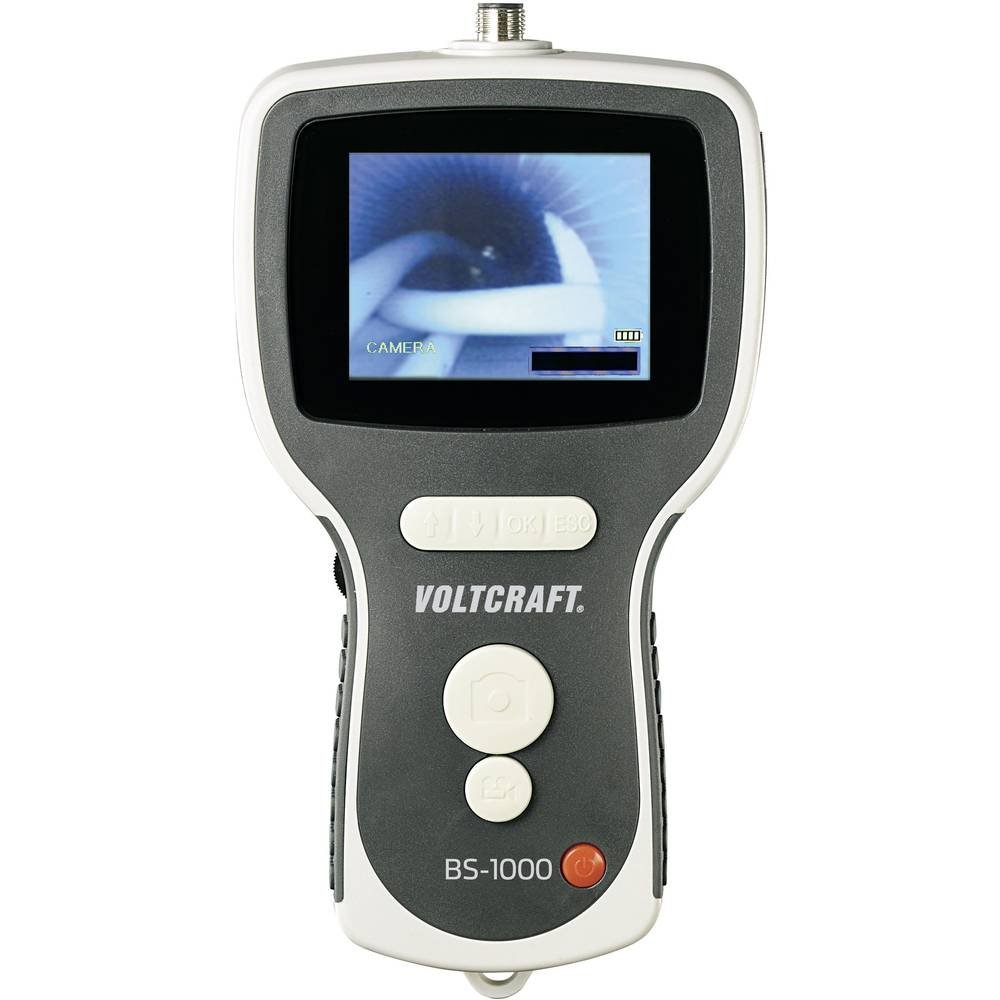
The VOLTCRAFT BS-1000T is a high-quality endoscope base unit designed for detailed visual inspection in various applications. It operates with a rechargeable battery and features a mini USB interface, a large 8.89 cm (3.5 inch) 320 x 240 pixel screen, an SD card slot, and a TV output. This base unit is compatible with various endoscope cameras, allowing for flexible use.
Асноўныя функцыі ўключаюць у сябе:
- 8.89 cm (3.5 inch) LCD screen
- Функцыя лічбавага маштабавання
- TV output for external display
- Video and photo recording capabilities
- Continuous brightness adjustment for the camera light
- Integrated LiPo battery for up to 4 hours of operation
- SD card support for media storage
- Tripod mounting thread for stable positioning
The VOLTCRAFT BS-1000T endoscope base unit, an SD card, and various accessories neatly organized within a black, hard-shell protective carrying case.
2. Інструкцыі па тэхніцы бяспекі
Калі ласка, прачытайце і зразумейце ўсе інструкцыі па тэхніцы бяспекі перад выкарыстаннем прылады. Невыкананне гэтых інструкцый можа прывесці да паражэння электрычным токам, пажару або сур'ёзных траўмаў.
- Трымайце прыладу далей ад вады і вільгаці.
- Не спрабуйце адкрываць або мадыфікаваць прыладу. Звяртайцеся па ўсё абслугоўванне да кваліфікаванага персаналу.
- Use only the specified power adapter for charging the integrated LiPo battery.
- Пазбягайце ўздзеяння на прыладу экстрэмальных тэмператур або прамых сонечных прамянёў.
- Ensure the endoscope camera probe is clean and undamaged before insertion into any area.
- Do not use the device in environments with explosive gases or vapors.
- Захоўваць у месцах, недаступных дзецям.
3. Кампаненты прадукту
The BS-1000T endoscope base unit consists of the main display unit, control buttons, and connection ports. It is designed to be used with a compatible endoscope camera probe (sold separately or included in specific kits).
Асаблівасці асноўнага блока:
- 3.5-цалевы ВК-экран: Displays live video feed and recorded media.
- Кнопкі кіравання: For power, menu navigation, zoom, brightness, and recording functions.
- Порт Mini USB: For charging and data transfer to a computer.
- Слот для SD-карты: For storing videos and images.
- Аўдыёвыход: Для падключэння да знешняга дысплея (напрыклад, тэлевізара).
- Раз'ём камеры: For attaching the flexible endoscope camera probe.
- Нітка штатыва: Located at the bottom for mounting on a tripod.

The VOLTCRAFT BS-1000T endoscope base unit held in hand, with a flexible camera probe extending from its top. The unit's screen shows a live feed from the camera.
4. Настройка
4.1. Зарадка акумулятара
- Connect the provided USB cable to the mini USB port on the BS-1000T unit.
- Падключыце другі канец USB-кабеля да адпаведнага адаптара харчавання USB (не ўваходзіць у камплект) або да USB-порта кампутара.
- The charging indicator will illuminate. A full charge provides up to 4 hours of operation.
4.2. Устаўка SD-карты
- Locate the SD card slot on the side of the BS-1000T unit.
- Insert a compatible SD card (up to 32GB, Class 10 recommended) into the slot with the metal contacts facing down until it clicks into place.
- To remove, gently push the SD card until it springs out.
4.3. Connecting the Endoscope Camera
- Ensure the BS-1000T unit is powered off.
- Align the connector of the endoscope camera probe with the camera connector port on the top of the BS-1000T unit.
- Gently push and twist the connector to secure the camera probe. Do not force the connection.
5. Аперацыя
5.1. Уключэнне / выключэнне харчавання
- Каб уключыць прыладу, націсніце і ўтрымлівайце кнопку харчавання, пакуль не падсвеціцца экран.
- Каб выключыць прыладу, націсніце і ўтрымлівайце кнопку харчавання, пакуль экран не выключыцца.
5.2. Запіс відэа
- With the unit powered on and camera connected, press the Video Record button to start recording. A recording indicator will appear on the screen.
- Press the Video Record button again to stop recording. The video file will be saved to the inserted SD card.
5.3. Захоп выявы
- Падчас жывога эфіру view or video playback, press the Photo Capture button to take a still image.
- Малюнак file will be saved to the inserted SD card.
5.4. Функцыя маштабавання
- Press the Zoom button to digitally magnify the image on the screen.
- Repeated presses will cycle through different zoom levels.
5.5. Рэгуляванне яркасці
- Use the Brightness control buttons to adjust the intensity of the camera's LED lights.
- This allows for optimal illumination in various inspection environments.
5.6. Image Mirroring
- The device supports mirroring the displayed image. This feature is useful when using mirror attachments on the camera probe to correct the visual orientation.
- Refer to the on-screen menu for mirroring options.
5.7. TV Output
- Connect an AV cable (not included) from the AV output port on the BS-1000T unit to the AV input of a television or external monitor.
- The live feed or recorded media will be displayed on the external screen.

A close-up shot of the VOLTCRAFT BS-1000T endoscope's color LCD screen, showing a detailed image captured by the connected camera.

A person is shown holding the VOLTCRAFT BS-1000T endoscope base unit, with its flexible camera probe inserted into a sink drain for inspection. The unit's screen displays the live view from inside the drain.
6. Тэхнічнае абслугоўванне
6.1. Уборка
- Wipe the main unit with a soft, dry cloth. Do not use abrasive cleaners or solvents.
- For the camera probe, gently clean the lens with a lens cleaning cloth. If necessary, use a slightly damp тканіну і пераканайцеся, што яна цалкам высахла перад захоўваннем.
6.2. Захоўванне
- Store the BS-1000T unit and its accessories in a cool, dry place, away from direct sunlight and extreme temperatures.
- Пры працяглым захоўванні пераканайцеся, што акумулятар часткова зараджаны (каля 50%), каб падоўжыць тэрмін яго службы.
7. Выпраўленне непаладак
If you encounter issues with your VOLTCRAFT BS-1000T, please refer to the following common problems and solutions:
| праблема | Магчымая прычына | Рашэнне |
|---|---|---|
| Прылада не ўключаецца. | Акумулятар разраджаны. | Charge the device using the USB cable. |
| Няма выявы на экране. | Camera probe not connected properly or faulty. | Ensure the camera probe is securely connected. Test with another compatible probe if available. |
| Cannot record video or capture images. | SD card is full, not inserted, or faulty. | Check if the SD card is inserted correctly. Delete old files or replace the SD card. Ensure the card is not write-protected. |
| Выява размытая або невыразная. | Camera lens is dirty or focus is incorrect. | Clean the camera lens. Adjust the focus type (manual focus for this model). |
| No output on external TV. | AV cable not connected correctly or TV input not selected. | Verify AV cable connection. Select the correct AV input source on your television. |
8. Тэхнічныя характарыстыкі
| Асаблівасць | Спецыфікацыя |
|---|---|
| Марка | ВАЛТКРАФТ |
| мадэль | БС-1000Т |
| Колер | Чорны |
| Памер экрана | 8.89 см (3.5 цалі) |
| Дазвол відэа | 320 х 240 пікселяў |
| Тэхналогія падлучэння | USB |
| Падтрымліваюцца фарматы | Video, Image |
| Сумяшчальныя прылады | Endoscope cameras |
| Памеры прадукту (Д х Ш х У) | 42 х 34 х 12 см |
| Вага прадмета | 450 грам |
| Тып маштабавання | Лічбавы |
| Тып фокусу | Дапаможнік |
| Эфектыўнае рашэнне | 320 пікселя |
9. Гарантыя і падтрымка
VOLTCRAFT products are designed for reliability and performance. For information regarding spare parts availability, please note that spare parts are guaranteed for 1 year from the date of purchase within the EU.
For further assistance, technical support, or warranty claims, please contact your retailer or visit the official VOLTCRAFT webсайт для кантактнай інфармацыі.