
InFocus IN124
DLP-праектар InFocus IN124
Кіраўніцтва карыстальніка
1. Уводзіны
This manual provides comprehensive instructions for the setup, operation, and maintenance of your InFocus IN124 DLP Projector. Please read this manual thoroughly before using the projector to ensure proper functionality and to maximize its lifespan.
The InFocus IN124 is designed to deliver clear and bright projections, suitable for various environments including home cinema and business presentations. Its compact design and robust features make it a versatile display solution.
2. Кампаненты прадукту
Upon unboxing your InFocus IN124 DLP Projector, please verify that all the following components are included:
- InFocus IN124 DLP Projector Unit
- Пульт дыстанцыйнага кіравання
- Сілавы кабель
- VGA Cable (may vary by region/package)
- User Manual (this document, typically on CD or downloadable)
If any items are missing or damaged, please contact InFocus customer support immediately.
3. Настройка
3.1 Фізічнае размяшчэнне
Position the projector on a stable, flat surface or mount it securely to a ceiling. Ensure adequate ventilation around the unit to prevent overheating. Maintain a clear path between the projector lens and the projection surface (screen or wall).
3.2 Падключэнне прылад
The InFocus IN124 supports various input sources. Connect your source device (e.g., laptop, DVD player, gaming console) to the projector using the appropriate cable.
- HDMI: For high-definition digital video and audio. Connect an HDMI cable from your source device to the HDMI port on the projector.
- VGA: For analog video input, commonly used with computers. Connect a VGA cable from your computer's VGA output to the VGA input on the projector.
- Кампазітнае відэа: For standard definition video. Connect a composite video cable (yellow RCA) to the corresponding port.
- Аўдыё ўваход/выхад: Connect external audio devices if needed.
3.3 Уключэнне
Пасля падключэння ўсіх неабходных кабеляў:
- Падключыце кабель харчавання да праектара, а затым да разеткі.
- Press the power button on the projector's control panel or the remote control. The power indicator light will change, and the projector lamp будзе асвятляць.
- Allow a few moments for the projector to warm up and display the image.
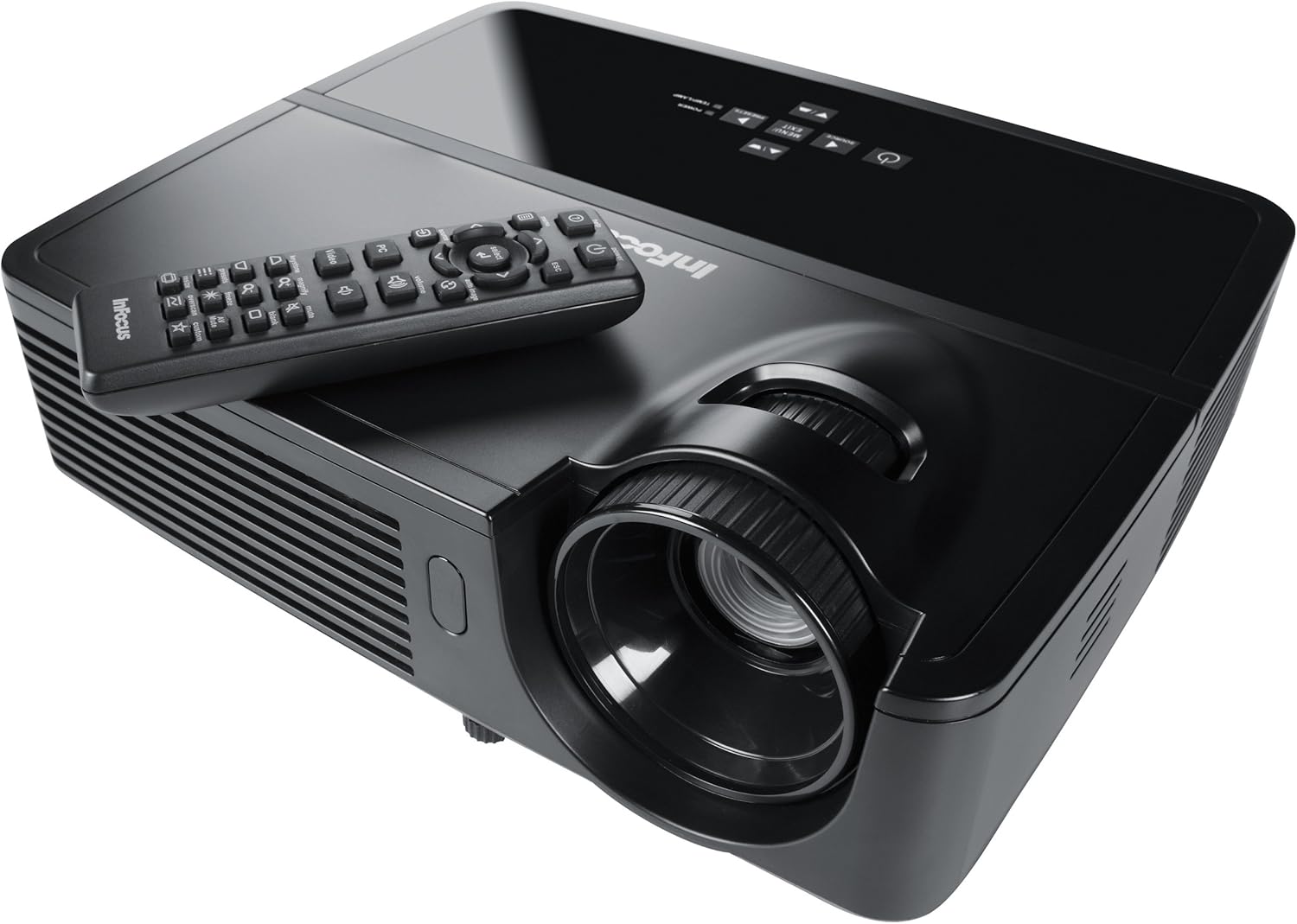
Figure 1: InFocus IN124 DLP Projector with its remote control. The image shows the top-down view of the black projector unit, highlighting the lens, ventilation grilles, and the control panel. The remote control is placed on top of the projector.
4. Кіраванне праектарам
4.1 Асноўныя элементы кіравання
The projector can be operated using the control panel on the unit or the included remote control.
- Кнопка харчавання: Уключае або выключае праектар.
- Кнопка крыніцы: Cycles through available input sources (HDMI, VGA, Video).
- Кнопка меню: Доступ да экраннага меню (OSD) для змены налад.
- Кнопкі са стрэлкамі: Перамяшчайцеся па пунктах меню і змяняйце значэнні.
- Кнопка ўводу/выбару: Пацвярджае выбар у меню.
- Кнопкі гучнасці: Рэгулюе ўзровень выхаднога гуку.
- Карэкцыя трапецеідальных скажэнняў: Карэктуе форму выявы, каб выправіць трапецападобнае скажэнне.
- Кольца факусіроўкі: Manually adjust the lens to sharpen the image.
4.2 Навігацыя па меню і налады
Press the "Menu" button to open the On-Screen Display (OSD). Use the arrow keys to navigate through categories such as "Picture," "Display," "Setup," and "Advanced." Press "Enter" to select a category or option. Adjust settings like brightness, contrast, color temperature, aspect ratio, and resolution to optimize your viewвопыту.
4.3 Функцыянальнасць 3D
The InFocus IN124 is 3D-ready. To experience 3D content, you will need compatible 3D source material, a 3D-capable player, and active DLP Link 3D glasses (sold separately). Refer to your 3D source device's manual for specific setup instructions.
5. Тэхнічнае абслугоўванне
Рэгулярнае тэхнічнае абслугоўванне забяспечвае аптымальную прадукцыйнасць і падаўжае тэрмін службы вашага праектара.
5.1 Ачыстка аб'ектыва
Use a soft, lint-free cloth specifically designed for optical lenses. Gently wipe the lens surface to remove dust or smudges. Avoid using abrasive cleaners or excessive force, which can scratch the lens.
5.2 Ачыстка паветраных фільтраў
The projector has air filters to prevent dust from entering the internal components. Locate the filter cover (refer to the diagram in the full manual if available) and remove it. Clean the filter using a small brush or a vacuum cleaner with a brush attachment. Replace the filter securely.
5.3 лamp Замена
Праектар лamp мае абмежаваны тэрмін службы. Калі lamp Калі індыкатар загараецца або выява становіцца цьмянай, пара замяніцьamp. Always allow the projector to cool down completely before attempting lamp replacement. Consult the full service manual or a qualified technician for detailed lamp replacement procedures specific to the IN124 model.
6. Выпраўленне непаладак
У гэтым раздзеле разглядаюцца распаўсюджаныя праблемы, з якімі вы можаце сутыкнуцца пры выкарыстанні праектара.
| праблема | Магчымая прычына | Рашэнне |
|---|---|---|
| Не адлюстроўваецца выява | Incorrect input source selected; Loose cable connection; Projector not powered on. | Press the "Source" button to cycle inputs; Check all cable connections; Ensure projector is powered on and lamp гарыць. |
| Відарыс размыты | Out of focus; Incorrect resolution setting. | Adjust the focus ring on the lens; Adjust the resolution setting in the OSD menu or on your source device. |
| Выява мае трапецападобную форму | Праектар не перпендыкулярны экрану. | Use the keystone correction feature (digital or manual) to square the image. Reposition the projector if possible. |
| Няма гуку | Volume too low; Incorrect audio input selected; Muted. | Increase volume; Check audio cable connections; Ensure projector or source device is not muted. |
| Праектар пераграваецца і выключаецца | Заблакіраваная вентыляцыя; забруджаны паветраны фільтр. | Ensure clear space around vents; Clean air filter as per maintenance section. |
For issues not listed here, please refer to the comprehensive online support resources or contact InFocus customer service.
7. Тэхнічныя характарыстыкі
Below are the key technical specifications for the InFocus IN124 DLP Projector:
| Асаблівасць | Дэталь |
|---|---|
| Нумар мадэлі | IN124 |
| Тэхналогія адлюстравання | DLP |
| Роднае дазвол | 1280x720 (HD) |
| Яркасць | Да 3200 люмен |
| Каэфіцыент кантраснасці | 3000:1 |
| Сувязь | HDMI, VGA, Composite Video |
| Асаблівасці | 3D-гатовы |
| Памеры прадукту (Д х Ш х У) | 12.99 х 12.99 х 5.9 цалі |
| Вага прадмета | 4.78 фунта (2.17 кг) |
| Электразабеспячэнне | 100-240 Volts at 50-60 Hz |
| Рэкамендуемае выкарыстанне | Хатні кінатэатр |
8. Гарантыя і падтрымка
InFocus provides a limited warranty for the IN124 DLP Projector. For detailed warranty terms and conditions, please refer to the warranty card included with your product or visit the official InFocus webсайт. Захоўвайце чэк аб куплі як пацвярджэнне пакупкі для гарантыйных прэтэнзій.
For technical support, troubleshooting assistance beyond this manual, or service requests, please contact InFocus customer support through their official website or the contact information provided in your product documentation. Online resources, including FAQs and driver downloads, may also be available.