
Уводзіны
This manual provides comprehensive instructions for the Ken-A-Vision 7200HD Video Flex Digital Document Camera. It covers setup, operation, maintenance, and troubleshooting to ensure optimal performance and longevity of your device. Please read this manual thoroughly before using the product.
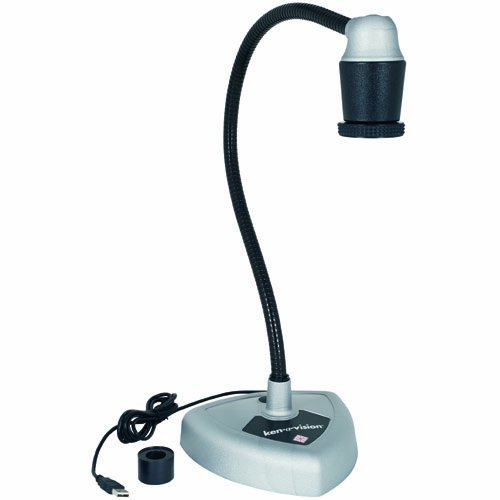
Figure 1: Ken-A-Vision 7200HD Video Flex Digital Document Camera.
This image displays the Ken-A-Vision 7200HD Video Flex Digital Document Camera from a front perspective. It features a flexible black neck extending from a grey triangular base, topped with a black and silver camera head. A USB cable is visible extending from the base.
Змест пакета
Праверце наяўнасць усіх прадметаў у камплекце:
- Ken-A-Vision 7200HD Video Flex Digital Document Camera
- Адаптар мікраскопа
- Сумка для пераноскі
- Discovery Scope Kit
- Applied Vision 4.0 Software (Windows, Mac, Linux compatible)
- USB 2.0 Cable (factory installed, 1.7 m)
Настройка
Распакаванне: Carefully remove all components from the carrying case.
Размяшчэнне: Place the camera base on a stable, flat surface. Ensure adequate space for the flexible neck and the object being viewрэд.
USB-злучэнне: Connect the integrated USB 2.0 cable from the camera base to an available USB port on your computer. The device is UVC Driverless, supporting plug-and-play functionality.
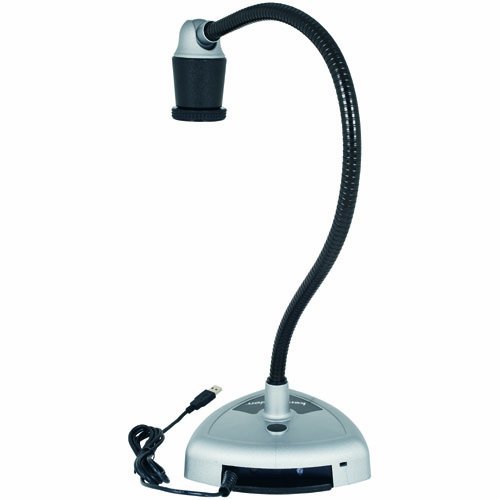
Figure 2: USB Connection Point.
This image shows the rear of the Ken-A-Vision 7200HD base, highlighting the integrated USB cable extending from the unit for connection to a computer.
Ўстаноўка праграмнага забеспячэння: Install the Applied Vision 4.0 software from the provided media or download the latest version from the Ken-A-Vision website. Follow the on-screen instructions for installation. The software is compatible with Windows, Mac, and Linux operating systems.
Інструкцыя па эксплуатацыі
Базавая аперацыя
Уключэнне: The device powers on automatically when connected via USB to a powered computer.
Запуск праграмнага забеспячэння: Open the Applied Vision 4.0 software on your computer.
Адрэгулюйце Viewкут нахілу: The flexible neck allows for a 180-degree ball and socket head viewing angle. Position the camera head over the object you wish to display.
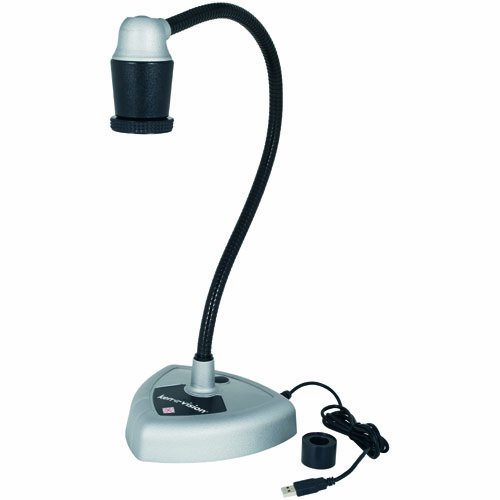
Figure 3: Flexible Neck Adjustment.
На гэтым малюнку паказаны бок view of the Ken-A-Vision 7200HD, illustrating the flexibility of its neck, which allows for precise positioning of the camera head.
Рэгуляванне фокусу: The camera features manual focus with a quick-turn focus ring located on the camera head. Rotate the ring until the image on your screen is clear.
Software Features (Applied Vision 4.0)
Лічбавае павелічэнне: Utilize the software buttons to digitally zoom in on your subject up to 16x magnification.
Negative/Positive: Toggle between negative and positive image modes using the dedicated software buttons.
Паварот выявы: Rotate the image 360 degrees in both directions via software controls.
Image Capture/Video Recording: Refer to the Applied Vision 4.0 software manual for detailed instructions on capturing still images and recording video.
Спецыяльныя прыкладання
Адаптар для мікраскопа: Attach the provided microscope adapter to the camera head to connect the Video Flex to a microscope eyepiece for magnified viewінж.
Interactive Whiteboards: The Ken-A-Vision 7200HD is compatible with various interactive whiteboards. Connect the camera to your computer, and the image can be projected and interacted with through your whiteboard software.
Тэхнічнае абслугоўванне
Ачыстка аб'ектыва: Use a soft, lint-free cloth specifically designed for optical lenses to gently clean the camera lens. Avoid abrasive materials or harsh chemicals.
Ачышчэнне арганізма: Wipe the camera body and flexible neck with a soft, damp тканіна. Не апускайце прыладу ў ваду і не выкарыстоўвайце празмерна вільготную тканіну.
захоўванне: When not in use, store the Ken-A-Vision 7200HD in its provided carrying case to protect it from dust and physical damage. Store in a cool, dry place.
Ліквідацыю непаладак
| праблема | Магчымая прычына | Рашэнне |
|---|---|---|
| No image displayed in software. |
|
|
| Выява размытая. |
|
|
| Праграмнае забеспячэнне завісае або дае збой. |
|
|
Тэхнічныя характарыстыкі
| Асаблівасць | Дэталь |
|---|---|
| мадэль | 7200HD |
| Датчык выявы | CMOS |
| Колькасць пікселяў | 1920 x 1080 (3.2 мегапікселя) |
| Разрозненне вываду | 1080P High Definition |
| Частата кадраў | Default 13 fps at 1280 x 1024; VGA 30 fps at 640 x 480 |
| Сувязь | USB 2.0 (UVC Driverless) |
| Даўжыня кабеля USB | 1.7 m (factory installed) |
| Viewing кут | 180-degree ball and socket head |
| Лічбавы зум | Up to 16x (controlled by software) |
| Фокус | Manual (quick turn focus) |
| Элементы кіравання выявамі | Negative/Positive, 360-degree rotation (controlled by software) |
| Праграмнае забеспячэнне ў камплекце | Applied Vision 4.0 (Windows, Mac, Linux compatible, free upgrades, unlimited site licenses) |
| Аксэсуары ў камплекце | Microscope adapter, carrying case, discovery scope kit |
| Памеры (пакет) | 18.5 х 13.4 х 8.5 цалі |
| Вага (упакоўкі) | 12.3 фунта |
| Колер | Black, Off-White |
Гарантыя і падтрымка
Інфармацыя аб гарантыі
The Ken-A-Vision 7200HD Video Flex Digital Document Camera comes with a 5-гадовая абмежаваная гарантыя. Please retain your proof of purchase for warranty claims. For detailed terms and conditions, refer to the warranty documentation included with your product or visit the official Ken-A-Vision webсайт.
Падтрымка кліентаў
For technical assistance, software updates, or further inquiries, please contact Ken-A-Vision customer support. Contact information can typically be found on the manufacturer's official webсайце або ва ўпакоўцы прадукту.