
Уводзіны
Дзякуй за пакупкуasing the Edifier Tick Tock Retro Multifunctional Alarm Clock. This device combines a retro design with modern functionality, offering an alarm clock, FM radio, and media playback from SD cards, USB drives, and auxiliary input. This manual provides detailed instructions for setup, operation, and maintenance to ensure optimal performance and longevity of your device.
Асаблівасці прадукту
- SD card reader and USB input port for media playback.
- LCD display screen for time, date, alarm status, and input mode (SD/USB/FM/AUX).
- Alarm clock function with customizable audio sources: SD card, USB drive, FM radio, or Auxiliary input.
- Auxiliary 3.5mm input jack for connecting external audio devices.
- FM radio function with 24 preset channels for easy access to your favorite stations.
- Two 360° omni-directional full-range speakers for rich, multi-directional sound.
Элементы кіравання і парты
Парты на задняй панэлі
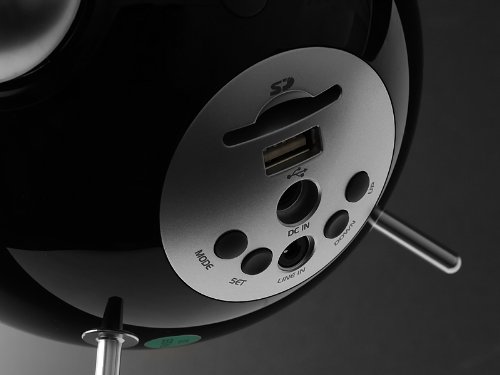
This image displays the rear panel of the Edifier Tick Tock alarm clock. Visible ports and buttons include:
- Слот для SD-карты: Insert an SD card for music playback.
- Порт USB: Connect a USB flash drive for music playback.
- DC IN: Уваход сілкавання для ўключанага адаптара пераменнага току.
- Лінейны ўваход (AUX): 3.5-мм аўдыёўваход для падлучэння знешніх прылад.
- Кнопка MODE: Cycles through input modes (SD, USB, FM, AUX).
- Кнопка SET: Used for entering settings menus (e.g., time, alarm).
- Кнопкі УВЕРХ/УНІЗ: Navigate menus, adjust volume, or change settings.
Элементы кіравання на верхняй панэлі
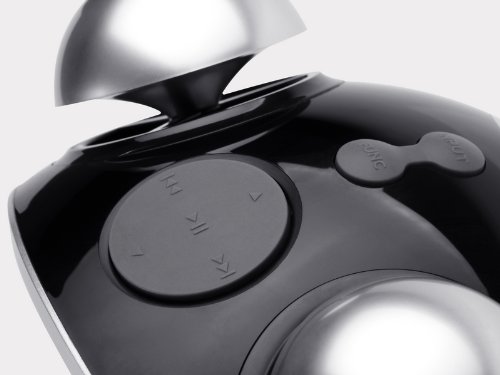
This image shows the top panel controls of the Edifier Tick Tock alarm clock. These include:
- Кнопка прайгравання/паўзы: Пачынае або прыпыняе прайграванне медыяфайлаў.
- Кнопкі папярэдняга/наступнага трэка: Skips to the previous or next track during media playback. Also used for tuning FM radio.
- Кнопкі павелічэння / памяншэння гучнасці: Рэгулюе гучнасць выхаднога гуку.
- Кнопка SNOOZE/LED: Актывуе паўтор сігналу будзільніка або рэгулюе яркасць дысплея.
Настройка
- Распакаванне: Carefully remove the alarm clock and all accessories from the packaging. Ensure all components are present: the alarm clock unit, AC power adapter, and this user manual.
- Падключэнне сілкавання: Connect the AC power adapter to the "DC IN" port on the rear of the alarm clock. Plug the adapter into a standard wall outlet. The display should illuminate.
- Першапачатковае ўключэнне: The unit should power on automatically. If not, press the power button (if available, otherwise it's always on when plugged in).
- Antenna (FM Radio): Extend the FM antenna located at the back of the unit for optimal radio reception.
Інструкцыя па эксплуатацыі
Ўстаноўка часу і даты
- Націсніце і ўтрымлівайце НАБОР кнопку, пакуль не пачне міргаць дысплей часу.
- Выкарыстоўвайце UP і УНІЗ кнопкі для налады гадзіны. Націсніце НАБОР каб пацвердзіць і перайсці да хвілін.
- Адкарэктуйце хвіліны з дапамогай UP і УНІЗ. Прэса НАБОР каб пацвердзіць.
- Continue this process to set the year, month, and day. Press НАБОР to exit the time/date setting mode.
Ўстаноўка будзільніка
- Націсніце НАБОР button once (do not hold) to enter alarm setting mode. The alarm time will flash.
- Выкарыстоўвайце UP і УНІЗ кнопкі для налады гадзіны будзільніка. Націсніце НАБОР каб пацвердзіць і перайсці да хвілін.
- Адкарэктуйце хвіліны з дапамогай UP і УНІЗ. Прэса НАБОР каб пацвердзіць.
- Next, select the alarm source (FM, SD, USB, AUX). Use UP і УНІЗ to cycle through options. Press НАБОР каб пацвердзіць.
- If FM is selected, use UP і УНІЗ to select a preset FM station (P01-P24).
- If SD or USB is selected, ensure a card/drive with audio is inserted. The alarm will play the first track.
- If AUX is selected, ensure an external device is connected and playing audio.
- Прэса НАБОР again to activate the alarm. An alarm icon will appear on the display.
- To deactivate the alarm, press НАБОР пакуль не знікне значок будзільніка.
- Калі прагучыць сігнал трывогі, націсніце SNOOZE / LIGHT button to activate snooze (typically 9 minutes). To turn off the alarm completely, press any other button.
Праца FM-радыё
- Націсніце РЭЖЫМ некалькі разоў кнопку, пакуль на дысплеі не з'явіцца надпіс «FM».
- Auto Scan and Preset: Націсніце і ўтрымлівайце ПРАЙГРАЦЬ/Паўза button. The radio will automatically scan for available stations and save them to presets (P01-P24).
- Ручная настройка: Выкарыстоўвайце ПАПЕРАДНІ/НАСТУПНЫ ТРАК кнопкі для дакладнай налады частаты.
- Выбар прэсетаў: In FM mode, briefly press the ПАПЕРАДНІ/НАСТУПНЫ ТРАК кнопкі для пераключэння паміж захаванымі прадусталяванымі станцыямі.
- Адрэгулюйце гучнасць з дапамогай UP і УНІЗ buttons on the rear panel.
SD Card / USB Playback
- Insert an SD card into the SD card slot or a USB flash drive into the USB port on the rear panel.
- Націсніце РЭЖЫМ button repeatedly until "SD" or "USB" appears on the display. The device will automatically start playing audio files.
- Выкарыстоўвайце ПРАЙГРАЦЬ/Паўза кнопку для прыпынення або аднаўлення прайгравання.
- Выкарыстоўвайце ПАПЕРАДНІ/НАСТУПНЫ ТРАК buttons on the top panel to skip tracks.
- Адрэгулюйце гучнасць з дапамогай UP і УНІЗ buttons on the rear panel.
Auxiliary Input (LINE IN)
- Connect an external audio device (e.g., smartphone, MP3 player) to the "LINE IN" (3.5mm) port on the rear panel using an audio cable (not included).
- Націсніце РЭЖЫМ некалькі разоў кнопку, пакуль на дысплеі не з'явіцца надпіс «AUX».
- Пачніце прайграванне на падлучанай знешняй прыладзе.
- Адрэгулюйце гучнасць з дапамогай UP і УНІЗ buttons on the rear panel, and also control volume from your external device.
Яркасць дысплея
Каротка націсніце SNOOZE / LIGHT button on the top panel to cycle through different display brightness levels.
Тэхнічнае абслугоўванне
- Уборка: Use a soft, dry cloth to clean the surface of the alarm clock. Do not use abrasive cleaners, waxes, or solvents.
- Размяшчэнне: Place the unit on a stable, flat surface. Avoid direct sunlight, high temperatures, humidity, or dusty environments.
- Магутнасць: Адключыце адаптар сілкавання ад разеткі, калі прылада не будзе выкарыстоўвацца працяглы час.
Ліквідацыю непаладак
| праблема | Магчымая прычына / рашэнне |
|---|---|
| Няма харчавання / дысплей выключаны |
|
| З дынамікаў няма гуку |
|
| Дрэнны прыём FM-радыё |
|
| Alarm does not sound or plays static |
|
| Display is too bright at night |
|
Тэхнічныя характарыстыкі
| Марка | Эдыфікатар |
| Нумар мадэлі | MF240Reto |
| Тып дысплея | ВК |
| Тэхналогія падлучэння | AUX, USB |
| Асаблівасці | Alarm, Radio, SD Card Reader, USB Playback |
| Крыніца харчавання | Правадная электрычная |
| Матэрыял | Пластыкавыя |
| Вага прадмета | 0.74 фунта (прыблізна 0.34 кг) |
| Вытворца | Edifier USA |
Гарантыя і падтрымка
This Edifier product comes with a Гарантыя ад вытворцы 2 год. For warranty claims, technical support, or further assistance, please contact Edifier USA customer service. Please retain your proof of purchase for warranty validation.
For the most up-to-date support information, please visit the official Edifier webсайт.