
1. Уводзіны
Дзякуй за пакупкуasing the Hello Kitty KT2064 AM/FM Projection Alarm Clock Radio. This device combines a digital alarm clock with an AM/FM radio and a unique projection feature, allowing you to display the time on your ceiling or wall. Please read this manual carefully to ensure proper operation and to fully utilize all features of your new alarm clock radio.

Выява 1.1: Спераду view of the Hello Kitty KT2064 Projection Alarm Clock Radio, showing the digital display and the Hello Kitty design.
2. Асаблівасці
- Функцыя праекцыі: Projects the time onto your ceiling or wall with adjustable focus and up to 120-degree pivot angle.
- Dual Alarm Options: Wake up to either a buzzer alarm or your favorite radio station.
- AM/FM-радыё: Integrated radio tuner for listening to broadcast stations.
- Функцыя затрымкі: Allows for an additional 9 minutes of sleep before the alarm sounds again.
- Sleep to Radio: Set a timer (up to 2 hours) for the radio to play before automatically turning off.
- Рэзервовае капіраванне батарэі: Захоўвае налады часу і будзільніка падчас адключэння электраэнергііtages (requires 3 CR2025 button cell batteries, not included).
- LED Time Display: Clear red LED display for current time.
3. Змесціва ўпакоўкі
Калі ласка, праверце ўпакоўку на наяўнасць наступных прадметаў:
- Hello Kitty KT2064 Projection Alarm Clock Radio Unit
- Адаптар пераменнага току
- Кіраўніцтва карыстальніка (гэты дакумент)
Note: 3 CR2025 button cell batteries for backup are not included and must be purchased separately.
4. Настройка
4.1 Падключэнне харчавання
- Unpack the alarm clock radio and its accessories.
- Connect the AC power adapter to the DC input jack located on the back of the unit.
- Plug the other end of the AC power adapter into a standard wall outlet. The unit will power on, and the LED display will light up.
4.2 Installing Backup Batteries
Installing backup batteries ensures that your time and alarm settings are retained during a power outage.
- Locate the battery compartment on the bottom or back of the unit.
- Адкрыйце крышку батарэйнага адсека.
- Insert 3 CR2025 button cell batteries, observing the correct polarity (+ and - markings).
- Надзейна зачыніце крышку батарэйнага адсека.

Малюнак 4.2: ззаду view of the alarm clock radio, showing control buttons and potential location for battery compartment.
5. Інструкцыя па эксплуатацыі
5.1 Настройка часу
- Націсніце і ўтрымлівайце УСТАНОВА ЧАСУ button (or similar button, refer to unit markings) for approximately 3 seconds until the hour digits begin to flash.
- Выкарыстоўвайце ГАДЗІНА or + / - кнопкі для рэгулявання гадзіны. Звярніце ўвагу на індыкатар AM/PM.
- Націсніце УСТАНОВА ЧАСУ зноў націсніце кнопку. Лічбы хвілін будуць міргаць.
- Выкарыстоўвайце ХВІЛІНА or + / - кнопкі для налады хвілін.
- Націсніце УСТАНОВА ЧАСУ button one more time to confirm and exit time setting mode.
5.2 Setting the Alarm (Alarm 1 and Alarm 2)
This unit supports two independent alarms.
- Націсніце і ўтрымлівайце AL1 НАБОР кнопка (для будзільніка 1) або AL2 НАБОР button (for Alarm 2) for approximately 3 seconds until the hour digits of the alarm time begin to flash.
- Выкарыстоўвайце ГАДЗІНА or + / - кнопкі для налады гадзін будзільніка.
- Націсніце адпаведную AL SET зноў націсніце кнопку. Лічбы хвілін будуць міргаць.
- Выкарыстоўвайце ХВІЛІНА or + / - кнопкі для налады хвілін будзільніка.
- Націсніце AL SET зноў націсніце кнопку, каб выбраць крыніцу сігналу трывогі: ЗУМЕР or РАДЫЁ. Выкарыстоўвайце + / - buttons to toggle.
- Націсніце AL SET яшчэ раз націсніце кнопку, каб пацвердзіць і выйсці з рэжыму налады будзільніка.
- Каб уключыць/выключыць будзільнік, націсніце кнопку AL1 УКЛ./ВЫКЛ. or AL2 УКЛ./ВЫКЛ. button (or similar) repeatedly until the alarm indicator appears/disappears on the display.
5.3 Using the Radio
- Націсніце РАДЫЁ ВКЛ/ВЫКЛ кнопка для ўключэння радыё.
- Націсніце AM/FM кнопка для пераключэння паміж дыяпазонамі AM і FM.
- Выкарыстоўвайце НАСТРОЙКА+ і МЕЛОДЫЯ- кнопкі для ручной налады на патрэбную станцыю.
- For automatic scanning, press and hold НАСТРОЙКА+ or МЕЛОДЫЯ- for a few seconds until the radio finds the next clear station.
- Адрэгулюйце гучнасць, выкарыстоўваючы ОБ'ём + і АБ'ЁМ - кнопкі.
- Каб выключыць радыё, націсніце РАДЫЁ ВКЛ/ВЫКЛ кнопку зноў.
5.4 Функцыя праекцыі
- Locate the projector lens on top of the unit.
- Націсніце ПРАЕКТАР ВКЛ/ВЫКЛ button to activate the time projection.
- Adjust the angle of the projector head (up to 120 degrees) to direct the time display onto your ceiling or wall.
- Павярнуць ФОКУС ring around the projector lens to achieve a clear image.
- To turn off the projection, press the ПРАЕКТАР ВКЛ/ВЫКЛ кнопку зноў.

Image 5.4: The alarm clock radio actively projecting the time and Hello Kitty logo onto a surface.
5.5 Функцыя паўтору
Калі гучыць будзільнік, націсніце вялікую кнопку СНАОЗ button (usually located on top of the unit). The alarm will pause for approximately 9 minutes and then sound again.
5.6 Sleep to Radio Function
This feature allows you to fall asleep to the radio, which will automatically turn off after a set period.
- Turn on the radio and tune to your desired station.
- Націсніце СПАЦЬ button repeatedly to cycle through the available sleep timer durations (e.g., 120, 90, 60, 30, 15 minutes, or OFF). The selected duration will appear on the display.
- The radio will play for the chosen duration and then automatically turn off.
6. Тэхнічнае абслугоўванне
- Уборка: Працірайце прыладу мяккай сухой тканінай. Не выкарыстоўвайце абразіўныя ачышчальнікі або растваральнікі.
- Ўздзеянне вады: Трымайце прыладу далей ад вады або празмернай вільгаці.
- тэмпература: Пазбягайце ўздзеяння на прыладу экстрэмальных тэмператур або прамых сонечных прамянёў.
- Замена батарэі: Replace backup batteries annually or when the low battery indicator appears to ensure continuous functionality during power outagэс.
7. Выпраўленне непаладак
| праблема | Магчымая прычына | Рашэнне |
|---|---|---|
| Прылада не ўключаецца. | Адаптар сілкавання не падключаны або няспраўная разетка. | Ensure the power adapter is securely plugged into the unit and a working wall outlet. Test the outlet with another device. |
| Time/alarm settings are lost after power outage. | Рэзервовыя акумулятары разрадзіліся або не ўсталяваныя. | Install new CR2025 button cell batteries or replace existing ones. |
| Projection is blurry. | Фокус настроены няправільна. | Павярнуць ФОКУС ring around the projector lens until the image is clear. |
| Дрэнны прыём радыё. | Антэна не выцягнутая або мае перашкоды. | Extend the FM wire antenna fully. For AM, try repositioning the unit. Avoid placing near electronic devices that may cause interference. |
| Сігналізацыя не гучыць. | Сігналізацыя не ўключана або настроена няправільна. | Ensure the alarm is set and activated (alarm indicator visible). Check alarm volume if set to radio. |
8. Тэхнічныя характарыстыкі
| Марка | Прывітанне Кіці |
| Нумар мадэлі | KT2064P |
| Тып дысплея | Лічбавы святлодыёд |
| Крыніца харчавання | Адаптар пераменнага току |
| Рэзервовы акумулятар | 3 x CR2025 Button Cell (not included) |
| радыёчастотныя | AM/FM (FM up to 108 MHz) |
| Памеры прадукту (Д х Ш х У) | 14.5 х 11.9 х 17.3 см (прыблізна 5.7 х 4.7 х 6.8 цалі) |
| Вага прадукту | 885 г (прыблізна 1.95 фунта) |
| Кут праекцыі | Да 120 градусаў |
| Працягласць адкладання | 9 хвілін |
| Таймер сну | Да 2 гадзін |
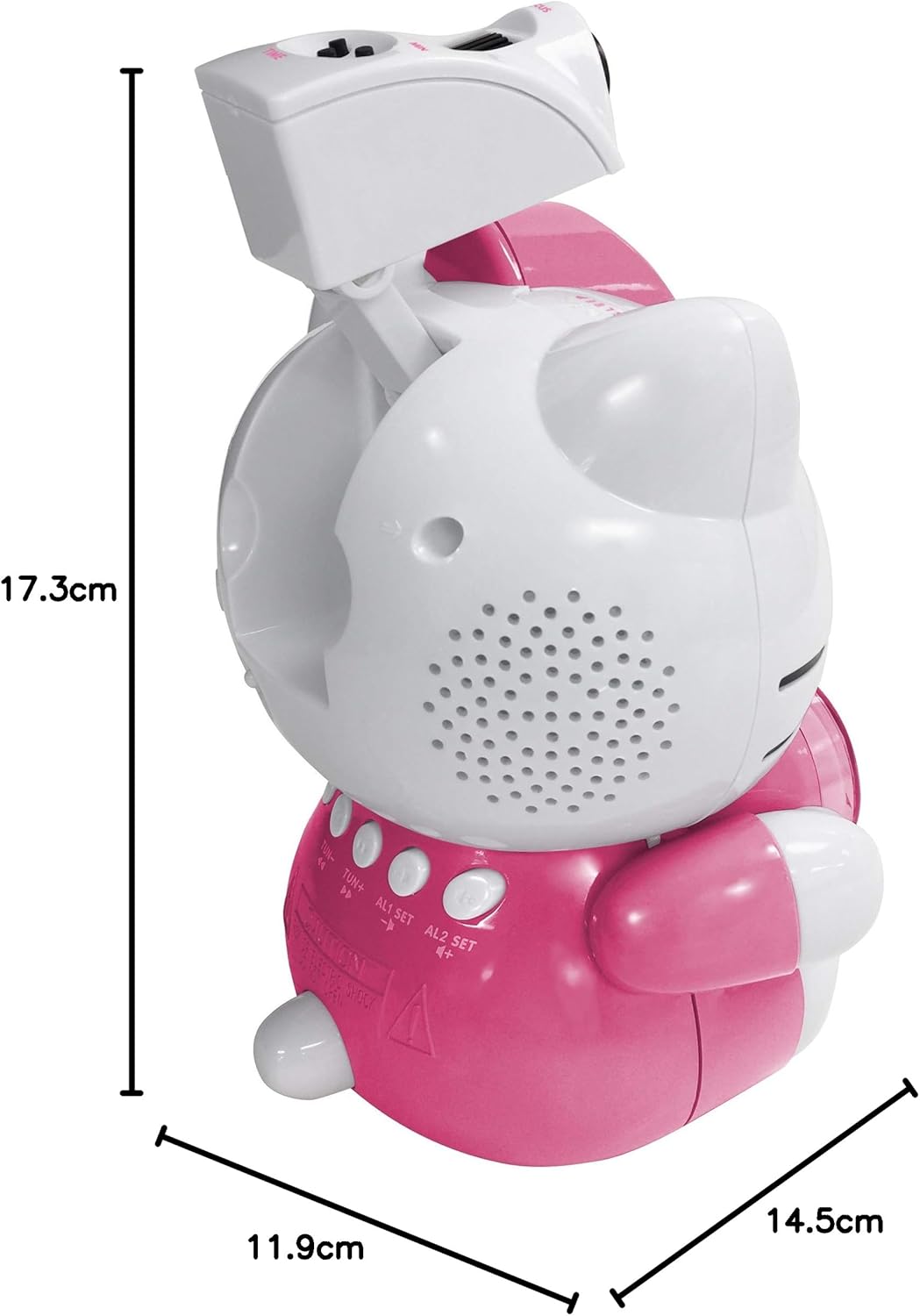
Image 8.1: Dimensions of the Hello Kitty KT2064 Projection Alarm Clock Radio.
9. Гарантыя і падтрымка
This product comes with a standard manufacturer's warranty. For specific warranty details, please refer to the documentation provided at the time of purchase or contact your retailer. If you encounter any issues not covered in the troubleshooting section, please contact customer support for assistance.
For support inquiries, please visit the official Hello Kitty product support webсайт або звярніцеся да мясцовага дыстрыбутара.