
1. Уводзіны
This manual provides comprehensive instructions for the setup, operation, maintenance, and troubleshooting of your DNP DS-RX1HS Dye Sublimation Photo Printer. The DS-RX1HS is designed for high-volume photo printing, offering enhanced efficiency and print speed for various applications, including photo booths and event photography. It supports multiple print sizes and features USB iSerial connectivity for seamless integration with Mac and PC systems.

Figure 1: DNP DS-RX1HS Photo Printer, angled front view. This image shows the compact design of the printer with its front media tray and the DNP logo.
2. Настройка
Follow these steps to set up your DNP DS-RX1HS printer.
2.1 Распакаванне
- Акуратна дастаньце прынтар з упакоўкі.
- Verify that all included components are present: Printer CD, Drivers for Windows OS7 and 8.1, Printhead Cushion, Power Cord. (Print media is not included and must be purchased separately).
- Remove any protective tapes or packing materials from the printer.
2.2 Падключэнне прынтара
The DS-RX1HS connects to your computer via a USB 2.0 Type B port.
- Locate the USB 2.0 Type B port on the rear of the printer.
- Connect one end of a USB 2.0 cable (not included) to the printer and the other end to an available USB port on your computer.
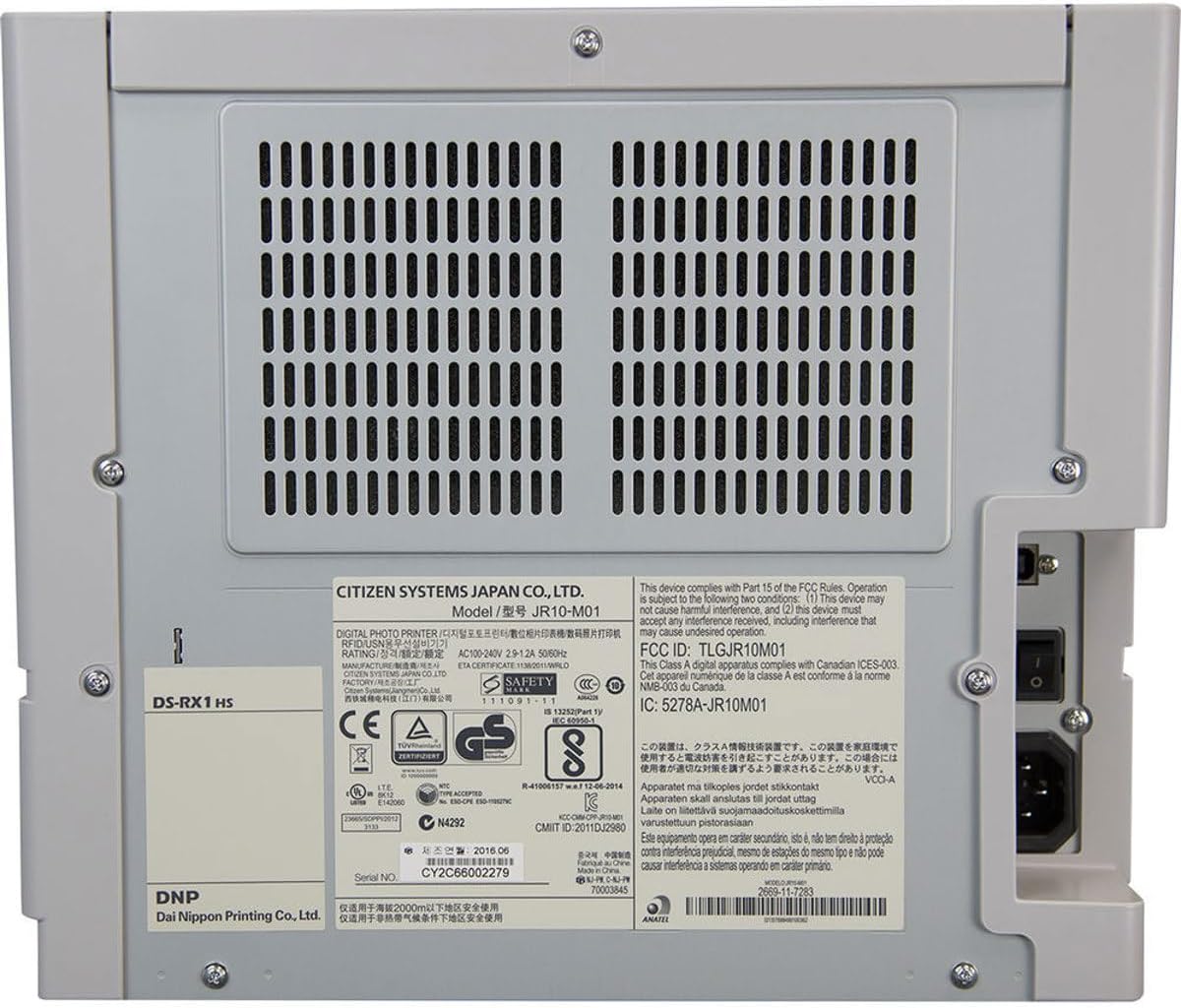
Малюнак 2: Задняя частка view of the DNP DS-RX1HS Photo Printer. This image highlights the power input and USB connectivity port on the back panel.
2.3 Ўстаноўка драйвера
Install the necessary drivers before operating the printer.
- Для Windows: Insert the included Printer CD and follow the on-screen instructions to install drivers for Windows OS7 and 8.1. Drivers for newer Windows versions and a printer Status App for RX1HS are available for download from the DNP webсайт.
- Для Mac: A Mac OS-X Print Center Driver is available for download from the DNP webсайт.
2.4 Loading Print Media
The DS-RX1HS uses dye-sublimation media, consisting of a ribbon and glossy photo paper.
- Адкрыйце пярэднюю крышку прынтара.
- Carefully insert the paper roll into the designated slot.
- Load the ribbon cartridge according to the instructions provided with your media kit. Ensure it is securely seated.
- Зачыніце пярэднюю крышку.

Малюнак 3: Інтэр'ер view of the DNP DS-RX1HS Photo Printer with media loaded. This image shows the paper roll and ribbon cartridge installed inside the printer.
2.5 Падключэнне харчавання
- Connect the power cord to the power input on the rear of the printer.
- Падключыце другі канец шнура харчавання да адпаведнай электрычнай разеткі.
- Press the power button, usually located on the front or side, to turn on the printer. The POWER indicator light should illuminate.
3. Кіраванне прынтарам
Once the printer is set up and drivers are installed, you can begin printing.
3.1 Basic Printing Process
- Пераканайцеся, што прынтар уключаны і падлучаны да кампутара.
- Open the image you wish to print using your preferred photo editing or printing software.
- Select the DNP DS-RX1HS as your printer.
- In the print settings, choose your desired print size (e.g., 4x6", 6x8") and quality (300x300dpi or 300x600dpi).
- Initiate the print command. The printer will process and output the photo.
3.2 Print Speed and Sizes
- Хуткасць друку: Approximately 12.4 seconds for a 4x6" print and 22 seconds for a 6x8" print.
- Падтрымліваюцца памеры: The printer supports 2x6", 4x6", and 6x8" print formats.
3.3 USB iSerial Functionality
The USB iSerial feature allows for simplified management when connecting multiple DS-RX1HS units to a single computer, enhancing productivity for large-scale events. Refer to the DNP website for specific software and setup instructions for this feature.
4. Тэхнічнае абслугоўванне
Рэгулярнае тэхнічнае абслугоўванне забяспечвае аптымальную прадукцыйнасць і падаўжае тэрмін службы вашага прынтара.
4.1 Замена носьбіта інфармацыі
The printer can produce up to 700 4x6" sheets per roll. Replace the ribbon and paper roll when the media runs out or when prompted by the printer status.
- Адкрыйце пярэднюю крышку.
- Remove the used paper roll and ribbon cartridge.
- Install new media as described in Section 2.4.
- Зачыніце пярэднюю крышку.
4.2 Ачыстка друкавальнай галоўкі
A printhead cushion is included with the printer. Refer to the DNP official documentation for detailed instructions on printhead cleaning procedures to maintain print quality.
4.3 Генеральная ўборка
- Працярыце знешнія паверхні прынтара мяккай сухой тканінай.
- Пазбягайце выкарыстання агрэсіўных хімікатаў або абразіўных ачышчальнікаў.
- Ensure no dust or debris accumulates in the media loading area.
5. Выпраўленне непаладак
This section addresses common issues you might encounter with your DS-RX1HS printer.
5.1 Светавыя індыкатары
The front panel of the printer features several indicator lights to communicate its status.

Малюнак 4: Спераду view of the DNP DS-RX1HS Photo Printer. This image shows the indicator lights for Power, Ribbon, Paper, and Error on the left side of the front panel.
- Магутнасць: Паказвае, што прынтар уключаны.
- RIBBON: Illuminates when the ribbon needs replacement or is incorrectly installed.
- ПАПЕР: Illuminates when the paper roll needs replacement or is incorrectly installed.
- ПАМЫЛКА: Indicates a general error. Refer to the printer's Status App or driver software for specific error codes.
5.2 Агульныя праблемы і рашэнні
| выпуск | Магчымая прычына | Рашэнне |
|---|---|---|
| Прынтар не ўключаецца. | Шнур сілкавання не падключаны, праблема з разеткай. | Пераканайцеся, што шнур харчавання надзейна падключаны да прынтара і разеткі. Праверце разетку з іншай прыладай. |
| "RIBBON" light is on. | Ribbon is empty or incorrectly installed. | Replace the ribbon cartridge or re-install it correctly. |
| "PAPER" light is on. | Paper roll is empty or incorrectly installed. | Replace the paper roll or re-install it correctly. |
| Poor print quality (streaks, incorrect colors). | Dirty printhead, old media, incorrect driver settings. | Clean the printhead (refer to Section 4.2). Replace media. Verify print settings in your software. |
| Прынтар не распазнаецца камп'ютарам. | Incorrect or missing drivers, loose USB connection. | Reinstall drivers (Section 2.3). Check USB cable connection. Try a different USB port or cable. |
For more detailed troubleshooting, consult the DNP Status App for Windows or the official DNP support webсайт.
6. Тэхнічныя характарыстыкі
Key technical specifications for the DNP DS-RX1HS Photo Printer:
| Асаблівасць | Дэталь |
|---|---|
| Назва мадэлі | DS-RX1HS |
| Тэхналогія друку | Сублімацыя фарбавальнікаў |
| Вывад на прынтэр | Колер |
| Тэхналогія падлучэння | USB 2.0 |
| Падтрымліваюцца памеры носьбітаў | 2x6", 4x6", 6x8" |
| Тып друкаванага носьбіта | Глянцавая фотапапера |
| Максімальная ёмістасць аркуша ўводу | 350 sheets (for 4x6" media) |
| Maximum Print Speed (4x6") | Прыбл. 12.4 секунд |
| Maximum Print Speed (6x8") | Прыбл. 22 секунд |
| дазвол | 300x300dpi (high speed), 300x600dpi |
| Памеры прадукту | 6" Г x 290" Ш x 4" У (Note: The width '290"W' appears to be a data entry anomaly; actual printer width is significantly less.) |
| Вага прадмета | 30.8 фунта (14 кілаграма) |
| Ёмістасць памяці | 64 Мб |
| Уключаныя кампаненты | Printer CD, Drivers for Windows OS7 and 8.1, Printhead Cushion, Power Cord (Print Media Not Included) |
7. Гарантыя і падтрымка
For information regarding product warranty, technical support, and additional resources, please contact DNP directly or visit their official webсайт.
- вытворца: ДНП
- Афіцыйны Webсайт: Refer to your product packaging or the DNP website for the most current support information and driver downloads.