
Уводзіны
The SeKi Easy Plus remote control is designed for simplicity and ease of use, making it ideal for seniors, children, and individuals who prefer a straightforward control experience. This universal learning remote can replace any infrared remote control, allowing you to consolidate multiple remotes into one. Its large, freely assignable buttons ensure comfortable operation, and all programmed settings are retained even when changing batteries.
Асаблівасці прадукту
- Universal Learning Function: Capable of learning commands from any existing infrared remote control.
- Replaces Multiple Remotes: Consolidate control for your TV and other IR devices.
- Freely Assignable Keys: Customize button functions to your preference.
- Вялікія, зручныя ў выкарыстанні кнопкі: Designed for enhanced visibility and tactile feedback.
- Захаванне памяці: Programmed settings are saved even after battery replacement.
- Сумяшчальныя прылады: Primarily designed for televisions, but can learn from other IR devices.
- Тэхналогія падключэння: Infrared (IR).
- Колькасць кнопак: 20.
- Максімальны дыяпазон: Да 10 метраў.
Змест пакета
The SeKi Easy Plus remote control package includes:
- 1x SeKi Easy Plus Universal Learning Remote Control (Silver-Black)
- Кіраўніцтва карыстальніка (гэты дакумент)
Заўвага: 2x AAA batteries are required for operation and are not included in the package.

Image: SeKi Easy Plus remote control in its retail packaging, showing the silver-black design and large buttons.
Настройка
1. Устаноўка батарэі
- Locate the battery compartment on the back of the SeKi Easy Plus remote control.
- Адкрыйце крышку адсека для батарэй.
- Устаўце дзве (2) батарэйкі тыпу AAA, сочачы за правільнай палярнасцю (+ і -), як паказана ўнутры адсека.
- Надзейна зачыніце крышку батарэйнага адсека.

Выява: Задняя частка view of the SeKi Easy Plus remote control with the battery cover removed, showing the empty battery slots.

Выява: Крупны план view of the battery compartment, clearly indicating the requirement for AAA batteries and their correct orientation.
2. Пачатковае ўключэнне
After installing the batteries, the remote is ready for programming. There is no separate power-on button; the remote will activate when a button is pressed.
Operating Instructions: Learning Function
The SeKi Easy Plus remote control learns commands directly from your original remote. Follow these steps carefully to program each button:
- Prepare Remotes: Place the SeKi Easy Plus remote and your original remote control on a flat surface, facing each other, with their infrared emitters aligned and approximately 1-3 cm apart. Ensure both remotes have fresh batteries.
- Увайдзіце ў рэжым навучання: Націсніце і ўтрымлівайце TV Power (red button) і AV buttons simultaneously on the SeKi Easy Plus remote for approximately 3 seconds until the red LED indicator light stays on continuously. This indicates the remote is in learning mode.
- Select Button to Program: On the SeKi Easy Plus remote, press the button you wish to program (e.g., Volume Up '+'). The red LED will start blinking slowly.
- Перадаць каманду: On your original remote control, press and hold the corresponding button (e.g., Volume Up) until the red LED on the SeKi Easy Plus remote blinks rapidly three times and then stays on continuously. This confirms the command has been learned successfully.
- Program More Buttons: Repeat steps 3 and 4 for all other buttons you wish to program (e.g., Volume Down '-', Channel Up '^', Channel Down 'v', Mute, Number buttons, etc.).
- Выйсці з рэжыму навучання: Пасля таго, як усе патрэбныя кнопкі будуць запраграмаваны, націсніце TV Power (red button) і AV buttons simultaneously again, or wait for approximately 10 seconds without any input. The red LED will turn off, indicating that the remote has exited learning mode and saved the settings.
Важныя заўвагі:
- Perform the programming steps promptly. If there is a long pause between button presses during learning mode, the remote may exit learning mode automatically.
- Ensure a clear line of sight between the two remotes during the learning process.
- If a button does not learn correctly, repeat the process for that specific button.

Image: Technical diagram illustrating the dimensions and button layout of the SeKi Easy Plus remote control, highlighting the large button design.

Выява: Side profile of the SeKi Easy Plus remote control, showcasing its ergonomic design and slim form factor.
Тэхнічнае абслугоўванне
Замена батарэі
When the remote's performance degrades or the LED indicator light does not respond, it's time to replace the batteries. Follow the battery installation steps in the "Setup" section. The SeKi Easy Plus remote retains its programmed settings even when batteries are removed, so reprogramming is not necessary after replacement.
Уборка
Для чысткі пульта дыстанцыйнага кіравання выкарыстоўвайце мяккую сухую тканіну. Для ўстойлівага бруду злёгкуampen the cloth with water or a mild cleaning solution. Do not use abrasive cleaners or immerse the remote in water.
Ліквідацыю непаладак
- Пульт не адказвае:
- Check if the batteries are correctly inserted and have sufficient charge. Replace with fresh AAA batteries if necessary.
- Ensure there is a clear line of sight between the remote and the device (TV).
- Buttons not working after programming:
- The learning process might have failed for specific buttons. Repeat the "Operating Instructions: Learning Function" steps for the affected buttons.
- Ensure the original remote's signal is strong and consistent during programming.
- Learning mode exits prematurely:
- This can happen if there's too long a pause between steps during the learning process. Try to complete each step more quickly.
- Ensure the original remote is transmitting a clear signal when its button is pressed.
- Device not responding to learned commands:
- Verify that the SeKi Easy Plus remote is pointed directly at the device's IR receiver.
- Confirm that the original remote works correctly with the device. If not, the issue might be with the device itself.
Тэхнічныя характарыстыкі
| Марка | SeKi |
| Назва мадэлі | EASY PLUS |
| Нумар мадэлі | 311154 |
| Колер | Серабрыста-Чорны |
| Тэхналогія падлучэння | Інфрачырвоны (ВК) |
| Сумяшчальныя прылады | Television (and other IR-controlled devices) |
| Асаблівасці | Universal, Learning Function, Large Buttons, Senior-Friendly, Freely Programmable, Settings retained during battery change |
| Колькасць кнопак | 20 |
| Максімальны дыяпазон | 10 метраў |
| Патрабуюцца батарэі | 2 разы AAA (не ўваходзіць у камплект) |
Гарантыя і падтрымка
The SeKi Easy Plus remote control comes with a Гарантыя 2 год з даты пакупкі. Калі ласка, захавайце пацвярджэнне пакупкі для прэтэнзій па гарантыі.
For further assistance, troubleshooting tips, or to view additional product information, please visit the official SeKi webсайт:
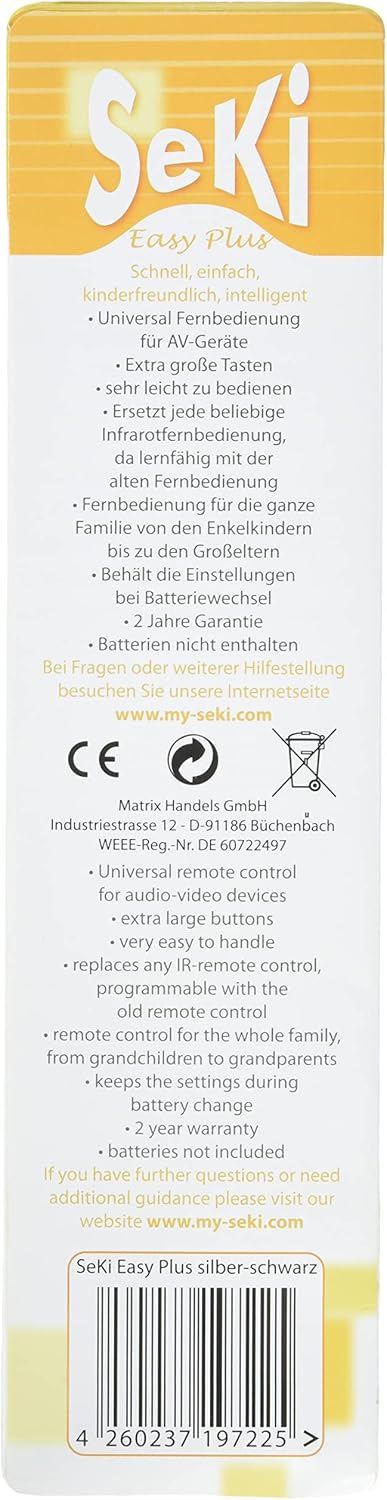
Image: Back of the product packaging, detailing key features, warranty information, and the official support webсайт.