
Уводзіны
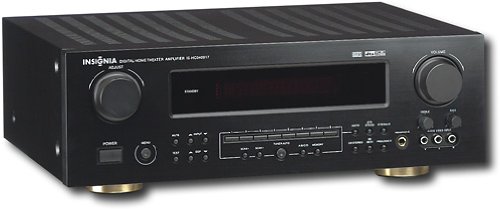
This manual provides essential instructions for the setup, operation, maintenance, and troubleshooting of your Insignia 6.1-Channel 600W Digital Home Theater Receiver, model IS-HC040917. Please read this manual thoroughly before using the receiver to ensure proper and safe operation.
Важныя інструкцыі па бяспецы
- Не блакуйце вентыляцыйныя адтуліны. Усталюйце ў адпаведнасці з інструкцыямі вытворцы.
- Не ўстанаўлівайце побач з крыніцамі цяпла, такімі як радыятары, абагравальнікі, пліты або іншыя прылады (у тым ліку ampLifiers), якія вырабляюць цяпло.
- Абараняйце сеткавы шнур ад наступання або заціскання, асабліва ў месцах вілкі, разеткі і месца выхаду з прылады.
- Выкарыстоўвайце толькі насадкі/аксэсуары, указаныя вытворцам.
- Адключайце гэты прыбор ад сеткі падчас навальніцы або калі ён не выкарыстоўваецца на працягу доўгага часу.
- Звяртайцеся да кваліфікаванага абслугоўваючага персаналу. Тэхнічнае абслугоўванне патрабуецца, калі прыбор быў пашкоджаны якім-небудзь чынам.
Кіраўніцтва па ўстаноўцы
1. Распакаванне
Carefully remove the receiver and all accessories from the packaging. Ensure all components are present:
- Insignia IS-HC040917 Receiver
- Пульт дыстанцыйнага кіравання
- Рамочная антэна AM
- FM-правадная антэна
- Кіраўніцтва карыстальніка (гэты дакумент)
2. Падключэнне дынамікаў
The IS-HC040917 receiver supports a 6.1-channel speaker configuration. Connect your speakers to the corresponding terminals on the rear panel. Ensure correct polarity (+ to + and - to -) for each speaker.
- Пярэдні левы/правы: Для асноўнага стэрэагуку.
- Цэнтр: Для дыялогу.
- Аб'ёмны левы/правы гук: For ambient sound effects.
- Аб'ёмны тыл: For additional rear channel effects in 6.1 setups.
- Subwoofer (Pre-out): Connect to a powered subwoofer's LFE input.
Note: The receiver is designed for speakers with an impedance of 8 ohms.
3. Падключэнне крыніц аўдыё/відэа
Connect your external devices (e.g., DVD player, Blu-ray player, game console, cable box) to the appropriate input jacks on the receiver.
- HDMI: Use HDMI cables for high-definition audio and video signals. The receiver has 3 HDMI input ports.
- Лічбавае аўдыё (аптычны/кааксіяльны): For digital audio from devices like CD players or set-top boxes.
- Аналагавы аўдыё (RCA): For standard stereo audio connections from devices like VCRs or older CD players.
- S-відэа: For video signals from compatible devices.
4. Падключэнне антэны
Connect the supplied AM loop antenna and FM wire antenna to their respective terminals on the rear panel for radio reception.
5. Падключэнне сілкавання
Once all audio/video and speaker connections are made, plug the receiver's power cord into a standard AC wall outlet.
выява: Rear panel of the Insignia IS-HC040917 receiver, showing various input and output connections for speakers, audio/video sources (HDMI, RCA, S-Video, Digital), and antenna terminals. This diagram is crucial for correctly wiring the home theater system.
Інструкцыя па эксплуатацыі
1. Уключэнне/выключэнне харчавання
Націсніце УЛАДА кнопку на пярэдняй панэлі або пульце дыстанцыйнага кіравання, каб уключыць або выключыць прыёмнік.
2. Выбар уводу
Выкарыстоўвайце ВЫБОР ВХОДА knob/buttons on the front panel or the remote control to choose the desired audio/video source (e.g., HDMI 1, DVD, CD, Tuner).
3. Рэгулятар гучнасці
Адрэгулюйце агульную гучнасць з дапамогай вялікага АБ'ЁМ ручку на пярэдняй панэлі або ГУЧКА +/- кнопкі на пульце.
4. Рэжымы гуку
The receiver supports various audio modes, including 6.1-channel surround sound. Use the РЭЖЫМ or DSP buttons on the remote to cycle through available sound modes (e.g., Stereo, Dolby Digital, DTS, Pro Logic).
5. Tuner Operation (AM/FM Radio)
Select the "Tuner" input. Use the ГУРТ button to switch between AM and FM. Use the НАСТРОЙКА +/- buttons to manually tune to stations or ПРАДУСТАНОЎКА +/- to select stored stations. Refer to the remote control for specific tuner functions.
Тэхнічнае абслугоўванне
1. Уборка
Wipe the exterior of the receiver with a soft, dry cloth. Do not use liquid cleaners or aerosol sprays, as they may damage the finish or internal components. Ensure the unit is unplugged before cleaning.
2. Вентыляцыя
Ensure that the ventilation openings on the top and sides of the receiver are not blocked. Proper airflow is essential to prevent overheating and ensure long-term performance.
3. Кіраванне кабелем
Periodically check all cable connections to ensure they are secure. Loose connections can lead to poor audio or video quality.
Ліквідацыю непаладак
| праблема | Магчымая прычына | Рашэнне |
|---|---|---|
| Няма ўлады | Шнур сілкавання адключаны; разетка неактыўная. | Праверце падключэнне шнура харчавання; паспрабуйце іншую разетку. |
| Няма гуку | Няправільны ўваходны сігнал; правады дынамікаў аслабленыя; гучнасць занадта нізкая; уключаны гук. | Выберыце правільны ўваход; праверце падключэнне дынамікаў; павялічце гучнасць; адключыце гук без гуку. |
| Няма відэа | Incorrect input selected; video cables loose or incorrect. | Select correct input; check video cable connections (HDMI, S-Video, RCA). |
| Пульт дыстанцыйнага кіравання не працуе | Разраджаныя батарэйкі; перашкода паміж пультам і прымачом; няправільны рэжым пульта. | Replace batteries; remove obstructions; ensure remote is in the correct operating mode. |
Тэхнічныя характарыстыкі
- мадэль: IS-HC040917
- Марка: ІНСІГНІЯ
- Выходная магутнасць: 600 ват
- Колькасць каналаў: 6.1 канал
- Рэжым вываду гуку: Акружаць
- Усяго партоў HDMI: 3
- Тыпы раздымаў: 3.5mm Jack, HDMI, RCA, USB
- Сумяшчальныя прылады: Дакладчык
- Метад кантролю: Дыстанцыйнае
- колер: Чорны
- UPC: 799530659962
- ASIN: B0075C3DN2
Гарантыя і падтрымка
Каб атрымаць інфармацыю пра гарантыю і падтрымку кліентаў, звярніцеся да гарантыйнага талона, які пастаўляецца з вашым прадуктам, або наведайце афіцыйны сайт Insignia. webсайт. Захоўвайце чэк аб пакупцы на выпадак прэтэнзій па гарантыі.
For further assistance, you may contact Insignia customer service. Contact details are typically available on the manufacturer's webсайце або ва ўпакоўцы прадукту.