
1. Уводзіны
This manual provides essential information for the safe and efficient operation of your Alto Professional TMX160 DFX 16-Channel Powered Mixer. The TMX160 DFX is a versatile audio mixing console featuring 16 input channels, a built-in Alesis digital effects processor, and an integrated power amplifier capable of delivering 750W stereo output at 4Ω or 1500W mono output at 8Ω. It includes 12 XLR microphone inputs with phantom power, 16 line inputs, and stereo RCA inputs, along with a 3-band equalizer on each mono and stereo channel.
Please read this manual thoroughly before using the product to ensure proper setup and operation. Keep this manual for future reference.
2. Інфармацыя па бяспецы
Заўсёды выконвайце асноўныя меры бяспекі пры выкарыстанні гэтага вырабу, каб знізіць рызыку пажару, паражэння электрычным токам і траўмаў людзей.
- Крыніца харчавання: Падключайце прыладу толькі да разеткі пераменнага току пазначанай магутнасці.tage.
- Зазямленне: Ensure the unit is properly grounded. Do not defeat the safety purpose of the polarized or grounding-type plug.
- Вада і вільгаць: Do not expose this equipment to rain or moisture. Do not use near water.
- Вентыляцыя: Забяспечце належную вентыляцыю. Не блакуйце вентыляцыйныя адтуліны.
- Цяпло: Не ўстанаўлівайце побач з крыніцамі цяпла, такімі як радыятары, абагравальнікі, пліты або іншыя прылады (у тым ліку ampLifiers), якія вырабляюць цяпло.
- Кабелі: Абараняйце шнуры сілкавання ад наступання або заціскання.
- Абслугоўванне: Звяртайцеся па ўсё абслугоўванне да кваліфікаванага абслугоўваючага персаналу. Не спрабуйце абслугоўваць гэты прадукт самастойна.
3. Настройка
3.1 Распакаванне і праверка
Carefully unpack the TMX160 DFX mixer and inspect it for any signs of damage that may have occurred during transit. If any damage is found, contact your dealer immediately.
3.2 Падключэнне сілкавання
Connect the supplied AC power cord to the mixer's power input and then to a suitable grounded AC power outlet. Ensure the mixer's power switch is in the OFF position before connecting to power.
3.3 Падключэнне ўваходаў
The TMX160 DFX offers a variety of input options:
- Microphone Inputs (MIC 1-12): Use XLR cables to connect microphones to the 12 XLR inputs. Phantom power (+48V) can be activated for condenser microphones.
- Line Inputs (Channels 1-16): Use 1/4-inch TRS or TS cables for line-level instruments or devices. Channels 13/14 and 15/16 are stereo line inputs, also accepting RCA for 2-Track In.
- 2-Track In: Падключыце знешнія крыніцы гуку, такія як CD-плэеры або медыяплэеры, з дапамогай кабеляў RCA.
3.4 Падключэнне выхадаў
Connect your speakers or monitoring system to the appropriate outputs:
- Выходы для дынамікаў: Connect passive speakers to the power amplifier outputs. Ensure the impedance of your speakers matches the mixer's output capabilities (e.g., 4Ω for 750W stereo, 8Ω for 1500W mono).
- Monitor/Aux Outputs: Use these outputs to send signals to stage monitors or external effects processors.
- Stereo Out/Mono Out: These outputs provide the main mix signal for recording or connecting to additional sound systems.
3.5 Першапачатковае ўключэнне
After all connections are made, ensure all channel faders and the main mix fader are at their lowest settings. Turn on any connected devices (e.g., microphones, instruments) first, then power on the TMX160 DFX mixer. Finally, turn on your power amplifiers або актыўныя калонкі.
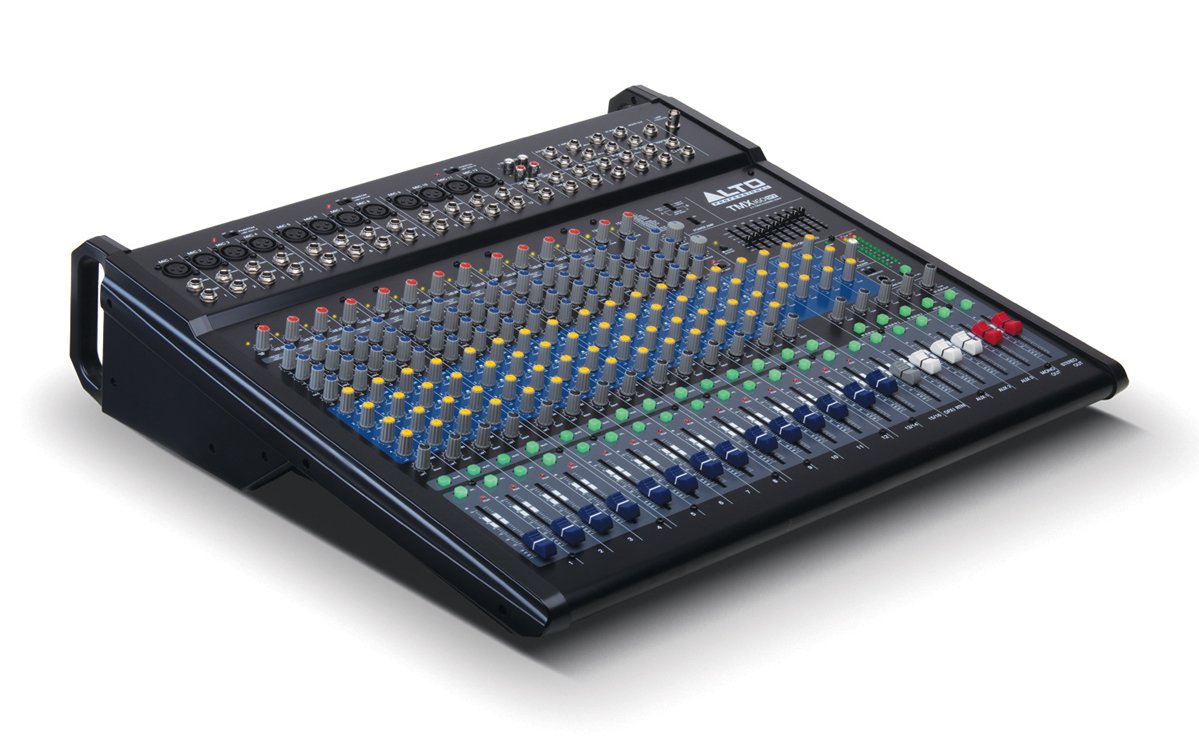
Малюнак 1: Пярэдняя панэль зверхуview of the Alto Professional TMX160 DFX mixer. This image shows the comprehensive layout including microphone and line inputs at the top, channel controls in the middle, and faders at the bottom.
4. Аперацыя
4.1 Элементы кіравання каналам
Each input channel (1-16) features a set of controls to shape its sound:
- УЗБЕГАЦЬ: Adjusts the input sensitivity for the connected microphone or line-level device. Set this to achieve a strong signal without clipping (distortion).
- Эквалайзер (высокі, сярэдні, нізкі): A 3-band equalizer allows you to boost or cut frequencies (treble, midrange, bass) for each channel.
- Адпраўкі AUX: Controls the amount of signal sent from the channel to the auxiliary outputs (e.g., for monitors or external effects).
- ПАН: Размяшчае сігнал канала ў стэрэапалоне (злева направа).
- LEVEL Fader: Рэгулюе агульную гучнасць канала ў асноўным міксе.
4.2 Галоўная секцыя
The master section controls the overall output of the mixer:
- Фейдэры мікса Main: Control the overall volume of the stereo output.
- DFX (Digital Effects) Controls: Select and adjust parameters for the built-in Alesis digital effects.
- Stereo Graphic EQ: A 7-band graphic equalizer allows for fine-tuning the overall frequency response of the main mix.
- Магутнасць Amp элементы кіравання: Adjust the output level and mode (Stereo/Mono) for the integrated power ampзадымнік.
4.3 Built-in Alesis Digital Effects
The TMX160 DFX features a high-quality Alesis digital effects processor. Use the DFX controls in the master section to browse and select from various effects such as reverb, delay, chorus, and more. Adjust the effect send levels on individual channels and the overall effect return level in the master section to blend the effects into your mix.
Малюнак 2: падрабязна view of the input channels, showing individual GAIN, EQ, AUX, PAN, and LEVEL controls for precise audio shaping.
5. Тэхнічнае абслугоўванне
Proper maintenance ensures the longevity and optimal performance of your TMX160 DFX mixer.
- Уборка: Для чысткі вонкавай паверхні міксера выкарыстоўвайце мяккую сухую тканіну. Пазбягайце выкарыстання абразіўных ачышчальнікаў, растваральнікаў або воску.
- пыл: Regularly remove dust from the ventilation openings to prevent overheating.
- захоўванне: Калі міксер не выкарыстоўваецца працяглы час, захоўвайце яго ў прахалодным, сухім месцы, удалечыні ад прамых сонечных прамянёў і экстрэмальных тэмператур.
- Фейдэры і ручкі: Avoid applying excessive force to faders and knobs. Keep them free from dust and debris.
6. Выпраўленне непаладак
If you encounter issues with your TMX160 DFX, refer to the following common problems and solutions:
- Няма харчавання:
- Check if the power cord is securely connected to both the mixer and the AC outlet.
- Verify the AC outlet is functional.
- Пераканайцеся, што выключальнік харчавання на міксеры знаходзіцца ў становішчы ON.
- Няма выхаду гуку:
- Праверце ўсе злучэнні ўваходных і выходных кабеляў.
- Ensure channel GAIN and LEVEL faders are appropriately set.
- Verify the Main Mix faders are raised.
- Check if connected speakers or power amplifiers are turned on and functioning.
- Забяспечце ўладу Amp controls are set correctly for your speaker configuration.
- Скажоны гук:
- Reduce the GAIN setting for the input channel.
- Lower the channel LEVEL fader or Main Mix faders.
- Праверце на наяўнасць пашкоджаных кабеляў.
- Эфекты не чуваць:
- Ensure the DFX send controls on the channels are turned up.
- Verify the DFX return level in the master section is raised.
- Check the selected effect program.
If the problem persists after trying these steps, contact Alto Professional customer support.
7. Тэхнічныя характарыстыкі
| Асаблівасць | Спецыфікацыя |
|---|---|
| Марка | Альт прафесійны |
| мадэль | TMX160 DFX |
| Колькасць каналаў | 16 |
| Вага прадмета | 12.5 кілаграма |
| Тэхналогія падлучэння | Дапаможны |
| Аўдыё ўваход | XLR, RCA, Line, AUX, 2-Track |
| Вытворца | у музыцы |
| ASIN | B007T1VZ52 |
| Power Output (Stereo) | 750 Вт пры 4 Ом |
| Power Output (Mono) | 1500 Вт пры 8 Ом |
| Эквалайзер | 3-band EQ per channel, Stereo Graphic EQ |
| Эфекты | Built-in Alesis Digital Effector (24-bit A/D and D/A converters) |
| Памеры (Ш х Г х У) | Прыбл. 21.9 х 22.2 х 5.7 цалі (555 х 565 х 145 мм) |
8. Гарантыя і падтрымка
For warranty information and technical support, please refer to the documentation included with your product or visit the official Alto Professional webсайт. Захоўвайце чэк аб куплі як пацвярджэнне пакупкі для гарантыйных прэтэнзій.
For further assistance, you may contact Alto Professional customer service directly.