
Прадукт скончаныview
The Targus Presenter AMP09AP is a multimedia presentation remote designed for ease of use during presentations. It features a laser pointer for highlighting content, backlit buttons for low-light environments, and an ergonomic design for comfortable handling. This remote also offers cursor control for remote program access and volume adjustment for media. Its wireless technology provides a range of up to 50 feet, and the USB receiver conveniently stores within the presenter.
Кіраўніцтва па ўстаноўцы
1. Распакаванне
Carefully remove the Targus Presenter AMP09AP and its components from the packaging. The box should contain:
- One Targus Presentation Remote
- One USB Receiver
2. Устаноўка батарэі
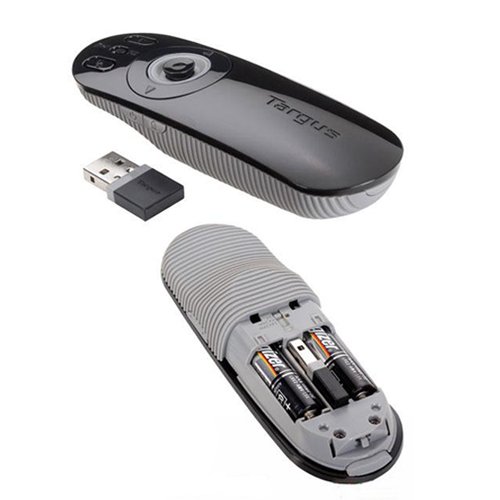
The Targus Presenter AMP09AP requires batteries (not included). Use alkaline batteries for optimal performance.
- Знайдзіце батарэйны адсек на задняй панэлі прэзентацыі.
- Адкрыйце крышку батарэйнага адсека.
- Устаўце патрэбныя батарэйкі, сачыце за правільнай палярнасцю (+/-).
- Надзейна зачыніце крышку батарэйнага адсека.
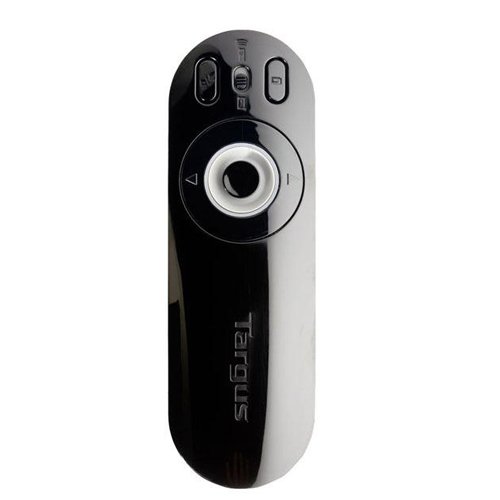
Image: The Targus Presenter AMP09AP, its USB receiver, and the open battery compartment revealing two AAA batteries.
3. Падключэнне USB-прыёмніка
- Remove the USB receiver from its storage slot within the presenter.
- Падключыце USB-прыёмнік да вольнага порта USB на вашым кампутары.
- Кампутар павінен аўтаматычна выявіць і ўсталяваць неабходныя драйверы.
The remote is now ready for use.
Інструкцыя па эксплуатацыі
Рэжым прэзентацыі
The presenter's simplistic layout allows for easy navigation during presentations.
Выява: Уверсе view of the Targus Presenter AMP09AP, highlighting the laser pointer button, slide navigation buttons, and the mode switch.
- лазерная ўказка: Press and hold the dedicated laser button to activate the laser pointer for highlighting content.
- Наступны слайд: Press the forward arrow button to advance to the next slide.
- Папярэдні слайд: Press the backward arrow button to return to the previous slide.
- Кнопкі з падсветкай: Buttons are backlit for visibility in dimly lit rooms.
Cursor Control Mode
The presenter features cursor control for remote access to programs and media functions.
- Activating Cursor Control: Use the mode switch (located at the top right of the remote) to toggle between presentation and cursor control modes.
- Moving Cursor: Use the central circular button (joystick/directional pad) to move the mouse cursor on the screen.
- Пстрычка: Press the center of the circular button to perform a left-click action.
- Рэгулятар гучнасці: Adjust the volume for music and videos remotely using the designated volume controls (if available on your specific model).
Далёкасць бесправадной сувязі
The wireless technology allows operation up to 50 feet (approximately 15 meters) from the computer, providing flexibility during presentations.
Тэхнічнае абслугоўванне
- Уборка: Працірайце прэзентацыю мяккай сухой тканінай. Пазбягайце выкарыстання агрэсіўных хімікатаў або абразіўных ачышчальнікаў.
- Замена батарэі: Replace batteries when the indicator light (if present) signals low power, or when performance degrades. Ensure correct polarity during replacement.
- захоўванне: When not in use, store the USB receiver inside the presenter's dedicated slot to prevent loss. Store the presenter in a cool, dry place.
Ліквідацыю непаладак
| праблема | Магчымая прычына | Рашэнне |
|---|---|---|
| Вядучы не адказвае | Акумулятары разрядились або разрядились | Заменіце батарэі на новыя шчолачныя. |
| Вядучы не адказвае | USB-прыёмнік не падключаны належным чынам | Пераканайцеся, што USB-прыёмнік надзейна падключаны да спраўнага USB-порта вашага кампутара. Паспрабуйце іншы USB-порт. |
| Вядучы не адказвае | Па-за дыяпазонам | Move closer to the computer (within 50 feet / 15 meters). |
| Не працуе лазерная ўказка | Нізкі акумулятар | Заменіце батарэі. |
| Cursor control erratic or not working | Interference or mode not activated | Ensure no obstructions between presenter and receiver. Check if cursor control mode is active using the mode switch. |
Тэхнічныя характарыстыкі
| Асаблівасць | Дэталь |
|---|---|
| Марка | Таргус |
| Нумар мадэлі | AMP09АП-51 |
| Колер | Чорны і Шэры |
| Памеры (ДхШхВ) | 12.1 х 3.8 х 2.5 см |
| Вага прадмета | 140 г |
| Тэхналогія падлучэння | Бесправадная сувязь |
| Далёкасць бесправадной сувязі | Да 50 футаў (прыблізна 15 метраў) |
| Тып батарэі | Шчолачны (не ўваходзіць у камплект) |
| Уключаныя кампаненты | Presentation Remote, USB Receiver |
| Асаблівасці | Ergonomic design, Laser pointer, Cursor control, Backlit buttons |
Гарантыя і падтрымка
For warranty information and technical support, please refer to the documentation provided with your purchase or visit the official Targus webсайт. Захоўвайце пацвярджэнне пакупкі для прэтэнзій па гарантыі.