
Прадукт скончаныview
The Focusrite ISA Two is a classic dual mono transformer-based microphone preamplifier designed for professional audio recording. It incorporates the renowned Lundahl LL1538 mic input transformer, originally selected by Rupert Neve for the ISA 110, ensuring exceptional audio quality.
Асноўныя функцыі ўключаюць у сябе:
- Lundahl LL1538 Transformer: Utilizes the high-quality Lundahl LL1538 mic input transformer for superior sound.
- High Gain and Low Noise: Offers up to 80 dB of clean gain on the microphone input with minimal noise.
- Пераменны ўваходны супраціў: Four selectable input impedance settings, including the original ISA 110 value, allow for optimal matching with various microphones.
- User-Calibrated Metering: Each channel features an eight-LED array for clear level display, with a rear panel calibration knob to match DAW converters.
- Універсальныя ўваходы: Two 1/4-inch front panel DI inputs for instruments and rear panel TRS line inputs.
- Фільтр высокіх частот: An 18dB/octave high-pass filter, based on the ISA 110 module, is built-in for precise low-frequency control.
- Balanced Inserts: Each channel includes balanced insert points (1/4-inch TRS send and receive) for integrating external hardware processors.
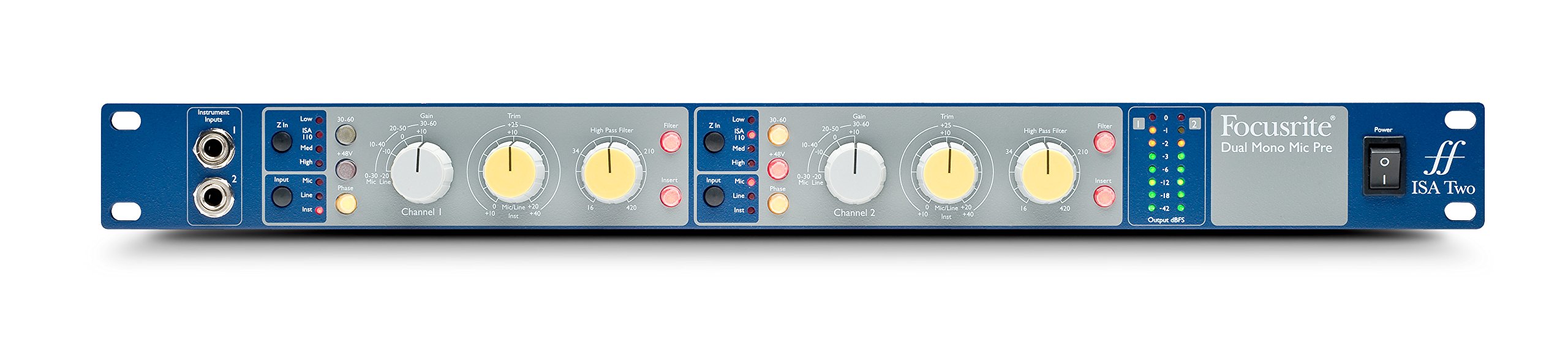
Малюнак 1: Спераду view of the Focusrite ISA Two preampвыратавальнік, шоуasing its controls and metering.
Змест пакета
Праверце наяўнасць усіх прадметаў у камплекце:
- Focusrite ISA Two Unit
- Сілавы кабель IEC
Кіраўніцтва па ўстаноўцы
Follow these steps to set up your ISA Two preampпадпітка:
- Ўстаноўка ў стойку: The ISA Two is designed for standard 19-inch rack mounting. Secure the unit using appropriate rack screws.
- Падключэнне сілкавання: Connect the supplied IEC power cable to the rear panel power inlet and then to a suitable AC power source. Ensure the power switch is in the OFF position before connecting.
- Падключэнне мікрафонаў: Use balanced XLR cables to connect your microphones to the 'MIC INPUT' XLR connectors on the rear panel for each channel.
- Connecting Line Sources: For line-level signals, use balanced TRS cables to connect to the 'LINE INPUT' TRS connectors on the rear panel.
- Падключэнне інструментаў: For instruments such as guitars or basses, use 1/4-inch jack cables to connect to the 'Instrument Inputs' on the front panel.
- Выхадныя злучэнні: Connect the 'OUTPUT' XLR connectors on the rear panel to your audio interface, mixer, or other recording equipment using balanced XLR cables.
- Insert Connections: If using external hardware processors, connect them to the 'SEND' and 'RETURN' 1/4-inch TRS jacks on the rear panel for each channel.

Figure 2: Rear panel of the Focusrite ISA Two, showing microphone, line, output, and insert connections.
Інструкцыя па эксплуатацыі
This section details the operation of the ISA Two preamplifier's controls:
- Уключэнне: After all connections are made, switch the power button on the front panel to the ON position.
- Выбар уводу: Use the 'Input' buttons (Mic, Line, Inst) to select the appropriate input source for each channel. Ensure only one input type is active per channel.
- Gain Control: The large 'Gain' knob adjusts the primary gain level (e.g., 0-30 dB, 30-60 dB). The smaller 'Trim' knob provides fine-tuning (+/-10 dB) for precise level setting.
- Variable Input Impedance (Z In): For microphone inputs, select one of the four impedance settings (Low, ISA 110, Med, High) to optimize the interaction with your microphone. Experiment to find the best sonic match.
- Фантомнае харчаванне (+48 В): Activate the +48V button for condenser microphones that require phantom power. Ensure the microphone is connected before engaging phantom power.
- Фільтр высокіх частот (HPF): Engage the 'Filter' button and use the 'High Pass Filter' knob to remove unwanted low-frequency rumble or proximity effect. The filter offers an 18dB/octave slope.
- Insert Function: Press the 'Insert' button to engage any external hardware processors connected to the rear panel insert points.
- Замер: Monitor your signal levels using the eight-LED array. Adjust gain and trim to achieve optimal levels without clipping (red LEDs). The VU meter provides an average level indication.
For a visual demonstration of the ISA Two in action, watch the official product video:
Video 1: Focusrite ISA Two Classic Dual Mono Transformer-Based Microphone Preamplifier in use during a recording session. This video demonstrates the preamplifier's features and sound quality in a practical studio environment.
Тэхнічнае абслугоўванне
To ensure the longevity and optimal performance of your Focusrite ISA Two, follow these maintenance guidelines:
- Уборка: Для чысткі вонкавых паверхняў прылады выкарыстоўвайце мяккую сухую тканіну. Пазбягайце выкарыстання абразіўных ачышчальнікаў, растваральнікаў або воску.
- Вентыляцыя: Ensure adequate airflow around the unit, especially if rackmounted, to prevent overheating.
- захоўванне: When not in use for extended periods, store the unit in a cool, dry environment away from direct sunlight and extreme temperatures.
- Кабельнае кіраванне: Keep cables organized and free from kinks or excessive tension to prevent damage to connectors and the unit.
Ліквідацыю непаладак
If you encounter issues with your ISA Two, consider the following common troubleshooting steps:
- Няма харчавання: Check the power cable connection to both the unit and the wall outlet. Ensure the power switch is ON.
- Няма аўдыявыхаду: Verify all input and output cables are securely connected. Check the input selection (Mic, Line, Inst) and ensure phantom power is engaged if using a condenser microphone. Confirm gain levels are appropriately set.
- Скажонае аўдыя: Reduce the input gain and trim levels. Check for proper impedance matching with your microphone. Ensure no cables are damaged.
- Перарывісты сігнал: Inspect all cable connections for looseness or damage. Try swapping cables to isolate a faulty one.
- Noise/Hum: Ensure all equipment is properly grounded. Check for nearby sources of electromagnetic interference.
If problems persist after these steps, contact Focusrite support for further assistance.
Тэхнічныя характарыстыкі
| Спецыфікацыя | Каштоўнасць |
|---|---|
| Марка | Фокусрыт |
| Назва мадэлі | ISA два |
| Тэхналогія падлучэння | Аналаг |
| Тып раздыма | 2 уваход / 2 выхад |
| Колер | Blue / Gray |
| Вага прадмета | 7 фунта |
| Памеры прадмета (Д х Ш х У) | 5.55 х 15.16 х 26.06 цалі |
| Матэрыял | Нержавеючая сталь |
| Апаратная платформа | Папярэдні мікрафонamp |
| Колькасць каналаў | 2 |
| АЧХ | 20 кГц |
| Матэрыял корпуса | Нержавеючая сталь |
| Нумар мадэлі | AMS-ISA-2 |
| Сусветны гандлёвы ідэнтыфікацыйны нумар (GTIN) | 815301005148 |
| UPC | 815301005148 |
| Вытворца нумар дэталі | ISA два |
Гарантыя і падтрымка
The Focusrite ISA Two comes with a Гарантыя 2 год з даты пакупкі, якая пакрывае вытворчыя дэфекты і няспраўнасці пры нармальным выкарыстанні.
Для атрымання тэхнічнай падтрымкі, рэгістрацыі прадукту або для view the full warranty terms and conditions, please visit the official Focusrite webсайт. Там вы таксама можаце знайсці часта задаваныя пытанні і дадатковыя рэсурсы.
Інтэрнэт-падтрымка: www.focusrite.com/support