
1. Прадукт скончыўсяview
The D-Link DIR-655 Xtreme N Gigabit Router is an IEEE 802.11n (draft) compliant device designed to deliver faster speeds and extended range compared to IEEE 802.11g, while maintaining backward compatibility with IEEE 802.11g and IEEE 802.11b devices. This router enables high-speed internet access for multiple computers, game consoles, and media players when connected to a cable or DSL modem. It facilitates the creation of a secure wireless network for sharing photos, files, music, videos, printers, and network storage.
2. Кіраўніцтва па наладцы
Follow these steps to set up your D-Link DIR-655 Xtreme N Wireless Router:
2.1. Распакаванне і размяшчэнне
- Акуратна выміце ўсе прадметы з упакоўкі.
- Place the router in a central location in your home or office for optimal wireless coverage. Avoid placing it near large metal objects, concrete walls, or devices that emit radio frequency interference (e.g., microwave ovens, cordless phones).
- Ensure proper ventilation around the router.
2.2. Апаратнае падключэнне
- Падключыце антэны: Падключыце тры знешнія антэны да раздыма на задняй панэлі маршрутызатара. Пераканайцеся, што яны надзейна закручаныя.
- Падключэнне да мадэма:
- Power off your cable or DSL modem.
- Connect one end of an Ethernet cable to the Internet (WAN) port on the back of the DIR-655 router.
- Connect the other end of this Ethernet cable to the Ethernet port on your cable or DSL modem.
- Power on your modem and wait for its indicator lights to stabilize (usually indicating an active internet connection).
- Падключыце харчаванне: Plug the power adapter into the power port (12V===2A) on the back of the router, then plug the other end into a wall outlet or power strip. The power LED on the front of the router should illuminate.
- Падключэнне прылад (дадаткова правадное): For wired connections, connect Ethernet cables from your computers or other network devices to any of the four LAN ports (1-4) on the back of the router.
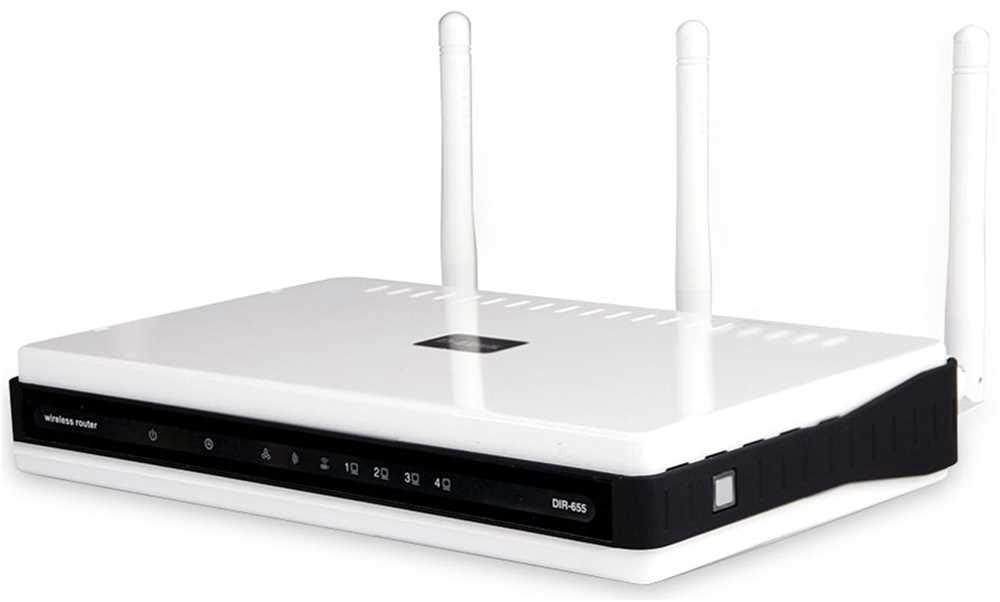
Малюнак 1: Задняя частка view of the D-Link DIR-655 router, highlighting the LAN, Internet, USB, Reset, and Power ports, along with the three external antennas.

Малюнак 2: Спераду view of the D-Link DIR-655 router, displaying the D-Link logo and various status indicator lights.
2.3. Initial Configuration (Wireless)
To connect wirelessly and configure your router:
- Знайсці назву сеткі (SSID): Look for the Wi-Fi network name (SSID) printed on a label on the bottom or back of your router.
- Падключыцеся да Wi-Fi: On your computer or mobile device, search for available Wi-Fi networks and select the SSID of your D-Link DIR-655.
- Увядзіце пароль: Enter the Wi-Fi password (also known as the network key or passphrase) found on the same label as the SSID.
- Інтэрфейс маршрутызатара доступу: Адкрыйце a web браўзэр і ўвядзіце
http://dlinkrouter.localor192.168.0.1(default IP address) into the address bar. - Лагін: Увядзіце імя карыстальніка па змаўчанні (звычайна
admin) and password (often blank oradmin). Refer to your router's label for default login credentials. - Запусціце майстар налады: Follow the on-screen instructions of the D-Link setup wizard to configure your internet connection and personalize your Wi-Fi network name and password.
3. Інструкцыя па эксплуатацыі
The D-Link DIR-655 is designed for high-performance wireless networking:
- Wireless N Technology: Utilizes IEEE 802.11n (draft) for enhanced speed and range, ideal for streaming HD video, online gaming, and large file перадачы.
- Гігабітныя парты Ethernet: Four LAN ports provide 10x faster wired connections than standard Ethernet, ensuring high-speed data transfer for connected devices.
- Падтрымка двух дыяпазонаў: The router supports dual-band operation, allowing for flexible network configurations and reduced interference.
- Некалькі антэн: Three external antennas help to optimize wireless signal strength and coverage throughout your home or office.
- USB SharePort: The USB port allows you to connect a USB storage device or printer and share it across your network.
4. Тэхнічнае абслугоўванне
Каб забяспечыць аптымальную прадукцыйнасць і даўгавечнасць вашага маршрутызатара:
- Абнаўленні прашыўкі: Regularly check the D-Link support webсайт для абнаўленняў прашыўкі. Абнаўленне прашыўкі можа палепшыць прадукцыйнасць, дадаць новыя функцыі і выправіць уразлівасці бяспекі.
- Фізічная ўборка: Трымайце маршрутызатар чыстым і без пылу. Выкарыстоўвайце мяккую сухую тканіну для праціркі вонкавых паверхняў. Пераканайцеся, што вентыляцыйныя адтуліны не заблакаваныя.
- Перыядычна перазапускаць: Перазагрузка маршрутызатара кожныя некалькі тыдняў можа дапамагчы ачысціць яго памяць і вырашыць нязначныя праблемы з сеткай, паляпшаючы агульную прадукцыйнасць.
- Бяспечнае размяшчэнне: Ensure the router is placed in a secure location where it won't be easily knocked over or exposed to extreme temperatures or moisture.
5. Выпраўленне непаладак
If you encounter issues with your D-Link DIR-655 router, try these common troubleshooting steps:
- Няма падключэння да Інтэрнэту:
- Check all cable connections (power, Ethernet to modem, Ethernet to devices).
- Restart your modem, then your router, and then your connected devices.
- Праверце, ці актыўна падключэнне вашага пастаўшчыка інтэрнэт-паслуг (ISP).
- Нізкая хуткасць бесправадной сувязі:
- Ensure your devices are within optimal range of the router.
- Мінімізуйце перашкоды ад іншых электронных прылад.
- Consider changing your Wi-Fi channel in the router settings to avoid congestion.
- Абнавіце драйверы бесправадной сеткі вашай прылады.
- Немагчыма атрымаць доступ да налад маршрутызатара:
- Пераканайцеся, што ваша прылада падключана да сеткі маршрутызатара (правадной або бесправадной).
- Паспрабуйце выкарыстоўваць IP-адрас па змаўчанні
192.168.0.1orhttp://dlinkrouter.local. - Ачысціце кэш і файлы cookie браўзера або паспрабуйце іншы браўзер.
- If you forgot your password, perform a factory reset (see below).
- Скід да заводскіх налад: To restore the router to its factory default settings, locate the "Reset" button on the back of the router. With the router powered on, use a paperclip or similar pointed object to press and hold the reset button for about 10 seconds. Release the button and wait for the router to restart. Заўвага: This will erase all custom settings, including your Wi-Fi name and password.
6. Тэхнічныя характарыстыкі
| Асаблівасць | Дэталь |
|---|---|
| Назва мадэлі | DIR-655 |
| Бесправадны тып | 802.11н |
| Марка | D-Link |
| Нумар мадэлі тавару | DIR-655/E |
| Аперацыйная сістэма | ЗыНОС |
| Вага прадмета | 2.65 унцыі (75 грама) |
| Памеры прадукту | 47.44 х 77.95 х 12.6 цалі |
| тtage | 110 вольт |
| Асаблівасць | WPS |
| Клас дыяпазону частот | Двухдыяпазонны |
| Стандарт бесправадной сувязі | 802.11н |
| Сумяшчальныя прылады | Гульнявая прыстаўка, прынтар |
| Рэкамендуемае выкарыстанне | Бізнес, гульні, дом |
| Тэхналогія падлучэння | Ethernet |
| Тып антэны | Выпраўлена |
7. Гарантыя і падтрымка
For detailed warranty information and technical support, please refer to the official D-Link website or the documentation included with your product. You can also visit the D-Link support portal for FAQs, firmware downloads, and contact options.
Інтэрнэт-падтрымка: www.dlink.com/support