
1. Уводзіны
This manual provides essential information for the proper installation, operation, and maintenance of your Alpine VIE-X08VS 7-inch WVGA HDD Navigation and AV Integrated System. Please read this manual thoroughly before using the product to ensure safe and optimal performance. Keep this manual for future reference.
2. Інфармацыя па бяспецы
УВАГА: Невыкананне гэтых інструкцый па бяспецы можа прывесці да пажару, паражэння электрычным токам або іншых траўмаў або пашкоджанняў.
- Do not attempt to install or service this product yourself. Installation and service should be performed by qualified professionals.
- Не карыстайцеся сістэмай такім чынам, каб гэта адцягвала вас ад кіравання. Заўсёды надавайце прыярытэт бяспецы дарожнага руху.
- Пераканайцеся, што ўся праводка падключана правільна, каб пазбегнуць кароткага замыкання або пашкоджанняў.
- Keep the unit free from moisture and extreme temperatures.
- Do not disassemble or modify the unit. This may cause malfunction or injury.
3. Змесціва ўпакоўкі
Праверце наяўнасць усіх прадметаў у камплекце:
- Alpine VIE-X08VS Main Unit
- Film TV Antenna (4 front pieces)
- Hands-free Call Microphone (4m cable)
- Кіраўніцтва карыстальніка (гэты дакумент)
- Кіраўніцтва па ўстаноўцы
4. Настройка і ўстаноўка
Professional installation is highly recommended for this integrated system. Incorrect installation can lead to damage to the unit or your vehicle's electrical system.
4.1. Праверкі перад устаноўкай
- Перад пачаткам усталёўкі пераканайцеся, што акумулятар аўтамабіля адключаны.
- Confirm compatibility with your vehicle's dashboard and wiring harness.
4.2. Ўстаноўка антэны
Install the included film TV antennas on the front windshield according to the separate installation guide. Ensure proper placement for optimal digital TV reception.
4.3. Размяшчэнне мікрафона
Mount the hands-free microphone in a location that allows clear voice pickup, typically near the driver's sun visor or rearview mirror. Route the cable discreetly to the main unit.
4.4. Пачатковае ўключэнне і налады
After installation, reconnect the battery. Upon first power-on, the system may guide you through initial setup steps, including language selection, time zone, and basic navigation preferences. Follow the on-screen prompts.
5. Інструкцыя па эксплуатацыі
The Alpine VIE-X08VS offers a comprehensive range of features. This section outlines the basic operation of key functions.
5.1. Навігацыйная сістэма
The 7-inch WVGA LCD provides clear map displays. The system supports both 2D and 3D map views for enhanced situational awareness. Utilize the Eco-Guide display function to support fuel-efficient driving.
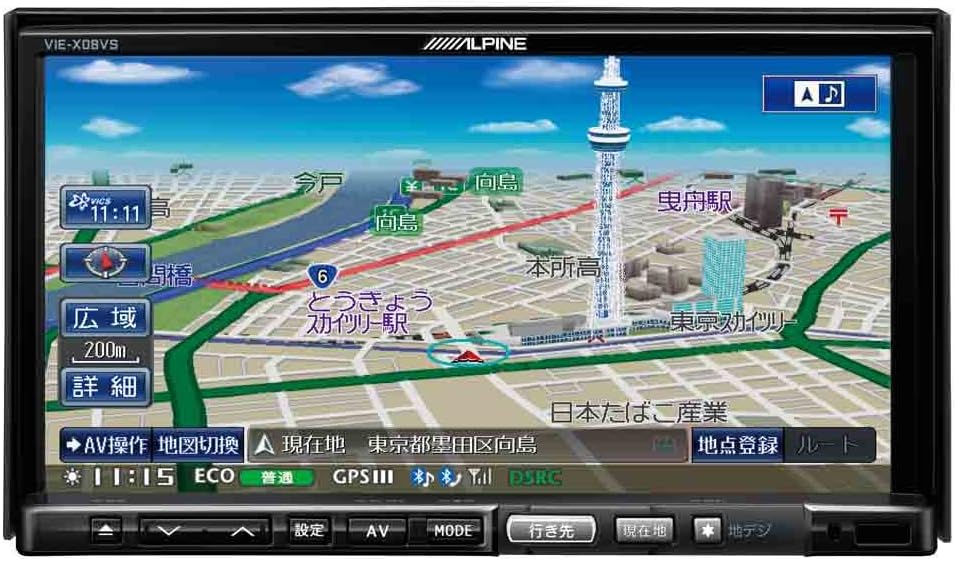
Малюнак 1: Спераду view of the Alpine VIE-X08VS unit displaying a detailed navigation map with Tokyo Skytree visible.

Малюнак 2: Пад вуглом view of the Alpine VIE-X08VS unit, showing the navigation map and side profile.
5.1.1. Абнаўленні карты
The system includes free map updates until the 2015 edition. For information on subsequent map updates, please refer to the Alpine support webсайт або звярніцеся да свайго дылера.
5.2. Audio/Video (AV) Features
The VIE-X08VS integrates various AV sources for your entertainment.
- HDD Music Storage: The built-in 60GB HDD is designed for audio, capable of automatically recording approximately 5,500 songs.
- Лічбавае ТБ: Access digital terrestrial TV broadcasts using the easy-to-use one-touch key.
- DVD-V/CD Playback: Insert DVDs or CDs into the disc slot for video and audio playback.
- Злучэнне Bluetooth: Pair your Bluetooth-enabled devices for audio streaming and hands-free calling.
- USB/SD-носьбіт: Connect USB devices or insert SD cards to play compatible audio and video files.
- 5.1ch Decoder: Enjoy enhanced audio quality with the built-in 5.1ch decoder.
- Rear Vision Link: Transmit high-quality video to rear monitors. This function also allows for navigation screen display and operation from the rear, enhancing the overall driving experience for passengers.
- Sony Walkman Compatibility: Connect compatible Sony Walkman devices for music playback.
5.3. Dual-Screen Display
The system supports a dual-screen display, allowing you to view both navigation and AV content simultaneously. This feature can be accessed via the on-screen menu or dedicated buttons.
6. Тэхнічнае абслугоўванне
Regular maintenance helps ensure the longevity and optimal performance of your Alpine VIE-X08VS unit.
6.1. Ачыстка дысплея
Выкарыстоўвайце мяккую сухую тканіну, каб акуратна працерці экран дысплея. Для выдалення ўстойлівых плям злёгку працярыцеampen the cloth with water or a screen-cleaning solution specifically designed for electronic displays. Avoid harsh chemicals or abrasive materials.
6.2. Генеральная ўборка
Wipe the exterior of the unit with a soft, dry cloth. Do not allow liquids to enter the unit.
6.3. Disc Slot Care
Keep the disc slot free of dust and debris. Avoid inserting bent, scratched, or dirty discs, as this can damage the disc drive.
7. Выпраўленне непаладак
If you encounter issues with your Alpine VIE-X08VS, refer to the following common problems and solutions before contacting support.
| праблема | Магчымая прычына / рашэнне |
|---|---|
| Няма ўлады | Check vehicle's fuse box. Ensure all power cables are securely connected. |
| Няма гуку | Verify volume level. Check speaker connections. Ensure audio source is selected correctly. |
| Страта сігналу GPS | Пераканайцеся, што антэна GPS мае свабодны view of the sky. Move to an open area away from tall buildings or tunnels. |
| Прылада Bluetooth не спалучаецца | Ensure Bluetooth is enabled on both the unit and your device. Place devices close together. Delete previous pairings and try again. |
| Праблемы з прайграваннем дыскаў | Ensure the disc is clean and free of scratches. Verify the disc format is supported. |
8. Тэхнічныя характарыстыкі
Detailed technical specifications for the Alpine VIE-X08VS unit:
| Асаблівасць | Спецыфікацыя |
|---|---|
| Вытворца | альпійская |
| Назва мадэлі | VIE X08VS |
| Нумар мадэлі прадукту | VIE-X08VS |
| Памеры прадукту (ДxШxВ) | 18.73 х 17.8 х 10 см |
| Вага прадмета | 3.2 кілаграма |
| Памер экрана | 7 цалі |
| Тып дысплея | WVGA LCD |
| Ёмістасць памяці | 60 GB (HDD) |
| Тэхналогія падлучэння | Bluetooth, USB |
| Носьбіты, якія падтрымліваюцца | DVD-V, CD, USB, SD |
| Тып карты | вул |
| Тып мацавання | Панэльнае мацаванне |
| Асаблівасці | Hands-free calling, Digital TV, 5.1ch Decoder, Eco-Guide, Rear Vision Link |
| Сумяшчальны тып аўтамабіля | Легкавы аўтамабіль |
9. Гарантыя і падтрымка
For warranty information, please refer to the warranty card included with your product or visit the official Alpine webсайт. Захоўвайце пацвярджэнне пакупкі для прэтэнзій па гарантыі.
9.1. Падтрымка кліентаў
If you require technical assistance, have questions about your product, or need to arrange service, please contact Alpine customer support through their official webсайт або кантактную інфармацыю, указаную ў дакументацыі да прадукту.