
1. Уводзіны
This manual provides comprehensive instructions for the installation, operation, maintenance, and troubleshooting of your D-Link DGS-1100-08 8 Port Easy Smart Managed Gigabit Network Internet Desktop Switch. Please read this manual thoroughly before using the device to ensure proper functionality and to prevent damage.
2. Інфармацыя па бяспецы
Observe the following safety guidelines to ensure safe operation of the device:
- Ensure the power adapter is connected to a compatible power source.
- Не падвяргайце прыладу ўздзеянню вады або празмернай вільготнасці.
- Не адкрывайце прыладу casinг; звяртайцеся да кваліфікаванага персаналу па ўсё абслугоўванне.
- Place the device on a stable, flat surface with adequate ventilation.
- Пазбягайце размяшчэння прылады побач з крыніцамі цяпла або пад прамымі сонечнымі прамянямі.
3. Змесціва ўпакоўкі
Пераканайцеся, што ваш пакет змяшчае наступныя элементы:
- D-Link DGS-1100-08 8 Port Easy Smart Managed Gigabit Network Internet Desktop Switch
- Адаптар сілкавання
- Documentation (Quick Installation Guide, Warranty Card)
4. Прадукт скончыўсяview
The DGS-1100-08 is an 8-port Gigabit Ethernet switch designed for small and medium businesses, offering essential management functions.
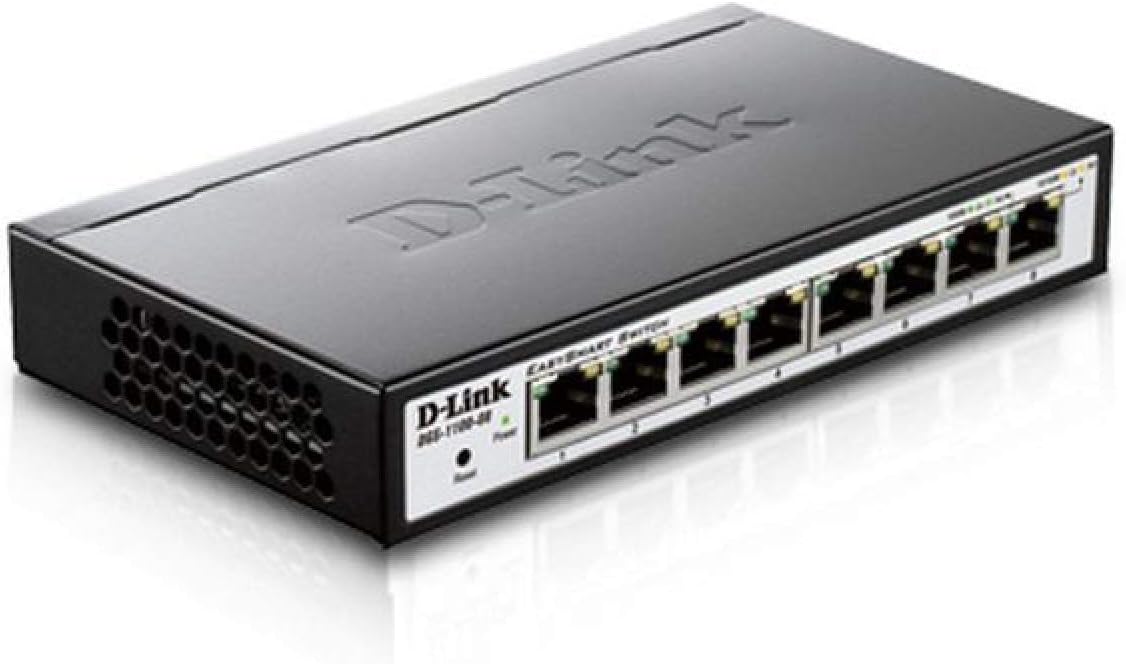
Малюнак 4.1: Пад вуглом view of the D-Link DGS-1100-08 switch, showing the D-Link logo, model number, power and reset buttons, and the eight Gigabit Ethernet ports with their corresponding LED indicators.

Малюнак 4.2: Спераду view of the D-Link DGS-1100-08 switch, clearly displaying the eight Gigabit Ethernet ports labeled 1 through 8, along with the Power LED and Reset button.
4.1 Пярэдняя панэль
- Парты Ethernet (1-8): Eight 10/100/1000BASE-T Gigabit Ethernet ports for network connections.
- Святлодыёд харчавання: Паказвае стан харчавання прылады.
- Кнопка скіду: Used to reset the device to factory default settings.
4.2 Святлодыёдныя індыкатары
| святлодыёд | Статус | Апісанне |
|---|---|---|
| Магутнасць | Суцэльны зялёны | Прылада ўключана. |
| Спасылка/Дзеянне (на порт) | Суцэльны зялёны | A valid network connection is established at Gigabit speed. |
| Спасылка/Дзеянне (на порт) | Цвёрды бурштын | A valid network connection is established at 10/100 Mbps speed. |
| Спасылка/Дзеянне (на порт) | Міргае | Data is being transmitted or received on the port. |
5. Настройка
Follow these steps to set up your DGS-1100-08 switch:
- Фізічнае падключэнне: Connect your network devices (computers, servers, network printers) to the Ethernet ports (1-8) on the switch using standard Ethernet cables.
- Падключэнне сілкавання: Connect the provided power adapter to the power input on the switch and then plug it into a power outlet. The Power LED should illuminate.
- Пачатковы доступ: The switch has a default IP address of 10.90.90.90 and a default username/password of адмін/адмін. Каб атрымаць доступ да web management interface, you may need to temporarily configure your computer's IP address to be in the same subnet (e.g., 10.90.90.100 with a subnet mask of 255.0.0.0).
- Web Доступ да інтэрфейсу: Адкрыйце a web браўзэр і ўвядзіце
http://10.90.90.90in the address bar. Log in with the default credentials. - Абнаўленне прашыўкі: It is recommended to check for and install the latest firmware version from the D-Link support website to ensure optimal performance and access to the latest features and bug fixes.
6. Інструкцыя па эксплуатацыі
The DGS-1100-08 is a managed switch, offering various features configurable via its web інтэрфейс кіравання:
- VLANs (Virtual Local Area Networks): Configure 802.1Q VLANs for network segmentation and enhanced security.
- Якасць абслугоўвання (QoS): Prioritize network traffic for critical applications like voice and video.
- Bandwidth Limiting: Control the maximum bandwidth for specific ports to manage network congestion.
- Агрэгаванне спасылак: Combine multiple physical links into a single logical link for increased bandwidth and redundancy.
- Адсочванне IGMP: Optimize multicast traffic delivery, preventing unnecessary flooding to all ports.
- Зеркаванне порта: Copy traffic from one or more source ports to a destination port for network monitoring and analysis.
Refer to the online help within the web management interface for detailed configuration steps for each feature.
7. Тэхнічнае абслугоўванне
To ensure the longevity and optimal performance of your switch:
- Трымайце прыладу чыстай і без пылу. Выкарыстоўвайце для чысткі мяккую сухую тканіну.
- Ensure proper ventilation by keeping the vents clear of obstructions.
- Regularly check the D-Link support website for firmware updates and apply them as recommended.
- Perform periodic backups of your switch configuration to a local file.
8. Выпраўленне непаладак
If you encounter issues with your DGS-1100-08 switch, consider the following:
- Няма харчавання: Ensure the power adapter is securely connected to both the switch and a working power outlet. Check the Power LED.
- Няма спасылкі на порт: Verify that the Ethernet cable is properly connected at both ends. Test with a different cable or port. Ensure the connected device is powered on and functioning correctly.
- Немагчыма атрымаць доступ Web інтэрфейс: Double-check your computer's IP address configuration to ensure it is in the same subnet as the switch (default 10.90.90.90). Clear your browser's cache or try a different browser.
- Праблемы з прадукцыйнасцю сеткі: Check for excessive network traffic, loopbacks (ensure loopback detection is enabled), or incorrect QoS configurations.
- Скінуць да заводскіх налад: If issues persist, use the reset button on the front panel to restore the switch to its original factory settings. This will erase all custom configurations.
9. Тэхнічныя характарыстыкі
| Асаблівасць | Дэталь |
|---|---|
| Нумар мадэлі | ДГС-1100-08 |
| Колькасць партоў | 8 x 10/100/1000BASE-T Gigabit Ethernet |
| Хуткасць перадачы даных | 1000 мегабіт у секунду |
| Памеры прадукту (ДxШxВ) | 6.75 х 3.94 х 1.13 цалі |
| Вага прадмета | 15 унцыі |
| Тып кіравання | Easy Smart Managed |
| Эканомія энергіі | D-Link Green Technology, IEEE 802.3az (Energy Efficient Ethernet) |
| Уключаныя кампаненты | Switch - 8 ports - managed |
10. Гарантыя і падтрымка
D-Link provides a Пажыццёвая гарантыя for the DGS-1100-08 switch, ensuring long-term reliability and peace of mind.
For further assistance, technical support, or to download the full user guide and latest firmware, please visit the official D-Link support website or refer to the User Guide (PDF) available at https://m.media-amazon.com/images/I/C13ip2mj4sS.pdf.
You can also visit the D-Link Store for more product information and resources: Крама D-Link на Amazon.