
RCA RTS736W
Кіраўніцтва карыстальніка для 30-цалёвага струменевага саўндбара RCA RTS736W
Model: RTS736W
Уводзіны
This user manual provides comprehensive instructions for the installation, operation, and maintenance of your RCA RTS736W 30-Inch Streaming Soundbar. Please read this manual thoroughly before using the product to ensure proper functionality and to prevent damage.
The RCA RTS736W is designed to enhance your home audio experience with its 3.0 channel sound and integrated Wi-Fi for streaming online content.
Асноўныя характарыстыкі
- Wi-Fi Built-In for streaming video content to a TV.
- 3.0 Channel Left/Center/Right audio configuration.
- HDMI 1080p Output for high-definition connectivity.
- Includes 1 Rear Analog Audio-in Jack and 1 Side Line-in Jack for various audio sources.
- Flexible placement options: includes table or wall mounting brackets.
Змест пакета
Праверце наяўнасць усіх прадметаў у камплекце:
- RCA RTS736W 30-Inch Streaming Soundbar
- Пульт дыстанцыйнага кіравання
- Адаптар сілкавання
- Table or Wall Mounting Brackets
- Кіраўніцтва карыстальніка (гэты дакумент)
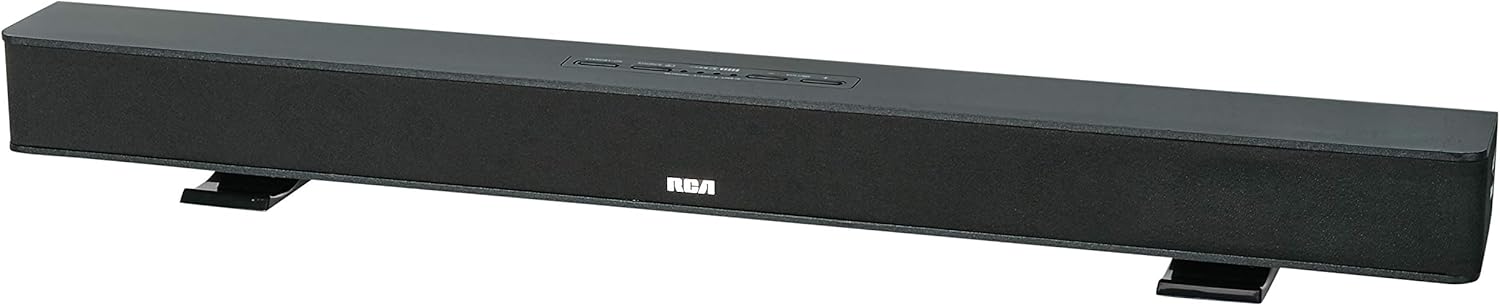
Image: The RCA RTS736W 30-Inch Streaming Soundbar, shown with its sleek black design and integrated controls.
Настройка
1. Варыянты размяшчэння
The soundbar offers flexible placement:
- Размяшчэнне на стальніцы: Place the soundbar on a flat, stable surface in front of your television. Ensure there is adequate ventilation around the unit.
- Насценны мантаж: Use the included wall mounting brackets to secure the soundbar to a wall. Refer to the separate wall mounting template (if provided) for detailed instructions. Ensure the wall can support the weight of the soundbar.

Image: The RCA RTS736W soundbar positioned on a TV stand, demonstrating a typical home theater setup with various streaming service icons displayed on the television screen.
2. Падключэнне да сілкавання
- Connect the power adapter to the DC IN 13.5V port on the back of the soundbar.
- Падключыце іншы канец адаптара сілкавання да насценнай разеткі.
3. Аўдыёзлучэнні
Choose one of the following methods to connect the soundbar to your audio source:
- Выхад HDMI: Connect an HDMI cable from the HDMI OUT port on the soundbar to an HDMI input on your television. This connection supports 1080p video output from the soundbar's streaming functions.
- Analog Audio-in (AUX 1 / AUX 2): Use RCA audio cables to connect your TV or other audio devices to the AUX 1 or AUX 2 input jacks on the back of the soundbar. Match the red and white connectors.
- Side Line-in Jack: For portable devices like smartphones or tablets, connect a 3.5mm audio cable from your device's headphone jack to the Line-in jack located on the side of the soundbar.

Выява: буйны план view of the rear panel of the RCA RTS736W soundbar, highlighting the AUX 1, AUX 2, DC IN 13.5V, HDMI OUT, and VIDEO OUT ports for various connections.
4. Падключэнне да сеткі (Wi-Fi)
To utilize the streaming features, connect the soundbar to your home Wi-Fi network. This process is typically guided by on-screen prompts when the soundbar is first powered on and connected to a TV via HDMI.
- Ensure your TV is connected to the soundbar via HDMI and powered on.
- Follow the on-screen instructions to select your Wi-Fi network and enter the password.
Інструкцыя па эксплуатацыі
1. Уключэнне/выключэнне харчавання
Націсніце Магутнасць кнопку на саўндбары або пульце дыстанцыйнага кіравання, каб уключыць або выключыць прыладу.
2. Выбар уводу
Націсніце Увод button on the remote control or the soundbar to cycle through available audio sources: HDMI, AUX 1, AUX 2, Line-in, and Wi-Fi streaming.
3. Рэгулятар гучнасці
Выкарыстоўвайце Аб'ём + і гучнасць - buttons on the remote control or the soundbar to adjust the audio level.
Націсніце Адключыць гук кнопку, каб часова адключыць гук.
4. Струменевае змесціва
Once connected to Wi-Fi and your TV via HDMI, you can access various streaming applications. Navigate using the directional buttons and OK кнопку на пульце.
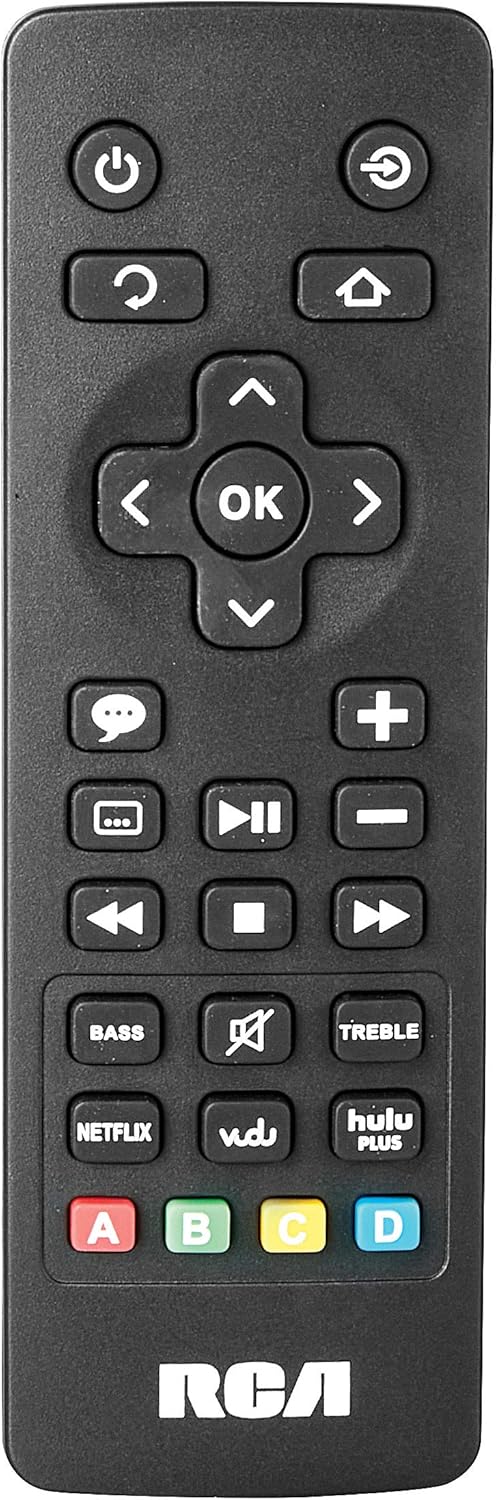
Image: The remote control for the RCA RTS736W soundbar, featuring dedicated buttons for power, volume, input selection, navigation, and direct access to streaming services like Netflix, Vudu, and Hulu Plus.
Dedicated buttons for services like Netflix, Vudu, and Hulu Plus may be available on the remote for direct access.
5. Налады гуку
Выкарыстоўвайце BASS і ТРЭБЛЯ buttons on the remote control to fine-tune the audio output to your preference.
Тэхнічнае абслугоўванне
- Уборка: Disconnect the soundbar from the power outlet before cleaning. Use a soft, dry cloth to wipe the exterior surfaces. Do not use liquid cleaners or abrasive materials.
- Вентыляцыя: Пераканайцеся, што вентыляцыйныя адтуліны гукавой панэлі не заблакаваныя. Правільная цыркуляцыя паветра прадухіляе перагрэў.
- захоўванне: Калі вы захоўваеце саўндбар працяглы час, адключыце яго ад сілкавання і захоўвайце ў прахалодным, сухім месцы, удалечыні ад прамых сонечных прамянёў і экстрэмальных тэмператур.
Ліквідацыю непаладак
Няма сілы
- Праверце, ці надзейна падключаны адаптар сілкавання да гукавой панэлі і спраўнай разеткі.
- Ensure the power outlet is active by testing it with another device.
Без гуку
- Пераканайцеся, што на гукавой панэлі выбрана правільная крыніца ўваходнага сігналу.
- Check all audio cable connections between the soundbar and your audio source (TV, etc.).
- Ensure the volume on both the soundbar and the connected audio source is turned up and not muted.
- If using HDMI, confirm that your TV's audio output settings are configured to send audio to the soundbar.
Streaming Issues (Buffering, Freezing)
- Check your Wi-Fi network connection. Ensure the signal strength is adequate.
- Restart your home router and modem.
- Restart the soundbar by unplugging it from the power outlet for a few minutes, then plugging it back in.
- Ensure your internet service is active and performing correctly.
Пульт дыстанцыйнага кіравання не працуе
- Замяніце батарэйкі ў пульце дыстанцыйнага кіравання.
- Пераканайцеся, што паміж пультам дыстанцыйнага кіравання і датчыкам саўндбара няма перашкод.
- Накіруйце пульт непасрэдна на гукавую панэль.
Тэхнічныя характарыстыкі
| Нумар мадэлі | RTS736W |
| Тып дынаміка | Саундбар |
| Каналы | 3.0 (Left/Center/Right) |
| Сувязь | HDMI, RCA, Wi-Fi |
| Бесправадныя тэхналогіі | Wi-Fi |
| Выхад HDMI | 1080p |
| аўдыё ўваходы | 2x Analog Audio-in (RCA), 1x Side Line-in (3.5mm) |
| Памер дынаміка | 30 цалі |
| Максімальная выхадная магутнасць | 150 ват |
| Імпеданс | 8 Ом |
| Крыніца харчавання | Правадная электрычная |
| Памеры прадукту (Д х Ш х У) | 33.5 х 6.5 х 5.5 цалі |
| Вага прадмета | 5.55 фунта |
| Вытворца | Alco Electronics Ltd. |
Інфармацыя аб гарантыі
Specific warranty details for the RCA RTS736W Soundbar are typically provided with the product packaging or can be found on the official RCA webсайт. Калі ласка, захавайце пацвярджэнне пакупкі для прэтэнзій па гарантыі.
For warranty service, contact RCA customer support with your model number and purchase date.
Падтрымка кліентаў
For further assistance, technical support, or service inquiries, please refer to the contact information provided in your product's original documentation or visit the official RCA support webсайт.
Інтэрнэт-рэсурсы: Наведайце краму RCA на Amazon