
Уводзіны
This manual provides detailed instructions for the installation, configuration, and operation of your D-Link DSR-150 VPN Router. The DSR-150 is designed to offer secure, high-performance networking solutions for small and medium businesses, integrating VPN capabilities and dynamic web фільтраванне кантэнту.
Прадукт скончаныview
The D-Link DSR-150 is a robust VPN router featuring multiple ports and indicator lights for easy status monitoring. Understanding the physical components is essential for proper setup and operation.
Пярэдняя панэль
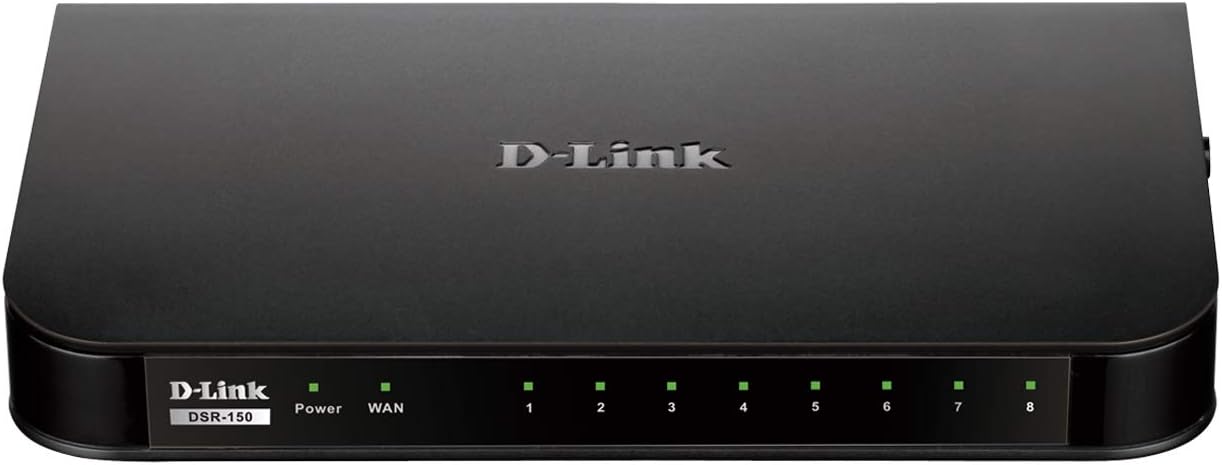
выява: Фронт view of the D-Link DSR-150 VPN Router. This image displays the device's front panel, including the D-Link branding, model number (DSR-150), and a series of LED indicators. These indicators typically show the status of power, WAN connection, and activity for each of the eight LAN ports.
Задняя панэль
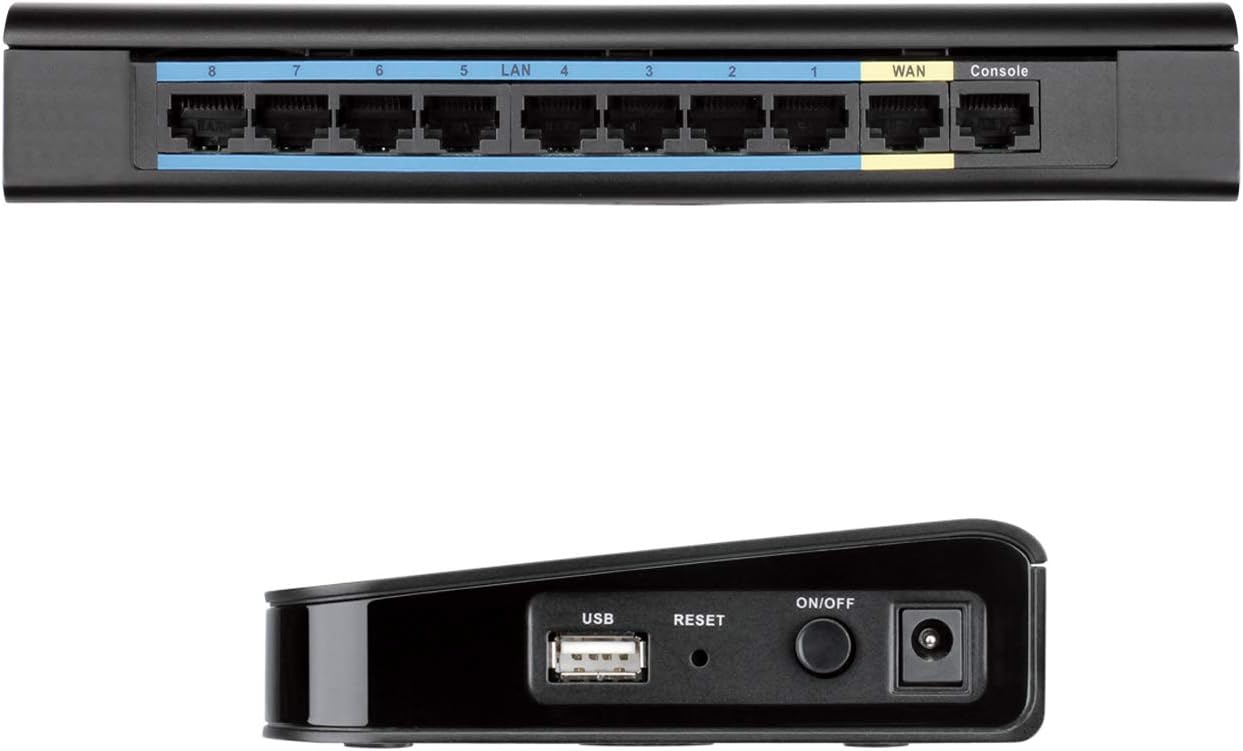
выява: Тыл view of the D-Link DSR-150 VPN Router. This image highlights the connectivity options on the back of the router, including eight LAN ports (typically for connecting local network devices), one WAN port (for connecting to the internet modem), and a Console port (for direct management access).
Бакавая панэль

выява: Збоку view of the D-Link DSR-150 VPN Router. This image shows the side of the device, featuring a USB port (for potential external storage or other peripherals), a recessed Reset button (for factory defaults), and the Power On/Off button alongside the power input jack.
Асноўныя характарыстыкі
The DSR-150 VPN Router offers a range of features designed for secure and efficient network management:
- High-Speed VPN Support: Integrated VPN tunnel support for secure remote network access.
- Multiple LAN/WAN Ports: Features eight (8) 10/100 LAN Ports and one (1) 10/100 WAN Port.
- Policy-Based Firewall: Policy-based service management allows for easy configuration of firewall rules.
- SSL VPN Tunnels: Supports one (1) SSL VPN tunnel for clientless remote access.
- GRE Tunnels: Supports five (5) Generic Routing Encapsulation (GRE) tunnels.
- IPsec/PPTP/L2TP Tunnels: Simultaneously supports up to ten (10) IPsec VPN tunnels plus ten (10) additional PPTP/L2TP tunnels for site-to-site connectivity.
- D-Link Green Ethernet: Incorporates D-Link Green Ethernet features to save power and reduce energy costs.
- Дынамічны Web Фільтраванне кантэнту: Enables administrators to allow or block access to websites based on categories.
Настройка
1. Распакаванне і праверка
Carefully unpack the router and verify that all components are present. This typically includes the DSR-150 router, a power adapter, and an Ethernet cable.
2. Фізічнае падключэнне
- Connect the provided power adapter to the router's power input port and then to a power outlet.
- Connect your internet modem or main network line to the WAN port on the rear of the DSR-150 using an Ethernet cable.
- Connect your computers or other network devices to any of the лакальная сетка ports (1-8) on the rear of the DSR-150 using Ethernet cables.
- Націсніце Уключэнне/Выключэнне button on the side panel to power on the router. Wait for the Power LED on the front panel to become solid.
3. Пачатковы доступ да канфігурацыі
Каб атрымаць доступ да web-based management interface for initial configuration:
- Пераканайцеся, што ваш камп'ютар падключаны да аднаго з партоў LAN маршрутызатара.
- Адкрыйце a web браўзер (напрыклад, Chrome, Firefox, Edge).
- Enter the default IP address of the router (commonly
192.168.10.1or similar, refer to the device label or quick installation guide) into the browser's address bar and press Enter. - Enter the default username and password (typically
adminfor both, or as specified in the quick installation guide) when prompted.
Інструкцыя па эксплуатацыі
Канфігурацыя VPN
The DSR-150 supports various VPN types to establish secure connections for remote users and branch offices.

выява: VPN capabilities for remote access. This image illustrates the concept of secure remote access, showing a user with a laptop and icons representing different VPN protocols like SSL VPN, PPTP, and L2TP, which facilitate secure connections to a central network.

выява: Site-to-Site VPN Tunnels. This diagram visually explains how a main office and a branch office can establish a secure connection over the internet using various VPN protocols such as IPsec, PPTP, and L2TP, creating encrypted virtual links between locations.
- SSL-VPN: For clientless remote access, navigate to the VPN > SSL VPN раздзел у ст web interface. Configure user accounts and access policies.
- IPsec/PPTP/L2TP: For site-to-site connections, go to VPN > IPsec or VPN > PPTP/L2TP. Define tunnel parameters, authentication methods, and network ranges for secure communication between offices.
- GRE Tunnels: Configure Generic Routing Encapsulation tunnels under the VPN > GRE section for specific routing needs.
Дынамічны Web Фільтраванне кантэнту
This feature allows administrators to control internet usage by blocking or allowing access to websites based on their categories.

выява: Web Content Filtering. This image depicts a laptop screen showing lines of code, symbolizing the router's capability to filter web content. This feature helps administrators manage and control internet usage by blocking access to specific websites or categories.
- Перайсці да Security > Content Filtering.
- Enable Dynamic Content Filtering.
- Configure policies to block or allow specific website categories or define custom URL/keyword filters.
Правілы брандмаўэра
The DSR-150's policy-based service management allows for granular control over network traffic.
- Доступ Firewall > Rules to create, modify, or delete firewall policies.
- Define rules based on source/destination IP, port numbers, and protocols to secure your network.
Тэхнічнае абслугоўванне
Абнаўленне прашыўкі
Regularly updating the router's firmware is crucial for security, performance, and access to new features.
- Visit the official D-Link support website for the DSR-150 model to download the latest firmware.
- У маршрутызатары web інтэрфейс, перайдзіце да System > Firmware Upgrade.
- Follow the on-screen instructions to upload and install the new firmware. Do not power off the device during this process.
Рэзервовае капіраванне і аднаўленне канфігурацыі
It is recommended to back up your router's configuration settings before making significant changes or firmware updates.
- Перайсці да System > Configuration Management.
- Use the options to save the current configuration to your computer or restore a previously saved configuration.
Перазагрузка прылады
A reboot can resolve minor network issues or apply certain configuration changes.
- Ад ст web інтэрфейс, перайдзіце да Сістэма > Перазагрузка and confirm the action.
- Alternatively, power off the device using the On/Off button, wait 10 seconds, and then power it back on.
D-Link Green Ethernet
The DSR-150 incorporates D-Link Green Ethernet technology to optimize power consumption.

выява: Efficient Green Technology. This image features a D-Link router alongside a large power symbol composed of green leaves, symbolizing the device's adherence to WEEE directives and its environmentally responsible design through D-Link Green Ethernet features.
Ліквідацыю непаладак
This section addresses common issues you might encounter with your DSR-150 router.
- Няма доступу ў Інтэрнэт:
- Verify the WAN cable connection to your modem.
- Check the WAN status in the router's web інтэрфейс.
- Пераканайцеся, што ваш мадэм працуе правільна.
- Немагчыма атрымаць доступ Web інтэрфейс:
- Confirm your computer is connected to a LAN port.
- Verify your computer's IP address is in the same subnet as the router (e.g., 192.168.10.x).
- Паспрабуйце ачысціць кэш браўзера або скарыстацца іншым браўзерам.
- Праблемы з падключэннем VPN:
- Double-check VPN tunnel settings, including IP addresses, authentication methods, and encryption.
- Ensure firewall rules are not blocking VPN traffic.
- Павольная прадукцыйнасць сеткі:
- Праверце наяўнасць высокага сеткавага трафіку або праграм, якія патрабуюць шмат прапускной здольнасці.
- Inspect Ethernet cables for damage.
- Пераканайцеся, што прашыўка маршрутызатара абноўлена.
Тэхнічныя характарыстыкі
- Нумар мадэлі: ДСР-150
- Марка: D-Link
- Тэхналогія падключэння: Правадная
- парты: 8 x 10/100 Fast Ethernet LAN, 1 x 10/100 Fast Ethernet WAN
- Падтрымка VPN: IPsec, PPTP, L2TP, SSL, GRE
- Памеры (Д х Ш х У): Прыкладна 11.34 х 9.76 х 2.6 цалі (28.8 х 24.8 х 6.6 см)
- Вага: Прыблізна 1 фунт (0.45 кг)
- асаблівасць: WPS (Wired Protected Setup)
- Тып антэны: Унутраны
Гарантыя і падтрымка
D-Link offers a Абмежаваная пажыццёвая гарантыя on the DSR Series VPN Routers, demonstrating their commitment to product quality and long-term customer confidence. For detailed warranty terms and conditions, please refer to the documentation included with your product or visit the official D-Link webсайт.
If you encounter issues that cannot be resolved using this manual, please contact D-Link Technical Support for assistance. Support contact information can typically be found on the D-Link webна сайце або ва ўпакоўцы вашага прадукту.