
Уводзіны
This manual provides comprehensive instructions for the setup, operation, and maintenance of your AT&T CL2940 Corded Phone. The CL2940 is designed for ease of use, featuring a large tilt display, extra-large buttons, a speakerphone, Caller ID/Call Waiting, and Audio Assist functionality. Please read this manual thoroughly to ensure proper use and to take full advantagусіх даступных функцый.
Змест пакета
Пераканайцеся, што ўсе прадметы прысутнічаюць у вашай упакоўцы:
- AT&T CL2940 Corded Speakerphone with Large Display
- Трубка
- Скручаны шнур трубкі
- Тэлефонны шнур
- Кіраўніцтва карыстальніка (гэты дакумент)
- Note: 4 AA batteries (not included) are required for Caller ID functionality.
Прадукт скончаныview
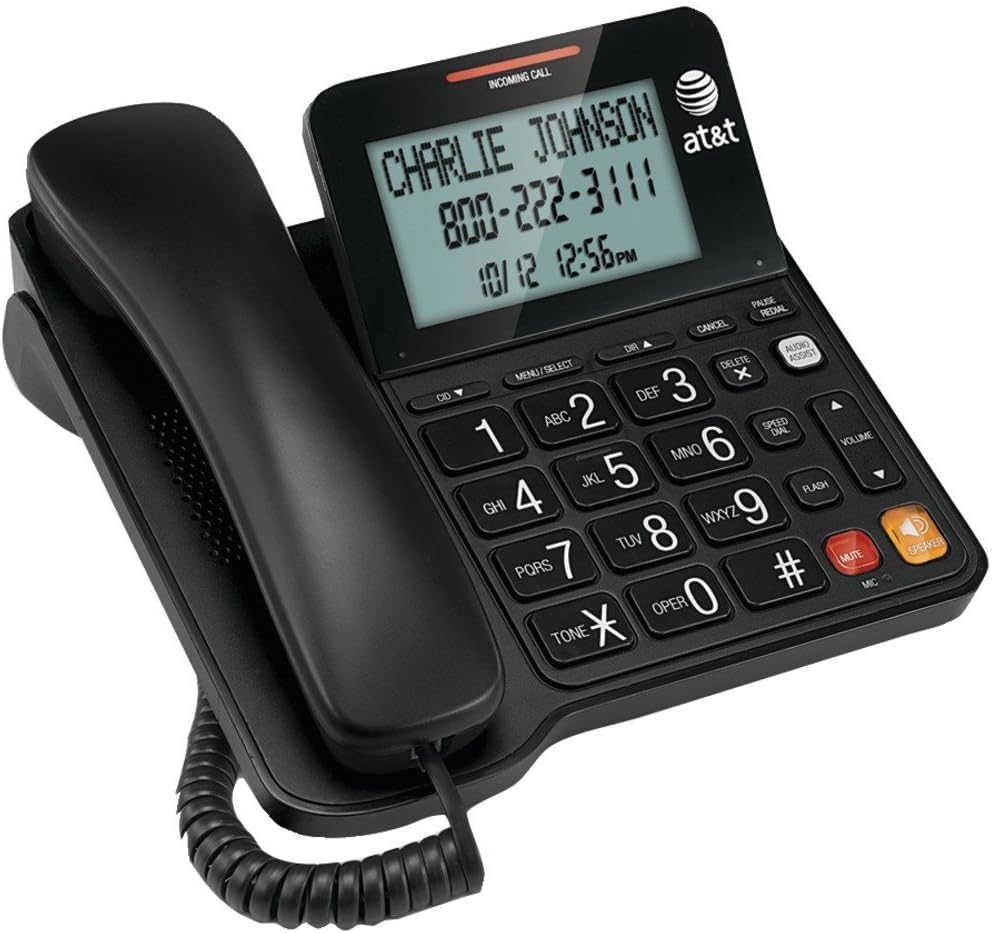
Figure 1: AT&T CL2940 Corded Phone
This image shows the AT&T CL2940 corded phone in black. The phone features a large, easy-to-read tilt display that currently shows an incoming call from 'CHARLIE JOHNSON' with the number '800-222-3111' and the date/time '10/12 12:56PM'. The large, clearly labeled buttons are visible on the keypad, including number keys, navigation buttons, and dedicated buttons for Speaker, Mute, Volume, and Audio Assist. The coiled handset cord connects the handset to the main unit.
Key Features and Components:
- Extra-Large Tilt Display: Provides clear visibility of Caller ID information, time, and menu options.
- Extra-Large Buttons: Designed for easy dialing and navigation.
- Гучная сувязь: Дазваляе гутарку без рук.
- Audio Assist: Enhances audio clarity during calls.
- Ідэнтыфікатар абанента/чаканне выкліку: Displays incoming caller information and manages multiple calls.
- Даведнік тэлефоннай кнігі: Захоўвае да 25 імёнаў і нумароў.
- Хуткі набор: 10-значны хуткі набор для часта тэлефануючых кантактаў.
- Extra-Loud Ringer: Adjustable ringer volume for clear alerts.
- Насценны: Can be placed on a desk or mounted on a wall.
Настройка
1. Connecting the Phone
- Connect one end of the coiled handset cord to the handset and the other end to the jack labeled Рука on the side of the phone base.
- Connect one end of the telephone line cord to the jack labeled ЛІНІЯ on the back of the phone base.
- Падключыце другі канец тэлефоннага шнура да тэлефоннай разеткі.
2. Installing Batteries (for Caller ID/Display)
The phone operates without AC power for basic calling functions. However, to enable the Caller ID display and other display-dependent features, 4 AA batteries (not included) are required.
- Locate the battery compartment on the underside of the phone base.
- Адкрыйце крышку батарэйнага адсека.
- Устаўце 4 батарэйкі тыпу АА, выконваючы правільную палярнасць (+ і -), як паказана ўнутры адсека.
- Замяніце крышку батарэйнага адсека.
3. Насценнае мацаванне (неабавязкова)
The CL2940 can be mounted on a wall to save desk space. Ensure you have a standard wall plate with two pins spaced appropriately.
- Remove the desk stand if attached.
- Align the two keyhole slots on the back of the phone with the wall plate pins.
- Slide the phone downwards to secure it in place.
Інструкцыя па эксплуатацыі
Тэлефанаванне
- Вазьміце слухаўку альбо націсніце СПІКЕР кнопка.
- Набярыце з клавіятуры патрэбны нумар тэлефона.
- To end the call, place the handset back on the cradle or press the СПІКЕР кнопку зноў.
Прыём званка
- Калі тэлефон зазваніць, падніміце слухаўку або націсніце СПІКЕР кнопку, каб адказаць.
- To end the call, place the handset back on the cradle or press the СПІКЕР кнопка.
Выкарыстанне гучнай сувязі
- Каб уключыць гучную сувязь падчас размовы, націсніце кнопку СПІКЕР кнопка.
- To switch back to the handset, pick up the handset.
- Каб завяршыць размову па гучнай сувязі, націсніце кнопку СПІКЕР кнопку зноў.
АОН і чаканне выкліку
- When an incoming call is received, the caller's name and number will appear on the display (requires battery installation and subscription to Caller ID service).
- Выкарыстоўвайце CID ▼ і DIR ▲ buttons to scroll through the Caller ID log.
- If you subscribe to Call Waiting, a tone will indicate a second incoming call. Press УСПЫШКА для пераключэння паміж выклікамі.
Тэлефонная кніга і хуткі набор
The phone allows you to store frequently called numbers for quick access.
- Programming Phonebook Entries: Refer to the detailed instructions in the full user manual for programming names and numbers into the 25-entry phonebook.
- Выкарыстанне хуткага набору: Націсніце Хуткасны цыферблат button, then the corresponding number (0-9) for the stored entry.
Аўдыё дапаможнік
Націсніце АЎДЫЯ ДАПАМОГА button during a call to temporarily boost the audio volume and clarity, making conversations easier to hear.
Рэгуляванне гучнасці і адключэнне гуку
- Аб'ём: Выкарыстоўвайце VOLUME ▲/▼ buttons to adjust the listening volume during a call (for both handset and speakerphone).
- Адключэнне гуку: Націсніце МУК button to temporarily silence your microphone during a call. The other party will not hear you, but you can still hear them. Press МУК зноў, каб аднавіць размову.
Тэхнічнае абслугоўванне
Чыстка тэлефона
To keep your phone in good condition, periodically wipe it with a soft, slightly damp cloth. Avoid using harsh chemicals or abrasive cleaners, as these can damage the phone's finish or electronic components.
Замена батарэі
If the Caller ID display becomes dim or unresponsive, it may be time to replace the 4 AA batteries. Follow the battery installation steps outlined in the "Setup" section.
Ліквідацыю непаладак
If you experience issues with your AT&T CL2940 phone, try the following common troubleshooting steps:
- Няма сігналу набору:
- Пераканайцеся, што тэлефонны шнур надзейна падключаны як да тэлефона, так і да разеткі.
- Test the wall jack with another working phone to confirm the line is active.
- Ідэнтыфікатар абанента не адлюстроўваецца:
- Verify that 4 AA batteries are correctly installed in the battery compartment.
- Check if your telephone service provider offers Caller ID service and that it is activated on your line.
- Заменіце старыя батарэі на новыя.
- Дрэнная якасць гуку:
- Адрэгулюйце гучнасць, выкарыстоўваючы АБ'ЁМ кнопкі.
- Пераканайцеся, што шнур тэлефоннай трубкі надзейна падключаны.
- If using the speakerphone, ensure you are within a reasonable distance from the microphone.
- Try activating the АЎДЫЯ ДАПАМОГА асаблівасць.
- Кнопкі не рэагуюць:
- Ensure the phone is connected to a live telephone line.
- If the issue persists, try disconnecting the phone from the wall jack for a few minutes, then reconnecting it.
For more detailed troubleshooting or persistent issues, please refer to the full product support documentation or contact AT&T customer service.
Тэхнічныя характарыстыкі
| Марка | AT&T |
| Нумар мадэлі | CL2940 |
| Тып тэлефона | рубчатая |
| Колер | Чорны |
| Памеры прадукту | 7.9 х 8.8 х 3.7 цалі |
| Вага прадмета | 1 фунт |
| Крыніца харчавання | Telephone Line Powered (Batteries for Caller ID/Display) |
| Патрабуюцца батарэі | 4 AA batteries (for Caller ID/Display, not included) |
| Вытворца | Vtech |
| Асаблівасці | Caller ID/Call Waiting, Speakerphone, Audio Assist, Extra-Large Tilt Display, Extra-Large Buttons, Extra-Loud Ringer, 10-Number Speed Dial, 25-Name/Number Phonebook |
Гарантыя і падтрымка
Your AT&T CL2940 Corded Phone is manufactured by Vtech. For warranty information and customer support, please refer to the documentation included with your purchase or visit the official AT&T or Vtech support websites. Keep your purchase receipt as proof of purchase.
For assistance, you may contact AT&T customer service directly.