
AT&T TL88102
AT&T TL88102 DECT 6.0 2-Line Cordless Telephone System User Manual
Мадэль: TL88102
1. Уводзіны
This manual provides comprehensive instructions for the AT&T TL88102 DECT 6.0 2-Line Cordless Telephone System, including the TL88102 base unit and TL88002 accessory handsets. This system is designed for clear, interference-free communication with extended range, featuring a 2-line answering system with caller ID/call waiting, and intercom capabilities.
The AT&T TL88102 system is ideal for busy households or home offices requiring dual line functionality and multiple cordless handsets for convenience.

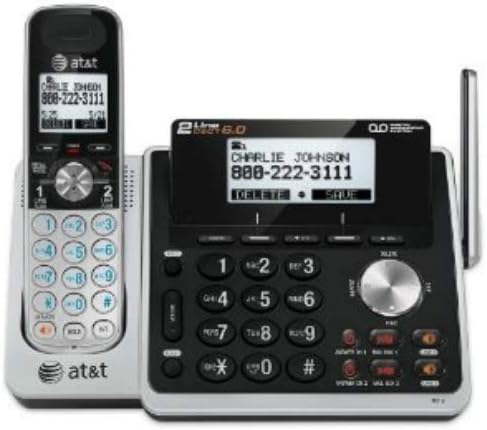
Figure 1: The AT&T TL88102 base unit with one cordless handset, and three additional TL88002 accessory handsets.
2. Настройка
2.1 Змест пакета
- AT&T TL88102 Base Unit with Cordless Handset
- Адаптар сілкавання пераменнага току для базавага блока
- Тэлефонны шнур
- TL88002 Accessory Handsets (quantity may vary based on bundle)
- Chargers for Accessory Handsets
- Rechargeable Batteries for Handsets (AAA batteries required)
2.2 Падключэнне базавага блока
- Connect the small end of the AC power adapter to the POWER jack on the back of the TL88102 base unit.
- Падключыце вялікі канец адаптара пераменнага току да стандартнай электрычнай разеткі.
- Connect one end of the telephone line cord to the TEL LINE 1 or TEL LINE 2 jack on the back of the base unit. If using two lines, connect the second line cord to the other TEL LINE jack.
- Plug the other end(s) of the telephone line cord(s) into your telephone wall jack(s).
Малюнак 2: Задняя частка view of the TL88102 base unit, illustrating the connection points for power and telephone lines.
2.3 Усталёўка і зарадка батарэй тэлефона
- Адкрыйце вечка батарэйнага адсека на задняй панэлі кожнай бесправадной трубкі.
- Insert the supplied rechargeable AAA batteries, observing the correct polarity (+ and - markings).
- Зачыніце крышку батарэйнага адсека.
- Place each handset in its respective charger (base unit or accessory charger). The CHARGE light on the handset will illuminate, indicating proper charging.
- Перад першым выкарыстаннем дайце тэлефонам зарадзіцца не менш за 16 гадзін, каб забяспечыць аптымальную прадукцыйнасць батарэі.
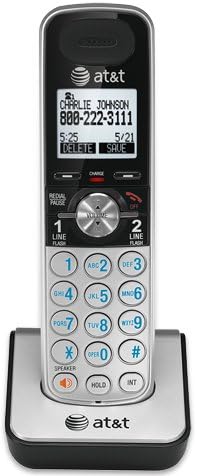
Figure 3: A cordless handset correctly seated in its charging cradle.
2.4 Registering Handsets
All accessory handsets (TL88002) must be registered to the TL88102 base unit before use. The handset included with the base unit is pre-registered.
- Place the handset you wish to register into the base unit's charger cradle.
- На базавай прыладзе націсніце і ўтрымлівайце ЗНАЙСІЦЬ СЛУШАКУ button for approximately 4 seconds until the IN USE light on the base unit begins to flash.
- На тэлефоннай трубцы націсніце кнопку # key. The handset will display "Registering..." and then "Handset Registered" upon successful registration.
- If registration fails, remove the handset from the charger and repeat the steps.
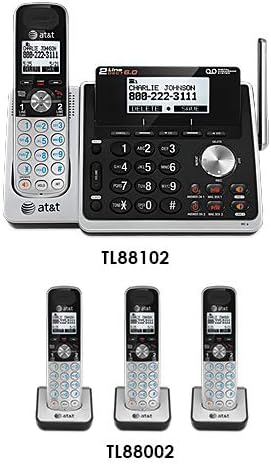
Figure 4: Illustration of the TL88102 base unit and TL88002 accessory handsets, indicating their relationship within the system.
3. Інструкцыя па эксплуатацыі
3.1 Здзяйсненне і прыём выклікаў
- Каб зрабіць званок: Прэса РАДОК 1 or РАДОК 2, then dial the number. Alternatively, dial the number first, then press РАДОК 1 or РАДОК 2.
- Каб адказаць на выклік: Прэса РАДОК 1, РАДОК 2, або СПІКЕР.
- Каб завяршыць выклік: Прэса ВЫКЛ або змесціце трубку ў зарадную прыладу.

Figure 5: The TL88102 base unit and its cordless handset, highlighting the keypad and display for call management.
Аўтаадказчык 3.2
The TL88102 features a digital answering system for both lines, capable of storing up to 14 minutes of messages per line.
- Уключэнне/выключэнне: Прэса ANS ON/OFF 1 or ANS ON/OFF 2 on the base unit to activate or deactivate the answering system for each line.
- Прайграванне паведамленняў: Прэса ПРАЙГРАЦЬ/СТОП on the base unit or access the answering system menu from any handset.
- Аддалены доступ: You can retrieve messages remotely by calling your phone number and entering your remote access code.
3.3 Ідэнтыфікацыя абанента/Чаканне выкліку
The system supports Caller ID and Call Waiting features. Ensure you subscribe to these services from your telephone service provider.
- Incoming call information (name and number) will display on the handset and base unit screens.
- During a call, if another call comes in, you will hear a tone. Press УСПЫШКА для пераключэння паміж выклікамі.
3.4 Дамафон
Use the intercom feature to communicate between the base unit and handsets, or between multiple handsets.
- To initiate intercom: Прэса ІНТ on the handset, then select the desired handset or base unit to call.
4. Тэхнічнае абслугоўванне
4.1 Cleaning the Product
Clean the telephone system with a soft, damp тканінай. Не выкарыстоўвайце ачышчальныя спрэі або агрэсіўныя хімікаты, бо яны могуць пашкодзіць пакрыццё або электрычныя кампаненты.
4.2 Сыход за акумулятарам
- Заўсёды выкарыстоўвайце акумулятарныя батарэйкі тыпу AAA, якія ўваходзяць у камплект.
- For optimal performance, keep handsets in their chargers when not in use.
- Калі тэлефон не будзе выкарыстоўвацца працяглы час, выміце батарэйкі, каб прадухіліць іх уцечку.
- Replace batteries when the handset displays "Low Battery" or when talk time significantly decreases.
5. Выпраўленне непаладак
| праблема | Рашэнне |
|---|---|
| Няма нумара набору. |
|
| Handset displays "Out of Range" or "No Power at Base". |
|
| Дрэнная якасць званка або шум. |
|
| Answering system not recording messages. |
|
6. Тэхнічныя характарыстыкі
- Тэхналогія: Лічбавая тэхналогія DECT 6.0
- Радкі: 2-Line Operation
- Сістэма аўтаадказчыка: Digital, up to 14 minutes recording time per line
- Ідэнтыфікатар абанента/чаканне выкліку: Так (патрабуецца падпіска)
- Каталог: 50-number phonebook
- Дамафон: Handset to Handset, Handset to Base
- Крыніца харчавання: AC Power Adapter (Base Unit), Rechargeable AAA Batteries (Handsets)
- Product Dimensions (Base Unit): Прыкладна 12.1 х 10.2 х 8.6 цалі
- Вага прадмета: Прыкладна 1.8 фунта
- колер: Серабро
- матэрыял: Пластыкавыя
- Сумяшчальныя прылады: Сумяшчальны са слыхавым апаратам
7. Гарантыя і падтрымка
For warranty information and technical support, please refer to the documentation included with your product or visit the official AT&T website. You may also contact AT&T customer service directly for assistance with product setup, operation, or troubleshooting.
Захоўвайце чэк аб куплі ў якасці пацверджання пакупкі для прэтэнзій па гарантыі.
Ask a question about this manual
Ask about setup, troubleshooting, compatibility, parts, safety, or missing instructions. Manuals+ will review the question and use this page’s manual context to help answer it.