
iFrogz CAL-VANGAU
iFrogz CAL-VANGAU Caliber Vanguard Premium Gaming Headphones
Model: CAL-VANGAU
Прадукт скончаныview
The iFrogz Caliber Vanguard headphones are designed for an immersive audio experience, suitable for both gaming and personal entertainment. They feature 40mm drivers that deliver clear and powerful 7.1 channel sound. An optional bass vibration feature enhances the audio experience by allowing users to feel the action. The integrated microphone is retractable, providing convenience for in-game communication or auto-muting when not in use. The headphones boast a sleek black finish with techno-cyan accents.
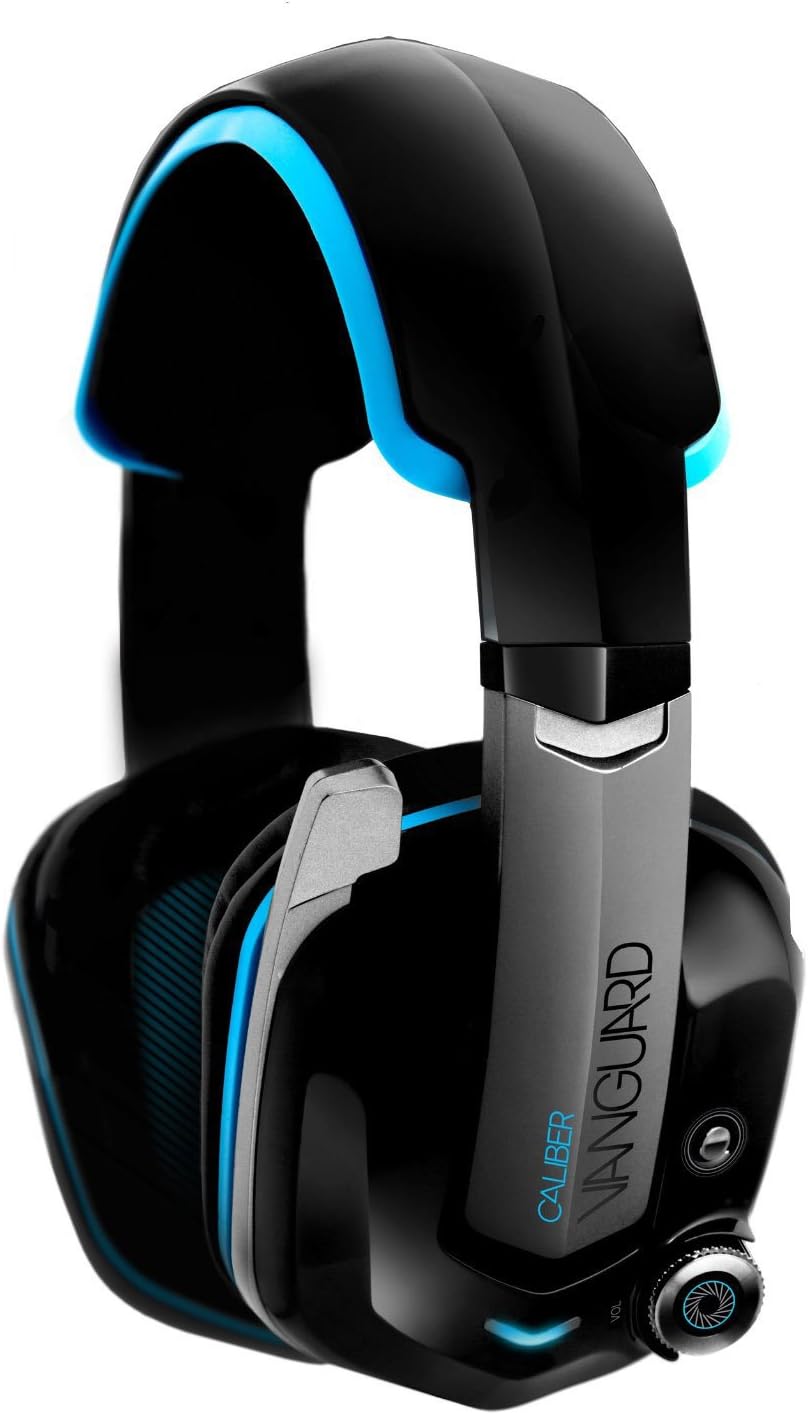
Image: iFrogz Caliber Vanguard Premium Gaming Headphones. This image displays the headphones from a front-side angle, highlighting their black and techno-cyan design, the retractable microphone, and the volume control knob on the ear cup.
Асноўныя характарыстыкі
- Высоўны мікрафон: For clear communication during gaming or convenient storage.
- Аб'ёмны гук 7.1: Provides an immersive audio experience for gaming and multimedia.
- Vibrating Bass Driver: Enhances low-frequency sounds, allowing users to feel the bass.
- Closed-Ear Design: Offers passive noise isolation for focused listening.
- 40-міліметровыя неадымавыя дынамікі: Delivers crisp, clear, and powerful audio.
- Правадное падключэнне: Ensures a stable audio connection via a 3.5mm jack.
Інструкцыя па наладзе
- Распакаванне: Carefully remove the headphones and any included accessories from the packaging. Ensure all components are present.
- Падключэнне да прылады:
- Locate the 3.5mm audio jack on your gaming console, PC, or other audio device.
- Insert the 3.5mm connector from the headphone cable firmly into the audio jack.
- Рэгуляванне падгонкі:
- Extend or retract the headband to comfortably fit your head. The earcups should fully enclose your ears.
- Ensure a snug fit to optimize sound quality and passive noise isolation.
- Размяшчэнне мікрафона:
- To use the microphone, gently pull it down from its retracted position until it is near your mouth.
- To mute the microphone, push it back into its retracted position.
Інструкцыя па эксплуатацыі
Рэгулятар гучнасці
The headphones feature an integrated volume control knob, typically located on one of the earcups or along the cable. Rotate the knob clockwise to increase volume and counter-clockwise to decrease volume.
Bass Vibration Feature
The Caliber Vanguard headphones include an optional bass vibration feature. A dedicated button, usually located near the volume control, allows you to toggle this feature on or off. When activated, the headphones will vibrate in sync with low-frequency sounds, enhancing the immersive experience.
Выкарыстанне мікрафона
The retractable microphone can be extended for voice communication during gaming or calls. When not needed, retract the microphone fully into the earcup to automatically mute it and keep it out of the way.
Тэхнічнае абслугоўванне
- Уборка: Use a soft, dry cloth to wipe down the headphones. For stubborn dirt, a slightly damp cloth can be used, but ensure no moisture enters the speaker grilles or control buttons.
- захоўванне: Захоўвайце навушнікі ў прахалодным, сухім месцы, удалечыні ад прамых сонечных прамянёў і экстрэмальных тэмператур. Не кладзіце на іх цяжкія прадметы.
- Сыход за кабелем: Avoid sharp bends or kinks in the cable. Do not pull the cable to disconnect the headphones; always grasp the plug.
- Амбушюры: Перыядычна правярайце амбушюры на наяўнасць зносу. Запасныя амбушюры можна набыць у вытворцы або ў аўтарызаваных прадаўцоў.
Ліквідацыю непаладак
| праблема | Магчымая прычына | Рашэнне |
|---|---|---|
| Няма гуку з навушнікаў. |
|
|
| Не працуе мікрафон. |
|
|
| Bass vibration not active. |
|
|
Тэхнічныя характарыстыкі
| Назва мадэлі | CAL-VANGAU |
| Тэхналогія падлучэння | Правадны (раз'ём 3.5 мм) |
| Блок драйвера | 40 мм неадым |
| Імпеданс | 32 Ом |
| Адчувальнасць | 95 dB +/- 3 dB at 1 kHz |
| АЧХ | ад 20 Гц да 20 кГц |
| Даўжыня шнура | 2 метраў |
| Формаў-фактар | Closed-back, Over-ear |
| Мікрафон | Высоўная |
| Аб'ёмны гук | Канал 7.1 |
| Асаблівасці | Vibrating Bass Driver |
| Памеры прадукту | 11.43 х 20.32 х 24.77 см |
| Вага прадмета | 0.5 фунта (прыблізна 226.8 г) |
| Колер | Black with Techno-Cyan Accents |
| Вытворца | ЗАГГ |
Інфармацыя аб гарантыі
For specific warranty details, including coverage period and terms, please refer to the warranty card included with your product or visit the official iFrogz webсайт. Захоўвайце пацвярджэнне пакупкі для прэтэнзій па гарантыі.
Заўвага: Умовы гарантыі могуць адрознівацца ў залежнасці ад рэгіёна і прадаўца.
Падтрымка кліентаў
If you encounter any issues or have questions not covered in this manual, please contact iFrogz customer support. Support contact information can typically be found on the product packaging, the official iFrogz webсайце або праз вашага прадаўца.
Інтэрнэт-рэсурсы: Visit the official iFrogz website for FAQs, updated manuals, and support contact details.
вытворца: ЗАГГ
Ask a question about this manual
Ask about setup, troubleshooting, compatibility, parts, safety, or missing instructions. Manuals+ will review the question and use this page’s manual context to help answer it.