
1. Уводзіны
Дзякуй за пакупкуasing the KLH R5100 Surround Sound Receiver. This receiver is designed to provide high-quality audio and video performance for your home entertainment system. It features multiple audio and video inputs, surround sound processing, and a powerful amplifier to deliver an immersive listening experience. Please read this manual thoroughly before operating the unit to ensure proper setup and optimal performance.
2. Важная інфармацыя па бяспецы
Каб знізіць рызыку паражэння электрычным токам, пажару або пашкоджання прылады, калі ласка, выконвайце наступныя меры бяспекі:
- Крыніца харчавання: Падключайце прыладу толькі да крыніцы пераменнага току 120 В, 60 Гц.
- Вентыляцыя: Забяспечце належную вентыляцыю. Не блакуйце вентыляцыйныя адтуліны. Пакіньце дастаткова месца вакол прылады для належнай цыркуляцыі паветра.
- Вада і вільгаць: Не падвяргайце прыладу ўздзеянню дажджу, вільгаці або празмернай вільготнасці. Не стаўце на прыладу прадметы, напоўненыя вадкасцямі, такія як вазы.
- Цяпло: Трымайце прыладу далей ад крыніц цяпла, такіх як радыятары, абагравальнікі, пліты або іншыя прыборы (у тым ліку ampLifiers), якія вырабляюць цяпло.
- Уборка: Перад чысткай адключыце прыладу ад разеткі. Выкарыстоўвайце для чысткі сухую тканіну.
- Абслугоўванне: Не спрабуйце абслугоўваць гэту прыладу самастойна. Звяртайцеся па любыя паслугі па абслугоўванні да кваліфікаванага персаналу.
- Кабелі: Абараняйце сеткавы шнур ад наступання або заціскання, асабліва ў месцах вілкі, разеткі і месца, дзе ён выходзіць з прылады.
3. Змесціва ўпакоўкі
Калі ласка, праверце, ці ў вашай пасылцы ёсць наступныя прадметы:
- KLH R5100 Surround Sound Receiver
- Пульт дыстанцыйнага кіравання
- Кіраўніцтва карыстальніка
- Аўдыё/відэа кабелі (тыпу RCA)
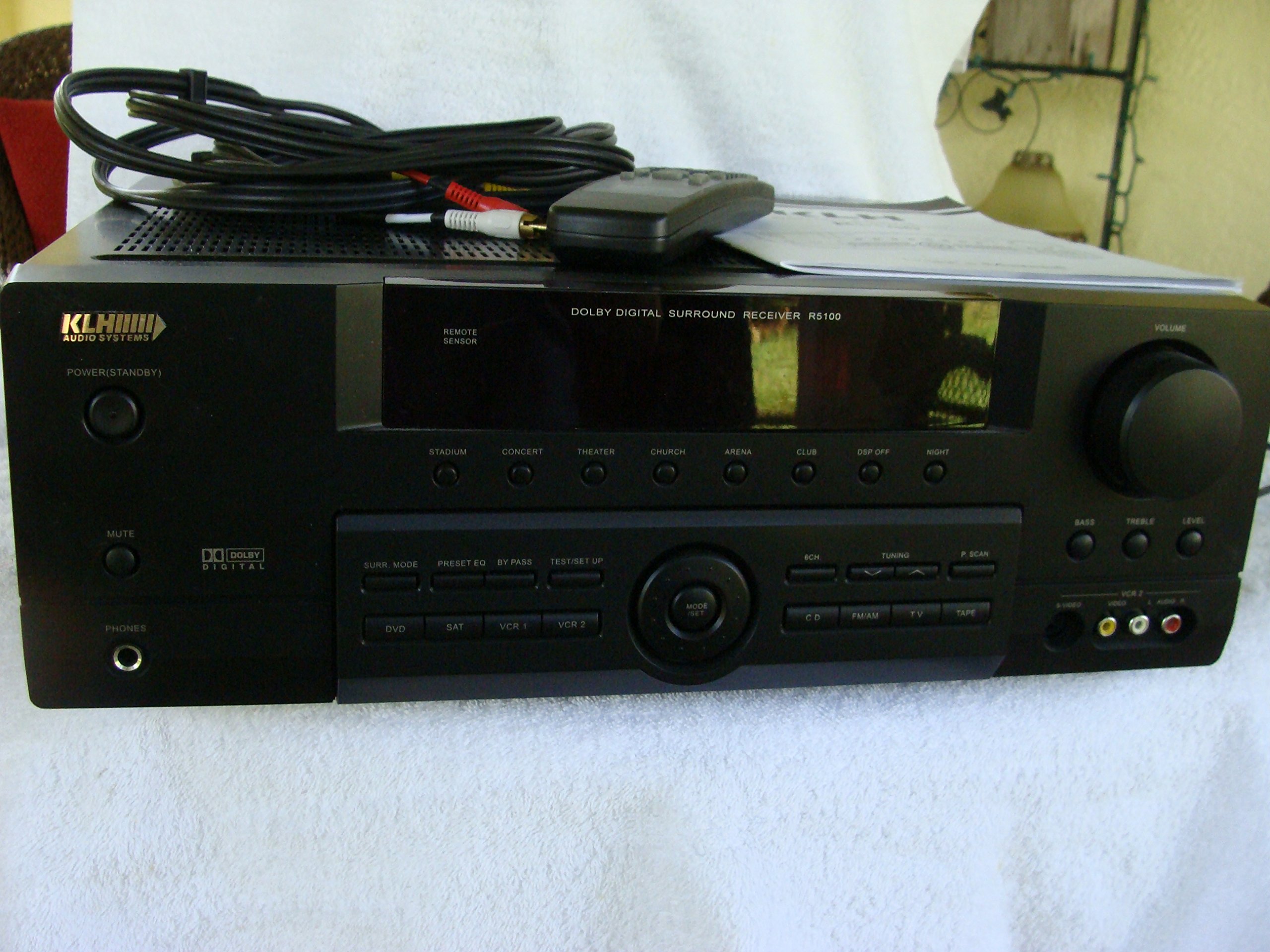
Image: The KLH R5100 receiver, its remote control, user manual, and included audio/video cables.
4. Прадукт скончыўсяview
4.1 Элементы кіравання пярэдняй панэлі
The front panel provides access to essential controls and indicators for daily operation.

Выява: Падрабязны view of the receiver's front panel, highlighting the display, volume control, and input selection buttons.
- Кнопка харчавання: Уключае або выключае прыёмнік.
- Селектары ўводу: Buttons for DVD, SAT, VCR 1, VCR 2, CD, FM/AM, TV, TAPE to choose your audio/video source.
- Рэгулятар гучнасці: Рэгулюе агульную гучнасць выхаднога гуку.
- Surround Mode Buttons: Select various sound fields like Stadium, Concert, Theater, Church, Arena, Club, DSP Off, Night.
- Bass/Treble/Level: Controls for adjusting audio tone and individual channel levels.
- Раз'ём для навушнікаў: Для прыватнага праслухоўвання.
4.2 Злучэнні задняй панэлі
The rear panel houses all input and output terminals for connecting your audio and video components, as well as speakers.

Image: The full rear panel of the receiver, displaying all connection ports for audio, video, and speakers.
- Калонкі: Connections for Main (Front Left/Right), Center, and Rear (Surround Left/Right) speakers.
- Аўдыёўваходы (RCA): For connecting CD players, tape decks, VCRs, TVs, and other stereo audio sources.
- Video Inputs/Outputs (RCA/S-Video): For connecting video sources like DVD players, VCRs, and TVs.
- Лічбавыя аўдыёўваходы (аптычны/кааксіяльны): For connecting digital audio sources like DVD players or set-top boxes.
- 6CH Direct Input: For connecting external multi-channel decoders or players with 5.1 analog outputs.
- Выхад на сабвуфер: Выхад RCA для падлучэння актыўнага сабвуфера.
- Тэрміналы антэны: For FM and AM antennas.
4.3 пульт дыстанцыйнага кіравання
The remote control provides convenient access to all receiver functions from your listening position.

Выява: буйны план view of the remote control unit, detailing its buttons for various functions.
- Уключэнне/выключэнне харчавання: Уключае або выключае прыёмнік.
- Селектары ўводу: Dedicated buttons for each input source (DVD, CD, TV, etc.).
- Павялічыць/паменшыць гучнасць: Рэгулюе галоўную гучнасць.
- Адключэнне гуку: Часова адключае гук.
- Рэжым аб'ёмнага гуку: Cycles through available surround sound modes.
- Level/Test: For adjusting individual speaker levels and running a test tone.
- Элементы кіравання цюнэрам: For FM/AM station tuning and memory functions.
5. Настройка
5.1 Падключэнне дынамікаў
Ensure the receiver is unplugged from the power outlet before making any connections.
- Пярэднія дынамікі: Connect your main left and right speakers to the 'MAIN SPEAKERS (8Ω)' terminals. Ensure correct polarity (+ to + and - to -).
- Цэнтральны дынамік: Connect your center channel speaker to the 'CENTER SPEAKER (8Ω)' terminals.
- Заднія дынамікі: Connect your surround left and right speakers to the 'REAR SPEAKERS (8Ω)' terminals.
- сабвуфер: Connect an active subwoofer to the 'SUBWOOFER OUT' RCA jack using a single RCA cable.

Выява: Падрабязная view of the speaker connection terminals on the rear panel.
5.2 Падключэнне крыніц аўдыё/відэа
Use appropriate cables (RCA, Optical, Coaxial) to connect your source components to the receiver.
- DVD-плэер: Connect the audio output of your DVD player to the 'DVD' audio input jacks (RCA) on the receiver. For digital audio, use either the 'DIGITAL IN OPTICAL' or 'DIGITAL IN COAXIAL' input. Connect the video output to the 'DVD' video input.
- Прайгравальнік кампакт-дыскаў: Connect the audio output of your CD player to the 'CD' audio input jacks (RCA).
- TV/Cable Box: Connect the audio output of your TV or cable box to the 'TV' audio input jacks (RCA). Connect video output to the 'TV' video input.
- Іншыя прылады: Use 'SAT', 'VCR 1', 'VCR 2', or 'TAPE' inputs for other audio/video components as needed.

Image: A close-up of the digital audio inputs (Coaxial, Optical) and the 6-channel direct input section on the rear panel.
5.3 Падключэнне антэны
Падключыце антэны FM і AM, якія ўваходзяць у камплект, да адпаведных раздымаў на задняй панэлі для прыёму радыё.
6. Інструкцыя па эксплуатацыі
6.1 Асноўныя аперацыі
- Уключэнне: Press the Power button on the front panel or remote control.
- Выберыце ўвод: Press the desired input selector button (e.g., 'DVD', 'CD') on the front panel or remote control to choose your source.
- Наладзіць гучнасць: Turn the Volume knob on the front panel or use the Volume Up/Down buttons on the remote control.
6.2 Surround Sound Modes
The R5100 offers various sound modes to enhance your listening experience:
- Стадыён: Simulates the acoustics of a large stadium.
- Канцэрт: Creates a concert hall ambiance.
- Тэатр: Optimized for movie playback, enhancing dialogue and effects.
- Касцёл: Replicates the spaciousness of a church.
- Arena: Provides a wide, open sound field.
- Клуб: Simulates a lively club environment.
- DSP Off: Disables digital sound processing for a direct stereo signal.
- Ноч: Reduces dynamic range for late-night listening without disturbing others.
Press the 'SURR. MODE' button on the remote or front panel to cycle through these modes.
6.3 Рэгуляванне тону
Use the BASS and TREBLE controls on the front panel or remote to adjust the low and high frequency response. The LEVEL controls allow for fine-tuning of individual speaker output levels.
6.4 Праца цюнера
To listen to radio:
- Press the 'FM/AM' input selector.
- Use the 'TUNING' buttons on the front panel or remote to find stations.
- Press 'MEMORY' to store favorite stations, and 'P.SCAN' to scan through presets.
7. Тэхнічнае абслугоўванне
To ensure the longevity and optimal performance of your KLH R5100 receiver, follow these maintenance guidelines:
- Уборка: Wipe the exterior surfaces with a soft, dry cloth. Do not use abrasive cleaners, waxes, or solvents as they may damage the finish.
- Вентыляцыя: Regularly check that the ventilation openings are not obstructed by dust or debris. Use a soft brush or vacuum cleaner to gently remove any build-up.
- Шнур харчавання: Inspect the power cord periodically for any signs of damage. If damaged, discontinue use and contact qualified service personnel.
- захоўванне: If storing the unit for an extended period, unplug it from the power outlet and cover it to protect against dust.
8. Выпраўленне непаладак
If you encounter problems with your receiver, refer to the following common issues and solutions before seeking professional service.
| праблема | Магчымая прычына | Рашэнне |
|---|---|---|
| Няма ўлады | Power cord unplugged; Power outlet not active | Ensure power cord is securely plugged in; Check power outlet with another device |
| Няма гуку | Incorrect input selected; Speakers not connected properly; Volume too low; Mute function active | Select correct input source; Check speaker connections and polarity; Increase volume; Deactivate Mute |
| Пульт дыстанцыйнага кіравання не працуе | Batteries depleted; Obstruction between remote and receiver; Remote sensor blocked | Replace batteries; Remove any obstructions; Ensure remote sensor on receiver is clear |
| Дрэнны прыём радыё | Антэна не падключана або няправільна размешчана | Connect antennas securely; Adjust antenna position for better reception |
| Скажоны гук | Input signal too high; Speaker impedance mismatch; Damaged cables | Reduce source volume; Ensure speakers match 8Ω impedance; Check and replace damaged cables |
9. Тэхнічныя характарыстыкі
The following are the technical specifications for the KLH R5100 Surround Sound Receiver:
- Нумар мадэлі: R5100
- Памеры прадукту: 16.88 х 6.88 х 15.75 цалі
- Вага прадмета: 24.2 фунта
- Крыніца харчавання: Пераменны ток 120 В, 60 Гц
- Спажываная магутнасць: 320 Вт
- Рэжым вываду гуку: Акружаць
- Канфігурацыя канала аб'ёмнага гуку: 5.1
- Тэхналогія падключэння: RCA, 3.5mm Jack, Optical, Coaxial
- Сумяшчальныя прылады: Выступоўцы
- Тып кантролера: Дыстанцыйнае
- асаблівасць: Advanced Room Calibration (as per product listing, though specific details may vary)
- колер: Чорны
10. Гарантыя і падтрымка
For warranty information and customer support, please refer to the documentation included with your purchase or contact KLH customer service directly. Keep your proof of purchase for any warranty claims.