
Уводзіны
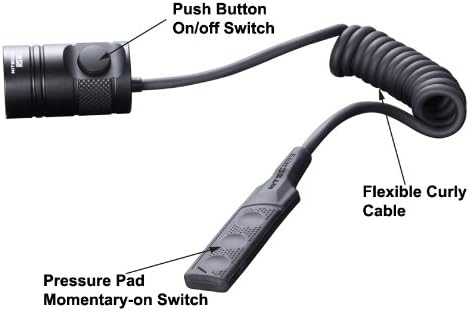
The NITECORE RSW1 Remote Pressure Switch is designed to replace the standard tail cap on compatible NITECORE tactical flashlights. This accessory allows for remote activation and mode control, enhancing usability, especially when the flashlight is weapon-mounted. The coiled cable provides flexibility in placement, ensuring convenient access to the pressure pad.
Настройка і ўстаноўка
- Remove the Original Tail Cap: Unscrew the existing tail cap from your compatible NITECORE flashlight.
- Attach the RSW1: Screw the tail cap component of the RSW1 Remote Pressure Switch onto the flashlight body until it is securely tightened.
- Position the Pressure Pad: Place the pressure pad (Momentary-on Switch) in your preferred location, typically where your stabilizing hand can easily access it. The coiled cable extends up to 15 inches for versatile mounting options.
Інструкцыя па эксплуатацыі
- Імгненная актывацыя: Press and hold any of the three buttons on the pressure pad (Momentary-on Switch) to activate the flashlight momentarily. Release the button to turn the flashlight off.
- Пастаяннае ўключэнне/выключэнне: The tail cap component of the RSW1 features a push button (Push Button On/off Switch). Press this button to turn the flashlight on for constant illumination. Press it again to turn the flashlight off.
- Mode Changing: The RSW1 is designed to work with flashlights that have a mode-changing function. The specific method for changing modes (e.g., brightness levels, strobe) will depend on the flashlight model. Typically, this is done via a dedicated mode button on the flashlight itself, or by partially pressing the tail switch. Refer to your flashlight's manual for detailed mode-changing instructions.
Сумяшчальнасць
The NITECORE RSW1 Pressure Switch is compatible with a range of NITECORE tactical flashlights. Please verify your flashlight model against the lists below:
Сумяшчальныя мадэлі:
- CR6, CG6, CI6, CU6
- P12, P12GT, P30, P16, P16TAC, P26
- MH12, MH12GT, MH25, MH25GT, MH27, MH27UV, MH40, MH40GT, MH41
- MT10C, MT42, MT40GT, MT25, MT26
- SRT6, SRT7, SRT7GT
Несумяшчальныя мадэлі:
- GTS series: MH12GTS, MH25GTS (These models require the RSW2 Pressure Switch)
- Strobe ready series: P10, P05, P10GT, P20, P20UV (These models require the RSW2 Pressure Switch)
Тэхнічныя характарыстыкі
- Памеры ўпакоўкі тавару Д х Ш х В: 3.2 х 2.9 х 1.1 цалі
- Вага ўпакоўкі: 0.02 фунта
- Памеры прадмета Д х Ш х У: 3.2 х 2.9 х 1.1 цалі
- Вага прадмета: 4.54 г
- колер: Чорны
- Максімальная колькасць падтрымоўваных прылад: 1
- асаблівасць: Эрганамічны
Што ў скрынцы
- NITECORE RSW1 Remote Pressure Switch
Тэхнічнае абслугоўванне
To maintain the functionality and longevity of your RSW1 Remote Pressure Switch, keep it clean and free from debris. Regularly inspect the connections for any signs of wear or damage. Store the switch in a dry environment when not in use.
Гарантыя і падтрымка
For warranty information or technical support, please refer to the official NITECORE website or contact your authorized NITECORE dealer. Keep your purchase receipt as proof of purchase for warranty claims.