
1. Уводзіны
This manual provides instructions for the OEM RMT-B119A remote control, designed as a replacement or secondary remote for various Sony Blu-ray player models. This remote offers full functionality for controlling your Blu-ray player's features.
Compatible Sony Blu-ray Player Models:
- BDP-BX59
- BDP-S390
- BDP-S590
- BDP-BX110
- BDP-S1100
- BDP-S3100
- BDP-BX310
2. Настройка
2.1 Устаноўка батарэі
The remote control requires two (2) AAA batteries (not included). Follow these steps to install the batteries:
- Знайдзіце крышку батарэйнага адсека на задняй частцы пульта дыстанцыйнага кіравання.
- Націсніце на язычок і зрушце вечка ўніз, каб адкрыць адсек.
- Устаўце дзве батарэйкі тыпу AAA, пераканаўшыся, што станоўчая (+) і адмоўная (-) клемы правільна сумяшчаюцца з пазнакамі ўнутры адсека.
- Засуньце вечка батарэйнага адсека на месца, пакуль яна надзейна не зашчоўкне.
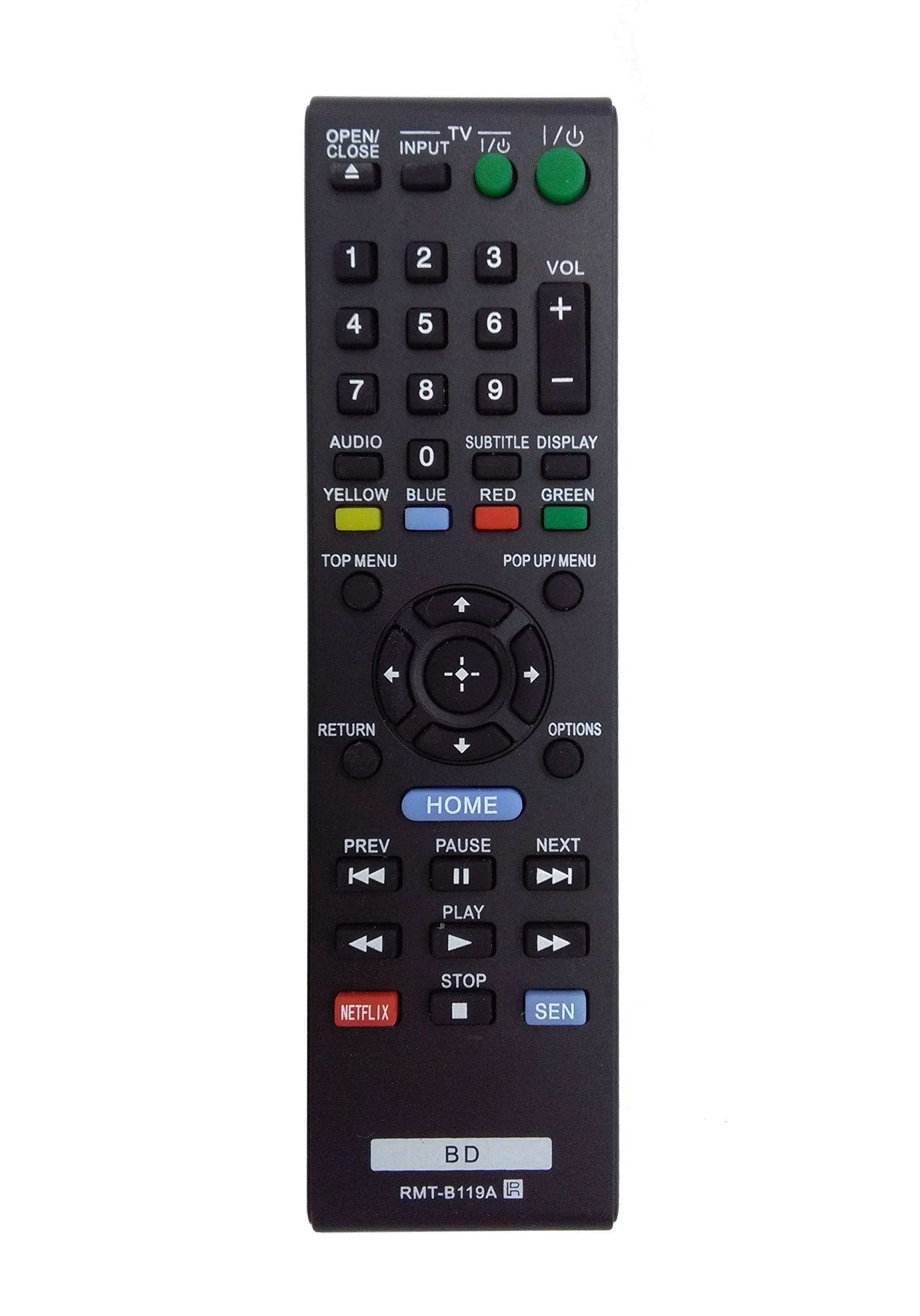
Image: The OEM RMT-B119A remote control, showing the full button layout on the front and a partial view of the open battery compartment on the back, revealing the battery terminals.
3. Інструкцыя па эксплуатацыі
3.1 Remote Control Layout and Button Functions
Familiarize yourself with the buttons on your RMT-B119A remote control. Below is a description of each button's primary function.
Image: The OEM RMT-B119A remote control, displaying all buttons and their labels.
- Харчаванне (увод/выхад): Уключае або выключае прайгравальнік Blu-ray.
- OPEN/CLOSE (▲): Адкрывае або закрывае латок для дыска.
- УХОД: Switches the input source on the connected TV (if programmed).
- тэлевізар: Пераключае пульт у рэжым кіравання тэлевізарам (калі запраграмаваны).
- Лічбавая клавіятура (0-9): Used for direct track selection, chapter selection, or entering numerical data.
- ГУЧНАСЦЬ (+/-): Adjusts the volume level (typically for the connected TV, if programmed).
- АЎДЫЯ: Changes the audio track or language during playback.
- SUBTITLE DISPLAY: Toggles subtitle display on or off, or cycles through available subtitle languages.
- YELLOW, BLUE, RED, GREEN: Color-coded function buttons, typically used for specific features within menus or interactive content. Their function varies depending on the disc or menu.
- ГАЛОЎНАЕ МЕНЮ: Accesses the main menu of the Blu-ray disc.
- POP UP/MENU: Displays the pop-up menu during disc playback.
- Directional Pad (↑↓←→): Перамяшчаецца па меню і параметрах.
- Center Button (Enter/Select): Пацвярджае выбар або ўваходзіць у пункт меню.
- ВЯРТАННЕ: Вяртаецца да папярэдняга экрана або меню.
- Параметры: Displays context-sensitive options or settings.
- ДОМА: Accesses the Blu-ray player's home menu.
- PREV (◀◀): Skips to the beginning of the current track/chapter or the previous track/chapter.
- PAUSE (▌▌): Прыпыняе прайграванне.
- NEXT (▶▶): Skips to the next track or chapter.
- ГУЛЬНЯ (▶): Пачынае або аднаўляе прайграванне.
- СТОП (■): Спыняе прайграванне.
- NETFLIX: Кнопка прамога доступу да струменевага сэрвісу Netflix.
- SEN: Direct access button for the Sony Entertainment Network (now PlayStation Video/Music).
- BD: Likely a dedicated button for Blu-ray Disc functions or to switch to Blu-ray mode.
4. Тэхнічнае абслугоўванне
Каб забяспечыць даўгавечнасць і належную працу пульта дыстанцыйнага кіравання, выконвайце наступныя рэкамендацыі па тэхнічным абслугоўванні:
- Уборка: Працярыце пульт дыстанцыйнага кіравання мяккай сухой тканінай. Для выдалення ўстойлівага бруду злёгкуampПрацярыце тканіну вадой або мяккім неабразіўным ачышчальнікам. Пазбягайце выкарыстання агрэсіўных хімікатаў або растваральнікаў.
- Замена батарэі: Замяняйце батарэйкі, калі пульт дыстанцыйнага кіравання становіцца павольным або перастае працаваць. Заўсёды замяняйце абедзве батарэйкі адначасова на новыя аднаго тыпу.
- захоўванне: Захоўвайце пульт у прахалодным, сухім месцы, удалечыні ад прамых сонечных прамянёў, экстрэмальных тэмператур і высокай вільготнасці. Калі пульт не будзе выкарыстоўвацца працяглы час, выміце батарэйкі, каб прадухіліць іх уцечку.
- Пазбягайце кропель: Беражыце пульт ад фізічных удараў, бо падзенні могуць пашкодзіць унутраныя кампаненты.
5. Выпраўленне непаладак
If you experience issues with your remote control, refer to the following table for common problems and solutions:
| праблема | Магчымая прычына | Рашэнне |
|---|---|---|
| Пульт не працуе. | Разраджаныя або няправільна ўстаўленыя батарэйкі. | Замяніце батарэйкі новымі, сачыце за правільнай палярнасцю (+/-). |
| Пульт працуе з перапынкамі. | Нізкі ўзровень зарада батарэі або перашкода. | Replace batteries. Ensure no objects are blocking the remote's signal path to the Blu-ray player. |
| Пульт не кіруе тэлевізарам. | Remote not programmed for TV or TV mode not selected. | This remote is primarily for Blu-ray players. TV control functionality may require specific programming not covered by this manual, or may not be supported by this OEM model. |
| Кнопкі не рэагуюць або заліпаюць. | Бруд або смецце пад гузікамі. | Clean the remote control surface. Avoid spilling liquids on the remote. |
6. Тэхнічныя характарыстыкі
- Марка: OEM
- Нумар мадэлі: RMT-B119A
- Тэхналогія падключэння: Інфрачырвоны (ВК)
- Сумяшчальныя прылады: Sony Blu-ray Players (specific models listed in Introduction)
- Крыніца харчавання: 2 х ААА батарэі (не ўключаны)
- Максімальны дыяпазон: Прыкладна 10 метраў (33 футы)
- асаблівасць: Эрганамічны дызайн
7. Гарантыя і падтрымка
This OEM RMT-B119A remote control comes with a Гарантыя 30 дзён з даты пакупкі, якая пакрывае вытворчыя дэфекты. Калі ласка, захавайце пацвярджэнне пакупкі для прэтэнзій па гарантыі.
For technical support or warranty inquiries, please contact the retailer or manufacturer directly. Refer to your purchase documentation for specific contact information.