
VTech CS6629
VTech VTCS6629 DECT 6.0 Expandable Speakerphone User Manual
Model: CS6629 | Brand: VTech
Прадукт скончаныview
The VTech VTCS6629 DECT 6.0 Expandable Speakerphone with Caller ID & Call Waiting is a single-handset system designed for clear communication. It features DECT 6.0 technology for superior sound quality and range, and is expandable with additional handsets.
Асноўныя функцыі ўключаюць у сябе:
- Backlit Keypad and Display for easy visibility in various lighting conditions.
- Eco Mode Power-conserving Technology to optimize battery life.
- Quiet Mode to silence ringers for undisturbed periods.
- 50 Name and Number Phonebook Directory for convenient contact storage.
- Digital Answering System with up to 15 minutes of recording capacity.
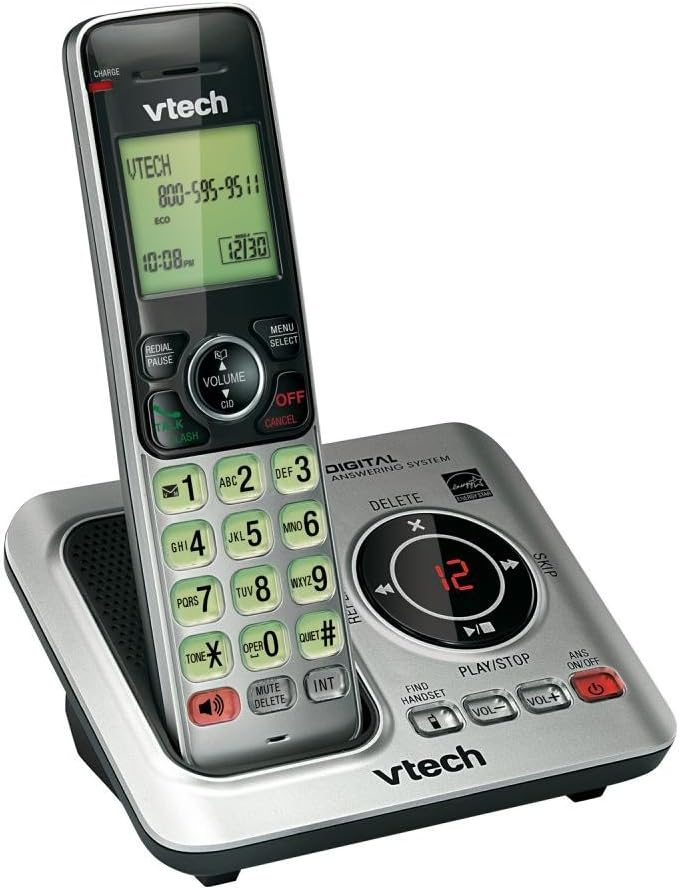
Image: The VTech CS6629 cordless phone handset resting in its charging base. The handset features a backlit display showing "VTECH 800-595-9511" and the time "10:08 PM". The base includes controls for the digital answering system, such as Play/Stop, Skip, Delete, and volume adjustments, along with a message counter displaying "12".
Кіраўніцтва па ўстаноўцы
- Ўстаноўка батарэі:
The handset requires 1 AAA battery (included). Open the battery compartment cover on the back of the handset, insert the battery according to the polarity markings, and close the cover. Place the handset in the charging cradle to charge for at least 10 hours before initial use.
- Падключыце базавы блок:
Connect the small end of the power adapter to the POWER jack on the back of the telephone base. Plug the large end of the power adapter into a wall outlet not controlled by a wall switch.
- Падключыце тэлефонную лінію:
Plug one end of the telephone line cord into the TEL LINE jack on the back of the telephone base. Plug the other end of the telephone line cord into a telephone wall jack.
- Першапачатковая ўстаноўка:
Once powered on and charged, the handset display will prompt you to set the date and time. Follow the on-screen instructions using the navigation and SELECT buttons.
Інструкцыя па эксплуатацыі
Здзяйсненне і прыём званкоў
- Каб зрабіць званок: Прэса ГОВОР / МІГАЦЬ or СПІКЕР, а затым набярыце нумар тэлефона.
- Каб адказаць на званок: Прэса ГОВОР / МІГАЦЬ or СПІКЕР калі званіць тэлефон.
- Каб завяршыць выклік: Прэса ВЫКЛ/АДМЕНА or place the handset back in the charging cradle.
Функцыя гучнай сувязі
Падчас размовы націсніце СПІКЕР button to switch between handset and speakerphone mode. Press it again to return to handset mode.
АОН і чаканне выкліку
When a call comes in, the caller's name and number will appear on the handset display if you subscribe to Caller ID service. If you have Call Waiting, a tone will indicate an incoming call while you are on the phone. Press ГОВОР / МІГАЦЬ to switch to the new call.
Тэлефонная кніга
The phonebook can store up to 50 names and numbers. To add an entry, press МЕНЮ/ВЫБАР, navigate to "Phonebook", and follow the prompts to add a new entry. To dial from the phonebook, press ДЫР (Directory) and scroll to the desired entry, then press ГОВОР / МІГАЦЬ.
Лічбавая сістэма адказаў
The integrated digital answering system can record up to 15 minutes of messages. The message counter on the base unit displays the number of new messages.
- Каб прайграваць паведамленні: Прэса ПРАЙГРАЦЬ/СТОП на базавым блоку.
- Каб выдаліць паведамленні: Падчас прайгравання паведамлення націсніце ВЫДАЛІЦЬ на базавым блоку.
- To Turn Answering System On/Off: Прэса ANS ВКЛ/ВЫКЛ на базавым блоку.
Ціхі рэжым
Activate Quiet Mode to silence all ringers on the telephone base and all handsets for a set period. This feature is useful for undisturbed periods. Refer to the handset menu for activation and duration settings.
Рэгулятар гучнасці
Падчас размовы націсніце VOLUME ▲ or VOLUME ▼ on the handset to adjust the earpiece volume. On the base unit, use ГУЧНАСЦЬ+ і ГУЧ- to adjust speaker volume during message playback or speakerphone calls.
Intercom Function (INT)
If you have multiple VTech CS6629 handsets, you can use the intercom feature to communicate between them. Press ІНТ on the handset and select the desired handset to call.
Find Handset
If you misplace your handset, press ЗНАЙСІЦЬ СЛУШАКУ on the telephone base. All registered handsets will ring, allowing you to locate them.
Тэхнічнае абслугоўванне
- Уборка: Clean the telephone and base unit with a soft, slightly damp тканінай. Не выкарыстоўвайце ачышчальныя спрэі або агрэсіўныя хімікаты.
- Сыход за батарэяй: To maintain optimal battery performance, fully charge the handset battery for 10 hours before first use. If the phone will not be used for an extended period, remove the battery to prevent leakage.
- Умовы навакольнага асяроддзя: Пазбягайце ўздзеяння на тэлефон экстрэмальных тэмператур, прамых сонечных прамянёў або вільгаці.
Ліквідацыю непаладак
| праблема | Рашэнне |
|---|---|
| Няма нумара набору. | Ensure the telephone line cord is securely plugged into both the telephone base and the wall jack. Check if other phones on the same line are working. |
| Handset does not charge or hold a charge. | Ensure the power adapter is securely connected. Clean the charging contacts on the handset and base with a dry cloth. The battery may need replacement after extended use (typically 1-2 years). |
| Дрэнная якасць гуку (статычны, прыглушаны). | Move the handset closer to the base unit. Avoid placing the base unit near other electronic devices (TVs, microwaves, computers) that may cause interference. Check the telephone line cord for damage. |
| Нельга рабіць або прымаць званкі. | Verify the telephone line is active. Ensure the handset is registered to the base. If the issue persists, try resetting the phone by unplugging the power adapter from the base for a few minutes, then plugging it back in. |
| Answering system not recording messages. | Ensure the answering system is turned ON. Check if the memory is full; delete old messages to free up space. |
Тэхнічныя характарыстыкі
| Асаблівасць | Дэталь |
|---|---|
| Памеры прадукту | 6.7 х 4.7 х 3.8 цалі |
| Вага прадмета | 0.317 унцыі |
| Нумар мадэлі | CS6629 |
| Батарэі | Патрабуецца 1 батарэйка ААА (у камплекце) |
| Вытворца | VTech |
| Краіна паходжання | ЗША |
| Колер | Белы/шэры |
| Тып тэлефона | Бесправадная |
| Крыніца харчавання | Харчаванне ад батарэі |
| Тып дазвону | Адзіная клавіятура |
| Тып аўтаадказчыка | Лічбавы |
| Сумяшчальныя прылады | VTech CS6609 accessory handset, up to 5 handsets |
| ёмістасць запісу | 15 хвілін |
Гарантыя і падтрымка
This VTech product is manufactured by VTech. For warranty information and technical support, please refer to the documentation included with your purchase or visit the official VTech support webсайт. Захоўвайце чэк аб куплі як пацверджанне пакупкі.
Юрыдычная адмова ад адказнасці:
Гэты прадукт змяшчае хімічныя рэчывы, якія, як вядома ў штаце Каліфорнія, выклікаюць рак і прыроджаныя дэфекты або іншыя рэпрадуктыўныя парушэнні.