
Прадукт скончаныview
The VTech IS7101 is an accessory cordless handset designed to expand your existing VTech IS7121 series phone system. This handset cannot operate independently and requires a compatible base unit from the IS7121 series to function. It offers features such as Voice Announce Caller ID, a 50-picture history, and Push-to-Talk functionality.
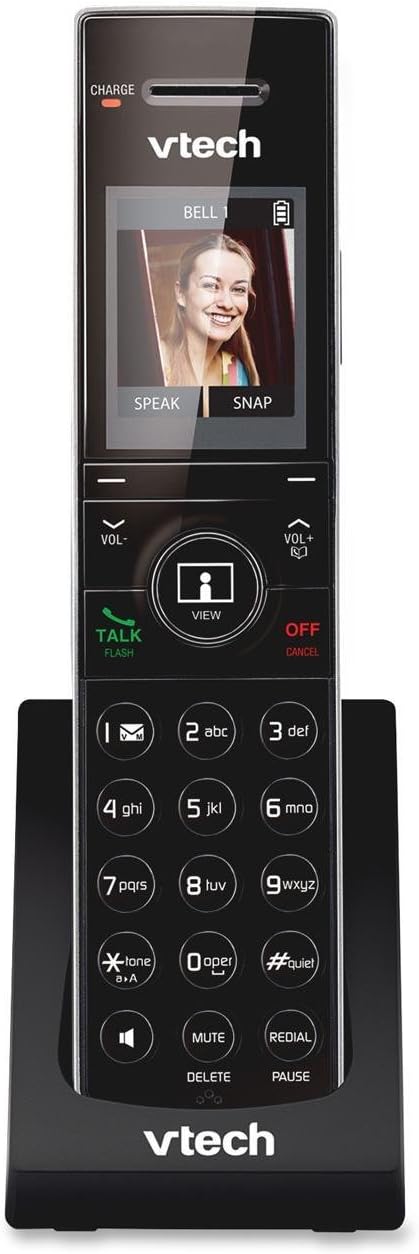
Image: VTech IS7101 Accessory Cordless Handset in its charging cradle. The handset features a large screen displaying a caller's image, a numeric keypad, and various function buttons.
Настройка і ўстаноўка
1. Устаноўка батарэі
The IS7101 handset requires 1 AAA battery (included). Ensure correct polarity when inserting the battery into the battery compartment located on the back of the handset.
2. Пачатковая зарадка
Place the handset in the charging cradle. The "CHARGE" indicator light on the handset (visible at the top left of the screen area) will illuminate, indicating that the handset is charging. For optimal battery performance, charge the handset for at least 16 hours before initial use.
3. Рэгістрацыя трубкі
This accessory handset must be registered to a VTech IS7121 series base unit to function. Refer to your IS7121 series base unit's user manual for detailed instructions on how to register new handsets. Typically, this involves placing the handset in the base unit's charger and initiating a registration process from the base unit.
Інструкцыя па эксплуатацыі
Здзяйсненне і прыём званкоў
- Каб зрабіць званок: Dial the desired phone number, then press the ГОВОР / МІГАЦЬ кнопка.
- Каб прыняць выклік: Калі тэлефон звоніць, націсніце кнопку ГОВОР / МІГАЦЬ кнопка.
- Каб завяршыць выклік: Націсніце ВЫКЛ/АДМЕНА button or place the handset back in the charging cradle.
Клавіятура і функцыянальныя кнопкі
The handset features a standard numeric keypad and several function buttons:
- ГОВОР / МІГАЦЬ: Initiates or answers a call; used for call waiting.
- ВЫКЛ/АДМЕНА: Ends a call; cancels an operation; deletes digits while dialing.
- ГУЧНОСТЬ- / ГУЧНОСТЬ+: Adjusts listening volume during a call; navigates menus.
- VIEW: Accesses the picture history or caller ID log.
- ВЫКЛЮЧЫЦЬ/ВЫДАЛІЦЬ: Mutes the microphone during a call; deletes entries from logs or memory.
- Паўторны набор/паўза: Redials the last number called; inserts a dialing pause.
- #ЦІША: Activates or deactivates Quiet Mode.
- *TONE/aA: Switches between tone and pulse dialing; changes text input mode.
Voice Announce Caller ID
When a call comes in, the handset will announce the name of the caller (if available in your directory or caller ID service). This feature allows you to screen calls without looking at the display.
50 Picture History
The handset stores a history of up to 50 pictures associated with incoming calls. Use the VIEW button to browse through the picture history. You can speak to or snap a picture of the caller directly from this screen, if supported by your base unit and service.
Push-to-Talk
The Push-to-Talk feature allows for instant, two-way communication between handsets registered to the same base unit, similar to a walkie-talkie. Consult your IS7121 series base unit manual for specific instructions on initiating and using Push-to-Talk.
Тэхнічнае абслугоўванне
- Уборка: Clean the handset and charging cradle with a soft, damp тканінай. Не выкарыстоўвайце ачышчальныя спрэі або агрэсіўныя хімікаты.
- Сыход за батарэяй: To prolong battery life, avoid exposing the handset to extreme temperatures. If the handset will not be used for an extended period, remove the battery.
- захоўванне: Store the handset in a cool, dry place away from direct sunlight and moisture.
Ліквідацыю непаладак
| праблема | Рашэнне |
|---|---|
| Тэлефон не ўключаецца або не мае харчавання. | Ensure the battery is correctly installed and fully charged. Place the handset in the charging cradle and check if the "CHARGE" indicator light is on. |
| Нельга рабіць або прымаць званкі. | Verify that the handset is registered to the IS7121 series base unit. Ensure the base unit has power and is connected to the telephone line. |
| Дрэнная якасць гуку або шум. | Move closer to the base unit. Check for interference from other electronic devices. Ensure the telephone line cord is securely connected to the base unit. |
| Caller ID is not displayed or announced. | Пераканайцеся, што вы падпісаліся на паслугу ідэнтыфікацыі абанента ў вашага тэлефоннага аператара. |
Тэхнічныя характарыстыкі
- мадэль: IS7101
- Памеры: 3.4 х 4.7 х 7.4 цалі (Д х Ш х У)
- Вага: 0.96 унцый (27.22 г)
- колер: Чорны
- Тып тэлефона: Бесправадная
- Крыніца харчавання: Харчаванне ад батарэі
- Тып батарэі: 1 батарэя AAA (у камплекце)
- матэрыял: Пластыкавыя
- Сумяшчальнасць: Requires VTech IS7121 series phone system to operate.
Гарантыя і падтрымка
For detailed warranty information, technical support, or to download the complete user manual, please visit the official VTech website or refer to the user manual provided with your VTech IS7121 series phone system.
A digital copy of the user manual can also be accessed via this link: VTech IS7101 User Manual (PDF)