
1. Уводзіны
This manual provides detailed instructions for the proper use and maintenance of your TFA 38.2028.02 Digital Timer and Stopwatch. This device is designed for precise timekeeping in various applications, featuring a reversible display, touch-sensitive buttons, and magnetic mounting options. Please read this manual thoroughly before operating the device.
2. Асаблівасці прадукту
- Reversible Display: Дазваляе лёгка viewз розных бакоў.
- Сэнсарныя кнопкі: For intuitive operation.
- Падсвятленне: Забяспечвае выразную бачнасць ва ўмовах нізкай асветленасці.
- Магнітнае мацаванне: Securely attaches to metallic surfaces.
- Wall or Tabletop Mounting: Універсальныя варыянты размяшчэння.
- Дыяпазон таймера: Counts up to 99 minutes and 59 seconds.
- Кампактны дызайн: Dimensions of 76 x 25 x 76 mm.
3. Змесціва ўпакоўкі
- TFA 38.2028.02 Digital Timer and Stopwatch Unit
- Кіраўніцтва карыстальніка (гэты дакумент)
Note: 2 x 1.5V AAA batteries are required and not included in the package.
4. Настройка
4.1 Устаноўка батарэі
- Знайдзіце вечка батарэйнага адсека на задняй панэлі прылады.
- Акуратна зрушце або падніміце вечка, каб адкрыць адсек.
- Устаўце дзве (2) батарэйкі тыпу AAA 1.5 В, сочачы за правільнай палярнасцю (+/-), як паказана ўнутры адсека.
- Зачыніце вечка батарэйнага адсека, пераканаўшыся, што яна надзейна зашчапілася.
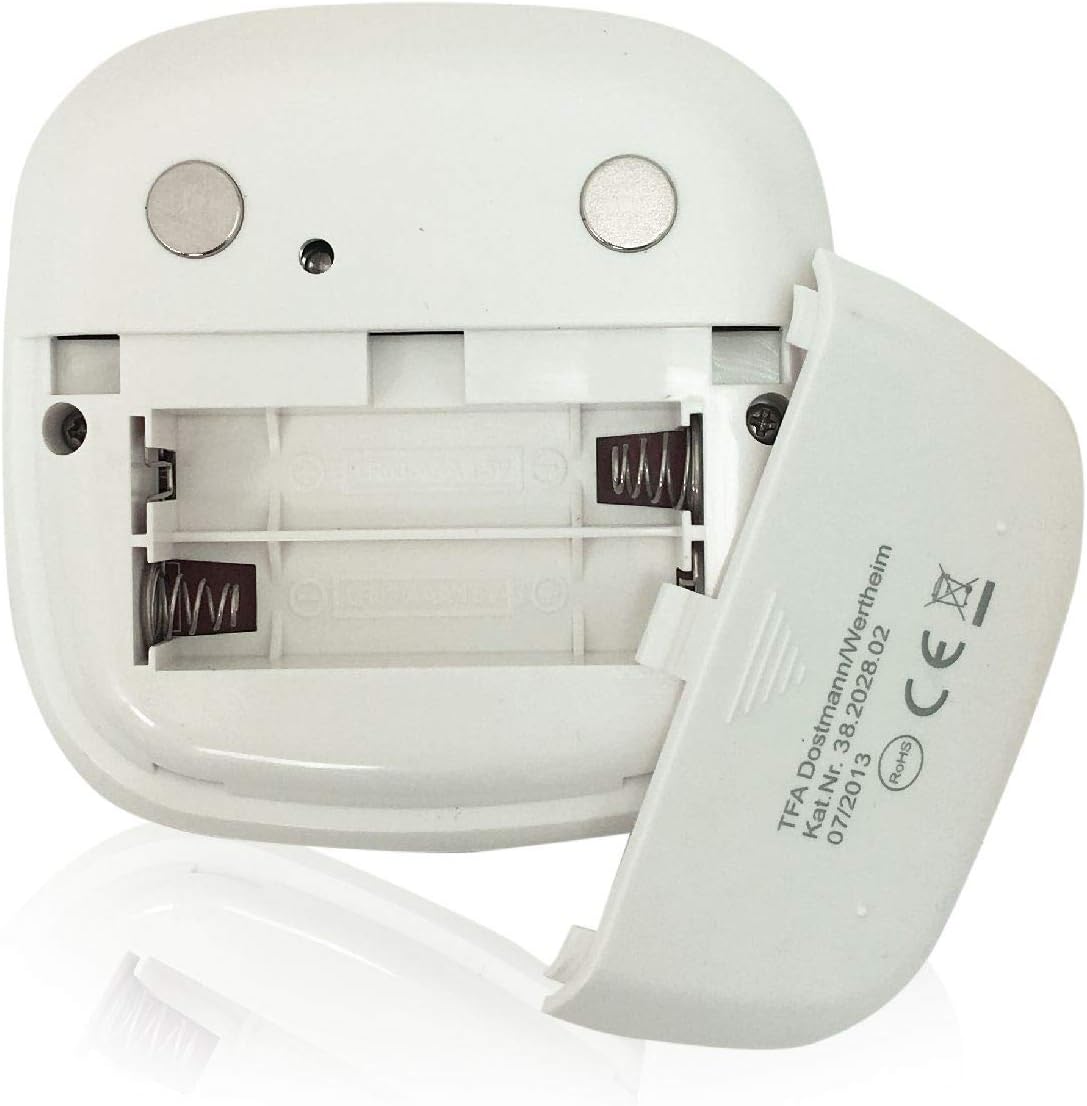
Выява: Задняя частка view of the timer with the battery compartment open, illustrating where to insert the two AAA batteries.
4.2 Першапачатковае ўключэнне
Once batteries are installed, the display will illuminate, and the device will be ready for use. The default display shows "00:00".
5. Інструкцыя па эксплуатацыі

Выява: спераду view of the TFA 38.2028.02 timer, highlighting the digital display and the three touch-sensitive buttons: 'M' for minutes, 'S' for seconds, and 'S/S' for Start/Stop.
5.1 Функцыі кнопак
- M (Minutes): Press to increase minutes. Hold to rapidly increase minutes.
- S (Seconds): Press to increase seconds. Hold to rapidly increase seconds.
- S/S (Start/Stop): Press to start or stop the timer/stopwatch.
5.2 Setting the Timer (Countdown)
- Ensure the display shows "00:00". If not, press M і S simultaneously to reset.
- Націсніце M button to set the desired minutes (up to 99 minutes).
- Націсніце S button to set the desired seconds (up to 59 seconds).
- Пасля таго, як патрэбны час будзе ўсталяваны, націсніце кнопку С/С кнопку, каб пачаць зваротны адлік.
- To pause the countdown, press С/С зноў. Прэса С/С аднавіць.
- When the timer reaches "00:00", an alarm will sound. Press any button to stop the alarm.
5.3 Using the Stopwatch (Count-up)
- Ensure the display shows "00:00". If not, press M і S simultaneously to reset.
- Націсніце С/С button to start the count-up. The display will begin counting from "00:00".
- Каб прыпыніць секундамер, націсніце С/С зноў. Прэса С/С аднавіць.
- To reset the stopwatch to "00:00", pause the stopwatch, then press M і S адначасова.
5.4 Функцыя падсветкі
The display features a backlight for improved visibility. The backlight activates automatically when buttons are pressed and typically remains on for approximately 30-40 seconds before dimming to conserve battery life.
6. Варыянты мантажу
The TFA 38.2028.02 timer offers flexible mounting solutions:
- Магнітнае мацаванне: The back of the timer is equipped with magnets, allowing it to be securely attached to refrigerators, oven hoods, or any other metallic surface.
- Размяшчэнне на стальніцы: The timer's design allows it to stand upright on a flat surface, such as a kitchen counter or desk.
- Насценны мантаж: The unit can also be mounted on a wall using a small hook or screw (not included) through the designated hole on the back.

Выява: Задняя частка view of the timer, showing the integrated magnets for secure attachment to metallic surfaces and the model number.
7. Тэхнічнае абслугоўванне
7.1 Ачыстка
To clean the timer, wipe it with a soft, damp cloth. Do not use abrasive cleaners or immerse the device in water. Avoid getting moisture into the battery compartment or display area.
7.2 Замена батарэі
When the display becomes dim or the device stops responding, it is time to replace the batteries. Follow the battery installation steps in Section 4.1. Always use fresh 1.5V AAA batteries and dispose of old batteries responsibly.
8. Выпраўленне непаладак
| праблема | Магчымая прычына | Рашэнне |
|---|---|---|
| Прылада не ўключаецца. | Батарэі разраджаны або ўсталяваны няправільна. | Праверце палярнасць батарэек або заменіце іх новымі батарэйкамі тыпу AAA. |
| Дысплей цьмяны або мігціць. | Нізкі зарад батарэі. | Заменіце батарэі. |
| Кнопкі не рэагуюць. | Нізкі зарад батарэі або часовы збой праграмнага забеспячэння. | Replace batteries. If problem persists, remove batteries for 1 minute and reinsert. |
| Timer alarm is too quiet. | Гучнасць будзільніка фіксаваная і не можа быць адрэгулявана. | Ensure the timer is placed in a location where the alarm can be heard. |
9. Тэхнічныя характарыстыкі
| Асаблівасць | Дэталь |
|---|---|
| Нумар мадэлі | 38.2028.02 |
| Марка | Пашырэнне TF |
| Памеры (Д х Ш х У) | 76 x 25 x 76 mm (approximately 2.5P x 7.6l x 7.6H cm) |
| Вага | 92 грамаў |
| Матэрыял | Plastic with integrated magnets |
| Электразабеспячэнне | 2 батарэйкі 1.5 В ААА (не ўключаны) |
| Дыяпазон таймера | Да 99 хвілін 59 секунд |
| Дысплей | Digital with backlight |
| Варыянты мантажу | Magnetic, Tabletop, Wall-mountable |

Image: The timer held in a hand, visually demonstrating its compact size and indicating its dimensions (7.6 cm x 7.6 cm x 2.5 cm).
10. Гарантыя і падтрымка
TFA products are manufactured with quality and precision. For specific warranty information, please refer to the documentation provided with your purchase or visit the official TFA website. For technical support or inquiries, please contact TFA customer service through their official channels.
Захоўвайце гэта кіраўніцтва для выкарыстання ў будучыні.