
1. Уводзіны
This manual provides instructions for the APEX LD200RM remote control, designed for use with various APEX LCD and LED television models. This remote control offers full functionality for your compatible APEX television, ensuring convenient operation of all features.
Compatible APEX TV Models:
- LD3249
- LD3288, LD3288T, LD3288M
- LD4077, LE4077M
- LD4088
- LD4688
- LE3212, LE3212D
- LE4012
- LE4612
- LE3242
- LE3942
- LE40B12
- LE4243
- LE4643
- LE5043
2. Настройка
2.1 Устаноўка батарэі
The APEX LD200RM remote control requires two (2) AA batteries for operation. Follow these steps to install the batteries:
- Знайдзіце крышку батарэйнага адсека на задняй частцы пульта дыстанцыйнага кіравання.
- Націсніце на язычок і зніміце вечка.
- Устаўце дзве батарэйкі тыпу АА, пераканаўшыся, што станоўчая (+) і адмоўная (-) клемы правільна сумяшчаюцца з пазнакамі ўнутры адсека.
- Засуньце вечка батарэйнага адсека на месца, пакуль яна надзейна не зашчоўкне.
Заўвага: Заўсёды мяняйце абедзве батарэйкі адначасова. Не выкарыстоўвайце разам старыя і новыя батарэйкі, а таксама батарэйкі розных тыпаў.
2.2 Першапачатковае выкарыстанне
The APEX LD200RM remote control is an original replacement and typically does not require any programming or pairing. Once batteries are installed, point the remote control towards your compatible APEX television and begin operation.
3. Інструкцыя па эксплуатацыі
This section details the functions of the buttons on your APEX LD200RM remote control.
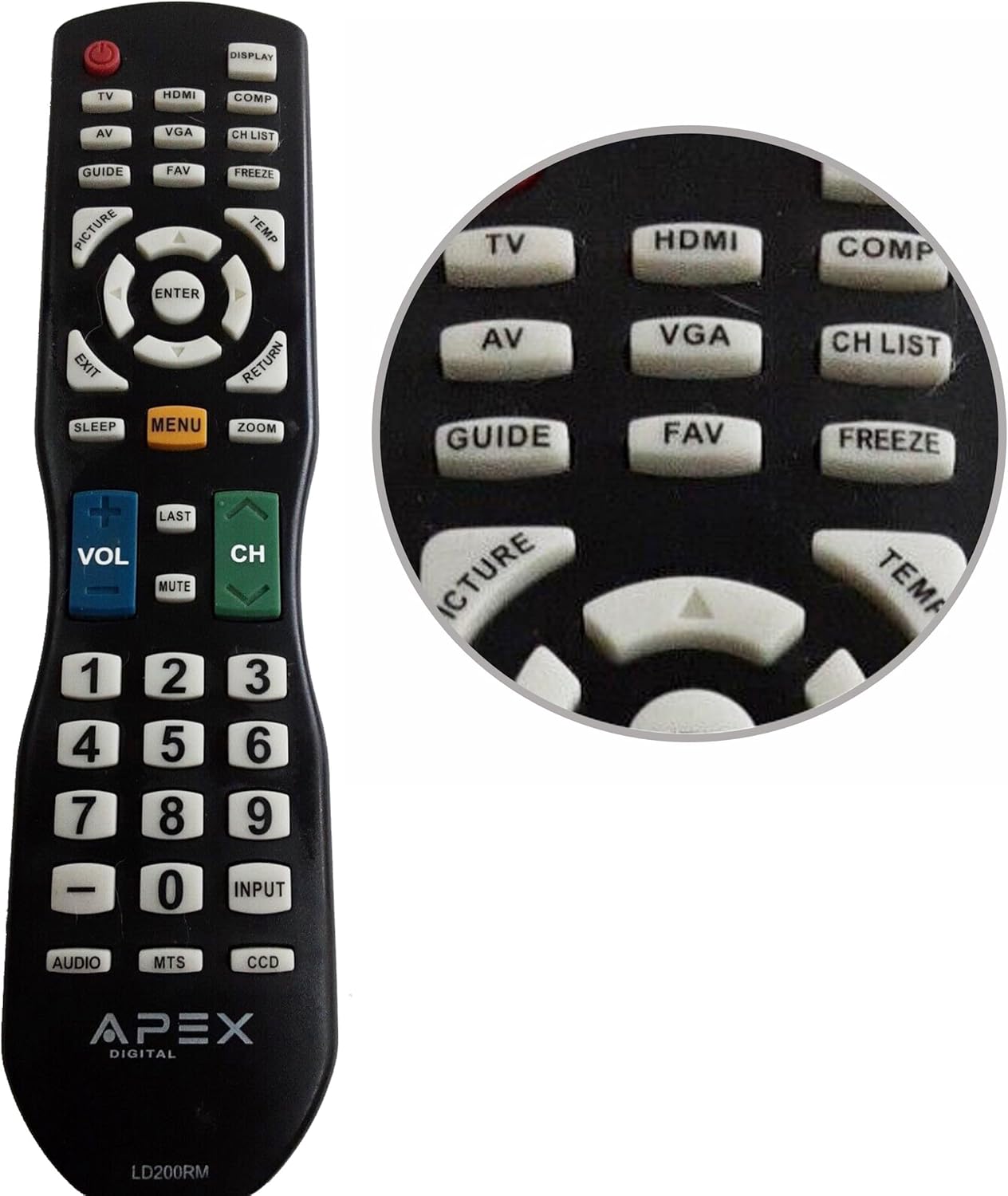
Figure 1: APEX LD200RM Remote Control Layout. This image displays the entire remote control, highlighting the arrangement of its various function buttons, including power, input selection, navigation, volume, channel, and numeric keypad.

Figure 2: Close-up of APEX LD200RM Remote Control Top Buttons. This image provides a detailed view of the upper section of the remote, focusing on buttons such as TV, HDMI, AV, VGA, COMP, CH LIST, DISPLAY, GUIDE, FAV, FREEZE, PICTURE, TEMP, MENU, ENTER, EXIT, RETURN, SLEEP, and ZOOM.
3.1 Выбар харчавання і ўваходу
- ХАРЧАВАННЕ (чырвоная кнопка): Уключае або выключае тэлевізар.
- тэлевізар: Selects the TV tuner input.
- HDMI: Selects the HDMI input.
- АВ: Selects the Audio/Video input.
- VGA: Selects the VGA input.
- КОМП: Selects the Component video input.
- DISPLAY: Паказвае інфармацыю на экране.
3.2 Channel and Volume Control
- ГУЧНАСЦЬ (+/-): Павялічвае або памяншае ўзровень гучнасці.
- CH (Up/Down): Змяняе тэлевізійны канал уверх або ўніз.
- АПОШНІ: Вяртаецца да ранейшага viewрэдагаваны канал.
- МУК: Адключае або ўключае гук тэлевізара.
- CH СПІС: Адлюстроўвае спіс каналаў.
3.3 Меню і навігацыя
- МЕНЮ: Адкрывае галоўнае меню тэлевізара.
- УВОД: Пацвярджае выбар у меню.
- Кнопкі са стрэлкамі (уверх/уніз/налева/направа): Навігацыя па пунктах меню і налада налад.
- ВЫХОД: Выхад з бягучага меню або экраннага меню.
- ВЯРТАННЕ: Вяртанне да папярэдняга меню або экрана.
3.4 Numeric Keypad and Special Functions
- 0-9 (Numeric Buttons): Непасрэдна ўводзіць нумары каналаў.
- УХОД: Цыклічнае пераключэнне даступных крыніц уваходнага сігналу.
- КІРАЎНІЦТВА: Адлюстроўвае электронны тэлегід (калі даступны).
- ЛЮБІМЫ: Доступ да любімых каналаў.
- ЗАМРАЗАЦЬ: Freezes the current image on the screen.
- КАРТЫКА: Рэгулюе параметры выявы.
- TEMP: (Function may vary by model, often related to picture temperature or a specific mode).
- СОН: Усталёўвае таймер сну.
- ZOOM: Adjusts the screen zoom level.
- АЎДЫЯ: Selects audio modes or tracks.
- МТС: Multi-channel Television Sound (stereo/SAP).
- ПЗС: Closed Captioning Display.
4. Тэхнічнае абслугоўванне
4.1 Замена батарэі
When the remote control's performance degrades or it stops responding, it is likely time to replace the batteries. Refer to Section 2.1 for detailed battery installation instructions. Always use fresh AA batteries.
4.2 Ачыстка
Для чысткі пульта дыстанцыйнага кіравання выкарыстоўвайце мяккую сухую тканіну. Для ўстойлівага бруду злёгкуampПрацярыце тканіну вадой або мяккім неабразіўным ачышчальнікам. Пазбягайце выкарыстання агрэсіўных хімічных рэчываў або абразіўных матэрыялаў, бо яны могуць пашкодзіць паверхню пульта дыстанцыйнага кіравання або ўнутраныя кампаненты.
4.3 Захоўванне
Store the remote control in a cool, dry place away from direct sunlight and extreme temperatures. If the remote will not be used for an extended period, it is advisable to remove the batteries to prevent leakage and potential damage.
5. Выпраўленне непаладак
- Пульт дыстанцыйнага кіравання не рэагуе:
- Ensure the batteries are correctly installed with the correct polarity (+/-).
- Заменіце старыя батарэйкі новымі батарэйкамі тыпу АА.
- Check for any obstructions between the remote control and the television's infrared sensor.
- Ensure you are within the effective range of the television's IR receiver.
- Некаторыя кнопкі не працуюць:
- Гэта можа сведчыць аб нізкім узроўні зараду батарэі. Заменіце батарэі.
- Ensure the remote is clean and there is no debris lodged under the buttons.
- Verify that the button function is applicable to your specific TV model. Some functions may not be supported by all compatible TVs.
- Television is not turning on/off:
- Пераканайцеся, што тэлевізар падключаны да спраўнай разеткі.
- Try using the power button directly on the television to rule out a TV issue.
6. Тэхнічныя характарыстыкі
| Асаблівасць | Дэталь |
|---|---|
| Нумар мадэлі | LD200RM |
| Марка | Вяршыня |
| Сумяшчальныя прылады | APEX LCD & LED Televisions |
| Крыніца харчавання | 2 батарэйкі АА (не ўключаны) |
| Памеры прадукту | 10 х 6 х 2 цалі (прыблізна) |
| Вага прадмета | 3.2 унцыі (прыблізна) |
| Колер | Чорны |
| Асаблівасць | Эрганамічны дызайн |
7. Інфармацыя аб гарантыі
This APEX LD200RM remote control typically comes with a 30-day warranty from the date of purchase. This warranty covers manufacturing defects. For specific details regarding warranty claims, returns, or replacements, please refer to your purchase documentation or contact the seller directly.
8. Падтрымка
If you encounter issues not covered in this manual or require further assistance, please contact the retailer or the manufacturer's customer support. When contacting support, please have your product model number (LD200RM) and your television model number readily available.