
1. Уводзіны
The Amped Wireless REC10 High Power 600mW Compact Wi-Fi Range Extender is designed to expand the range of your existing 802.11b/g/n wireless network. It repeats the signal from your wireless router, redistributing it to new, extended locations, providing up to 6,500 sq ft of additional Wi-Fi coverage. This manual provides essential information for setting up, operating, and maintaining your device.
2. Змесціва ўпакоўкі
- 1 x High Power 600mW Compact Wi-Fi Range Extender
- 1 x Detachable High Gain 2dBi Antenna
- 1 x Setup Guide
- 1 x CD: Users Guide, Installation Video
3. Прадукт скончыўсяview
The REC10 features advanced dual 600mW amplifiers and a high gain 2dBi detachable antenna to significantly boost your Wi-Fi signal. Its compact, plug-in design allows for discreet placement in any room. The device also includes a wired Ethernet port for connecting additional network devices.
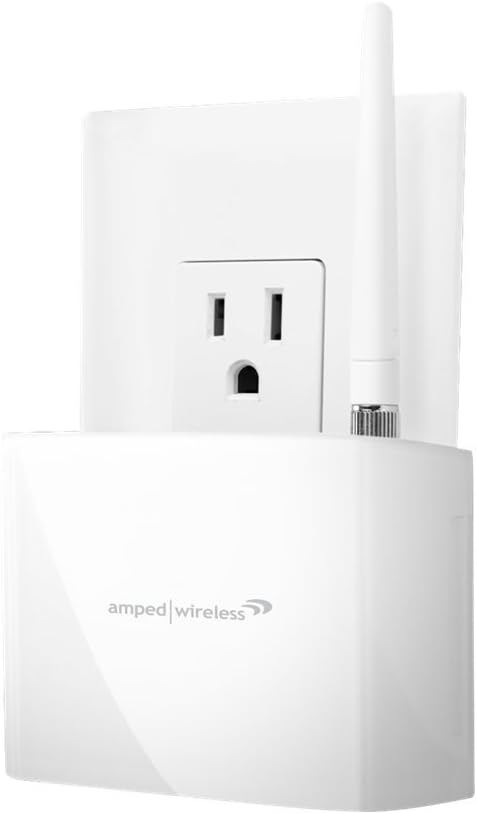
Малюнак 1: Спераду view з Amped Wireless REC10 Wi-Fi Range Extender, showing it plugged into a wall outlet with its antenna attached.

Малюнак 2: Верх view з Amped Wireless REC10 Wi-Fi Range Extender, highlighting the wired Ethernet port, reset button, and WPS button.
4. Настройка
Setting up your REC10 Range Extender is a straightforward process that can be completed wirelessly using a tablet, smartphone, or laptop. Follow these general steps:
- Plug the REC10 into a power outlet.
- Connect your device (tablet, smartphone, or laptop) to the Range Extender's Wi-Fi network.
- Адкрыйце a web browser and navigate to the setup URL provided in the Setup Guide.
- Access the Setup Wizard, scan for your existing wireless network, and select it.
- Выконвайце падказкі на экране, каб завяршыць наладку.
For detailed, step-by-step instructions, please refer to the included Setup Guide or the User Guide on the provided CD.
5. Інструкцыя па эксплуатацыі
Once the REC10 is successfully set up, it will automatically extend your Wi-Fi network, providing enhanced coverage. You can now enjoy seamless internet access for your devices throughout your home or office.
Падключэнне правадных прылад
The Range Extender includes a wired Ethernet port (RJ-45 10/100 LAN) located on the device. This port allows you to connect and bridge an additional network device, such as a PC, server, printer, Internet-enabled television, Blu-ray player, or game console, directly to your extended Wi-Fi network.
6. Тэхнічнае абслугоўванне
Каб забяспечыць аптымальную прадукцыйнасць і даўгавечнасць вашага Amped Wireless REC10, consider the following maintenance tips:
- Размяшчэнне: Keep the device in a well-ventilated area, away from direct sunlight, heat sources, and moisture.
- Уборка: Для чысткі вонкавых паверхняў прылады выкарыстоўвайце мяккую сухую тканіну. Не выкарыстоўвайце вадкія ачышчальнікі або аэразолі.
- Абнаўленні прашыўкі: Перыядычна правярайце Ampрэд бесправ website for available firmware updates. Keeping your device's firmware up-to-date can improve performance, add new features, and enhance security.
- Цыкл харчавання: If you experience minor performance issues, try power cycling the device by unplugging it from the outlet for 10 seconds and then plugging it back in.
7. Выпраўленне непаладак
Калі ў вас узніклі праблемы з вашым Amped Wireless REC10, please refer to the following common troubleshooting steps:
- Няма доступу ў Інтэрнэт: Ensure the Range Extender is properly connected to your main Wi-Fi router. Check the status lights on the extender to confirm it's receiving a signal. Try restarting both the extender and your main router.
- Слабая магутнасць сігналу: Relocate the extender to a position that is roughly halfway between your main router and the area where you need improved coverage. Avoid placing it near large metal objects or other electronic devices that may cause interference.
- Немагчыма атрымаць доступ да старонкі налад: Verify that your device is connected to the extender's Wi-Fi network (usually named 'Amped_Wireless_2.4GHz' or similar) and that you are entering the correct setup URL.
- Забыты пароль: If you forget your extender's administrative password, you may need to perform a factory reset. Refer to the User Guide for instructions on how to reset the device.
For more comprehensive troubleshooting and support, consult the detailed User Guide on the included CD or visit the Amped Wireless support webсайт.
8. Тэхнічныя характарыстыкі
| Асаблівасць | Апісанне |
|---|---|
| мадэль | REC10 |
| Тэхналогіі | Бесправадная сувязь-N |
| Гурты | 2.4 ГГц, 802.11 b/g/n |
| Хуткасць бесправадной сувязі | 300Mbps (Rx), 300Mbps (Tx) |
| Антэны | 1 x Detachable High Gain 2dBi Antenna, 1 x Internal High Gain Antenna |
| Парты Ethernet | 1 x RJ-45 10/100 (LAN) |
| Ampасаднікі | Dual 2.4GHz 600mW Amplifiers, Dual Low Noise Ampасаднікі |
| Патрабаванні да ўстаноўкі | Wireless 802.11b/g/n 2.4GHz network, computer, tablet or smartphone with Wi-Fi access and a web браўзер |
| Сумяшчальнасць з АС | Works with all OS, including Windows and Mac |
| Вага прадмета | 1 фунта |
| Памеры прадукту | 9.25 х 7.5 х 2.6 цалі |
9. Гарантыя і падтрымка
The Amped Wireless REC10 comes with the Amped Wireless Range Increase Guarantee, ensuring guaranteed performance and results. Amped Wireless is committed to providing excellent customer service and technical support.
- Elite Support: Enjoy free, US-based, in-house technical support 7 days a week.
- Дакументацыя: Please refer to the User Manual and the User Guide (on the included CD) for comprehensive information and assistance.
For further support, please visit the official Ampрэд бесправ webсайт або звярніцеся непасрэдна ў службу падтрымкі кліентаў.