1. Уводзіны
Thank you for choosing the Fonestar AS-24U Hi-Fi USB/SD/MP3 Amplifier. This manual provides essential information for the safe and efficient operation of your device. Please read it thoroughly before use and retain it for future reference.
2. Інструкцыі па тэхніцы бяспекі
- крыніца харчавання: Забяспечце amplifier is connected to a power source matching the specified voltagе (230В).
- Вентыляцыя: Не блакуйце вентыляцыйныя адтуліны. Пакіньце дастатковую прастору вакол прылады для належнай цыркуляцыі паветра і прадухілення перагрэву.
- Вільготнасць: Трымайце amplifier away from water, moisture, and high humidity environments. Do not expose it to dripping or splashing.
- Крыніцы цяпла: Пазбягайце размяшчэння прылады побач з крыніцамі цяпла, такімі як радыятары, абагравальнікі, пліты або іншыя прыборы, якія выпрацоўваюць цяпло.
- Уборка: Disconnect the power cord before cleaning. Use a dry, soft cloth. Do not use liquid cleaners or aerosol cleaners.
- Абслугоўванне: Не спрабуйце самастойна абслугоўваць гэты прадукт. Звярніцеся да ўсіх абслугоўванняў кваліфікаванага абслуговага персаналу.
- Пранікненне аб'екта/вадкасці: Ніколі не праштурхоўвайце любыя прадметы ў гэты прадукт праз адтуліны, бо яны могуць дакрануцца да небяспечнага аб'ёмуtagкропкі або замыканне частак, што можа прывесці да пажару або паражэння электрычным токам.
3. Прадукт скончыўсяview
3.1 Пярэдняя панэль
The front panel features controls for power, input selection, volume adjustment, and USB/SD media playback. It also includes a display for media information.
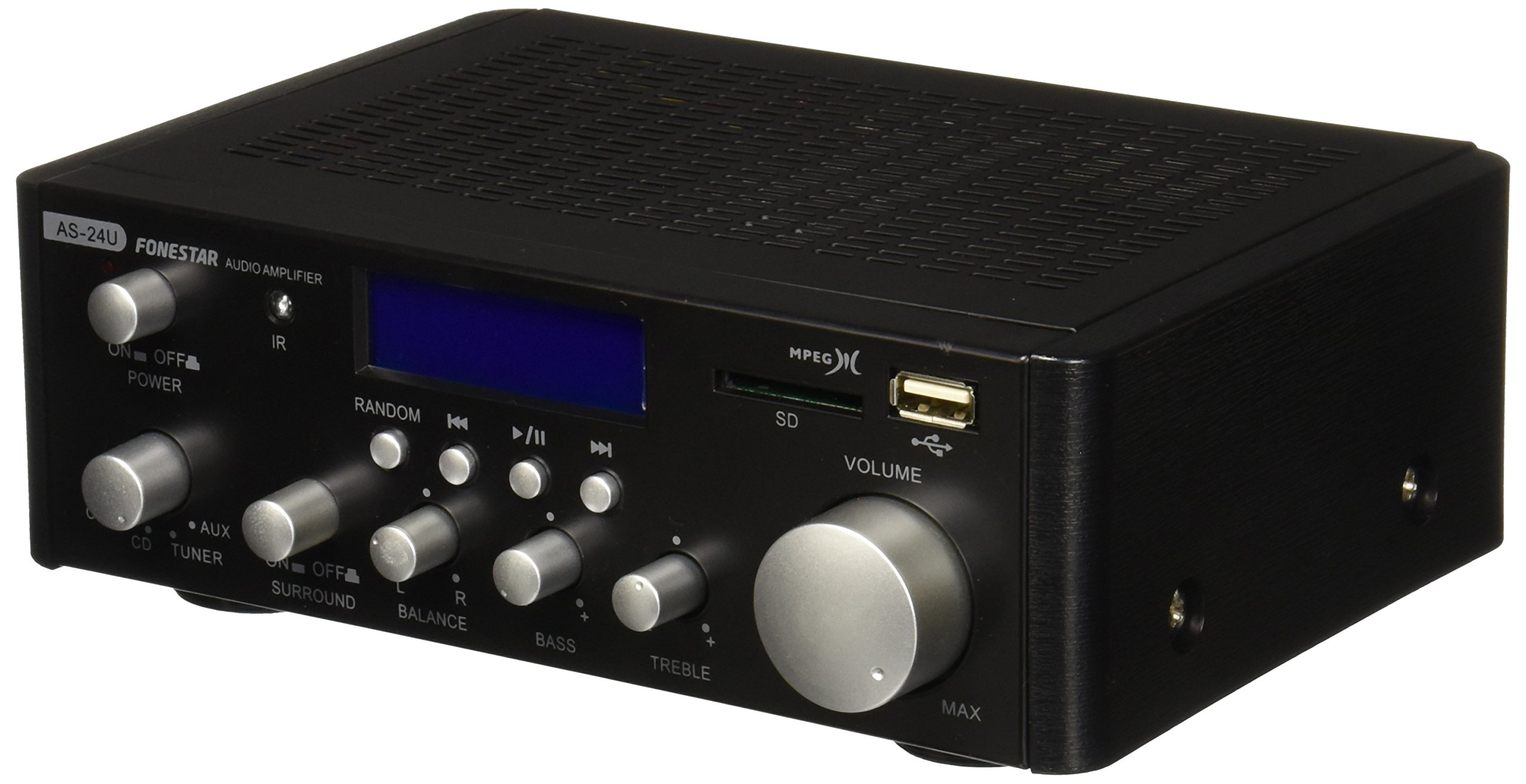
Выява 1: Спераду view of the Fonestar AS-24U amplifier, showing the main controls and display.
3.2 Задняя панэль
The rear panel provides all necessary connections for audio input sources, speaker outputs, and power.

Малюнак 2: ззаду view of the Fonestar AS-24U amplifier, detailing input/output ports and power connection.
- INPUT (AUX, TUNER, CD): RCA stereo inputs for connecting external audio sources.
- SPEAKER OUT (STEREO): Spring clip terminals for connecting passive speakers (4-8 Ω).
- SPEAKER OUT (SURROUND): Additional spring clip terminals for surround speakers (8 Ω).
- УХОД: AC power input for the main power cable.
- VOLTAGE ВЫБАР: Switch for selecting between 115V and 230V power input. Ensure this is set correctly for your region.
3.3 Пульт дыстанцыйнага кіравання
У камплекце ёсць пульт дыстанцыйнага кіравання, які дазваляе зручна кіраваць amplifier's media playback functions.
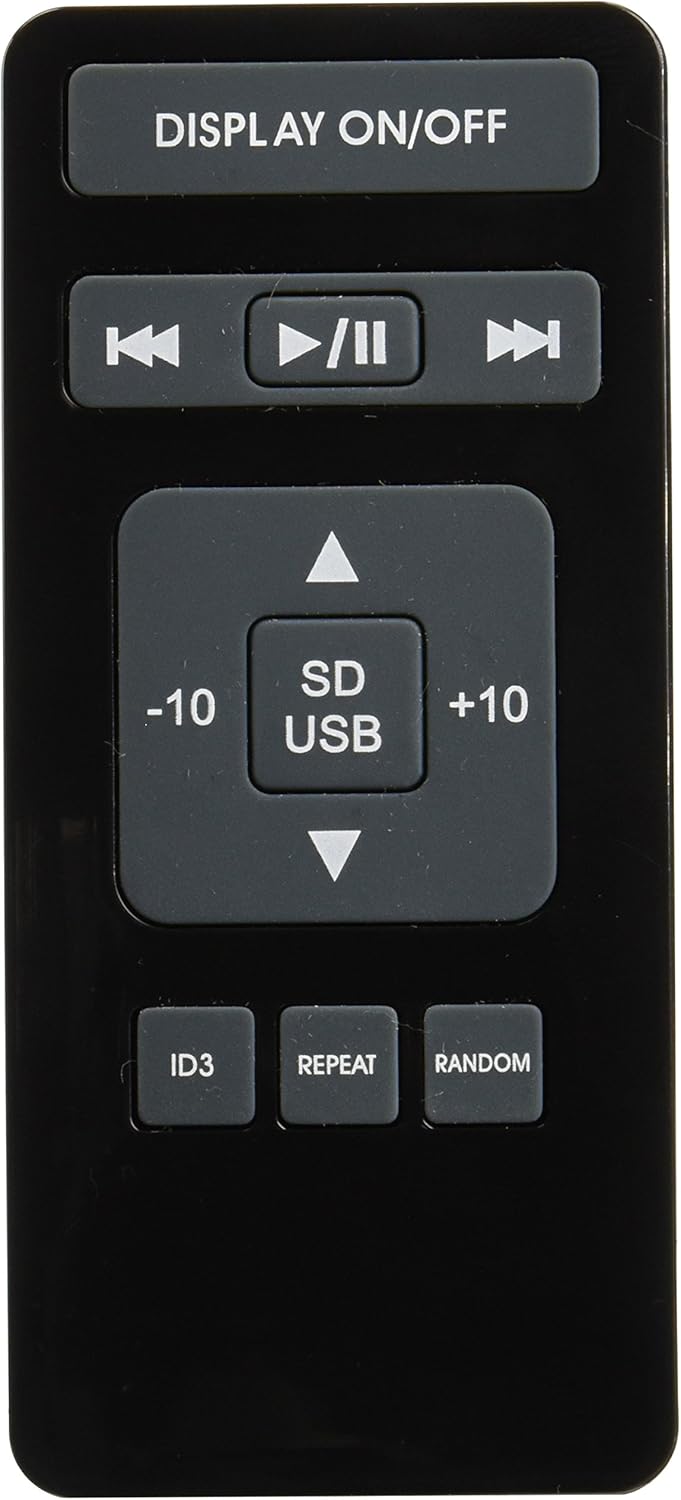
Image 3: Remote control for the Fonestar AS-24U amplifier, showing buttons for media playback and display control.
- ДЫСПЛЕЙ ВКЛ/ВЫКЛ: Пераключае дысплей пярэдняй панэлі.
- PLAY/PAUSE, PREVIOUS/NEXT: Controls for media playback.
- SD/USB: Selects between SD card and USB drive as the media source.
- -10/+10: Skips tracks by 10.
- ID3: Displays ID3 tag інфармацыя для mp3 files.
- Паўтор: Toggles repeat modes (e.g., repeat one, repeat all).
- Выпадкова: Toggles random playback.
4. Настройка
4.1 Падключэнне дынамікаў
- Забяспечце ampвыратавальнік выключаны і адключаны ад сеткі.
- Connect your passive speakers to the SPEAKER OUT terminals on the rear panel.
- Сумясціце станоўчы (+) полюс на amplifier to the positive (+) terminal on your speaker, and the negative (-) to the negative (-).
- For stereo speakers, use the 4-8 Ω terminals. For surround speakers, use the 8 Ω terminals. Ensure your speakers' impedance matches the ampспецыфікацыі lifier.
4.2 Падключэнне аўдыёкрыніц
- Connect your audio devices (e.g., CD player, tuner, auxiliary device) to the corresponding RCA INPUT jacks (CD, TUNER, AUX) on the rear panel.
- Ensure left and right channels are correctly matched (red for right, white for left).
4.3 Падключэнне харчавання
- Праверце VOLTAGПерамыкач E SELECTOR на задняй панэлі ўсталяваны ў правільнае становішча гучнасціtage for your region (e.g., 230V).
- Connect the power cable to the POWER IN socket on the rear panel and then to a suitable wall outlet.
5. Інструкцыя па эксплуатацыі
5.1 Уключэнне/выключэнне
Press the power button on the front panel to turn the amplifier on or off. A soft start protection circuit is integrated.
5.2 Выбар крыніцы ўваходнага сігналу
Use the input selector knob or buttons on the front panel to choose between CD, TUNER, AUX, USB, or SD inputs.
5.3 Рэгуляванне гучнасці
Rotate the main volume knob on the front panel to adjust the overall sound level. Start with a low volume and gradually increase it to a comfortable listening level.
5.4 Прайграванне з USB/SD-карты
- Устаўце флэш-назапашвальнік USB або SD-карту з аўдыёфайлам MP3 files into the respective slot on the front panel.
- Select the USB or SD input using the input selector.
- Use the playback controls (Play/Pause, Previous/Next) on the front panel or remote control to manage your music.
- The remote control allows for additional functions like skipping 10 tracks (+10/-10), displaying ID3 tags, repeating tracks, and random playback.
6. Тэхнічнае абслугоўванне
6.1 Ачыстка
Каб ачысціць amplifier, first unplug it from the power outlet. Use a soft, dry cloth to wipe down the exterior surfaces. Do not use abrasive cleaners, waxes, or solvents as they may damage the finish.
6.2 Захоўванне
Калі захоўваць amplifier for an extended period, ensure it is unplugged, clean, and stored in a cool, dry place away from direct sunlight and extreme temperatures.
7. Выпраўленне непаладак
- Няма харчавання:
- Праверце, ці надзейна падключаны кабель харчавання да абодвух ampзапальвальнік і разетку.
- Пераканайцеся, што разетка спраўная.
- Праверце VOLTAGE SELECTOR switch is set correctly.
- Няма гуку:
- Пераканайцеся, што выбрана правільная крыніца ўваходнага сігналу.
- Праверце ўсе падключэнні дынамікаў на правільнасць палярнасці і надзейнасць мацавання.
- Пераканайцеся, што гучнасць павялічана і не адключана.
- Праверце з іншай крыніцай гуку.
- Скажоны гук:
- Паменшыць гучнасць.
- Check speaker impedance compatibility.
- Ensure audio cables are not damaged and are securely connected.
- USB/SD Playback Issues:
- Ensure the USB drive or SD card is formatted to a compatible file сістэма (напрыклад, FAT32).
- Пераканайцеся, што аўдыё fileяны ў фармаце MP3.
- Паспрабуйце іншы USB-назапашвальнік або SD-карту.
8. Тэхнічныя характарыстыкі
| Марка | FONESTAR |
| мадэль | AS-24U |
| Stereo Power Output | 25 + 25 W max, 15 + 15 W RMS (4 Ω), 12 + 12 W RMS (8 Ω) |
| Surround Power Output | 10 + 10 W max, 6 + 6 W RMS (8 Ω) |
| Уваходы | 3 stereo (CD, Tuner, AUX), 2 x RCA 400 mV |
| Абарона | Soft start, short circuit, overload |
| тtage | 230 вольт |
| Памеры (Д х Ш х У) | 5 х 5 х 10 см (прыблізна 50 х 50 х 100 мм) |
| Вага | 1.9 кг |
| Падключэнне дынамікаў | Правадная |
9. Гарантыя і падтрымка
This Fonestar AS-24U amplifier comes with a standard manufacturer's warranty. Please refer to the warranty card included with your purchase for specific terms and conditions. For technical support, service, or warranty claims, please contact your retailer or the official Fonestar customer service.