
1. Уводзіны
This manual provides comprehensive instructions for the proper use and maintenance of your Horizon SF-400D Digital Precision Scale. Please read this manual thoroughly before operating the device to ensure accurate measurements and prolong its lifespan.
The Horizon SF-400D is a versatile digital precision scale designed for various weighing applications, including jewelry, coins, herbs, spices, and medication. It offers high accuracy and multiple weighing modes, along with a convenient counting function.

Малюнак 1: Horizon SF-400D Digital Precision Scale. This image shows the overall design of the scale, featuring a black body, a stainless steel weighing platform, and a blue backlit LCD display with control buttons.
2. Тэхніка бяспекі
- Do not overload the scale beyond its maximum capacity of 500g.
- Avoid exposing the scale to extreme temperatures, humidity, or direct sunlight.
- Трымайце вагі далей ад моцных электрамагнітных палёў.
- Ачысціце накіп мяккай, damp тканінай. Не выкарыстоўвайце абразіўныя ачышчальныя сродкі і не апускайце прыладу ў ваду.
- Ensure the scale is placed on a stable, level surface during operation to ensure accuracy.
3. Кампаненты прадукту
Familiarize yourself with the main parts of your SF-400D scale:
- Платформа для ўзважвання: Stainless steel surface for placing items.
- ВК-дысплей: Backlit screen showing weight, units, and other indicators.
- Кнопка ON/OFF: Уключае і выключае вагі.
- Кнопка MODE: Changes weighing units (g, oz, ct, dwt, gn, T).
- Кнопка TARE: Resets the display to zero, useful for weighing items in a container.
- PCS Button: Activates the piece counting function.
- CAL Button: Used for calibration.
- Рэгуляваныя ножкі: Located on the bottom for leveling the scale.
- Узровень бурбалкі: Integrated on the scale to assist with leveling.
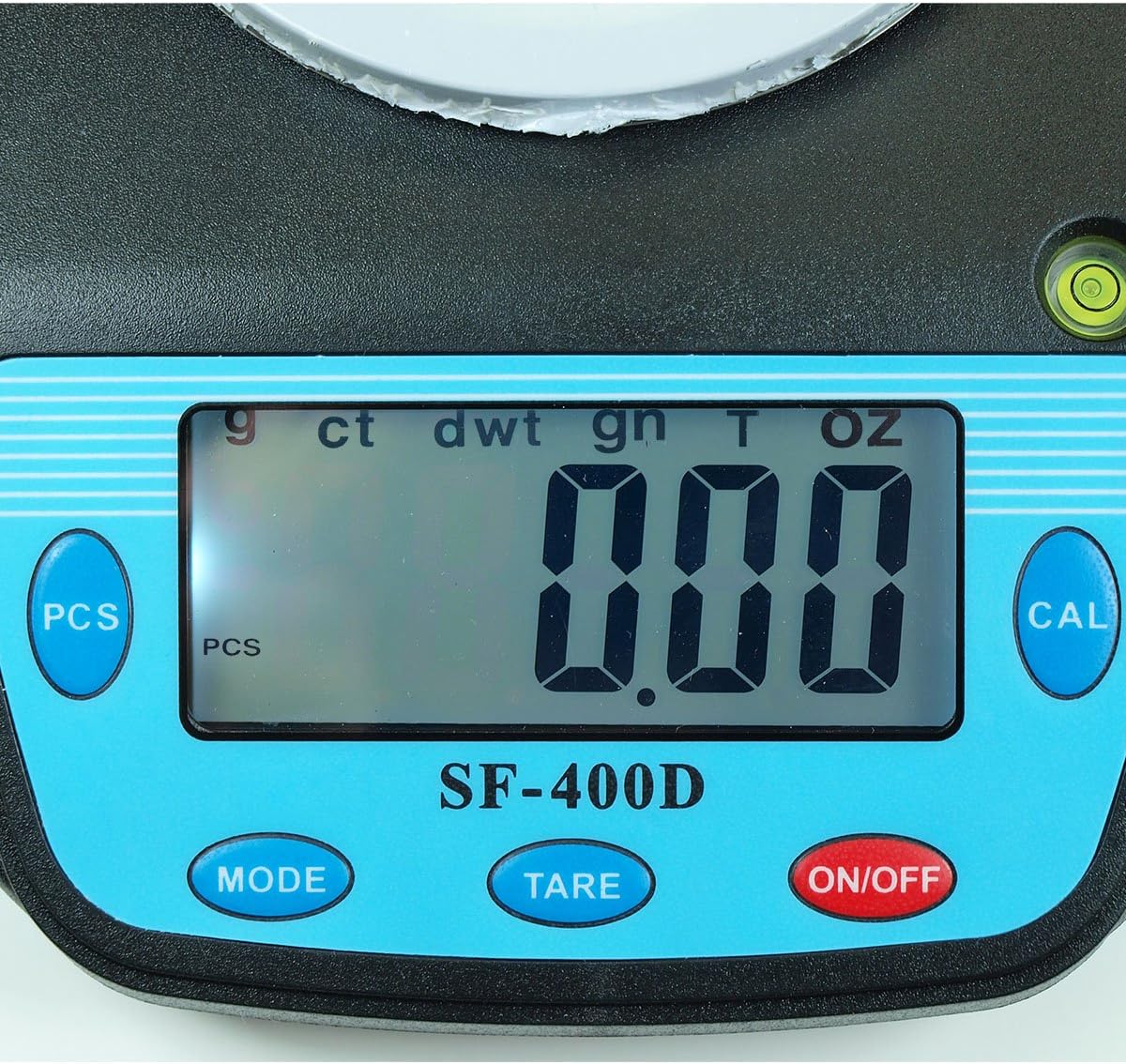
Малюнак 2: Close-up of the SF-400D display and control buttons. This image highlights the LCD screen, showing various unit indicators (g, ct, dwt, gn, T, oz), and the function buttons: PCS, MODE, TARE, ON/OFF, and CAL.

Малюнак 3: Underside of the SF-400D scale showing adjustable legs. Green arrows indicate the location of the four adjustable feet, which are used to level the scale for accurate measurements.
4. Настройка
4.1. Электразабеспячэнне
The SF-400D scale operates on two AA batteries (included) or an optional AC power adapter (not included).
- Адкрыйце вечка батарэйнага адсека на ніжняй частцы вагаў.
- Устаўце дзве батарэйкі тыпу АА, сачыце за правільнай палярнасцю (+/-).
- Зачыніце батарэйны адсек.
- Alternatively, connect a compatible AC power adapter (6V, amperage not specified in product details, consult manufacturer if needed) to the power port.
4.2. Placement and Leveling
For optimal accuracy, the scale must be placed on a stable, flat, and level surface.
- Place the scale on your desired weighing surface.
- Observe the integrated bubble level.
- Adjust the four adjustable legs on the bottom of the scale by rotating them until the bubble is centered within the level indicator.
5. Інструкцыя па эксплуатацыі
5.1. Асноўнае ўзважванне
- Націсніце ВКЛ/ВЫКЛ button to turn on the scale. The display will show "88888" and then "0.00" (or "0.0" depending on the unit).
- If the display does not show zero, press the СКАРА кнопку, каб абнуліць шкалу.
- Націсніце РЭЖЫМ button to select your desired weighing unit (g, oz, ct, dwt, gn, T).
- Gently place the item(s) to be weighed on the center of the stainless steel platform.
- Прачытайце стабільную вагу, якая адлюстроўваецца на ВК-экране.
- Каб выключыць вагі, націсніце і ўтрымлівайце ВКЛ/ВЫКЛ button for a few seconds. The scale also features an auto shut-off function to conserve battery power.
5.2. Функцыя тары
The Tare function allows you to subtract the weight of a container, so only the contents are weighed.
- Пастаўце пусты кантэйнер на платформу для ўзважвання.
- Wait for the display to stabilize and show the container's weight.
- Націсніце СКАРА кнопка. На дысплеі скінецца значэнне «0.00» (ці «0.0»).
- Дадайце ў кантэйнер прадметы, якія вы хочаце ўзважыць. На дысплеі будзе паказвацца толькі чыстая вага прадметаў.
- To clear the tare, remove all items from the platform and press СКАРА again if the display does not return to zero automatically.
5.3. Piece Counting Function (PCS)
This function is useful for counting multiple identical items.
- Turn on the scale and ensure it is zeroed.
- Націсніце шт button. The display will show "PCS" and a sample size (e.g., "25", "50", "75", "100").
- Націсніце РЭЖЫМ button to cycle through the available sample sizes (25, 50, 75, 100 pieces). Select the sample size that matches the number of items you will place on the scale for sampлінг.
- Place the exact number of sample items (e.g., 25 pieces) onto the weighing platform according to your selected sample памер.
- Націсніце шт button again to confirm the sample. The display will now show the number of pieces.
- You can now add more items of the same type, and the scale will display the total count.
- To exit the counting mode, press the РЭЖЫМ кнопка.
5.4. Каліброўка
Calibration ensures the accuracy of your scale. It is recommended to calibrate the scale periodically or if you suspect inaccurate readings. You will need a known calibration weight (e.g., 500g) for this process.

Малюнак 4: SF-400D display showing "CAL" during calibration mode. This image illustrates the scale's screen indicating it is in calibration mode, prompting the user to place a calibration weight.
- Ensure the scale is on a stable, level surface and turned off.
- Націсніце і ўтрымлівайце КАЛ кнопку, затым націсніце ВКЛ/ВЫКЛ button simultaneously. Release both buttons when the display shows "CAL".
- The display will then show a flashing weight value (e.g., "500.00g"). This is the required calibration weight.
- Place the exact calibration weight (e.g., 500g) onto the center of the weighing platform.
- Wait for the display to stabilize and show "PASS" or return to normal weighing mode. This indicates successful calibration.
- Remove the calibration weight. The scale is now calibrated and ready for use.
- If "FAIL" or an error message appears, repeat the calibration process.
6. Тэхнічнае абслугоўванне
6.1. Уборка
- Wipe the scale surface with a soft, slightly damp тканіна.
- Do not use harsh chemicals, abrasive cleaners, or immerse the scale in water.
- Перад захоўваннем або наступным выкарыстаннем пераканайцеся, што шалі цалкам высахлі.
6.2. Захоўванне
- Захоўвайце шалі ў прахалодным, сухім месцы, удалечыні ад прамых сонечных прамянёў і экстрэмальных тэмператур.
- Пры працяглым захоўванні выміце батарэйкі, каб прадухіліць уцечку.
7. Выпраўленне непаладак
| праблема | Магчымая прычына | Рашэнне |
|---|---|---|
| Шкала не ўключаецца. | Low or dead batteries; incorrect battery installation; no power from AC adapter. | Replace batteries; check battery polarity; ensure AC adapter is properly connected and functional. |
| Няправільныя паказанні. | Scale not level; unstable surface; needs calibration; overloaded; strong air currents or vibrations. | Ensure scale is level using adjustable legs and bubble level; place on stable surface; perform calibration; do not exceed 500g capacity; operate in a stable environment. |
| "O_Ld" or "EEEE" displayed. | Шкала перагружаная. | Remove excess weight immediately. Do not exceed 500g capacity. |
| Display shows "UNST". | Unstable environment or surface. | Move the scale to a more stable location, away from vibrations or drafts. |
| Counting function not working correctly. | Няправільнае сample size selected; sample items not identical in weight. | Пераканайцеся, што сample size matches the number of items placed for sampling; use identical items for accurate counting. |
8. Тэхнічныя характарыстыкі
| Асаблівасць | Дэталь |
|---|---|
| мадэль | SF-400D |
| Ёмістасць | 500 grams (g) / 17.5 ounces (oz) |
| Accuracy (Readability) | 0.01 grams (g) / 0.0005 ounces (oz) |
| Рэжымы ўзважвання | g (grams), oz (ounces), ct (carats), dwt (pennyweights), gn (grains), T (troy ounces), pcs (pieces) |
| Матэрыял платформы | Нержавеючая сталь |
| Platform Diameter | 4.2 цаляў |
| Дысплей | LCD з падсветкай |
| Магутнасць | 2 x AA batteries (included) or 6V AC adapter (not included) |
| Памеры (Д х Ш х У) | 8.25" x 6.0" x 1.75" |
| Асаблівасці | Tare function, Piece Counting, Auto Shut-Off, Backlit Display, Adjustable Legs, Bubble Level |
9. Гарантыя і падтрымка
For warranty information or technical support, please refer to the documentation included with your purchase or contact the retailer. Specific warranty terms may vary by region and retailer.
Па агульных пытаннях або каб азнаёміцца з іншымі прадуктамі, вы можаце наведаць Horizon Store on Amazon.