
Уводзіны
Thank you for choosing the Divoom Onbeat 200 Bluetooth Portable Speaker. This manual provides essential information for setting up, operating, and maintaining your speaker. Please read it thoroughly before use to ensure optimal performance and longevity of your device.
The Divoom Onbeat 200 is a compact and powerful portable speaker designed to deliver rich audio with the convenience of Bluetooth wireless connectivity. It features a built-in microphone for hands-free calling, making it versatile for both music playback and communication.
Змест пакета
Калі ласка, праверце ўпакоўку на наяўнасць наступных прадметаў:
- Divoom Onbeat 200 Bluetooth Portable Speaker
- USB-кабель для зарадкі
- Аўдыёкабель 3.5 мм
- Кіраўніцтва карыстальніка
If any items are missing or damaged, please contact your retailer for assistance.
Прадукт скончаныview
The Divoom Onbeat 200 features a sleek design with intuitive controls. Familiarize yourself with the speaker's components before use.
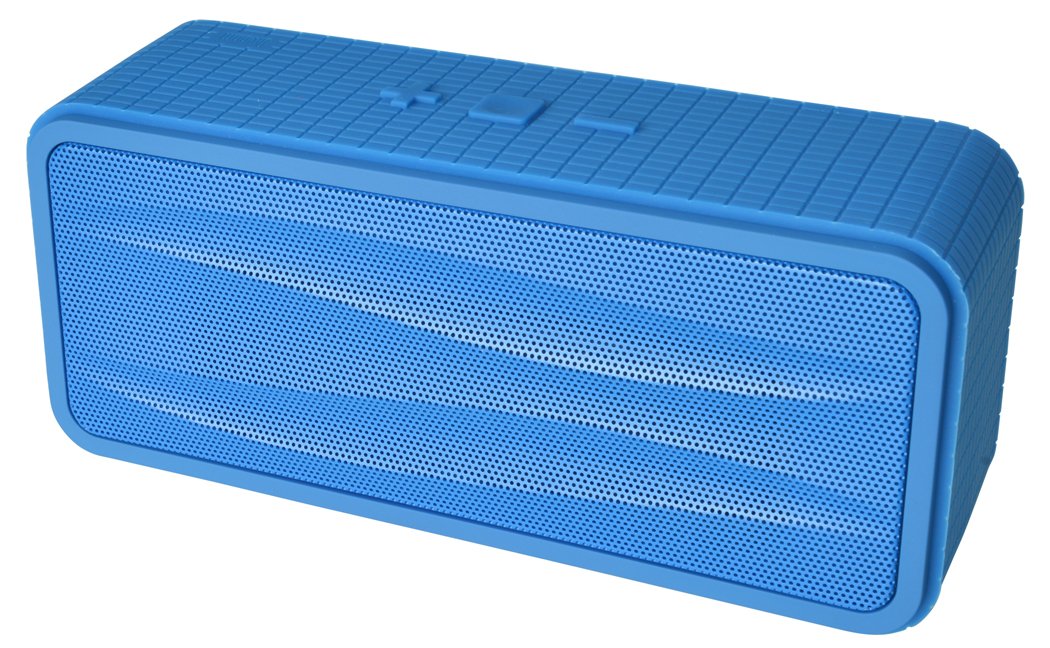
Малюнак 1: Divoom Onbeat 200 Bluetooth Portable Speaker shown with various compatible smartphones, highlighting its wireless connectivity. The speaker is blue and rectangular with a mesh grille.
The speaker is equipped with dual drivers for stereo sound and a passive radiator for enhanced bass. The control panel typically includes power, volume, and Bluetooth pairing buttons. A built-in microphone is integrated for hands-free communication.

Малюнак 2: Detailed dimensions of the Divoom Onbeat 200 speaker. The speaker measures approximately 16.5 cm in length, 7 cm in height, and 5.2 cm in depth.
Настройка
1. Зарадка дынаміка
- Падключыце меншы канец USB-кабеля для зарадкі да порта зарадкі на дынаміку.
- Падключыце большы канец USB-кабеля для зарадкі да USB-адаптара харчавання (не ўваходзіць у камплект) або USB-порта кампутара.
- Індыкатар зарадкі будзе гарэць, звычайна чырвоным, падчас зарадкі.
- Once fully charged, the indicator light will change color or turn off (refer to specific LED behavior in the full manual if available). A full charge usually takes 2-3 hours.
Заўвага: For first-time use, ensure the speaker is fully charged.
2. Спарванне Bluetooth
- Ensure the speaker is charged and turned off.
- Press and hold the Power button (or dedicated Bluetooth button) for a few seconds until you hear an audible prompt or see the Bluetooth indicator light flashing rapidly, indicating it's in pairing mode.
- На смартфоне, планшэце або іншай прыладзе з падтрымкай Bluetooth перайдзіце ў налады Bluetooth.
- Уключыце Bluetooth і знайдзіце даступныя прылады.
- Select "Onbeat 200" from the list of devices.
- Once paired, you will hear a confirmation tone, and the Bluetooth indicator light will typically glow solid blue.
Савет: Пры ўключэнні дынамік аўтаматычна паспрабуе падключыцца да апошняй спалучанай прылады, калі Bluetooth гэтай прылады актыўны і знаходзіцца ў зоне дзеяння.
Інструкцыя па эксплуатацыі
Уключэнне/выключэнне харчавання
- Каб уключыць: націсніце і ўтрымлівайце кнопку харчавання, пакуль не загарыцца індыкатар.
- Каб выключыць прыладу: націсніце і ўтрымлівайце кнопку харчавання, пакуль індыкатар не пагасне.
Рэгулятар гучнасці
- To increase volume: Press the Volume Up (+) button.
- To decrease volume: Press the Volume Down (-) button.
You can also adjust the volume directly from your connected device.
Прайграванне музыкі
- Play/Pause: Press the Play/Pause button (often integrated with the Power or Bluetooth button).
- Next Track: Double-press the Volume Up (+) button (or a dedicated skip button).
- Previous Track: Double-press the Volume Down (-) button (or a dedicated skip button).
Заўвага: Specific button functions may vary slightly. Refer to the physical markings on your speaker.
Дапаможны ўваход (AUX)
For devices without Bluetooth, you can use the 3.5mm audio cable:
- Падключыце адзін канец аўдыёкабеля 3.5 мм да порта AUX-in на дынаміку.
- Падключыце другі канец да раздыма для навушнікаў аўдыяпрылады.
- The speaker will automatically switch to AUX mode, or you may need to press a mode button.
Здзяйсненне і прыём званкоў
The Divoom Onbeat 200 features a built-in microphone for hands-free calling when connected via Bluetooth to a smartphone.
- Адказ на званок: When a call comes in, the music will pause. Press the Play/Pause button (or phone icon button) once to answer the call.
- Завяршэнне выкліку: During a call, press the Play/Pause button (or phone icon button) once to end the call.
- Адхіленне званка: Press and hold the Play/Pause button (or phone icon button) for approximately 2 seconds to reject an incoming call.
- Паўторны набор апошняга нумара: Double-press the Play/Pause button (or phone icon button) to redial the last number called.
Audio will be routed through the speaker, and your voice will be picked up by the built-in microphone.
Тэхнічнае абслугоўванне
- Трымайце дынамік далей ад вады, вільгаці і экстрэмальных тэмператур.
- Працірайце дынамік мяккай сухой тканінай. Не выкарыстоўвайце абразіўныя ачышчальнікі або растваральнікі.
- Пазбягайце падзення дынаміка або моцных удараў.
- Калі дынамік не выкарыстоўваецца працяглы час, захоўвайце яго ў прахалодным, сухім месцы і перыядычна зараджайце, каб падтрымліваць яго працаздольнасць.
Ліквідацыю непаладак
| праблема | Магчымае рашэнне |
|---|---|
| Дынамік не ўключаецца. | Пераканайцеся, што дынамік цалкам зараджаны. Падключыце яго да крыніцы харчавання і паспрабуйце яшчэ раз. |
| Немагчыма падключыцца праз Bluetooth. |
|
| Няма гуку або нізкі ўзровень гучнасці. |
|
| Скажэнне гуку. |
|
Тэхнічныя характарыстыкі
- Назва мадэлі: Onbeat 200
- Нумар мадэлі тавару: Onbeat 200-Blue
- Марка: Водаправод
- Тып дынаміка: Кніжная паліца
- Асаблівасці: Built-in Microphone, Stereo
- Рэкамендуемае выкарыстанне: Музыка
- Сумяшчальныя прылады: Смартфон
- Канфігурацыя канала аб'ёмнага гуку: 2.0
- колер: Сіні
- Вага прадмета: 544 г (1.2 фунта)
- Воданепранікальны: няма
- Метад кантролю: App (Note: While listed, primary control is via physical buttons and connected device)
- Тэхналогія бесправадной сувязі: Bluetooth
- Крыніца харчавання: Працуе ад акумулятара (1 літый-іённы акумулятар уключаны)
- Памеры прадукту: 16.51 х 5.08 х 7.11 см
- Максімальная выхадная магутнасць дынаміка: 4 ват
- Тэхналогія падключэння: Bluetooth
- Тып мацавання: Стальніца
- Першыя даступныя: 17 мая 2013 г
Гарантыя і падтрымка
The Divoom Onbeat 200 comes with a standard manufacturer's warranty. Please refer to the warranty card included in your package or visit the official Divoom webсайт для атрымання падрабязных гарантыйных умоў.
For technical support, troubleshooting assistance, or service inquiries, please contact Divoom customer support through their official channels. Keep your purchase receipt and product model information handy when contacting support.