
Уводзіны
The Zalman ZM-NS2000 is a high-performance laptop cooling pad designed to prevent overheating and enhance the longevity and stability of your notebook. It features a large, quiet 200mm fan and an ergonomic design with adjustable tilt, providing a comfortable and efficient cooling solution for laptops up to 17 inches. Additionally, it includes an integrated USB hub to expand your connectivity options.
Асаблівасці прадукту
- Эрганамічны дызайн: Features an adjustable tilt mechanism for comfortable typing and viewныя вуглы.
- Эфектыўнае астуджэнне: Equipped with a large 200mm fan that operates quietly at approximately 20 dB(A).
- Рэгуляваная хуткасць вентылятара: Manually regulate fan speed from 470 to 610 RPM to optimize cooling performance.
- Інтэграваны USB-канцэнтратар: Includes three additional USB 2.0 ports for connecting peripherals such as a mouse, keyboard, or external drives.
- Шырокая сумяшчальнасць: Designed to accommodate laptops up to 17 inches.
- Харчаванне ад USB: Conveniently powered directly from your laptop's USB port, with the connection cable included.
- Кабельнае кіраванне: Features a system to keep cables organized for a tidy workspace.
Змест пакета
- Zalman ZM-NS2000 Laptop Cooling Pad
- USB-кабель
Настройка
- Размяшчэнне: Place the Zalman ZM-NS2000 cooling pad on a stable, flat surface.
- Размяшчэнне ноўтбука: Carefully place your laptop onto the cooling pad, ensuring it is centered over the fan area for optimal airflow.
- Рэгуляванне нахілу: Adjust the integrated stand at the rear of the cooling pad to achieve your desired ergonomic typing or viewкут нахілу.
- Падключыце сілкаванне USB: Connect one end of the provided USB cable to the USB input port on the cooling pad and the other end to an available USB port on your laptop. The cooling fan will begin to operate.
- Падключэнне перыферыйных прылад (неабавязкова): Utilize the three additional USB 2.0 ports on the cooling pad to connect external devices such as a mouse, keyboard, or USB flash drive.

Image: The Zalman ZM-NS2000 cooling pad shown with its adjustable stand extended and USB ports visible on the side.
Інструкцыя па эксплуатацыі
- Уключэнне/выключэнне харчавання: The cooling pad powers on automatically when connected to a powered USB port on your laptop. Disconnect the USB cable to turn it off.
- Рэгуляванне хуткасці вентылятара: Locate the fan speed adjustment dial or switch on the side of the cooling pad. Rotate the dial or move the switch to increase or decrease the fan speed according to your cooling needs.
- USB Hub Usage: The integrated USB 2.0 ports function as a standard USB hub. Connect your devices to these ports as needed. Note that these ports are for data transfer and power for low-power devices; high-power devices may require an external power source or direct connection to the laptop.
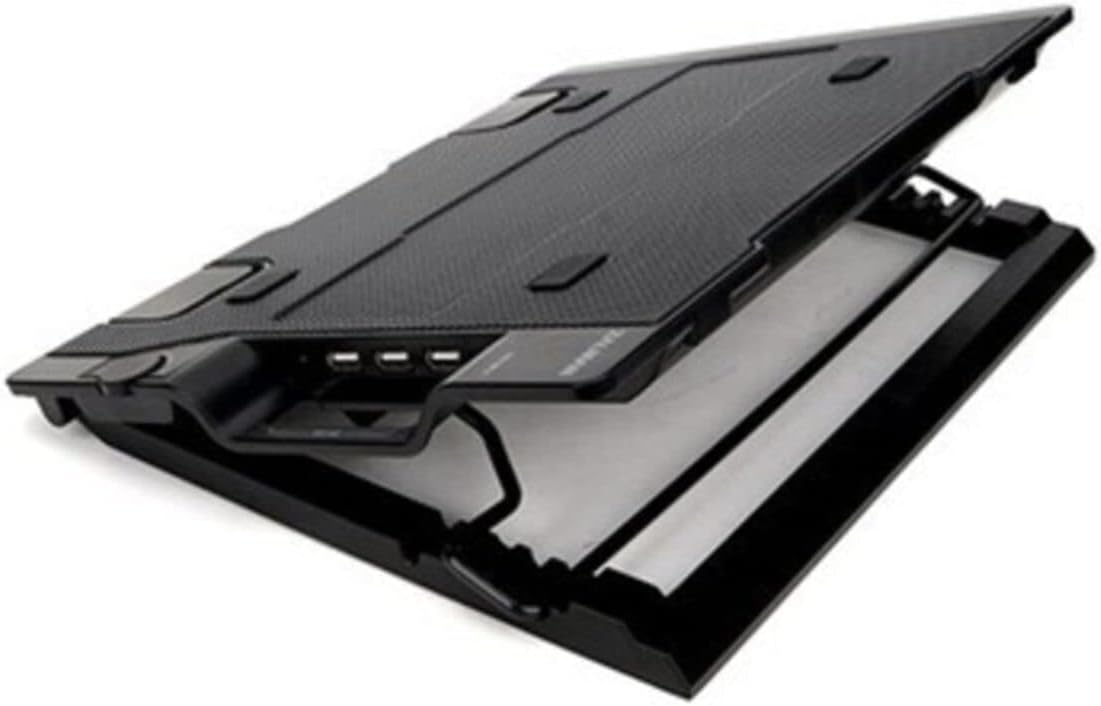
Выява: Крупны план view of the Zalman ZM-NS2000, highlighting the three USB 2.0 ports and the fan speed control dial.
Тэхнічнае абслугоўванне
- Уборка: Regularly clean the fan and the surface of the cooling pad to prevent dust accumulation, which can impede airflow and fan performance. Use a soft, dry cloth or compressed air. Do not use liquid cleaners directly on the fan or electronic components.
- захоўванне: Калі яна не выкарыстоўваецца, захоўвайце яе ў прахалодным сухім месцы, удалечыні ад прамых сонечных прамянёў і экстрэмальных тэмператур.
Ліквідацыю непаладак
- Вентылятар не круціцца:
- Ensure the USB connection cable is securely plugged into both the cooling pad and a functioning USB port on your laptop.
- Try connecting the cooling pad to a different USB port on your laptop or another device to rule out a faulty port.
- Check if the fan speed control is set to a minimum or off position. Adjust it to increase speed.
- Недастатковае астуджэнне:
- Verify that your laptop's intake and exhaust vents are not obstructed by the cooling pad or other objects.
- Increase the fan speed to its maximum setting.
- Ensure the cooling pad is placed on a hard, flat surface to allow for proper airflow underneath.
- Не працуюць USB-парты:
- Confirm the main USB connection to your laptop is secure and providing power.
- Test the peripheral device by connecting it directly to your laptop to ensure it is working correctly.
- Some high-power USB devices may not function correctly through the cooling pad's hub due to power limitations. Connect such devices directly to your laptop.
Тэхнічныя характарыстыкі
| Марка | Залман |
| Нумар мадэлі | ЗМ-НС2000 |
| Колер | Чорны |
| Памер вентылятара | 200 мм |
| Хуткасць вентылятара | 470 - 610 RPM (Manually Adjustable) |
| Узровень шуму | Прыкладна 20 дБ(А) |
| Парты USB | 3 х USB 2.0 |
| Спосаб астуджэння | паветра |
| Матэрыял | сталь |
| Вага прадмета | 2.4 фунта (прыблізна 1.09 кг) |
| Сумяшчальнасць з ноўтбукам | Да 17 цаляў |
| UPC | 823884205312 |
Гарантыя і падтрымка
For technical assistance, warranty information, or customer support regarding your Zalman ZM-NS2000 Laptop Cooling Pad, please contact Zalman customer service directly through their official website or the contact information provided with your purchase documentation. Please retain your proof of purchase for warranty claims.


