
1. Уводзіны
Thank you for choosing the Chieftec Libra Series LG-01B Mid-Tower ATX PC Case. This manual provides essential information for the proper installation, operation, and maintenance of your new computer chassis. Please read this manual thoroughly before beginning installation to ensure optimal performance and safety.
2. Інфармацыя па бяспецы
Заўсёды выконвайце наступныя меры бяспекі:
- Ensure the power supply is disconnected from the mains before opening the case or installing components.
- Handle components with care to avoid damage from electrostatic discharge (ESD). Consider using an anti-static wrist strap.
- Захоўвайце дробныя дэталі і інструменты далей ад дзяцей.
- Do not operate the case in environments with excessive dust, moisture, or extreme temperatures.
- Refer to the manuals of your individual components (motherboard, power supply, etc.) for specific installation instructions.
3. Змесціва ўпакоўкі
Праверце наяўнасць усіх прадметаў у камплекце:
- Chieftec Libra Series LG-01B PC Case
- Accessory kit (screws, motherboard standoffs, thumb screws)
Note: Power supply unit (PSU) is not included and must be purchased separately.
4. Асноўныя магчымасці
- Modern and ergonomic design
- Support for mATX and ATX motherboards
- Front panel connectivity: 1x USB 3.0, 2x USB 2.0, Mic-in, Audio-out (HD Audio)
- Tool-less installation for 5.25" optical drives and 3.5" hard drives
- Drive Bays: 2x 5.25" external, 1x 3.5" external, 2x 3.5" internal, 1x 2.5" internal
- Fan preparations: 1x 80/90/120mm (front), 2x 80mm (rear), 2x 120mm (left side panel)
- Максімальная вышыня кулера працэсара: 140 мм
- Maximum VGA card length: 380mm
5. Усталёўка і налада
5.1. Адкрыццё справы
To access the interior, remove the side panel. Typically, this involves unscrewing two thumb screws at the rear of the case and sliding the panel backward.
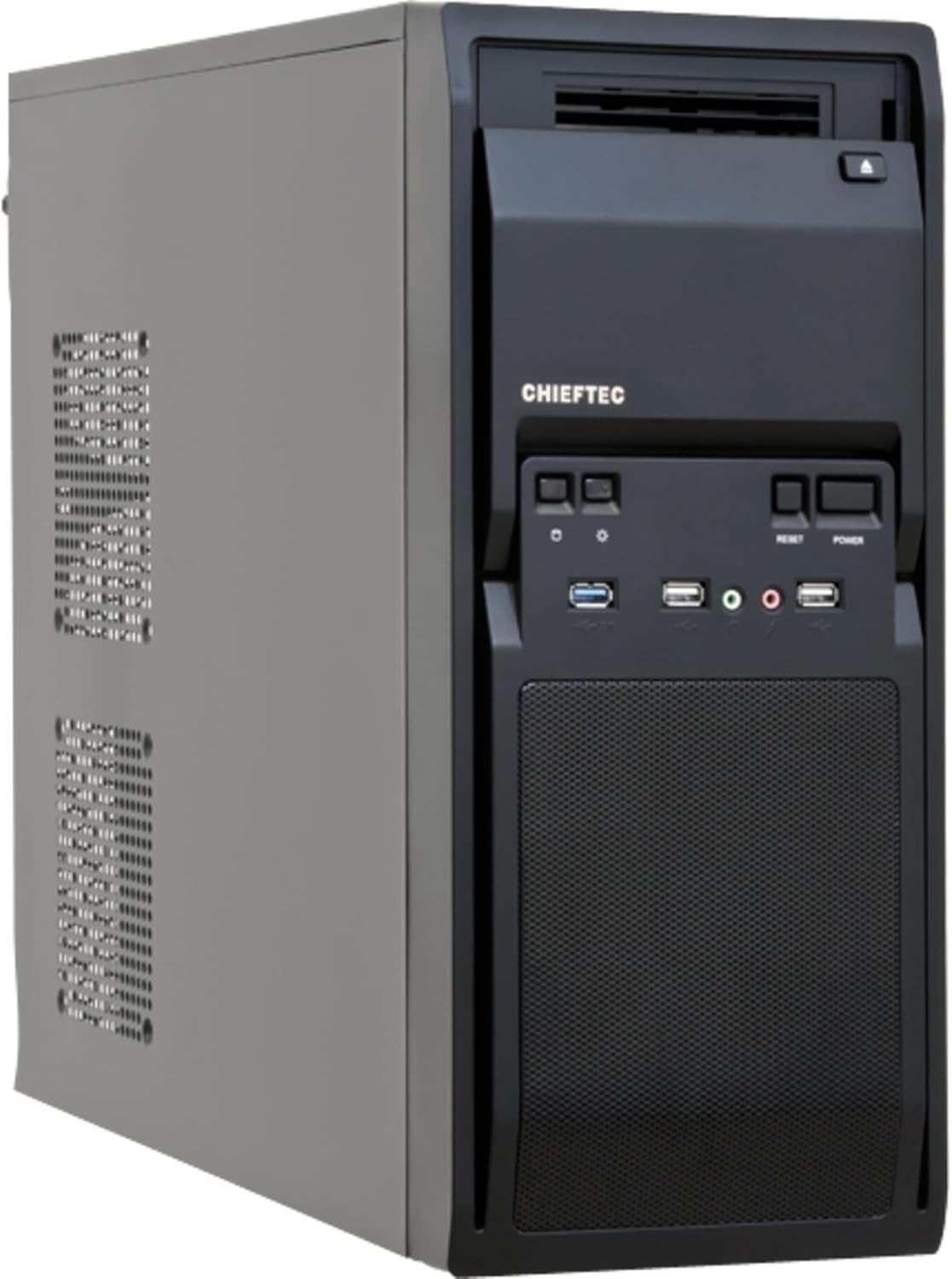
Малюнак 1: Пярэдні левы бок view of the Chieftec LG-01B PC case, showing the main chassis and front panel design. The side panel is secured by screws at the rear.
5.2. Устаноўка мацярынскай платы
- Install the necessary motherboard standoffs into the motherboard tray according to your motherboard's form factor (ATX or mATX).
- Place the I/O shield into the opening at the rear of the case.
- Carefully align your motherboard with the standoffs and I/O shield, then secure it with screws.

Малюнак 2: Інтэр'ер view of the Chieftec LG-01B PC case, showing the motherboard tray, drive bays with tool-less clips, and cable management cutouts. The rear I/O shield opening is visible.
5.3. Усталёўка блока сілкавання (БС)
Install your ATX power supply into the designated bay at the top rear of the case and secure it with screws from the exterior.

Малюнак 3: Задняя частка view of the Chieftec LG-01B PC case, highlighting the power supply mounting area at the top, expansion slots, and fan mounting points.
5.4. Drive Installation (ODD/HDD/SSD)
- 5.25" Optical Drives: Remove the front panel bay cover, slide the optical drive into the bay, and secure it using the tool-less clips.
- 3.5" Hard Drives: Slide the 3.5" HDD into an internal bay and secure it with the tool-less clips.
- 2.5-цалевыя SSD-назапашвальнікі: Install 2.5" SSDs into the dedicated internal 2.5" bay, typically requiring screws.

Малюнак 4: Спераду view of the Chieftec LG-01B PC case with the front panel cover for the I/O ports opened, revealing the 5.25" and 3.5" external drive bays. The USB and audio ports are also visible.
5.5. Падключэнні пярэдняй панэлі
Connect the front panel cables (USB 3.0, USB 2.0, HD Audio, Power, Reset, HDD LED, Power LED) to the corresponding headers on your motherboard. Refer to your motherboard manual for header locations.
5.6. Expansion Cards (GPU, etc.)
Remove the necessary expansion slot covers at the rear of the case. Insert your expansion card into the PCIe slot on the motherboard and secure it with a screw.
5.7. Кіраванне кабелем
Utilize the cable routing cutouts and tie-down points behind the motherboard tray to manage cables for improved airflow and aesthetics.
6. Інструкцыя па эксплуатацыі
Once all components are installed and connected, close the side panel. Connect your monitor, keyboard, mouse, and power cable to the system. Press the power button on the front panel to start your computer.
6.1. Front Panel Ports
- Порт USB 3.0: Для хуткаснай перадачы дадзеных з сумяшчальнымі прыладамі.
- Порты USB 2.0: Для падлучэння стандартных USB-прылад.
- Mic-in Jack: Для падлучэння мікрафона.
- Audio-out Jack: Для падлучэння навушнікаў або дынамікаў.
- Кнопка харчавання: Каб уключыць/выключыць сістэму.
- Кнопка скіду: Каб перазагрузіць сістэму.
7. Тэхнічнае абслугоўванне
Regular maintenance helps ensure the longevity and optimal performance of your PC components.
- Ачыстка ад пылу: Periodically clean dust from inside the case, especially from fan filters and heatsinks, using compressed air or a soft brush. Ensure the system is powered off and unplugged before cleaning.
- Кабельнае кіраванне: Ensure cables are neatly routed to prevent obstruction of airflow.
- Вентыляцыя: Ensure the case has adequate clearance around its ventilation openings for proper airflow.
8. Выпраўленне непаладак
Калі ў вас узніклі праблемы, разгледзьце наступныя распаўсюджаныя дзеянні па ліквідацыі непаладак:
- Сістэма не ўключаецца:
- Check if the power cable is securely connected to the PSU and the wall outlet.
- Пераканайцеся, што перамыкач блока харчавання знаходзіцца ў становішчы «ON».
- Verify that the front panel power button cable is correctly connected to the motherboard header.
- Няма вываду на дысплей:
- Ensure the monitor cable is securely connected to the graphics card or motherboard (if using integrated graphics).
- Пераўсталюйце відэакарту і модулі аператыўнай памяці.
- Не працуюць USB-парты:
- Check if the front panel USB cables are correctly connected to the motherboard headers.
- Ensure necessary drivers are installed for your motherboard.
Для больш складаных праблем звярніцеся да інструкцый па эксплуатацыі кампанентаў або звярніцеся па дапамогу да спецыялістаў.
9. Тэхнічныя характарыстыкі
| мадэль | LG-01B |
| Формаў-фактар | Сярэдняя вежа |
| Сумяшчальнасць матчыных поплаткаў | ATX, mATX |
| Памеры (ДхШхВ) | 484mm x 180mm x 404mm (with feet +3mm) / 19.06 x 7.09 x 15.91 inches |
| Вага | 4.5 kg / 9.9 lbs (without PSU) |
| Знешнія адсекі для дыскаў | 2x 5.25", 1x 3.5" |
| Унутраныя адсекі для прывадаў | 2x 3.5", 1x 2.5" |
| Парты на пярэдняй панэлі | 1x USB 3.0, 2x USB 2.0, Mic-in, Audio-out (HD Audio) |
| Fan Preparations | Front: 1x 80/90/120mm; Rear: 2x 80mm; Left Side: 2x 120mm |
| Максімальная вышыня працэсарнага кулера | 140 мм |
| Максімальная даўжыня карты VGA | 380 мм |
| Таўшчыня матэрыялу | 0.6 мм |
10. Гарантыя і падтрымка
The Chieftec Libra Series LG-01B PC case comes with a 24-month warranty from the date of purchase. This warranty covers manufacturing defects. It does not cover damage caused by improper installation, misuse, accidents, modifications, or unauthorized repairs.
For technical support or warranty claims, please contact your retailer or visit the official Chieftec webсайт для кантактнай інфармацыі.