
1. Уводзіны
This manual provides comprehensive instructions for the installation, configuration, operation, and maintenance of your D-Link DGS-1210-08P Smart Switch. The DGS-1210 series represents the third generation of D-Link Web Smart Switches, designed to integrate advanced security and management functions for optimal application performance and modularity. Its innovative fanless design ensures silent operation and extended durability, making the DGS-1210 an efficient and cost-effective solution for small and medium-sized businesses (SMBs).
2. Прадукт скончыўсяview
2.1 Асноўныя магчымасці
- Features 8 Power over Ethernet (PoE) ports.
- These PoE ports provide up to 15.4 W per port.
- Offers the flexibility to connect 802.3af compatible devices, such as network cameras and IP phones.
- Includes 2 Gigabit SFP ports for fiber optic connections.
- Web-managed interface for advanced configuration.
2.2 Змест пакета
- D-Link DGS-1210-08P Smart Switch Unit
- Адаптар сілкавання
- Камплект для мантажу ў стойку (пры наяўнасці)
2.3 Прадукт Views
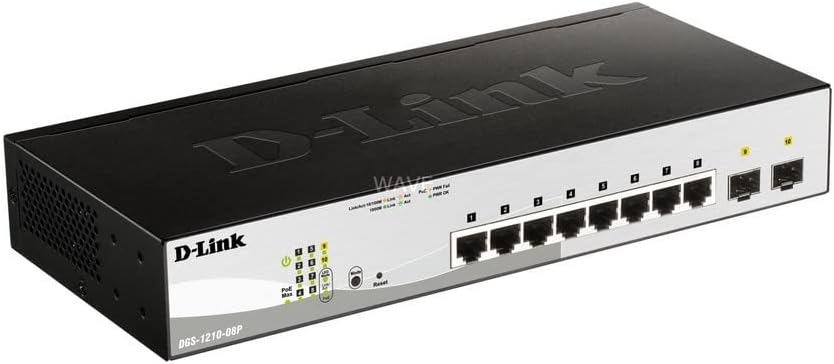
Малюнак 1: Пад вуглом view of the D-Link DGS-1210-08P Smart Switch, showcasinдзякуючы кампактнаму дызайну і размяшчэнню партоў.

Малюнак 2: Спераду view of the D-Link DGS-1210-08P Smart Switch, highlighting the 8 Gigabit Ethernet ports and 2 SFP ports, along with LED indicators.

Малюнак 3: Задняя частка view of the D-Link DGS-1210-08P Smart Switch, showing the power input and grounding screw.

Figure 4: D-Link DGS-1210-08P Smart Switch with key dimensions indicated: 28 cm length, 12.6 cm width, and 4.4 cm height.
3. Настройка
3.1 Фізічная ўстаноўка
- Размяшчэнне: Position the switch on a flat, stable surface or mount it in a standard 19-inch equipment rack using the provided rackmount kit. Ensure adequate ventilation around the unit.
- Асяроддзе: Avoid placing the switch in direct sunlight, near heat sources, or in areas with high humidity or dust.
3.2 Падключэнне харчавання
- Connect the power adapter to the power input port on the rear panel of the switch.
- Падключыце іншы канец адаптара сілкавання да адпаведнай разеткі.
- Verify that the Power LED on the front panel illuminates, indicating the switch is receiving power.
3.3 Сеткавае падключэнне
- Connect your network devices (computers, servers, network cameras, IP phones) to the RJ45 Ethernet ports (1-8) on the front panel using standard Ethernet cables.
- For fiber optic connections, insert SFP transceivers into the SFP ports (9-10) and connect fiber optic cables.
- For PoE-powered devices, connect them to any of the 8 PoE-enabled ports. The switch will automatically detect and provide power to compatible devices.
3.4 Пачатковая канфігурацыя
The DGS-1210-08P is a managed switch, allowing for advanced configuration via a web-based graphical user interface (GUI). Refer to the detailed D-Link documentation for specific instructions on accessing and configuring the web interface, including default IP addresses and login credentials.
4. Інструкцыя па эксплуатацыі
4.1 Функцыянальнасць харчавання па Ethernet (PoE)
The switch's 8 PoE ports automatically detect and supply power to IEEE 802.3af compliant devices. This eliminates the need for separate power cables for devices like IP cameras or VoIP phones, simplifying deployment and reducing cable clutter.
4.2 Перадача дадзеных
The Gigabit Ethernet ports support high-speed data transfer up to 1000 Mbps, while the SFP ports provide flexible uplink options. The switch operates automatically to forward data packets between connected devices.
5. Тэхнічнае абслугоўванне
5.1 Ачыстка
Regularly clean the exterior of the switch with a soft, dry cloth. Do not use liquid or aerosol cleaners. Ensure ventilation openings are free from dust and obstructions.
5.2 Абнаўленне прашыўкі
Periodically check the D-Link support website for firmware updates. Keeping the switch's firmware up-to-date ensures optimal performance, security, and access to new features.
6. Выпраўленне непаладак
6.1 Праблемы з харчаваннем
- If the Power LED is off, ensure the power adapter is securely connected to both the switch and a working power outlet.
- Праверце разетку з дапамогай іншай прылады, каб пераканацца ў яе працаздольнасці.
6.2 Праблемы з падключэннем
- Check that Ethernet cables are securely connected to both the switch and the network device.
- Verify that the Link/Act LED for the connected port is illuminated or blinking, indicating a valid connection and activity.
- Пераканайцеся, што падключаная прылада ўключана і правільна настроена.
6.3 PoE Issues
- Confirm that the connected device is IEEE 802.3af compliant.
- Check the PoE status LEDs on the switch for any error indications.
- Ensure the total power budget (65W) is not exceeded by all connected PoE devices.
7. Тэхнічныя характарыстыкі
| Памеры прадукту | 28 Д x 12.6 Ш x 4.4 У см |
| Вага прадмета | 1.23 кілаграма |
| тtage | 240 Вольт |
| Housing Material Type | Пластыкавыя |
| Максімальная магутнасць (бюджэт PoE) | 65 ват |
| Тып інтэрфейсу | SFP, RJ45 |
| Хуткасць перадачы даных | 2000 мегабіт у секунду |
| Намінальны ток | 2 Ampраней |
| Вытворца | D-Link Mediterraneo S.r.l. |
| Марка | D-Link |
| серыял | ДГС-1210-08П |
| Колер | Чорны |
| Нумар мадэлі тавару | ДГС-1210-08П |
| Колькасць партоў Ethernet | 8 |
| Агульная ватtage | 97 ват |
| Тып блока харчавання | Type F Connector (EU) |
| Уключаныя кампаненты | Пераключальнік |
8. Гарантыя і падтрымка
8.1 Інфармацыя аб гарантыі
This product originates from and is shipped within the European Economic Area (EEA). It is an original product from manufacturer-authorized distributors. For specific warranty terms and conditions, please refer to the warranty card included with your product or visit the official D-Link webсайт.
8.2 Тэхнічная падтрымка
For further assistance, technical support, or to download the latest drivers and firmware, please visit the official D-Link support webсайт: www.dlink.com/support.