
1. Уводзіны
The ICY DOCK FatCage MB155SP-B is a 5-bay hot-swappable backplane cage designed to accommodate five 3.5" SATA I/II/III hard drives within three standard 5.25" drive bays of a computer chassis. This unit provides efficient data storage expansion with hot-swap capabilities, enhanced cooling, and a robust design for various applications.
2. Асаблівасці прадукту
- Accommodates five 3.5" SATA I/II/III (SATA 6Gbps) hard drives.
- Installs into three standard 5.25" device bays.
- Full support for SATA Hot-Swap functionality.
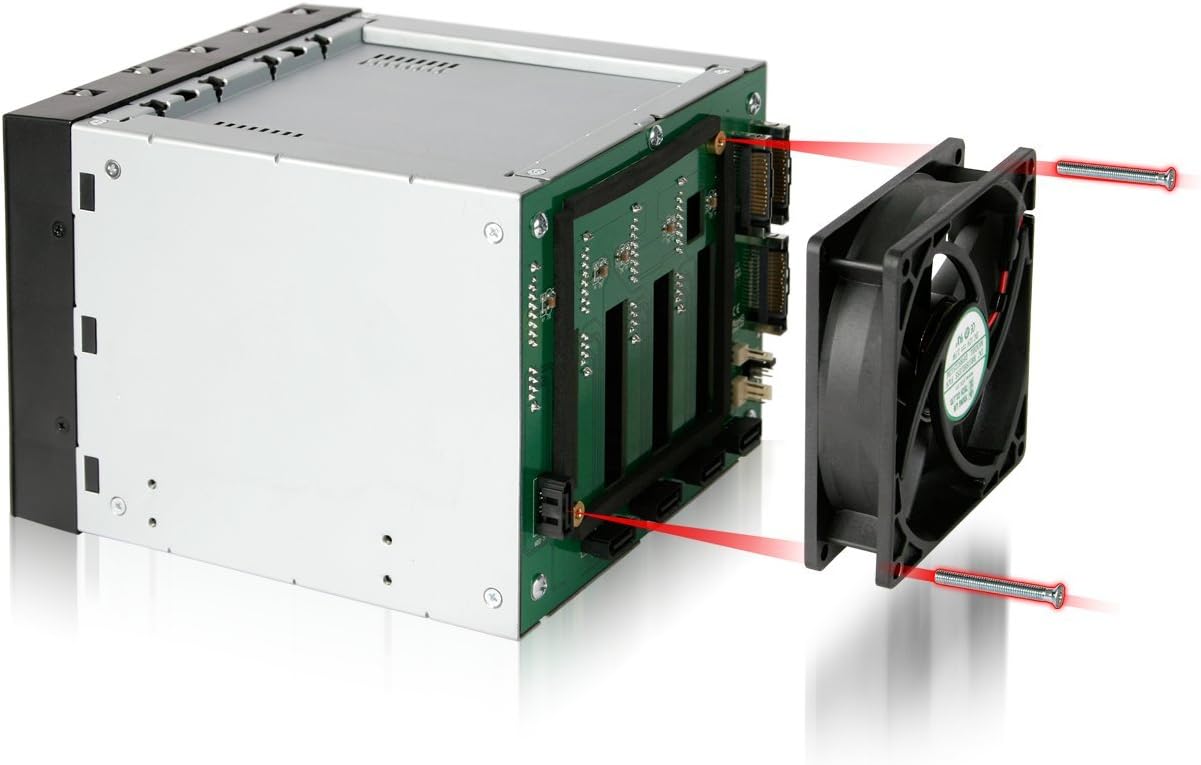
- Integrated 92mm cooling fan with adjustable speed for effective heat dissipation.
- Full metal body construction for durability and thermal performance.
- Кампактны і займальны дызайн.
- Interchangeable EZ-Tray design for secure drive installation and maintenance.
- Compatible with DataCage Classic MB45X, ICYBento MB559, and ICYCube MB561 series trays.
- Utilizes 15-pin SATA power connectors for modern system compatibility.
3. Змесціва ўпакоўкі
Праверце наяўнасць усіх прадметаў у камплекце:
- ICY DOCK FatCage MB155SP-B unit
- 5 x Hard Drive Trays (EZ-Tray)
- Крапежныя шрубы
- Кіраўніцтва карыстальніка (гэты дакумент)
4. Кіраўніцтва па ўстаноўцы
4.1 Installing the MB155SP-B into a PC Chassis
- Падрыхтуйце шасі: Ensure your computer is powered off and unplugged. Open the computer case and locate three consecutive empty 5.25" drive bays. Remove any bay covers or brackets as necessary.
- Insert the Cage: Carefully slide the MB155SP-B unit into the three 5.25" bays from the front of the chassis until the mounting holes align.
- Secure the Cage: Use the provided screws to secure the MB155SP-B to the chassis on both sides. Ensure it is firmly seated to prevent vibration.

4.2 Installing Hard Drives into EZ-Trays
- Remove a Tray: Press the release latch on the front of an EZ-Tray and pull the handle to slide the tray out of the MB155SP-B unit.
- Усталюйце жорсткі дыск: Place a 3.5" SATA hard drive into the tray. Align the screw holes on the drive with the holes on the tray. Secure the drive using the provided screws.
- Устаўце латок: Slide the loaded EZ-Tray back into the corresponding bay of the MB155SP-B until it clicks into place.


4.3 Connecting Power and Data Cables
- Падключыце харчаванне: Connect three 15-pin SATA power cables from your power supply unit (PSU) to the corresponding 15-pin SATA power ports on the back of the MB155SP-B.
- Connect Data: Connect five SATA data cables from your motherboard or RAID controller to the five 7-pin SATA data ports on the back of the MB155SP-B. Ensure each drive bay is connected to a dedicated SATA port on your host system.

5. Інструкцыя па эксплуатацыі
5.1 Функцыянальнасць гарачай замены
The MB155SP-B supports SATA hot-swap functionality, allowing you to insert or remove hard drives while the system is running, provided your motherboard or RAID controller also supports this feature. Always ensure proper software ejection procedures are followed before physically removing a drive to prevent data loss.
5.2 Святлодыёдныя індыкатары
Each drive bay features two LED indicators on the front panel:
- Зялёны святлодыёд: Indicates that the hard drive is powered on and ready.
- Жоўты святлодыёд: Flashes to indicate hard drive activity (data access).

5.3 Рэгуляванне хуткасці вентылятара
The MB155SP-B includes a 92mm cooling fan with adjustable speed settings. A jumper on the backplane allows you to select between "High," "Low," or "Off" fan speeds to balance cooling performance and noise levels. Refer to Figure 4.4 for the location of the fan speed jumper.

6. Тэхнічнае абслугоўванне
- Чыстка вентылятара: Periodically inspect the 92mm cooling fan for dust accumulation. If necessary, power down the system, unplug the unit, and carefully clean the fan blades using compressed air or a soft brush. The fan can be removed for thorough cleaning if needed (refer to Figure 6.1).
- Генеральная ўборка: Keep the exterior of the unit clean with a soft, dry cloth. Avoid using liquid cleaners directly on the unit.
- Кабельныя злучэнні: Пераканайцеся, што ўсе кабелі харчавання і перадачы дадзеных надзейна падключаны, каб пазбегнуць перыядычных праблем.
7. Выпраўленне непаладак
| праблема | Магчымая прычына | Рашэнне |
|---|---|---|
| Жорсткі дыск не выяўлены. |
|
|
| No power to hard drives (Green LED off). |
|
|
| Overheating drives. |
|
|
8. Тэхнічныя характарыстыкі
| Нумар мадэлі | MB155SP-B |
| Сумяшчальнасць з драйверамі | 5 x 3.5" SATA I/II/III Hard Drives |
| Інтэрфейс хоста | 5 x 7-pin SATA Data Ports |
| Увод магутнасці | 3 x 15-pin SATA Power Connectors |
| Drive Bay Requirement | 3 x 5.25" Device Bays |
| Хуткасць перадачы даных | Up to 6 Gbps (SATA III) |
| Сістэма астуджэння | 92mm Cooling Fan with 3-speed control (High/Low/Off) |
| Будаўнічы матэрыял | Full Metal Body |
| Памеры (ДхШхВ) | 5.76 х 7.89 х 4.92 цалі (146.3 х 200.4 х 125 мм) |
| Вага прадмета | 3.55 фунта (1.61 кг) |
| Сумяшчальныя прылады | DataCage Classic MB45X, ICYBento MB559 & ICYCube MB561 series trays |
9. Гарантыя і падтрымка
9.1 Інфармацыя аб гарантыі
The ICY DOCK FatCage MB155SP-B comes with a 3-year limited warranty from the date of purchase. This warranty covers defects in materials and workmanship under normal use. Please retain your proof of purchase for warranty claims. The warranty does not cover damage caused by misuse, accident, modification, or unauthorized repair.
9.2 Тэхнічная падтрымка
For technical assistance, troubleshooting, or warranty inquiries, please visit the official ICY DOCK webсайт або звярніцеся ў службу падтрымкі кліентаў. Кантактную інфармацыю звычайна можна знайсці на сайце вытворцы webсайт.
Webсайт: www.icydock.com