
Sagemcom Sixty
Sagemcom Sixty Cordless Telephone and Answer Machine
Model: Sixty
Марка: Sagemcom
Прадукт скончаныview
The Sagemcom Sixty Cordless Telephone and Answer Machine combines modern technology with a classic design. Its unique aesthetic, smooth finish, and touchscreen functionality make it a distinctive addition to any environment. Designed for user comfort, the Sixty offers a range of features including hands-free mode, extended battery life, and an intuitive interface for easy communication.
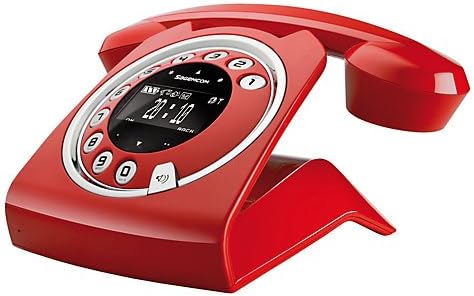
Image: The Sagemcom Sixty Cordless Telephone and Answer Machine in red, showcasing its unique retro-modern design with a circular dial and digital display.

Выява: Збоку view of the Sagemcom Sixty Cordless Telephone, highlighting its sleek profile and the cradle design.
Кіраўніцтва па ўстаноўцы
1. Распакаванне
Carefully remove all components from the packaging. Ensure you have the base unit, handset, power adapter, and telephone line cord.
2. Падключэнне базавага блока
- Connect the power adapter to the 'DC IN' port on the back of the base unit and plug the other end into a wall outlet.
- Connect one end of the telephone line cord to the 'LINE' port on the base unit and the other end to your telephone wall jack.
3. Усталёўка і зарадка акумулятара
- Адкрыйце батарэйны адсек на трубцы.
- Устаўце акумулятарныя батарэйкі, якія ўваходзяць у камплект, выконваючы правільную палярнасць (+ і -).
- Зачыніце батарэйны адсек.
- Place the handset on the base unit. The display will indicate charging. Allow the handset to charge for at least 16 hours before first use to ensure optimal battery performance.
Інструкцыя па эксплуатацыі
Здзяйсненне і прыём званкоў
- Каб зрабіць званок: Падніміце слухаўку або націсніце Тэлефануйце button. Dial the number using the touchscreen keypad.
- Каб прыняць выклік: Падніміце слухаўку або націсніце Тэлефануйце кнопку, калі тэлефануе тэлефон.
- Каб завяршыць выклік: Пакладзеце трубку назад на базу або націсніце кнопку Завяршыць выклік кнопка.
Выкарыстанне сэнсарнага экрана
The Sixty features a responsive touchscreen for navigation and input. Tap icons or numbers to select functions or dial. Swipe to scroll through lists or menus.
Рэжым гучнай сувязі
Падчас размовы націсніце Дакладчык button to activate hands-free mode. Press it again to return to handset mode.
Кіраванне тэлефоннай кнігай
- Даданне кантакту: Navigate to the Phonebook menu, select 'Add New Contact', enter the name and number using the touchscreen, and save. The phonebook can store up to 150 names.
- Пошук кантакту: Access the Phonebook and use the search function or scroll through the list.
- Рэдагаванне/выдаленне кантакту: Select the desired contact from the Phonebook and choose the 'Edit' or 'Delete' option.
Функцыі аўтаадказчыка
The integrated answering machine has a recording capacity of 10 minutes.
- Актывацыя/дэактывацыя: Access the Answering Machine menu to turn it on or off.
- Прайграванне паведамленняў: Select 'Play Messages' from the Answering Machine menu.
- Запіс выходнага паведамлення: Follow the prompts in the Answering Machine menu to record a personalized outgoing message.
Тэхнічнае абслугоўванне
Cleaning Your Phone
To clean the phone, wipe it with a soft, damp cloth. Do not use abrasive cleaners or solvents, as these can damage the surface. Ensure the phone is disconnected from power before cleaning.
Сыход за батарэяй
- Always use the supplied rechargeable batteries.
- Калі тэлефон не будзе выкарыстоўвацца працяглы час, выміце батарэйкі, каб прадухіліць іх уцечку.
- Утылізуйце старыя батарэі адказна ў адпаведнасці з мясцовымі правіламі.
Ліквідацыю непаладак
| праблема | Магчымае рашэнне |
|---|---|
| Няма сігналу набору | Check if the telephone line cord is securely connected to both the base unit and the wall jack. Ensure the power adapter is plugged in. |
| Тэлефон не зараджаецца | Ensure the handset is correctly placed on the base unit. Clean the charging contacts on both the handset and base unit with a dry cloth. Verify the power adapter is working. |
| Дрэнная якасць гуку | Падыдзіце бліжэй да базавай прылады. Праверце на наяўнасць перашкод ад іншых электронных прылад. Пераканайцеся, што тэлефонны шнур не пашкоджаны. |
| Дысплей пусты | Check if the handset battery is charged. If not, place it on the base unit to charge. Ensure the power adapter is connected to the base unit. |
| Немагчыма рабіць або прымаць званкі | Verify that the telephone line is active. Check all cable connections. Restart the base unit by unplugging and replugging the power adapter. |
Тэхнічныя характарыстыкі
| Асаблівасць | Спецыфікацыя |
|---|---|
| Марка | Sagemcom |
| мадэль | Шэсцьдзесят |
| Колер | Чырвоны |
| Тып тэлефона | Бесправадная |
| Час размовы па тэлефоне | Да 10 гадзін |
| Час чакання | Да 120 гадзін |
| Recording Capacity (Answering Machine) | 10 хвілін |
| Ёмістасць тэлефоннай кнігі | 150 Імёны |
| ASIN | B00DX64LPI |
| Першая даступная дата | 15 красавіка 2014 г |
Гарантыя і падтрымка
For warranty information and customer support, please refer to the documentation included with your purchase or visit the official Sagemcom webсайт. Захоўвайце пацвярджэнне пакупкі для любых гарантыйных прэтэнзій.