
Plugable UD-3900
Plugable UD-3900 Universal Laptop Docking Station
Інструкцыя карыстальніка
Уводзіны
This manual provides detailed instructions for setting up, operating, and troubleshooting your Plugable UD-3900 Universal Laptop Docking Station. This docking station is designed to expand the connectivity of your laptop, offering dual HDMI display outputs, multiple USB ports, Gigabit Ethernet, and audio jacks through a single connection to your host computer.
Прадукт скончаныview
The Plugable UD-3900 is a versatile docking solution for both Windows and Mac laptops. It features a hybrid 2-in-1 USB 3.0 and USB-C cable for broad compatibility.

Малюнак 1: спераду і ззаду View of the Plugable UD-3900 Docking Station
Што ў скрынцы:
- Plugable UD-3900 USB Docking Station
- Power Adapter (UL 62368-1 Certified)
- Hybrid 2-in-1 USB 3.0 and USB-C Cable

Малюнак 2: Змест пакета
Функцыі і парты
The UD-3900 docking station provides a comprehensive set of ports to expand your laptop's capabilities:

Figure 3: Port Layout and Features
- Dual HDMI Video Outputs: Supports resolutions up to 1920x1200 @ 60Hz for two displays. A single HDMI display can reach 2560x1440 @ 50Hz. Note: 4K resolution is not supported.
- Гігабітны Ethernet: Provides a stable and fast wired network connection.
- Аўдыёраздымы: Separate 3.5mm jacks for headphone output and microphone input.
- Порты USB 3.0: Two (2) USB 3.0 ports for high-speed data transfer.
- Порты USB 2.0: Four (4) USB 2.0 ports for connecting various peripherals like keyboards, mice, and printers.
- Hybrid USB 3.0 / USB-C Cable: A single cable connects the dock to your host laptop, supporting both USB-A and USB-C ports.
Сумяшчальнасць
The Plugable UD-3900 docking station is designed for universal compatibility with a wide range of operating systems and devices:

Figure 4: Operating System and Device Compatibility
- Windows: Compatible with Windows 11, 10, 8.x, and 7. Driver installation is typically plug-and-play via Windows Update.
- MacOS: Compatible with macOS 10.14 or later. A manual DisplayLink driver installation is required. Instructions are provided with the product.
- ChromeOS: Compatible with ChromeOS 100 or later, requiring no additional setup.
- Incompatible Systems: Not compatible with Linux/Unix systems. Does not support some non-DisplayLink adapters, DisplayPort connections, or HDCP protected content.
Кіраўніцтва па ўстаноўцы
Follow these steps to set up your Plugable UD-3900 docking station:
- Падключыце харчаванне: Connect the included power adapter to the DC 5V/4A input port on the back of the docking station, then plug the adapter into a wall outlet.
- Падключэнне да хост-ноўтбука: Use the provided hybrid 2-in-1 USB 3.0 and USB-C cable to connect the docking station to an available USB 3.0 (USB-A) or USB-C port on your laptop.
- Ўстаноўка драйвераў (пры неабходнасці):
- For Windows: Drivers typically install automatically via Windows Update upon first connection.
- For macOS: A manual DisplayLink driver installation is required. Please refer to the included instructions or the Plugable support website for the latest driver and installation guide.
- For ChromeOS: No additional driver installation is needed.
- Падключыць маніторы: Connect your HDMI monitors to the two HDMI output ports on the back of the docking station using HDMI cables.
- Падключэнне перыферыйных прылад: Plug your USB devices (keyboard, mouse, external drives), Ethernet cable, and audio devices into the corresponding ports on the docking station.
Інструкцыя па эксплуатацыі
Канфігурацыя дысплея:
Once connected, your operating system should detect the external monitors. You can configure your display settings (extend, duplicate, or primary display) through your computer's display settings. For optimal performance, ensure your display drivers are up to date.
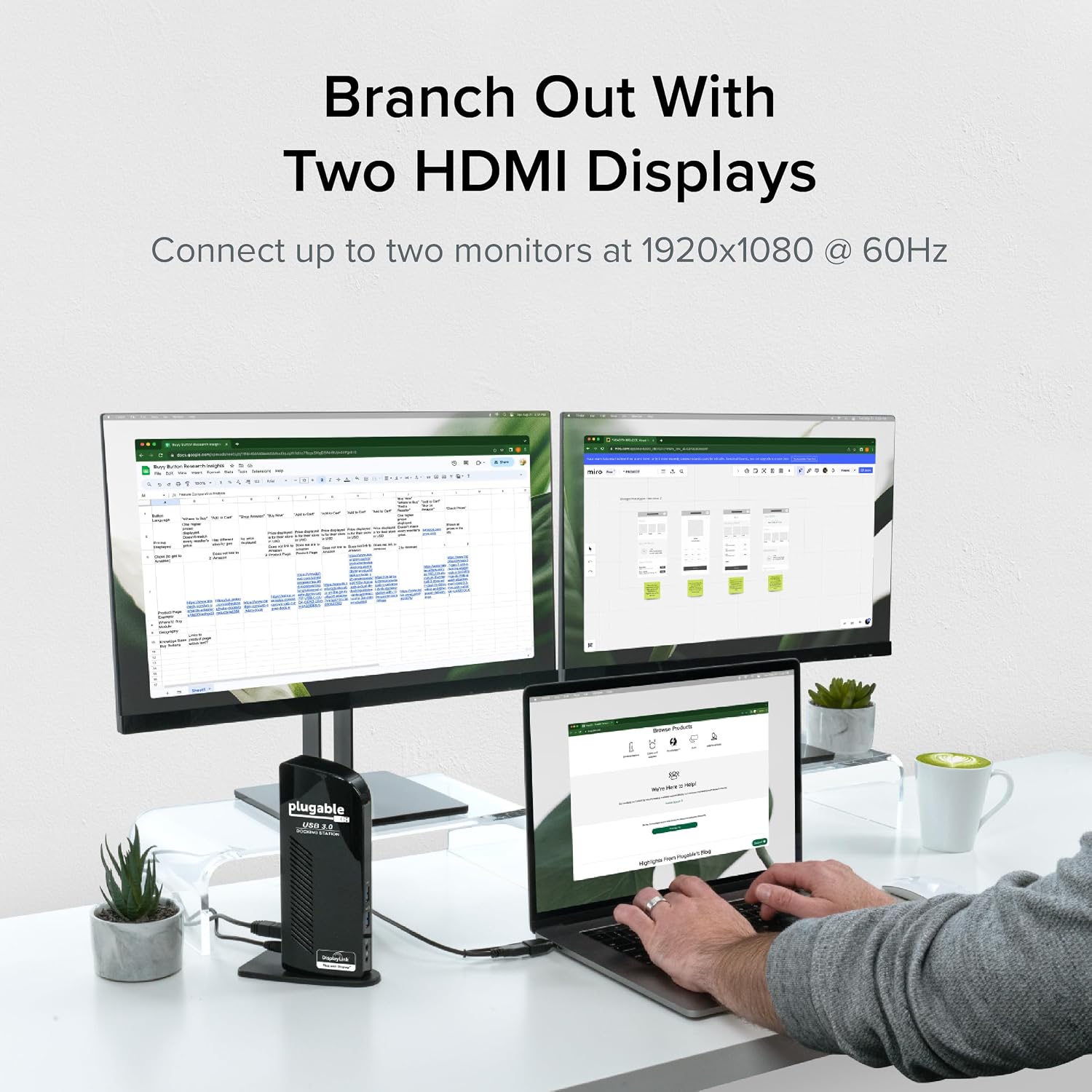
Figure 5: Dual Monitor Setup Example
Зарадка ноўтбука:
Important Note: This USB docking station does not charge the host laptop.
An external power supply is needed to charge your host system. The docking station provides power to its own internal components and connected USB peripherals, but not to the laptop itself.

Figure 6: Dock Does Not Charge Laptop
Рэкамендацыі па выкарыстанні:
The UD-3900 is ideal for web browsing, productivity software, and general office tasks. It is not recommended for gaming or applications requiring high-performance graphics due to the nature of DisplayLink technology.
Тэхнічнае абслугоўванне
Каб забяспечыць даўгавечнасць і аптымальную прадукцыйнасць вашай док-станцыі:
- Keep the device in a clean, dry environment.
- Пазбягайце ўздзеяння на прыладу экстрэмальных тэмператур або прамых сонечных прамянёў.
- Do not block the ventilation slots on the sides of the docking station.
- Працірайце вонкавыя паверхні мяккай сухой тканінай. Не выкарыстоўвайце вадкія ачышчальнікі або аэразолі.
- Disconnect the power adapter when the device is not in use for extended periods.
Ліквідацыю непаладак
If you encounter issues with your Plugable UD-3900 docking station, please refer to the following common solutions or consult the official troubleshooting guide:
- Няма вываду на дысплей: Ensure all cables (power, host, HDMI) are securely connected. Verify that the correct DisplayLink drivers are installed and up to date for your operating system. Try restarting your computer.
- USB-прылады не працуюць: Confirm the docking station is powered on and connected to your host. Try connecting the USB device to a different port on the dock or directly to your computer to isolate the issue.
- Праблемы з падключэннем да сеткі: Check the Ethernet cable connection to both the dock and your router/modem. Verify network settings on your computer.
- Праблемы з гукам: Ensure speakers/headphones are properly connected to the audio output jack. Check your computer's sound settings to confirm the docking station's audio output is selected as the default device.
- Праблемы з драйверамі: If displays are not functioning correctly, reinstall the DisplayLink drivers. For macOS, manual installation is always required.
For more detailed troubleshooting steps, you can refer to the official Кіраўніцтва па ліквідацыі непаладак (PDF).
Інфармацыя па бяспецы:
Standard USB ports on the docking station are not primarily designed for charging USB devices. While some devices may charge in certain scenarios, USB device charging behavior can vary. For detailed information on device-specific charging behaviors, please consult the product listing page on the Plugable webсайт.
Тэхнічныя характарыстыкі
| Асаблівасць | Спецыфікацыя |
|---|---|
| Нумар мадэлі | УД-3900 |
| Connectivity to Host | Hybrid USB 3.0 (USB-A) and USB-C |
| Відэавыхады | 2x HDMI |
| Максімальнае разрозненне (два дысплеі) | 1920x1200 пры 60 Гц |
| Максімальнае разрозненне (адзін дысплей) | 2560x1440 пры 50 Гц |
| Парты USB | 2x USB 3.0, 4x USB 2.0 (Total 6 USB Ports) |
| Ethernet | Гігабітны Ethernet |
| Аўдыё | 3.5mm Headphone Output, 3.5mm Microphone Input |
| Крыніца харчавання | DC Power Adapter (20 watts) |
| Памеры (ДхШхВ) | 6.45 х 3.22 х 4.02 цалі |
| Вага прадмета | 13 унцыі |
| Апаратная платформа | PC |
Гарантыя і падтрымка
Every Plugable product, including the UD-3900 docking station, is covered against defects for 2 гады from the date of purchase. Plugable also provides пажыццёвая тэхнічная падтрымка для сваёй прадукцыі.
If you have any questions or require assistance, please do not hesitate to contact the Plugable North American-based support team. You can find contact information and additional resources on the official Plugable webсайт або наведаўшы Plugable Store on Amazon.
Ask a question about this manual
Ask about setup, troubleshooting, compatibility, parts, safety, or missing instructions. Manuals+ will review the question and use this page’s manual context to help answer it.