
Уводзіны
This manual provides comprehensive instructions for the setup, operation, and maintenance of your VTech CS6829-2 2-Handset Cordless Phone with Answering System. This system is designed for home use, offering features such as caller ID, a digital answering machine, backlit keypad, and a full duplex speakerphone for enhanced communication.
Што ў скрынцы
Праверце, ці ўсе прадметы ўваходзяць у ваш пакет:
- Базавая адзінка
- 2 бесправадных тэлефонаў
- Зарадная прылада
- 2 адаптара
- 2 батарэі
- Тэлефонны шнур
- Насценны кранштэйн
- Кароткае кіраўніцтва
Настройка
Follow these steps to set up your VTech CS6829-2 phone system:
- Падключыце базавы блок:
Plug one end of the telephone line cord into the TEL LINE jack on the back of the base unit. Plug the other end into a telephone wall jack. Plug the small end of the power adapter into the POWER jack on the back of the base unit. Plug the large end of the power adapter into a wall outlet not controlled by a wall switch.
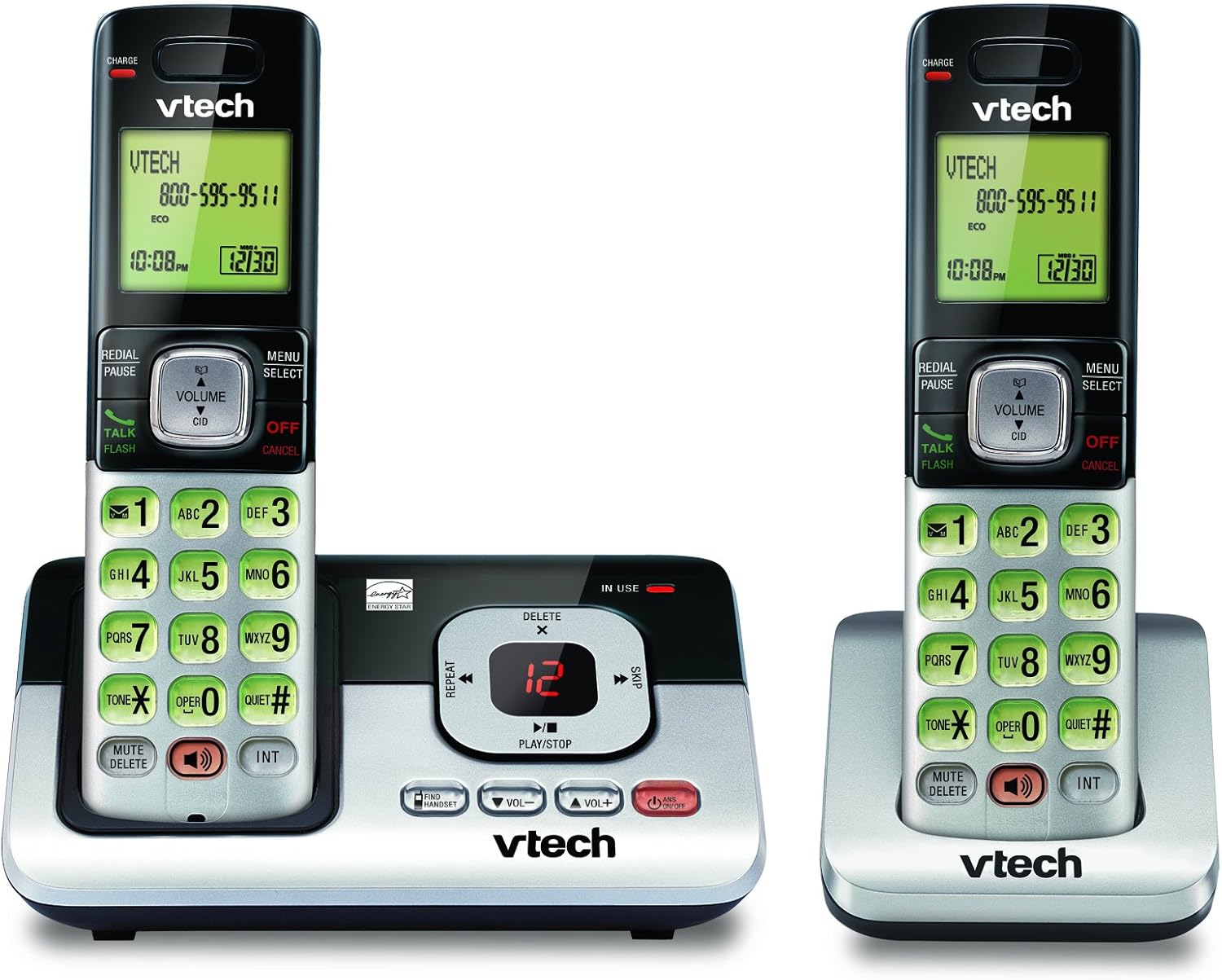
Image: The VTech CS6829-2 base unit with one handset docked, and a second handset with its charging cradle. This illustrates the main components of the phone system.
- Усталюйце батарэйкі ў тэлефон:
Open the battery compartment cover on the back of each handset. Connect the battery pack connector securely into the jack inside the compartment. Place the battery pack with the label facing up and tuck the wires inside the compartment. Close the battery compartment cover.
- Зарадка тэлефонаў:
Place each handset in the base unit or charger with the display facing up. The CHARGE light on the handset will illuminate, indicating proper charging. Allow the handsets to charge for at least 16 hours before initial use for optimal battery performance.

Выява: Пад вуглом view of the VTech CS6829-2 base unit with one handset docked, and the second handset in its separate charging cradle. This shows how the handsets are placed for charging.
- Усталяваць дату і час:
After the handsets are charged, follow the on-screen prompts or refer to the quick start guide to set the date and time. This is important for accurate caller ID and answering system timestamps.
Інструкцыя па эксплуатацыі
Здзяйсненне і адказ на званкі
- Каб зрабіць званок: Прэса ГОВОР / МІГАЦЬ or any dialing key to get a dial tone, then dial the phone number.
- Каб адказаць на званок: Калі тэлефон зазвоніць, націсніце ГОВОР / МІГАЦЬ або любую клавішу набору.
- Каб завяршыць выклік: Прэса ВЫКЛ/АДМЕНА or place the handset back in the base unit/charger.
Лічбавая сістэма адказаў
- Прайграванне паведамленняў: На базавым блоку націсніце ПРАЙГРАЦЬ/СТОП. On a handset, press МЕНЮ/ВЫБАР, scroll to "Answering System", then select "Play Messages".
- Recording an Outgoing Announcement: On the base unit or handset, navigate to the answering system menu and select "Record OGM" (Outgoing Message).
- Выдаленне паведамленняў: Падчас прайгравання паведамлення націсніце ВЫДАЛІЦЬ на базавай прыладзе або трубцы.
Функцыя гучнай сувязі
- To Use Speakerphone: Падчас размовы націсніце СПІКЕР button on the handset. Press it again to switch back to the handset earpiece.
Асноўныя характарыстыкі
- Digital Answering System with LED Indicator and Volume Control: This system records up to 14 minutes of messages, announcements, and memos. An LED indicator notifies you of new messages. Volume control keys on the base allow easy adjustment of message playback volume.
- Caller ID / Call Waiting — Stores up to 50 Calls: Displays the name, number, time, and date of incoming calls, helping you identify callers before answering.
- Поўная дуплексная гучная сувязь: The handset features a full duplex speakerphone, enabling natural two-way conversations where both parties can speak and be heard simultaneously.
- Клавіятура і дысплей з падсветкай: The entire keypad and LCD screen on the handset illuminate, ensuring clear visibility and easy dialing even in low-light conditions.
- ECO Mode Power-Conserving Technology: This technology optimizes power consumption for extended battery performance and energy efficiency.
- Ціхі рэжым: Allows you to silence the ringer on both the handset and base unit immediately or for a set period, providing peace and quiet when needed.
Тэхнічнае абслугоўванне
- Уборка: Чысціце тэлефон і базу мяккай губкайamp cloth. Do not use cleaning sprays or liquid cleaners.
- Сыход за батарэяй: Replace batteries when they no longer hold a charge. Use only the specified battery type. Dispose of old batteries responsibly according to local regulations.
- Умовы навакольнага асяроддзя: Пазбягайце размяшчэння тэлефона пад прамымі сонечнымі прамянямі, побач з крыніцамі цяпла або ў месцах з падвышанай вільготнасцю.
Ліквідацыю непаладак
If you experience issues with your phone, try the following solutions:
| праблема | Рашэнне |
|---|---|
| Няма нумара набору. | Ensure the telephone line cord is securely plugged into both the base unit and the wall jack. Check that the power adapter is plugged into a working electrical outlet. |
| Тэлефон не зараджаецца. | Ensure the handset is properly seated in the base unit or charger. Clean the charging contacts on both the handset and base/charger with a dry cloth. Verify the power adapter is connected. |
| Дрэнная якасць гуку / Статычны шум. | Move the handset closer to the base unit. Avoid placing the phone near other electronic devices (e.g., microwaves, computers) that may cause interference. Check the telephone line cord for damage. |
| Answering system not recording messages. | Ensure the answering system is turned ON. Check if the memory is full; delete old messages if necessary. |
Тэхнічныя характарыстыкі
| Асаблівасць | Дэталь |
|---|---|
| Нумар мадэлі | CS6829-2 |
| Памеры прадукту | 5.77 х 3.41 х 6.77 цалі |
| Вага прадмета | 1.41 фунта |
| Батарэі | Патрабуецца 2 батарэя для канкрэтнага прадукту (у камплекце) |
| Тып аўтаадказчыка | Лічбавы |
| Памяць ідэнтыфікатара абанента | Да 50 званкоў |
| Час запісу аўтаадказчыка | Да 14 хвілін |
| Колер | Чорны/Срэбны |
| Тып тэлефона | Бесправадная |
Гарантыя і падтрымка
Каб атрымаць інфармацыю пра гарантыю і тэхнічную падтрымку, звярніцеся да гарантыйнага талона, які пастаўляецца з вашым прадуктам, або наведайце афіцыйны сайт VTech. webсайт. Захоўвайце чэк аб куплі як пацвярджэнне пакупкі для гарантыйных прэтэнзій.
Вы таксама можаце наведаць в Крама VTech на Amazon каб атрымаць дадатковую інфармацыю пра прадукт і рэсурсы падтрымкі.