
1. Уводзіны
The D-Link DIR-808L Wireless AC600 Dual-Band Cloud Router provides high-speed Wi-Fi connectivity with dual-band technology and Fast Ethernet ports. This device is designed to deliver a reliable networking experience for home use, supporting activities such as HD media streaming, online gaming, and web browsing. It includes security features and mydlink Cloud Services for remote network management.
The DIR-808L is backward compatible with existing Wi-Fi devices (802.11a/b/g/n) for seamless integration into your current network setup.
2. Змесціва ўпакоўкі
Пераканайцеся, што ваш пакет змяшчае наступныя элементы:
- Wireless AC600 Dual Band Cloud Router (DIR-808L)
- Адаптар сілкавання
- Кабель Ethernet
- Кіраўніцтва па хуткай ўстаноўцы
If any of the above items are missing or damaged, please contact your local D-Link reseller.
3. Мінімальныя сістэмныя патрабаванні
To set up and use the D-Link DIR-808L router, ensure your computer meets the following minimum requirements:
- Аперацыйная сістэма: Windows® 8, Windows® 7, Windows Vista®, Windows® XP SP3, or Mac OS® X (v10.4 or higher)
- Web Браўзэр: Internet Explorer® v6, Mozilla® Firefox®, Google Chrome, or Safari 4 or higher
- Абсталяванне: Сеткавы інтэрфейс (NIC)
For Internet access, you will also need:
- Кабельны або DSL-мадэм
- Падпіска ў Інтэрнэт-правайдэра (ISP)
4. Абсталяванне скончыласяview
Familiarize yourself with the physical components and ports of your DIR-808L router.

Малюнак 4.1: Фронт view of the DIR-808L router with power and internet status indicators.

Малюнак 4.2: Rear panel of the DIR-808L router, detailing port layout.
Апісанне задняй панэлі:
- Парты LAN (1-4): Four Fast Ethernet ports for connecting wired devices such as computers, gaming consoles, or network storage.
- Інтэрнэт-порт: Падключаецца да вашага мадэма для доступу ў Інтэрнэт.
- Кнопка скіду: Press and hold for 10 seconds to restore the router to factory default settings.
- Спажываная магутнасць: Падключыце адаптар харчавання, які ўваходзіць у камплект.
- Кнопка WPS: Use for easy, secure wireless connection to WPS-compatible devices.
5. Настройка і ўстаноўка
Follow these steps to set up your D-Link DIR-808L router.
5.1 Фізічнае злучэнне
- Выключэнне: Адключыце харчаванне ад мадэма і маршрутызатара (калі гэта магчыма).
- Падключэнне мадэма: Connect an Ethernet cable from your modem's Ethernet port to the Інтэрнэт port on the back of your DIR-808L router.
- Connect Computer (Optional): For initial setup, connect an Ethernet cable from your computer's Ethernet port to any of the лакальная сетка ports (1-4) on the back of your DIR-808L router. You can also connect wirelessly using the default Wi-Fi name and password found on the device label.
- Уключэнне мадэма: Connect the power adapter to your modem and power it on. Wait for the modem's indicator lights to stabilize, indicating an active internet connection.
- Уключэнне маршрутызатара: Падключыце адаптар сілкавання, які ўваходзіць у камплект Увод магутнасці on the back of your DIR-808L router and plug it into a power outlet. The power LED on the front of the router should illuminate.
5.2 Пачатковая канфігурацыя (Web браўзер)
After physical connections are made, configure your router using a web браўзер.
- Адкрыйце a web браўзер (напрыклад, Chrome, Firefox, Edge) на кампутары, падлучаным да маршрутызатара.
- У адраснай радку ўвядзіце
http://dlinkrouter.localor192.168.0.1і націсніце Enter. - The D-Link Setup Wizard should appear. Follow the on-screen instructions to configure your Internet connection, wireless network name (SSID), and password.
- Create a unique password for your router's administration interface for security.
5.3 Quick Router Setup Mobile App
Alternatively, you can use the D-Link Quick Router Setup mobile app for convenient setup from your smartphone or tablet.
- Download the "D-Link QRS Mobile" app from the Apple App Store or Google Play Store.
- Падключыце мабільную прыладу да сеткі Wi-Fi маршрутызатара па змаўчанні (SSID і пароль знаходзяцца на налепцы маршрутызатара).
- Launch the QRS Mobile app and follow the instructions to complete the setup.
6. Аперацыя
This section covers the basic operation of your DIR-808L router.
6.1 Dual-Band Wireless Performance
The DIR-808L operates on two frequency bands: 2.4 GHz and 5 GHz.
- Дыяпазон 2.4 ГГц: Забяспечвае больш шырокае пакрыццё і лепшае пранікненне скрозь сцены, падыходзіць для агульнага карыстання Інтэрнэтам і старых прылад.
- Дыяпазон 5 ГГц: Offers faster speeds and less interference, ideal for high-bandwidth activities like HD video streaming and online gaming, but with a shorter range.
You can configure separate SSIDs (network names) for each band or use a single SSID for both, allowing the router to intelligently assign devices to the optimal band.
6.2 Правадное падключэнне
The four Fast Ethernet LAN ports allow you to connect up to four wired devices directly to the router for stable and fast connections.
6.3 mydlink Cloud Management
mydlink Cloud Services enable you to monitor and manage your network remotely from anywhere using the mydlink Lite app or the mydlink web партал.
- Аддалены доступ: View connected devices, block unwanted users, and receive notifications.
- Бацькоўскі кантроль: Manage internet access schedules and block specific webсайты.
To use mydlink services, you will need to register your router with a mydlink account during or after the initial setup process.
6.4 Бяспека бесправадной сеткі
The DIR-808L supports WPA/WPA2 encryption to secure your wireless network. It is recommended to use WPA2-PSK (AES) for the strongest security.
- WPS (абароненая ўстаноўка Wi-Fi): Provides a simple way to connect WPS-compatible devices to your wireless network by pressing the WPS button on the router and the device.
7. Тэхнічнае абслугоўванне
Proper maintenance ensures optimal performance and longevity of your router.
- Абнаўленні прашыўкі: Periodically check the D-Link support website for firmware updates. Updating firmware can improve performance, add new features, and fix security vulnerabilities. Instructions for updating firmware are typically provided with the update package.
- Уборка: Keep the router in a clean, dust-free environment. Use a soft, dry cloth to clean the exterior. Do not use liquid cleaners or aerosols.
- Размяшчэнне: Place the router in a central location, away from obstructions and devices that may cause interference (e.g., cordless phones, microwaves).
8. Выпраўленне непаладак
This section addresses common issues you might encounter with your DIR-808L router.
8.1 Няма падключэння да Інтэрнэту
- Праверце кабелі: Пераканайцеся, што ўсе кабелі Ethernet надзейна падключаны да правільных партоў на маршрутызатары і мадэме.
- Цыкл харчавання: Power off your modem, then your router. Wait 30 seconds, then power on your modem first. Once the modem is fully online (indicator lights stable), power on your router.
- Статус мадэма: Verify that your modem has an active internet connection. Check its indicator lights or consult your modem's manual.
- Налады інтэрнэт-правайдэра: Confirm your Internet Service Provider (ISP) settings are correctly entered in the router's web інтэрфейс.
8.2 Slow Wireless Speed or Poor Range
- Размяшчэнне маршрутызатара: Position the router in a central location, elevated, and away from large metal objects, concrete walls, and other electronic devices that may cause interference.
- Перашкоды: Other wireless devices (cordless phones, microwaves, Bluetooth devices) can interfere with Wi-Fi signals. Try changing the wireless channel in the router's settings.
- Dual-Band Usage: Connect devices that require high bandwidth (e.g., streaming devices) to the 5 GHz band, and other devices to the 2.4 GHz band.
- Прашыўка: Пераканайцеся, што прашыўка вашага маршрутызатара абноўлена.
8.3 Немагчыма атрымаць доступ да маршрутызатараў Web Інтэрфейс
- IP-адрас: Пераканайцеся, што ваш камп'ютар настроены на аўтаматычнае атрыманне IP-адраса (DHCP).
- Правільны адрас: Double-check that you are typing the correct address:
http://dlinkrouter.localor192.168.0.1. - Temporary Disable Firewall/Antivirus: Часова адключыце любы брандмаўэр або антывіруснае праграмнае забеспячэнне на вашым кампутары, якія могуць блакаваць доступ.
- Скінуць налады маршрутызатара: If all else fails, perform a factory reset by pressing and holding the Reset button on the back of the router for 10 seconds. Заўвага: Гэта сатрэ ўсе вашы карыстальніцкія налады.
9. Тэхнічныя характарыстыкі
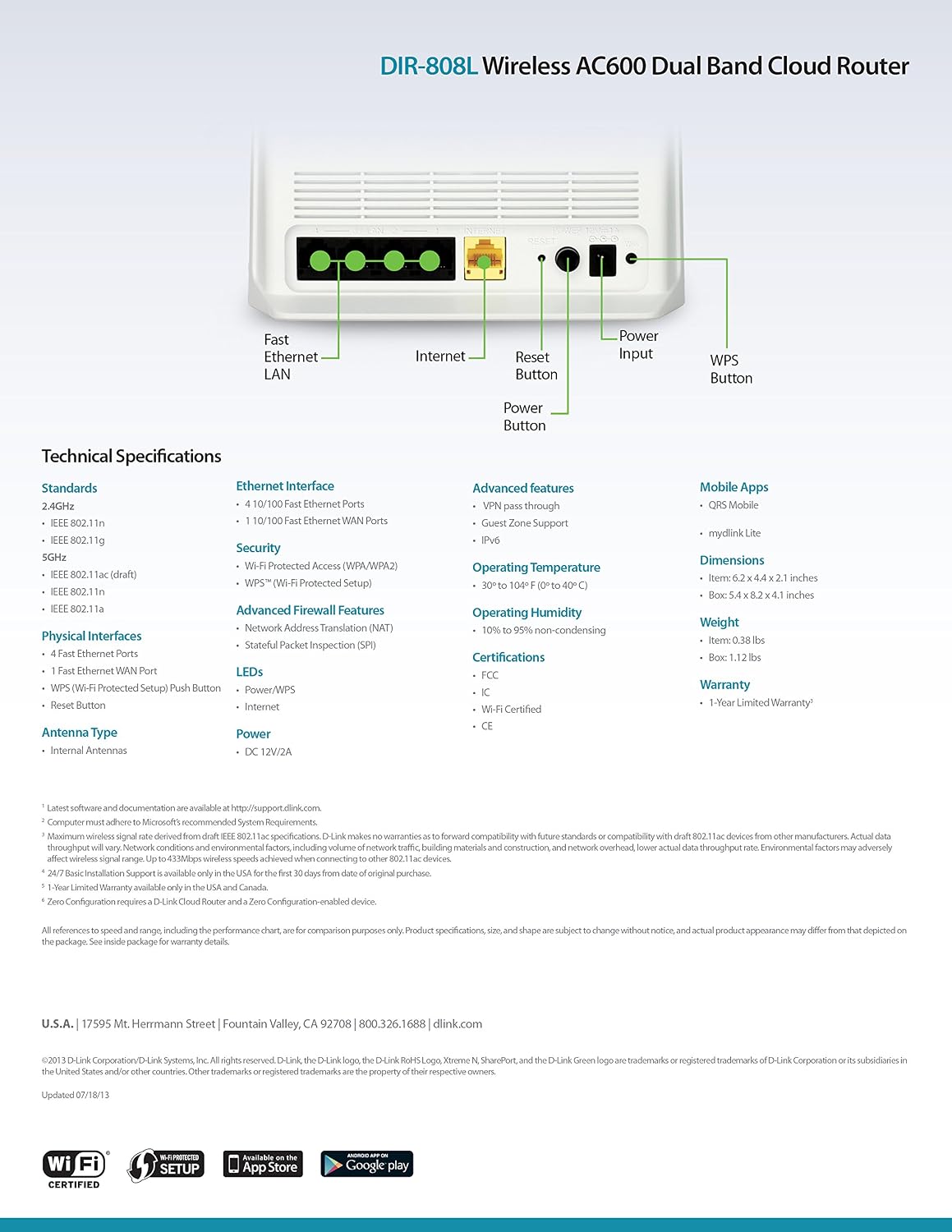
Малюнак 9.1: Technical specifications and rear panel diagram of the DIR-808L router.
| Асаблівасць | Апісанне |
|---|---|
| Назва мадэлі | ДЫР-808Л |
| Бесправадны тып | 802.11ac (AC600), 802.11a/b/g/n |
| Клас дыяпазону частот | Двухдыяпазонны (2.4 ГГц і 5 ГГц) |
| Правадное падключэнне | 4 x Fast Ethernet LAN Ports, 1 x Fast Ethernet WAN Port |
| Бяспека | WPA/WPA2, WPS (Wi-Fi Protected Setup) |
| Сумяшчальнасць аперацыйнай сістэмы | Windows, Mac, Android |
| Памеры (ДхШхВ) | 2.1 х 6.1 х 4.4 цалі |
| Вага прадмета | 7.2 унцыі (0.45 фунта) |
| Увод магутнасці | 12V DC, 1A |
| Працоўная тэмпература | Ад 0 да 40°C (ад 32 да 104°F) |
| Працоўная вільготнасць | Ад 10% да 95% без кандэнсацыі |
| Сертыфікаты | FCC, Wi-Fi Certified, CE |
10. Інфармацыя аб гарантыі
The D-Link DIR-808L Wireless AC600 Dual-Band Cloud Router comes with a 1-гадовая абмежаваная гарантыя з дня пакупкі. Гэтая гарантыя распаўсюджваецца на дэфекты матэрыялаў і вырабу пры звычайным выкарыстанні.
For full warranty terms and conditions, please refer to the warranty card included with your product or visit the official D-Link webсайт.
Legal Disclaimer: D-Link is not responsible for honoring warranty claims from unauthorized resellers. Please contact the manufacturer directly for official warranty service.
11. Тэхнічная падтрымка
If you encounter problems that are not addressed in this manual, or require further assistance, please contact D-Link Technical Support.
- Падтрымка D-Link Webсайт: Наведайце support.dlink.com for FAQs, documentation, and firmware downloads.
- Phone Support (U.S.): You may contact D-Link customer support at 1-877-453-5465. Please have your product model number (DIR-808L) and serial number ready when calling.