
Eurotime 23708-00
Лічбавы будзільнік Eurotime LCD, мадэль 23708-00, кіраўніцтва карыстальніка
Мадэль: 23708-00
Уводзіны
This manual provides instructions for the setup, operation, and maintenance of your Eurotime LCD Digital Alarm Clock, Model 23708-00. Please read this manual thoroughly before using the product to ensure proper function and longevity.
The Eurotime LCD Digital Alarm Clock features an LCD display, 7-color changing LED lighting, multiple natural alarm tones, and displays time, date, day of the week, and indoor temperature. It also includes a snooze function and a countdown feature.
Інфармацыя па бяспецы
- Захоўвайце прыладу далей ад вады і высокай вільготнасці.
- Не падвяргайце прыладу ўздзеянню прамых сонечных прамянёў або экстрэмальных тэмператур.
- Use only the specified battery type (3 x 1.5V AAA batteries).
- Не змешвайце старыя і новыя батарэі або розныя тыпы батарэй.
- Утылізуйце выкарыстаныя батарэі адказна ў адпаведнасці з мясцовымі правіламі.
- Не спрабуйце разбіраць або рамантаваць прыладу самастойна. Звярніцеся да кваліфікаванага персаналу для абслугоўвання.
Змест пакета
- Eurotime LCD Digital Alarm Clock (Model 23708-00)
- 3 батарэйкі 1.5 В ААА
- Кіраўніцтва карыстальніка (гэты дакумент)
Прадукт скончаныview
Азнаёмцеся з кампанентамі і элементамі кіравання вашага будзільніка.
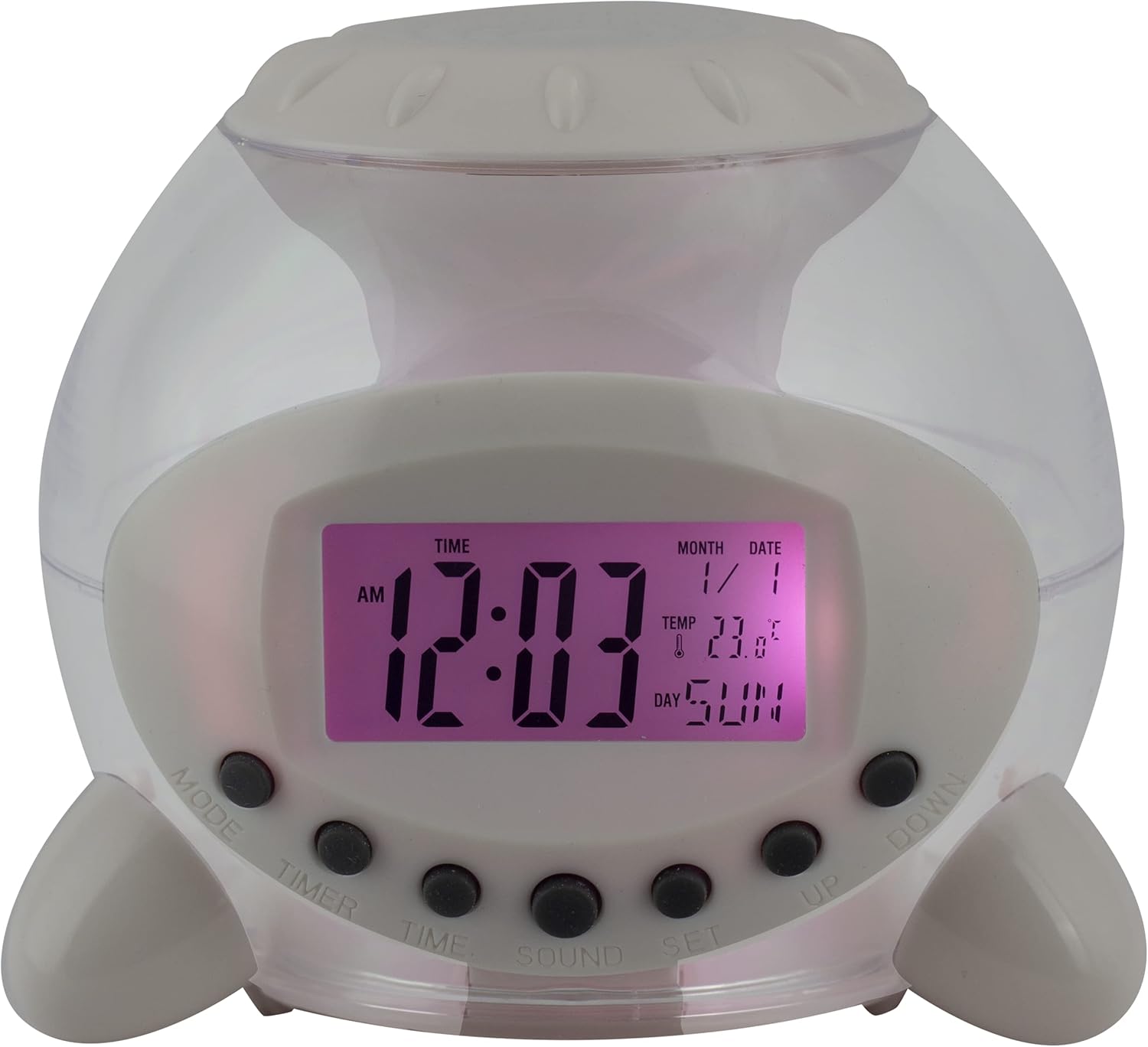
Малюнак 1: Спераду View of the Alarm Clock. This image displays the front of the Eurotime LCD Digital Alarm Clock, highlighting its transparent plastic housing and the central LCD screen. The screen shows the time (12:03 AM), month (1), date (1), temperature (23.8°C), and day (SUN). Below the screen are control buttons labeled MODE, TIMER, TIME, SOUND, and SET, along with UP and DOWN buttons.

Малюнак 2: бок View with Control Buttons. This image shows a side perspective of the alarm clock, emphasizing the array of control buttons located on the front-bottom edge. The transparent housing allows a glimpse of the internal structure and the LED lighting effect. The buttons are clearly visible for user interaction.

Малюнак 3: бок View with Internal Lighting. This image provides another side view, illustrating the transparent housing and the internal LED lighting. The light emanates from the base, creating a soft glow within the clock's structure, demonstrating its color-changing feature.
Кнопкі кіравання:
- Рэжым: Switches between time display, alarm setting, and countdown timer.
- ТАЙМЕР: Activates and sets the countdown timer.
- ЧАС: Выкарыстоўваецца для ўстаноўкі бягучага часу і даты.
- ГУК: Selects alarm tones or natural sounds.
- УСТАВ: Confirms settings or enters setting mode.
- УВЕРХ-УНІЗ: Adjusts values during setting modes.
Настройка
1. Устаноўка батарэі
- Locate the battery compartment on the bottom of the alarm clock.
- Адкрыйце крышку батарэйнага адсека.
- Insert three (3) 1.5V AAA batteries, ensuring correct polarity (+/-).
- Надзейна зачыніце крышку батарэйнага адсека.
Заўвага: The clock will automatically power on after battery installation. The display may flash, indicating it's ready for time setting.
Інструкцыя па эксплуатацыі
1. Устаноўка часу і даты
- У звычайным рэжыме адлюстравання часу націсніце ЧАС адзін раз націсніце кнопку. Лічбы гадзін будуць міргаць.
- Выкарыстоўвайце UP or УНІЗ кнопкі для рэгулявання гадзіны.
- Прэса ЧАС again to move to minute setting. Adjust with UP or УНІЗ.
- Працягвайце націскаць ЧАС каб пераключацца паміж наладамі года, месяца і даты, карэктуючы кожную з іх UP or УНІЗ.
- After setting the date, press ЧАС one last time or wait a few seconds for the settings to be saved and return to normal display.
2. Налада сігналізацыі
- Націсніце РЭЖЫМ button until "ALARM" appears on the display (or an alarm icon).
- Націсніце НАБОР кнопка. Лічбы гадзін будзільніка будуць міргаць.
- Выкарыстоўвайце UP or УНІЗ кнопкі для налады гадзін будзільніка.
- Прэса НАБОР again to move to minute setting. Adjust with UP or УНІЗ.
- Прэса НАБОР one last time to confirm the alarm time.
- Каб уключыць/выключыць будзільнік, націсніце кнопку UP button in alarm display mode. An alarm icon will appear/disappear.
3. Функцыя паўтору будзільніка
Калі гучыць будзільнік, націсніце любую кнопку (акрамя НАБОР or РЭЖЫМ) to activate the snooze function. The alarm will pause and sound again after a few minutes (duration is adjustable, refer to advanced settings if available).
Каб цалкам выключыць будзільнік, націсніце кнопку НАБОР button when it is sounding.
4. Color Changing LED Lighting
The alarm clock features a 7-color changing LED light. This function typically activates automatically when the alarm sounds or can be manually toggled. Refer to the РЭЖЫМ or НАБОР button for specific controls related to the lighting, if available.
5. Natural Alarm Tones
To select an alarm tone:
- In alarm setting mode (after pressing РЭЖЫМ to display alarm time), press the ГУК кнопка.
- Выкарыстоўвайце UP or УНІЗ buttons to cycle through the available natural alarm tones.
- Прэса НАБОР каб пацвердзіць свой выбар.
6. Countdown Feature
Каб выкарыстоўваць таймер зваротнага адліку:
- Націсніце РЭЖЫМ button until "TIMER" appears on the display.
- Націсніце ТАЙМЕР кнопка. Лічбы гадзін будуць міргаць.
- Выкарыстоўвайце UP or УНІЗ to set the desired countdown hour.
- Прэса ТАЙМЕР again to set minutes, then seconds.
- Прэса НАБОР каб пачаць зваротны адлік.
- Каб прыпыніць або аднавіць, націсніце НАБОР. Каб скінуць, націсніце РЭЖЫМ.
Тэхнічнае абслугоўванне
Уборка
- Працярыце гадзіннік мяккай сухой тканінай.
- Do not use abrasive cleaners or solvents, as they may damage the plastic housing or display.
Замена батарэі
When the display dims or functions become erratic, it is time to replace the batteries. Follow the "Battery Installation" steps in the Setup section.
Ліквідацыю непаладак
| праблема | Магчымая прычына | Рашэнне |
|---|---|---|
| Дысплей пусты або цьмяны. | Нізкі ўзровень зарада або разраджаныя батарэі. Няправільная ўстаноўка батарэй. | Replace batteries with new 1.5V AAA batteries. Ensure correct polarity. |
| Сігналізацыя не гучыць. | Alarm is not activated. Alarm volume is too low (if adjustable). | Ensure the alarm icon is displayed. Check alarm settings. |
| Час/дата няправільныя. | Not set correctly after battery installation or power interruption. | Follow "Setting Time and Date" instructions to reset. |
| Color changing light not working. | Feature not activated or malfunction. | Check operating instructions for light activation. If problem persists, contact support. |
Тэхнічныя характарыстыкі
- Марка: Eurotime
- Нумар мадэлі: 23708-00
- Памеры прадукту: 8.99 х 8.99 х 8 см
- Вага: 120 г
- матэрыял: Пластыкавыя
- Тып дысплея: Лічбавы ВК
- Асаблівасці: Calendar display, Snooze, Alarm, 7-Color Changing LED, Natural Alarm Tones, Countdown Feature, Indoor Temperature Display
- Крыніца харчавання: 3 батарэйкі тыпу AAA 1.5 В (у камплекце)
Гарантыя і падтрымка
For warranty information or technical support, please refer to the retailer where the product was purchased or visit the official Eurotime webсайт. Захоўвайце чэк аб куплі як пацверджанне пакупкі.
Ask a question about this manual
Ask about setup, troubleshooting, compatibility, parts, safety, or missing instructions. Manuals+ will review the question and use this page’s manual context to help answer it.