
Уводзіны
This manual provides essential information for the proper use and care of your Beats Studio Wireless Over-Ear Headphones. Please read these instructions carefully before using your headphones to ensure optimal performance and longevity. The Beats Studio Wireless headphones offer a premium audio experience with wireless connectivity and Adaptive Noise Canceling technology.
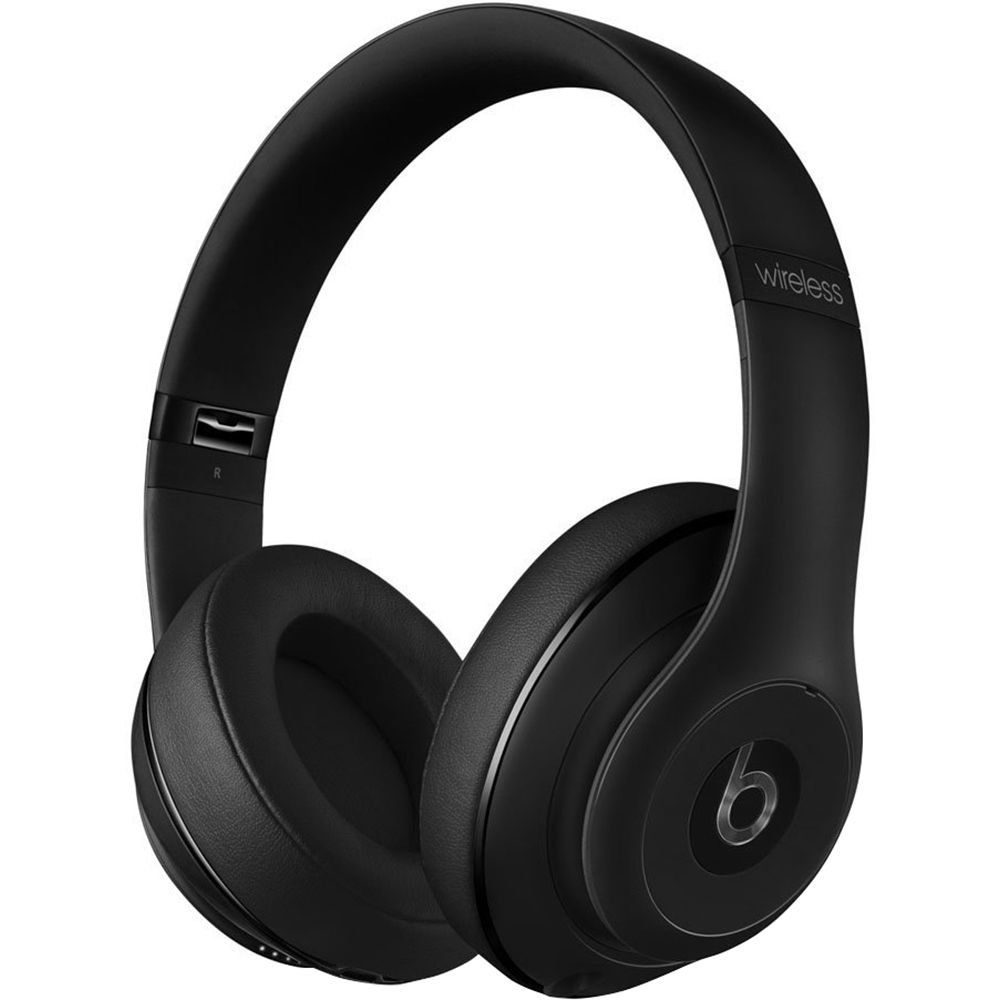
Image: Beats Studio Wireless Over-Ear Headphones in Matte Black, showcasinг элегантны дызайн.
Што ў скрынцы
Праверце, ці ёсць усе прадметы ў вашай упакоўцы:
- Beats Studio Wireless over-ear headphones
- 3.5mm audio cable with RemoteTalk (for wired connection and controls)
- Standard 3.5 mm audio cable (for wired connection without RemoteTalk features)
- USB 2.0 cable (USB-A to USB Micro-B) for charging
- Hard-shell carrying case with carabiner clip

Image: The Beats Studio Wireless headphones, hard-shell carrying case, and various cables laid out from the packaging.
Настройка
1. Зарадка навушнікаў
Before first use, fully charge your Beats Studio Wireless headphones. A full charge provides approximately 12 hours of wireless playback or 20 hours of wired playback with Adaptive Noise Canceling enabled.
- Connect the small end of the USB 2.0 cable (USB-A to USB Micro-B) to the Micro-USB port on the right earcup of the headphones.
- Connect the larger end of the USB cable to a USB power adapter (not included) or a powered USB port on a computer.
- The Fuel Gauge LEDs on the right earcup will indicate charging status. When all five LEDs are solid white, the headphones are fully charged.
Заўвага: The headphones cannot be used while charging.
2. Спарванне Bluetooth
Падключыце навушнікі да прылады з падтрымкай Bluetooth для бесправаднога аўдыё.
- Пераканайцеся, што вашы навушнікі зараджаныя і выключаныя.
- Press and hold the power button on the right earcup for 3-5 seconds until the Fuel Gauge LEDs begin to pulse. This indicates pairing mode.
- На прыладзе перайдзіце ў налады Bluetooth і ўключыце Bluetooth.
- Select "Beats Studio Wireless" from the list of available devices.
- Once paired, the Fuel Gauge LEDs will turn solid white.
The headphones have a Bluetooth range of up to 30 feet (9 meters).
3. Правадное падключэнне
For a wired connection, use the provided 3.5mm audio cables.
- Plug one end of the 3.5mm audio cable into the audio input port on the left earcup.
- Plug the other end into the 3.5mm audio output jack of your device.
The RemoteTalk cable allows for inline control of music and calls when connected to compatible devices.
Інструкцыя па эксплуатацыі
1. Уключэнне/выключэнне харчавання
- Каб уключыць: Press and hold the power button on the right earcup until the Fuel Gauge LEDs illuminate.
- Каб выключыць: Press and hold the power button until the Fuel Gauge LEDs turn off.
2. Controls (Wireless Mode)
The "b" button on the left earcup and the volume buttons control playback and calls.
- Прайграванне/Паўза: Press the "b" button once.
- Наступны трэк: Press the "b" button twice quickly.
- Папярэдні трэк: Press the "b" button three times quickly.
- Павялічыць гучнасць: Press the top volume button.
- Паменшыць гучнасць: Press the bottom volume button.
- Адказ/завяршэнне выкліку: Press the "b" button once during an incoming call or active call.
- Адхіліць выклік: Press and hold the "b" button for 2 seconds during an incoming call.
- Актываваць галасавы памочнік: Press and hold the "b" button for 2 seconds (functionality depends on device).
3. Adaptive Noise Canceling (ANC)
The Beats Studio Wireless headphones feature Dual-Mode Adaptive Noise Canceling. ANC is automatically active when the headphones are powered on. There are two modes:
- Full ANC: Engaged when listening to music or media, providing maximum noise reduction.
- Толькі АНК: When the audio cable is unplugged and the headphones are powered on, ANC will automatically switch to a more aggressive mode to reduce external noise without playing audio.
Тэхнічнае абслугоўванне
1. Уборка
To maintain the appearance and performance of your headphones:
- Працярыце амбушуры і агалоўе мяккай, сухой тканінай без ворса.
- Не выкарыстоўвайце абразіўныя ачышчальнікі, спірт або хімічныя растваральнікі.
- Пазбягайце траплення вільгаці ў любыя адтуліны.
2. Захоўванне
When not in use, store your headphones in the provided hard-shell carrying case to protect them from damage.
- Fold the headphones carefully to fit into the case.
- Keep headphones away from extreme temperatures and humidity.
3. Сыход за батарэяй
Каб падоўжыць тэрмін службы батарэі:
- Пазбягайце частай поўнай разрадкі акумулятара.
- Рэгулярна зараджайце навушнікі, нават калі яны не выкарыстоўваюцца працяглы час.
- Захоўваць у прахалодным, сухім месцы.
Ліквідацыю непаладак
If you encounter issues with your Beats Studio Wireless headphones, try the following solutions:
Няма харчавання / Не ўключаецца
- Ensure the headphones are fully charged. Connect them to a power source using the USB cable.
- Праверце кабель USB і порт для зарадкі на наяўнасць пашкоджанняў.
Няма гуку / перарывісты гук
- Бесправадная сувязь:
- Пераканайцеся, што навушнікі спалучаныя і падлучаныя да вашай прылады.
- Праверце ўзровень гучнасці як у навушніках, так і на прыладзе.
- Move closer to your device to avoid interference or exceeding Bluetooth range.
- Паспрабуйце адлучыць навушнікі ад прылады і зноў падключыць іх.
- Wired:
- Ensure the 3.5mm audio cable is securely plugged into both the headphones and your audio source.
- Try a different 3.5mm audio cable if available.
Праблемы спалучэння
- Ensure the headphones are in pairing mode (pulsing Fuel Gauge LEDs).
- Выключыце, а затым уключыце Bluetooth на прыладзе.
- Forget "Beats Studio Wireless" from your device's Bluetooth list and attempt to pair again.
- Ensure no other Bluetooth devices are interfering with the pairing process.
Adaptive Noise Canceling (ANC) Not Working
- Ensure the headphones are powered on. ANC requires power.
- Check for any obstructions around the external microphones on the earcups.
Тэхнічныя характарыстыкі
Key technical specifications for the Beats Studio Wireless Over-Ear Headphones:
- Назва мадэлі: Студыя
- Тэхналогія падключэння: Bluetooth (Wireless), 3.5 mm Jack (Wired)
- Тэхналогія бесправадной сувязі: Bluetooth
- Дыяпазон Bluetooth: Да 30 футаў (9 метраў)
- Кантроль шуму: Active Noise Cancellation (Dual-Mode Adaptive Noise Canceling)
- Тэрмін службы батарэі: Approximately 12 hours (wireless), 20 hours (wired with ANC)
- Тып батарэі: 1 Lithium Ion battery (rechargeable)
- Тып кіравання: Media Control (on-earcup "b" button, volume buttons)
- Мікрафон: Убудаваны для гучнай сувязі
- Формаў-фактар: Над вухам
- Размяшчэнне вушэй: Над вухам
- матэрыял: Пластыкавыя
- Вага прадмета: Прыблізна 9.2 унцыі (0.26 кілаграма)
- Памеры прадукту: 9.6 х 7.3 х 4.5 цалі
- вытворца: Кампанія Beats Electronics, LLC
- Дата першай даступнасці: 1 снежня 2013 г

Выява: буйны план view of the headphone's inner band, displaying the model number B0501.
Гарантыя і падтрымка
For warranty information and customer support, please refer to the official Beats webсайт або звярніцеся непасрэдна ў службу падтрымкі кліентаў. Захоўвайце пацвярджэнне пакупкі для прэтэнзій па гарантыі.
Заўвага: This product is an older model. Specific warranty terms may vary based on purchase date and region. Please consult the manufacturer's official resources for the most accurate and up-to-date information.
Каб атрымаць дадатковую дапамогу, наведайце: Падтрымка Beats