
1. Уводзіны
This manual provides essential instructions for the safe operation and maintenance of your VTech VM333 Safe & Sound Video Baby Monitor. Please read this manual thoroughly before using the product to ensure proper setup and functionality. The VTech VM333 is designed to help you monitor your baby with a high-resolution color LCD screen, automatic night vision, and two-way audio communication.
2. Прадукт скончыўсяview
The VTech VM333 system includes a Parent Unit (monitor) and a Baby Unit (camera). Familiarize yourself with the components and controls of each unit.
2.1. Parent Unit
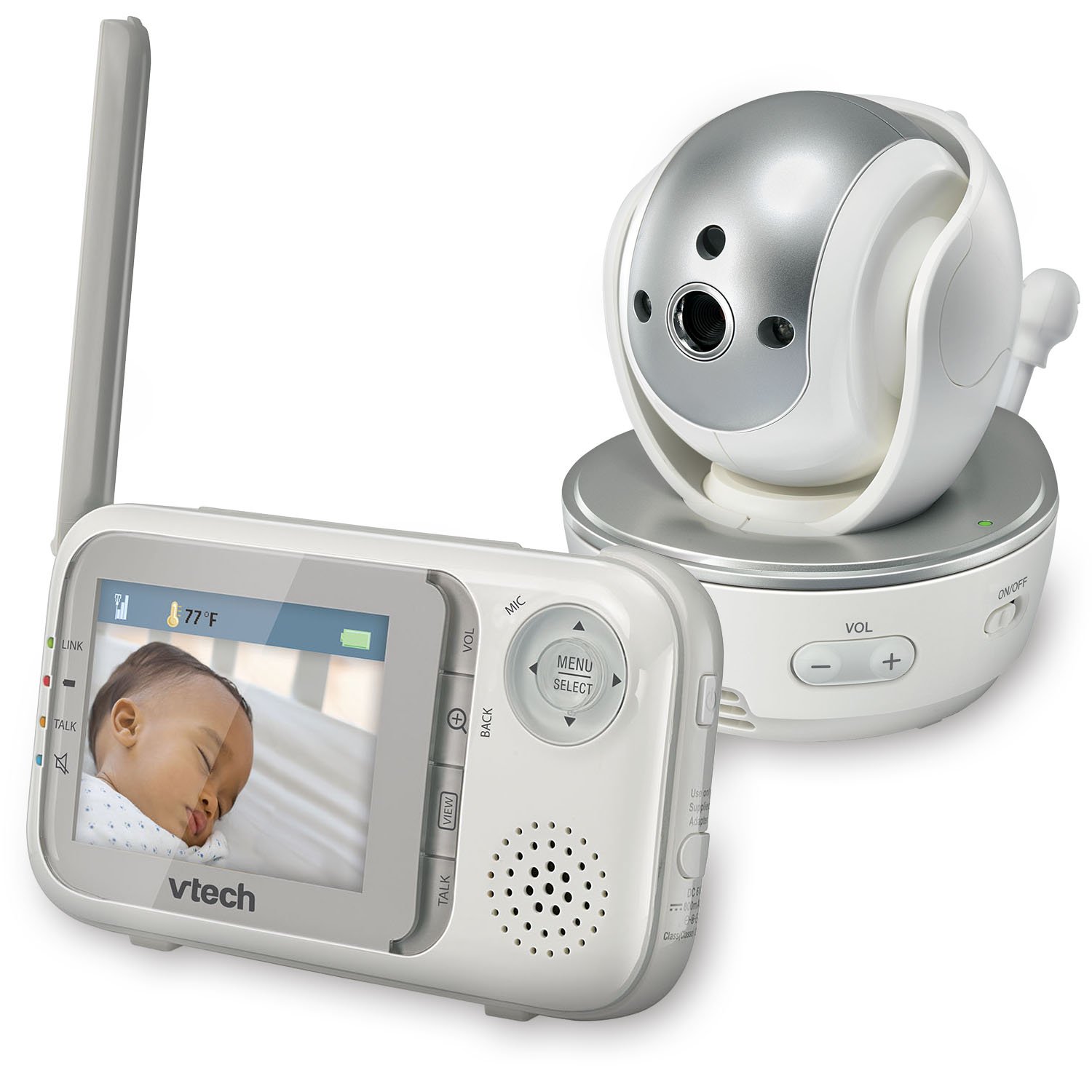
Выява: спераду view of the VTech VM333 Parent Unit.
- 2.8-цалевы каляровы ВК-экран: Displays live video feed from the Baby Unit.
- MENU/SELECT Button: Доступ да опцый меню і пацвярджэнне выбару.
- Directional Arrows (Up/Down/Left/Right): Navigates menus and controls camera pan/tilt.
- ZOOM Button (+/-): Magnifies the video image.
- Кнопка ГАВОРЫ: Activates two-way audio communication.
- VOLUME Buttons (+/-): Adjusts the Parent Unit speaker volume.
- Індыкатар LINK: Shows connection status between units.
- Індыкатар батарэі: Адлюстроўвае бягучы ўзровень батарэі.
- Дысплей тэмпературы: Shows the temperature detected by the Baby Unit.
2.2. Дзіцячы блок (камера)

Выява: спераду view of the VTech VM333 Baby Unit camera.
- Аб'ектыў камеры: Захоплівае відэа.
- Інфрачырвоныя святлодыёды: Provide night vision in low light conditions.
- Мікрафон: Detects sound from the baby's room.
- Дакладчык: Для двухбаковай гукавой сувязі.
- Датчык тэмпературы: Кантралюе тэмпературу ў памяшканні.
- Перамыкач уключэння / выключэння харчавання: Turns the Baby Unit on or off.
- Раз'ём харчавання: Падключаецца да адаптара сілкавання.

Выява: Збоку view of the VTech VM333 Baby Unit, illustrating the wall-mount bracket.
3. Настройка
3.1. Powering On the Units
- Падключыце дзіцячы блок: Plug the small end of the power adapter into the power jack on the back of the Baby Unit. Plug the large end into a wall outlet.
- Connect the Parent Unit: Plug the small end of the power adapter into the power jack on the side of the Parent Unit. Plug the large end into a wall outlet. The Parent Unit battery will begin charging.
- Уключыць: Slide the ON/OFF switch on the Baby Unit to the ON position. Press and hold the POWER button on the Parent Unit until the screen turns on.
The units are pre-linked. If they do not link automatically, refer to the "Troubleshooting" section for re-pairing instructions.
3.2. Positioning the Baby Unit (Camera)
Place the Baby Unit at least 3 feet (1 meter) away from your baby to avoid potential hazards. Ensure the camera is positioned to capture the desired viewing area. Avoid placing the Baby Unit where it can be easily reached by children.
- For optimal performance, place the Baby Unit on a flat surface or mount it to a wall using the included wall-mount bracket.
- Keep the Baby Unit and Parent Unit within range (up to 1,000 feet / 300 meters in open space). Obstacles like walls and furniture can reduce the range.
Image: Proper placement of the Baby Unit near a crib.
4. Аперацыя
4.1. Базавы маніторынг
Once both units are powered on and linked, the Parent Unit will display live video from the Baby Unit. Adjust the volume using the ГУЧНАСЦЬ + і ТОМ - buttons on the Parent Unit.
4.2. Pan, Tilt, and Zoom
The Baby Unit camera can be remotely controlled from the Parent Unit to adjust its viewing angle and zoom level.
- Панарамаванне/нахіл: Выкарыстоўвайце Стрэлкі напрамкаў (Up, Down, Left, Right) on the Parent Unit to move the camera lens horizontally (up to 270 degrees) and vertically (up to 124 degrees).
- Маштаб: Націсніце Павялічыць + button to zoom in (2x magnification) and ZOOM - каб паменшыць.
Video: Demonstration of the VTech VM333's pan, tilt, and zoom features, showing remote camera control from the Parent Unit.
4.3. Двухбаковая размова
You can speak to your baby through the Baby Unit's speaker.
- Націсніце і ўтрымлівайце ГАВАРЫЦЬ button on the Parent Unit.
- Speak clearly into the microphone on the Parent Unit.
- Адпусціце ГАВАРЫЦЬ button to stop speaking and hear your baby again.

Image: Using the two-way talk feature on the Parent Unit.
4.4. Automatic IR Night Vision
The Baby Unit is equipped with infrared LEDs that automatically activate in low light conditions, providing a clear black and white video image of your baby in the dark.
Image: The Baby Unit operating in night vision mode.
4.5. Sound Activation Mode
This mode allows the Parent Unit screen to turn off automatically to save power and reduce light disturbance, and then turn back on when sounds are detected from the Baby Unit.
- Націсніце МЕНЮ/ВЫБАР button on the Parent Unit.
- Перайдзіце да Адчувальнасць VOX or Гукавая актывацыя ўстаноўка.
- Select your desired sound sensitivity level. A higher sensitivity will activate the screen with softer sounds.
Image: Parent Unit displaying the sound activation icon.
4.6. Temperature Monitoring and Alerts
The Baby Unit monitors the room temperature and displays it on the Parent Unit screen. You can set alerts for temperature deviations.
- Націсніце МЕНЮ/ВЫБАР кнопка.
- Перайдзіце да Абвестка аб тэмпературы налады.
- Set your desired minimum and maximum temperature thresholds. The Parent Unit will beep if the temperature goes outside this range.
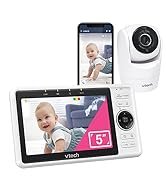
Image: Parent Unit displaying room temperature.
4.7. Multiple Camera Monitoring (Expandable System)
The VM333 system supports up to four cameras (additional cameras sold separately). You can view multiple cameras in different modes.
- Халасты View: Displays video from one camera at a time. Use the VIEW button to cycle through connected cameras.
- Раскол View: Displays video from multiple cameras simultaneously on a split screen.
- Рэжым патрулявання: Automatically cycles through all connected cameras, displaying each for a few seconds.
Video: Demonstration of multi-camera viewing modes, including single view, раскол view, and patrol mode.
5. Тэхнічнае абслугоўванне
- Уборка: Clean the surfaces of the Parent Unit and Baby Unit with a soft, damp cloth. Do not use cleaning sprays or liquid cleaners.
- Сыход за батарэяй: The Parent Unit uses a rechargeable Lithium-Ion battery. For optimal battery life, fully charge the unit before first use. Avoid extreme temperatures. If storing the unit for an extended period, remove the battery.
- Сыход за лінзамі: Keep the camera lens clean to ensure clear video quality. Use a soft, lint-free cloth to gently wipe the lens if needed.
6. Выпраўленне непаладак
| праблема | Рашэнне |
|---|---|
| No video/audio on Parent Unit. |
|
| Дрэнная якасць відэа. |
|
| Parent Unit beeps (low battery, out of range, temperature). |
|
| Перашкоды іншым прыладам. |
|
7. Тэхнічныя характарыстыкі
| Асаблівасць | Дэталь |
|---|---|
| Нумар мадэлі | VM333 |
| Памер экрана | 2.8 inches (LCD) |
| Бесправадныя тэхналогіі | 2.4 GHz FHSS digital transmission |
| Дыяпазон | Да 300 метраў (1,000 футаў) на адкрытай прасторы |
| Пан Кут | Up to 270 degrees horizontal |
| Кут нахілу | Up to 124 degrees vertical |
| маштабаванне | 2x лічбавы зум |
| Начное бачанне | Automatic infrared (IR) |
| Двухбаковае аўдыё | так |
| Гукавая актывацыя | Так (VOX) |
| Датчык тэмпературы | Так, з абвесткамі |
| Пашыраецца | Up to 4 cameras (additional cameras sold separately) |
| Тэрмін службы батарэі бацькоўскага блока | Up to 3.5 hours (video streaming) |
| Крыніца харчавання | Rechargeable Lithium-Ion battery (Parent Unit), AC power (Baby Unit) |
| Колер | Белы / Срэбра |
| Вага прадмета | 2 фунта |
8. Гарантыя і падтрымка
For warranty information and technical support, please contact VTech customer service.
- Нумар падтрымкі кліентаў: (800) 595-9511
- Webсайт: www.vtechbabycare.com
- электронная пошта: support@vtechbabycare.com
Калі ласка, захавайце чэк аб куплі ў якасці пацверджання пакупкі для гарантыйных мэт.