
1. Уводзіны
Thank you for choosing the SCHWAIGER DCR600HD Full HD Cable TV Receiver. This manual provides essential information for the safe and efficient use of your device. Please read these instructions carefully before installation and operation, and keep them for future reference.
2. Інструкцыі па тэхніцы бяспекі
- крыніца харчавання: Only use the power adapter supplied with the device. Ensure the voltage адпавядае вашай мясцовай крыніцы харчавання.
- Вентыляцыя: Do not block ventilation openings. Ensure adequate space around the receiver for proper airflow to prevent overheating.
- Вільготнасць: Keep the device away from water, moisture, and high humidity. Do not expose it to rain or splashes.
- Уборка: Адключыце сілкаванне перад чысткай. Выкарыстоўвайце мяккую сухую тканіну. Не выкарыстоўвайце вадкія або аэразольныя ачышчальнікі.
- Размяшчэнне: Place the receiver on a stable, flat surface. Avoid direct sunlight, heat sources, and strong magnetic fields.
- Абслугоўванне: Не спрабуйце адкрываць або рамантаваць прыладу самастойна. Звяртайцеся да кваліфікаванага персаналу па любыя паслугі па абслугоўванні.
3. Змесціва ўпакоўкі
Калі ласка, праверце ўпакоўку на наяўнасць наступных прадметаў:
- SCHWAIGER DCR600HD Cable TV Receiver
- Пульт дыстанцыйнага кіравання
- Power Cable (integrated or separate adapter)
- Кіраўніцтва карыстальніка (гэты дакумент)
4. Прадукт скончыўсяview
4.1 Пярэдняя панэль
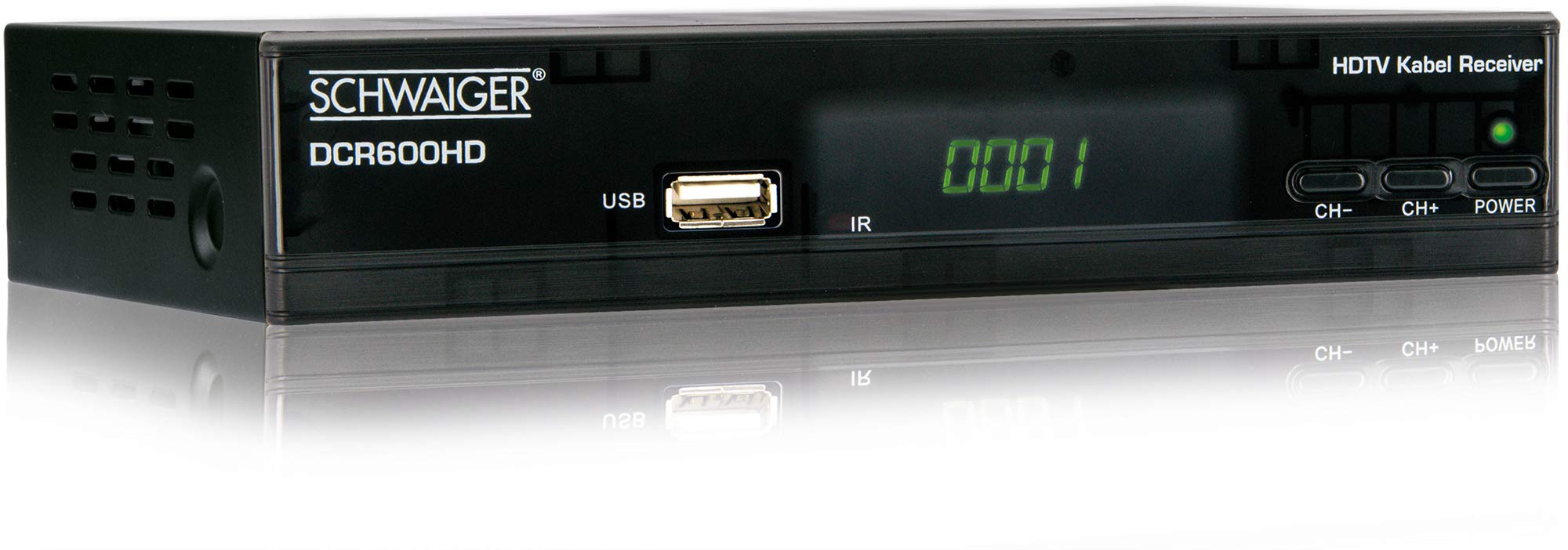
выява: Фронт view of the SCHWAIGER DCR600HD receiver, showing the display, USB port, IR receiver, and control buttons.
- Дысплей: Паказвае нумар канала або час.
- Порт USB: Для падключэння USB-назапашвальнікаў для прайгравання медыяфайлаў.
- ВК: Інфрачырвоны прыёмнік для пульта.
- CH- / CH+: Buttons for changing channels.
- Магутнасць: Button to turn the receiver on or off (standby).
4.2 Задняя панэль

выява: Тыл view of the SCHWAIGER DCR600HD receiver, displaying various input and output ports.
- RF IN: Input for connecting to your cable TV network.
- ETHERNET / LAN: For network connection (if supported for updates or specific services).
- HDMI: High-Definition Multimedia Interface output for connecting to an HD TV.
- TV SCART (CVBS): SCART output for connecting to older TVs or other devices.
- ~220-240V 50/60Hz: Уваход харчавання для прымача.
4.3 Пульт дыстанцыйнага кіравання

выява: Layout of the SCHWAIGER DCR600HD remote control, showing various function buttons.
The remote control allows you to operate all functions of your receiver. Familiarize yourself with the button layout for easy navigation.
5. Настройка
5.1 Падключэнне прымача
- Connect to Cable Network: Connect your cable TV antenna cable to the РФ port on the rear panel of the receiver.
- Падключэнне да тэлевізара:
- For High Definition (HD) picture quality, connect an HDMI cable from the HDMI port on the receiver to an HDMI input on your TV.
- For standard definition (SD) or older TVs, connect a SCART cable from the TV SCART (CVBS) port on the receiver to the SCART input on your TV.
- Падключыце харчаванне: Plug the power cable into the receiver's power input and then into a wall outlet.
- Turn on TV: Switch on your television and select the correct input source (HDMI or SCART) corresponding to your connection.
5.2 Першая ўстаноўка
Upon first power-on, the receiver will typically guide you through an initial setup process:
- Выбар мовы: Use the remote control to select your preferred language for the on-screen menus.
- Выбар краіны: Select your country. This helps configure regional settings and channel frequencies.
- Сканаванне каналаў: The receiver will prompt you to perform an automatic channel scan. Confirm to start scanning for available cable TV channels. This process may take several minutes.
- Захаваць налады: Once the scan is complete, save the found channels. Your receiver is now ready for use.
6. Інструкцыя па эксплуатацыі
6.1 Асноўныя аперацыі
- Уключэнне/выключэнне харчавання: Націсніце УЛАДА button on the remote control or front panel to switch the receiver on or to standby mode.
- Выбар канала: Выкарыстоўвайце CH+ / CH- buttons on the remote or front panel to change channels sequentially. Alternatively, use the number buttons to directly enter a channel number.
- Рэгуляванне гучнасці: Выкарыстоўвайце ГУЧНАСЦЬ+ / ГУЧ- кнопкі на пульце дыстанцыйнага кіравання для рэгулявання гучнасці гуку.
- Адключэнне гуку: Націсніце МУК кнопку, каб часова адключыць гук. Націсніце яшчэ раз, каб аднавіць.
6.2 Электронны тэлегід (EPG)
The EPG provides a schedule of current and upcoming TV programs.
- Націсніце EPG button on the remote control to access the Electronic Program Guide.
- Navigate through channels and program times using the arrow buttons.
- Прэса OK каб view падрабязная інфармацыя аб абранай праграме.
6.3 Прайграванне мультымедыя праз USB
You can play multimedia files (AVI, MKV, MP3) from a USB storage device.
- Устаўце флэшку або знешні жорсткі дыск у USB порт на пярэдняй панэлі.
- The receiver should detect the USB device and prompt you to open the media player, or you can access it via the main menu.
- Перамяшчайцеся па сваім files and folders using the arrow buttons and press OK to select and play a file.
- Use the media control buttons (Play, Pause, Stop, Fast Forward, Rewind) on the remote control for playback.
6.4 Тэлетэкст
Access teletext services provided by broadcasters.
- Націсніце ТТХ button on the remote control to activate teletext.
- Use the number buttons to enter page numbers or the arrow buttons to navigate.
- Прэса ТТХ again to exit teletext.
7. Тэхнічнае абслугоўванне
- Уборка: Regularly wipe the receiver with a soft, dry, lint-free cloth. Do not use abrasive cleaners, waxes, or solvents.
- Вентыляцыя: Ensure that the ventilation slots are not obstructed by dust or other objects.
- Абнаўленні праграмнага забеспячэння: Перыядычна правярайце інфармацыю вытворцы website for any available software updates for your model. Follow the instructions provided with the update carefully.
8. Выпраўленне непаладак
If you encounter problems with your receiver, refer to the following common issues and solutions:
| праблема | Магчымая прычына / рашэнне |
|---|---|
| Няма малюнка і гуку |
|
| Пульт дыстанцыйнага кіравання не працуе |
|
| Падчас сканавання каналы не знойдзены |
|
| USB media not playing |
|
9. Тэхнічныя характарыстыкі
| Асаблівасць | Апісанне |
|---|---|
| Назва мадэлі | DCR600HD |
| Тып прадукту | Digital DVB TV Tuner / Digital Player |
| Колер | Чорны |
| Памеры (Ш х Г х У) | 17 см х 4.5 см х 10 см |
| Вага | 380 г |
| Тэхналогія падлучэння | HDMI, USB, SCART, RF |
| Сумяшчальныя прылады | Тэлебачанне |
| Кадзіроўка відэа | H.264 |
| Падтрымліваюцца дазволы | 576i, 576p, 720p, 1080i, 1080p |
| Суадносіны бакоў | 4:3, 16:9 |
| Рэжым выхаду гуку | Стэрэа |
| Падтрымліваюцца аўдыяфарматы | MP3 |
| Падтрымліваныя тыпы носьбітаў | AVI, MKV, MP3 |
| Усяго партоў USB | 1 (USB 4-pin Type A) |
| Усяго партоў HDMI | 1 |
| Энергаспажыванне | 3.8 Вт |
| тtage | 240 вольт |
| Асаблівасці | Electronic Program Guide (EPG), Teletext, Built-in Bluetooth (Note: Bluetooth functionality may vary by region/firmware) |
| Пульт дыстанцыйнага кіравання | У камплекце |
10. Гарантыя і падтрымка
For warranty information and technical support, please refer to the documentation included with your product packaging or visit the official SCHWAIGER webсайт. Захоўвайце чэк аб куплі як пацвярджэнне пакупкі для гарантыйных прэтэнзій.