
1. Уводзіны
This manual provides comprehensive instructions for the setup, operation, and maintenance of your A4tech Natural A Ergonomic Keyboard, model KRS-85. Designed with patented A-Shape keys and round-edged keycaps, this keyboard aims to promote a natural typing position, thereby helping to prevent Repetitive Strain Injury (RSI).
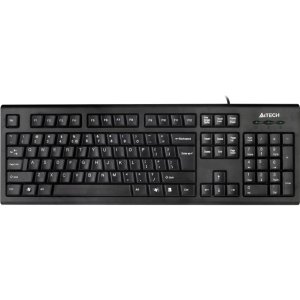
Figure 1: A4tech Natural A Ergonomic Keyboard (KRS-85). This image displays the full layout of the black wired keyboard, highlighting its ergonomic design with A-Shape keys and round keycaps.
2. Настройка
2.1 Сістэмныя патрабаванні
- IBM or Compatible Systems
- Windows 2000 / XP (X64) / 2003 (X64) / Vista
2.2 Падключэнне клавіятуры
- Знайдзіце даступны USB-порт на вашым кампутары.
- Insert the USB connector of the A4tech KRS-85 keyboard firmly into the USB port.
- Ваша аперацыйная сістэма павінна аўтаматычна выявіць і ўсталяваць неабходныя драйверы. Гэты працэс можа заняць некалькі хвілін.
- Once installation is complete, the keyboard is ready for use.
3. Інструкцыя па эксплуатацыі
The A4tech Natural A Keyboard is designed for comfortable and efficient typing. Its unique features are intended to enhance your typing experience and reduce strain.
3.1 Асноўныя магчымасці
- Patented A-Shape Keys: The layout of the keys is designed to align with the natural position of your hands and wrists, promoting a more relaxed posture.
- Round Edged Keycaps: These keycaps provide a smooth and comfortable typing surface.
- Стандартны макет: The keyboard features a full-size layout including a numeric keypad, function keys (F1-F12), and navigation keys.
3.2 Асноўнае выкарыстанне
Use the keyboard as you would any standard computer keyboard for typing, navigating, and executing commands. The ergonomic design is intended to provide comfort during extended use.
4. Тэхнічнае абслугоўванне
Правільнае абслугоўванне забяспечвае даўгавечнасць і аптымальную прадукцыйнасць вашай клавіятуры.
4.1 Ачыстка
- Адключыце клавіятуру ад кампутара перад чысткай.
- Выкарыстоўвайце мяккую безворсовую тканіну, злёгку dampпрамыйце вадой або мяккім ачышчальным растворам, каб працерці паверхню клавіятуры.
- Пазбягайце выкарыстання агрэсіўных хімікатаў, абразіўных ачышчальнікаў або празмернай вільготнасці.
- Для ачысткі паміж клавішамі выкарыстоўвайце сціснутае паветра, каб выдаліць пыл і смецце.
5. Выпраўленне непаладак
If you encounter issues with your A4tech Natural A Keyboard, please refer to the following common solutions.
5.1 Клавіятура не рэагуе
- Пераканайцеся, што кабель USB надзейна падключаны да спраўнага порта USB на вашым камп'ютары. Паспрабуйце іншы порт USB.
- Перазагрузіце кампутар.
- Check your computer's Device Manager (Windows) to see if the keyboard is recognized and if there are any driver issues.
5.2 Specific Key Combinations Not Working (e.g., Ctrl-Alt-Del)
- Some users have reported that certain key combinations, such as Ctrl-Alt-Del, may not function as expected on this keyboard with Windows operating systems. This is a known compatibility limitation for some configurations.
- If this issue persists, consider using alternative methods for these functions within your operating system, or consult A4tech support for potential workarounds or driver updates if available.
6. Тэхнічныя характарыстыкі
| Асаблівасць | Дэталь |
|---|---|
| Назва прадукту | Natural_A Rounded Edge Keyboard |
| Нумар мадэлі | КРС-85 |
| Тэхналогія падлучэння | Cable (USB) |
| Апісанне клавіятуры | Эрганамічны |
| Колькасць ключоў | 85 |
| Памеры прадукту | 19.69 х 7.87 х 1.97 цалі |
| Вага прадмета | 2.2 фунта |
| Вытворца | ERGOGUYS (A4tech Co., Ltd) |
| Дата першай даступнасці | 31 кастрычніка 2013 г |
7. Інфармацыя аб гарантыі
The A4tech Natural A Ergonomic Keyboard (KRS-85) comes with a 1-гадовая абмежаваная гарантыя ад вытворцы. Гэтая гарантыя распаўсюджваецца на дэфекты матэрыялаў і вырабу пры нармальным выкарыстанні.
Please retain your proof of purchase for warranty claims. For detailed terms and conditions, refer to the warranty documentation provided with your product or contact the manufacturer directly.
8. Падтрымка
For further assistance, technical support, or warranty inquiries, please contact the manufacturer or your point of purchase. Ensure you have your product model number (KRS-85) and proof of purchase ready when contacting support.