
Уводзіны
This manual provides comprehensive instructions for the installation, operation, and maintenance of your Azza XT1 Full Tower Gaming Case (Model: CSAZ-XT1 W). Please read this manual thoroughly before beginning installation to ensure proper setup and to maximize the performance and longevity of your product.
Інфармацыя па бяспецы
Observe the following safety precautions to prevent damage to the case or injury to yourself:
- Заўсёды адключайце блок харчавання ад разеткі перад любой устаноўкай або тэхнічным абслугоўваннем.
- Handle internal components with care to avoid electrostatic discharge (ESD) damage. Consider using an anti-static wrist strap.
- Ensure all cables are routed properly to prevent interference with fans or other moving parts.
- Do not block ventilation openings. Maintain adequate airflow around the case.
- Трымайце корпус далей ад крыніц цяпла, прамых сонечных прамянёў і вільгаці.
Асаблівасці прадукту
The Azza XT1 Full Tower Gaming Case is designed with several features to enhance your computing experience:
- Падтрымка відэакарты: Accommodates VGA cards up to 340 mm in length.
- Easy Swap Slot: Features a bottom-mounted easy swap slot for tool-less hard drive installation.
- Прадукцыйнасць астуджэння: Equipped with four pre-installed fans for optimal airflow and supports up to two 120mm water cooling radiators.
- Customizable Grilles: Front and top decorative grilles are removable and exchangeable for aesthetic customization.
- Tool-less Installation: Designed for easy installation of 5.25" devices and HDDs with a tool-less mechanism and a 90-degree rotating HDD holder.
- Кабельнае кіраванне: Includes a dedicated compartment for efficient cable routing, improving internal airflow and aesthetics.
Настройка і ўстаноўка
Follow these steps to set up your Azza XT1 case and install components:
1. Падрыхтуйце справу
Place the case on a stable, flat surface. Remove the side panels by unscrewing the thumb screws at the rear and sliding the panels backward.
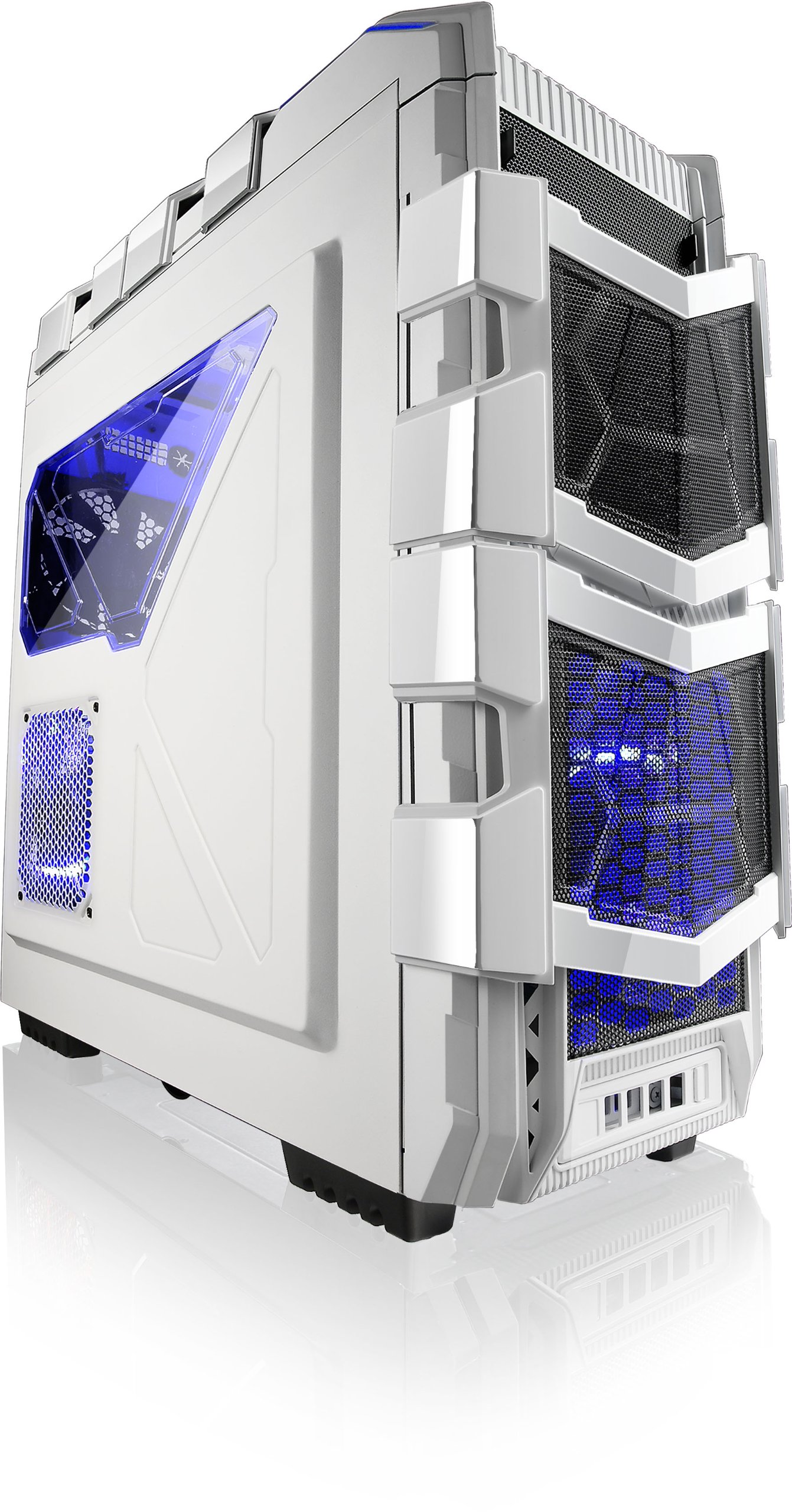
Малюнак 1: Пад вуглом view of the Azza XT1 case, showing its overall design and front mesh panels.
2. Устаноўка мацярынскай платы
Install the I/O shield into the rear opening of the case. Align your ATX motherboard with the standoffs inside the case. Secure the motherboard using the provided screws.

Figure 2: Internal layout of the Azza XT1 case, highlighting the motherboard tray and drive bay areas.
3. Устаноўка блока сілкавання
Mount your power supply unit (PSU) into the designated area at the bottom rear of the case. Secure it with screws from the outside.
4. Усталёўка дыска (HDD/SSD)
Utilize the tool-less HDD holders. For the easy swap slot, simply slide the hard drive into the bottom slot until it clicks into place. For other bays, secure drives using the provided trays or mounting mechanisms. The HDD holder can rotate 90 degrees for easier access.

Figure 3: Rear internal view of the Azza XT1 case, illustrating the drive bays and the space behind the motherboard for cable management.
5. Expansion Card Installation (VGA, etc.)
Remove the necessary expansion slot covers at the rear of the case. Insert your VGA card or other expansion cards into the motherboard's PCIe slots and secure them with screws or the tool-less retention clips.
6. Кіраванне кабелем
Route all power and data cables through the designated cutouts and tie-down points behind the motherboard tray. This improves airflow and maintains a clean internal appearance.
7. Зачыніць справу
Once all components are installed and cables are managed, reattach the side panels and secure them with the thumb screws.
Кіраванне корпусам
The Azza XT1 case provides the housing and cooling for your PC components. Operation primarily involves using the front panel controls:
- Кнопка харчавання: Located on the top panel, press to power on or off your system.
- Кнопка скіду: Located on the top panel, press to restart your system.
- Парты USB: Connect USB devices to the front panel USB 2.0 and USB 3.0 ports.
- Аўдыёраздымы: Connect headphones and microphones to the front panel audio jacks.

Малюнак 4: Верх view of the Azza XT1 case, detailing the power button, USB ports, and audio jacks.
Тэхнічнае абслугоўванне
Regular maintenance helps ensure optimal performance and longevity of your Azza XT1 case and its components.
- Ачыстка ад пылу: Перыядычна чысціце пылавыя фільтры і ўнутраныя кампаненты сціснутым паветрам. Перад чысткай пераканайцеся, што сістэма выключана і адключана ад сеткі.
- Агляд вентылятара: Check fans for dust buildup and ensure they are spinning freely. Clean as necessary.
- Праверка кабеля: Verify that all internal cables remain securely connected and are not obstructing airflow.
- Знешняя ачыстка: Працярыце вонкавыя паверхні мяккай, damp тканіна. Пазбягайце абразіўных ачышчальнікаў.
Ліквідацыю непаладак
У гэтым раздзеле разглядаюцца распаўсюджаныя праблемы, з якімі вы можаце сутыкнуцца пры выкарыстанні корпуса вашага ПК.
| праблема | Магчымая прычына | Рашэнне |
|---|---|---|
| Сістэма не ўключаецца. | Power button not connected correctly; PSU issue; motherboard issue. | Verify front panel power button cable is securely connected to the motherboard. Check PSU connections. |
| Вентылятары не круцяцца. | Fan cables disconnected; fan failure; insufficient power. | Ensure all fan power cables are properly connected to the motherboard or fan controller. |
| Не працуюць USB-порты на пярэдняй панэлі. | USB header cable disconnected or incorrectly connected. | Check that the USB 2.0 and USB 3.0 header cables from the front panel are correctly plugged into the motherboard. |
| Poor airflow or overheating. | Dust buildup; blocked vents; improper fan configuration. | Clean dust filters and internal components. Ensure case fans are oriented correctly for optimal airflow. |
Тэхнічныя характарыстыкі
Detailed specifications for the Azza XT1 Full Tower Gaming Case (CSAZ-XT1 W):
| Асаблівасць | Дэталь |
|---|---|
| Марка | Азза |
| Нумар мадэлі | CSAZ-XT1 W |
| Тып корпуса | Поўная вежа |
| Колер | Белы |
| Матэрыял | SECC Steel |
| Сумяшчальнасць матчыных поплаткаў | ATX |
| Памеры прадукту (ДxШxВ) | 51.56 х 20.57 х 56.64 см |
| Вага прадмета | 9.98 кг |
| Парты USB 2.0 | 2 |
| Парты USB 3.0 | 1 |
| Падтрымка даўжыні відэакарты | Да 340 мм |
| Падтрымка вадзянога астуджэння | Up to 2x120mm radiators |
Гарантыя і падтрымка
For warranty information and technical support, please refer to the official Azza webсайт або звярніцеся ў службу падтрымкі кліентаў. Захоўвайце чэк аб куплі як пацвярджэнне пакупкі для прэтэнзій па гарантыі.
вытворца: AZZA (USA) Technology Inc