
Уводзіны
The EDUP EP-B3511 is a compact wireless Bluetooth music receiver designed to add Bluetooth audio streaming capabilities to any device with a 3.5mm audio input. This device allows you to wirelessly connect your smartphone, laptop, or other Bluetooth-enabled devices to car stereos, home audio systems, headphones, and more. It also features an integrated microphone for hands-free calling.
Інфармацыя па бяспецы
- Не падвяргайце прыладу ўздзеянню экстрэмальных тэмператур, вільгаці або прамых сонечных прамянёў.
- Не кідайце прыладу і не падвяргайце яе моцным ударам.
- Захоўваць у месцах, недаступных дзецям.
- Выкарыстоўвайце толькі зарадны кабель, які ўваходзіць у камплект, або яго сертыфікаваны эквівалент.
- Не спрабуйце разбіраць або мадыфікаваць прыладу. Гэта прывядзе да анулявання гарантыі.
Змест пакета
Калі ласка, праверце ўпакоўку на наяўнасць наступных прадметаў:
- EDUP EP-B3511 Wireless Bluetooth Music Receiver
- Зарадны кабель USB - Mini-USB
- 3.5mm Male-to-Male Audio Connector
- Кіраўніцтва карыстальніка (гэты дакумент)
Прадукт скончаныview
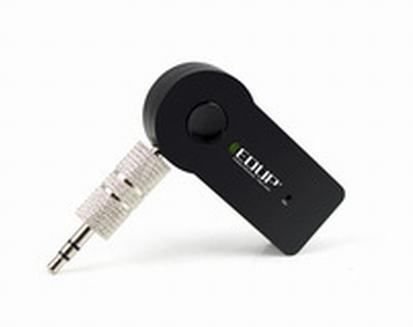
Image: The EDUP EP-B3511 Wireless Bluetooth Music Receiver, a small black rectangular device with a 3.5mm audio jack on one side and a mini-USB charging port on the other. It features a central multi-function button and an indicator light.
The EDUP EP-B3511 is designed for ease of use. It typically features:
- Шматфункцыянальная кнопка: For power on/off, pairing, play/pause, and call management.
- 3.5-мм аўдыёвыхад: Connects to your audio system's AUX input.
- Зарадны порт Mini-USB: Для падзарадкі ўнутранай батарэі.
- Святлодыёдны індыкатар: Паказвае стан харчавання, спалучэння і зарадкі.
- Убудаваны мікрафон: Для сувязі без рук.
Настройка
1. Зарадка прылады
- Connect the Mini-USB end of the charging cable to the receiver's charging port.
- Connect the USB end of the cable to a USB power source (e.g., car charger, computer USB port, USB wall adapter).
- The LED indicator will typically glow red during charging and turn off or change color when fully charged.
- A full charge usually takes 1-2 hours.
2. Падключэнне да аўдыёсістэмы
- Ensure your audio system (car stereo, home theater, headphones) has a 3.5mm AUX input.
- Insert the 3.5mm male-to-male audio connector into the receiver's 3.5mm audio output jack.
- Connect the other end of the 3.5mm connector to the AUX input of your audio system.
- Set your audio system's input source to AUX.
3. Спалучэнне з прыладай Bluetooth
- Уключэнне: Press and hold the multi-function button on the receiver until the LED indicator flashes blue rapidly (or red and blue alternately), indicating it is in pairing mode.
- Уключыць Bluetooth: On your smartphone, tablet, or laptop, enable Bluetooth and search for new devices.
- Выберыце прыладу: Look for "EP-B3511" or a similar name in the list of available Bluetooth devices and select it to pair.
- Пацверджанне: Once successfully paired, the LED indicator will typically flash blue slowly or remain solid blue. A voice prompt might also confirm the connection.
- The device will automatically attempt to reconnect to the last paired device when powered on.
Інструкцыя па эксплуатацыі
Уключэнне/выключэнне харчавання
- Уключэнне: Press and hold the multi-function button for approximately 3 seconds until the LED indicator flashes blue.
- Выключэнне: Press and hold the multi-function button for approximately 5 seconds until the LED indicator turns off.
Прайграванне музыкі
- Once paired, open your music player on your Bluetooth device.
- Music will stream wirelessly to your connected audio system.
- Use the controls on your Bluetooth device to play, pause, skip tracks, and adjust volume. The receiver's multi-function button may also act as a play/pause control (single press).
Званок па гучнай сувязі
- Адказаць на званок: When a call comes in, press the multi-function button once to answer.
- Завяршыць выклік: Падчас размовы націсніце шматфункцыянальную кнопку адзін раз, каб завяршыць размову.
- Адхіліць выклік: Націсніце і ўтрымлівайце шматфункцыянальную кнопку прыблізна 2 секунды, каб адхіліць уваходны выклік.
- Паўторны набор апошняга нумара: Double-press the multi-function button to redial the last number.
- The integrated microphone will pick up your voice for communication. Ensure you are within reasonable proximity to the receiver for clear audio.
Тэхнічнае абслугоўванне
- Уборка: Для чысткі прылады выкарыстоўвайце мяккую сухую тканіну. Не выкарыстоўвайце вадкія ачышчальнікі або растваральнікі.
- захоўванне: Захоўвайце прыладу ў прахалодным, сухім месцы, удалечыні ад прамых сонечных прамянёў і экстрэмальных тэмператур, калі яна не выкарыстоўваецца працяглы час.
- Сыход за батарэяй: Каб падоўжыць тэрмін службы батарэі, пазбягайце частай поўнай разрадкі. Рэгулярна зараджайце прыладу, нават калі яна не выкарыстоўваецца пастаянна.
Ліквідацыю непаладак
| праблема | Рашэнне |
|---|---|
| Прылада не ўключаецца. | Ensure the device is charged. Connect it to a power source using the USB cable. |
| Немагчыма спалучыцца з прыладай Bluetooth. |
|
| Няма гуку або дрэнная якасць гуку. |
|
| Мікрафон не працуе падчас званкоў. |
|
| Прылада аўтаматычна выключаецца. | The device may have an auto-off feature if not connected or active for a period (e.g., 5 minutes). Recharge the battery if it's low. |
Тэхнічныя характарыстыкі
- мадэль: EP-B3511
- Тэхналогія падключэння: Bluetooth
- Стандарт бесправадной сувязі: Bluetooth V4.1 (supports all Bluetooth versions of mobile/tablet)
- Крыніца харчавання: Battery Powered (inbuilt rechargeable battery)
- Сумяшчальныя прылады: Headphone, Laptop, Smartphone, Car Audio Systems, Home Audio Systems
- Вага прадмета: Прыкладна 60 г
- Памеры ўпакоўкі: Прыкладна 13.6 х 11.4 х 2.6 см
- Асаблівасці: Integrated Microphone for calls
Гарантыя і падтрымка
This product comes with a standard manufacturer's warranty. For specific warranty terms, duration, and support inquiries, please refer to the documentation provided at the time of purchase or contact your retailer or the manufacturer directly. Keep your proof of purchase for warranty claims.