
1. Уводзіны
1.1 Прадукт скончыўсяview
The CELLULARLINE Interphone F5MC is a advanced Bluetooth communication system designed for motorcycle helmets. It provides hands-free communication, music streaming, and GPS navigation audio, compatible with both open and closed helmets. This device features a new microchip for enhanced performance and offers robust functionality for riders.
1.2 Асноўныя магчымасці
- Bluetooth Connectivity for wireless communication.
- Integrated Microphone for clear audio transmission.
- Waterproof design for use in various weather conditions.
- Touch control method for intuitive operation.
- Compatible with smartphones, tablets, and car audio systems.
- Designed for motorcycle riding applications.
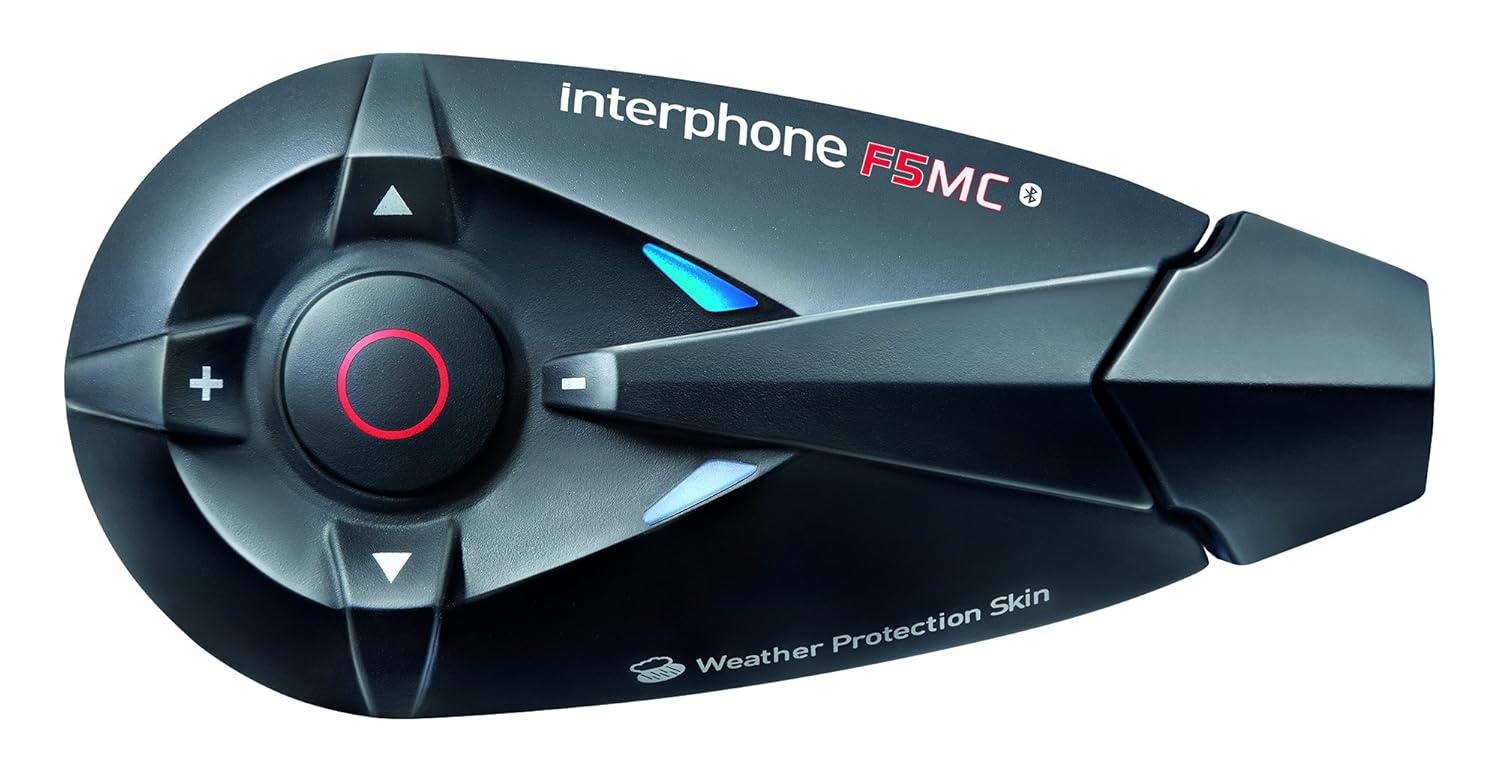
Малюнак 1.1: The Interphone F5MC Bluetooth Headset. This image displays the main unit of the Interphone F5MC, highlighting its ergonomic design and control buttons, including the central multifunction button and volume controls.
2. Змесціва ўпакоўкі
The Interphone F5MC package typically includes the following components:
- Interphone F5MC Main Unit(s)
- Ear Cushions / Speakers
- Microphone for full-face helmet
- Microphone for jet helmet
- DC Power Charging & Music Line In Cable
- Mounting Brackets (clip and adhesive options)
- USB-кабель для зарадкі

Малюнак 2.1: Interphone F5MC Product Packaging. This image shows the retail box for the Interphone F5MC, indicating it is a dual unit package suitable for two helmets, highlighting features like multi-user conference and long distance communication.

Малюнак 2.2: Interphone F5MC Component Diagram. This diagram illustrates the various components included with the Interphone F5MC system, such as the main unit, different microphone types (for full-face and jet helmets), speakers, and charging/audio cables, along with their connections.
3. Настройка
3.1 Зарадка прылады
- Connect the DC power charging cable to the charging port on the Interphone F5MC unit.
- Plug the other end of the cable into a suitable USB power source (e.g., computer USB port, USB wall adapter).
- The status LED will indicate charging status. A full charge is recommended before first use.
3.2 Mounting the Unit to a Helmet
- Choose between the clip mount or adhesive mount option based on your helmet type and preference.
- Securely attach the chosen mounting bracket to the side of your helmet. Ensure it is positioned where the unit will not obstruct vision or movement.
- Slide the Interphone F5MC main unit onto the mounted bracket until it clicks into place.
3.3 Microphone and Speaker Installation
- Select the appropriate microphone for your helmet type (full-face or jet).
- Attach the speakers inside the helmet, aligning them with your ears for optimal audio. Use the provided adhesive pads if necessary.
- Position the microphone close to your mouth, ensuring it is not directly in the path of wind noise.
- Connect the speaker and microphone cables to the corresponding ports on the Interphone F5MC main unit. Refer to Figure 2.2 for connection details.
3.4 Пачатковае спалучэнне Bluetooth
- Ensure the Interphone F5MC unit is powered off.
- Press and hold the Multi-Function Button (MFB) until the status LED flashes rapidly, indicating pairing mode.
- На вашым смартфоне або іншай прыладзе Bluetooth уключыце Bluetooth і знайдзіце даступныя прылады.
- Select "Interphone F5MC" from the list of found devices.
- Калі будзе прапанавана, увядзіце PIN-код (звычайна «0000»).
- Once paired, the status LED will change to a slow flash or solid blue, depending on the unit's status.
4. Інструкцыя па эксплуатацыі
4.1 Уключэнне/выключэнне сілкавання
- Каб уключыць: Press and hold the MFB for approximately 3 seconds until you hear an audible tone and the LED illuminates.
- Каб выключыць: Press and hold the MFB for approximately 5 seconds until you hear a descending tone and the LED turns off.
4.2 Інтэрком-сувязь
The F5MC supports multi-user intercom communication. Refer to the full manual for detailed pairing instructions for multiple units.
- Уключыць інтэрком: Briefly press the Intercom button (specific button may vary, refer to unit's markings).
- Канец дамафона: Briefly press the Intercom button again.
4.3 Тэлефонныя званкі
- Адказаць на званок: Коратка націсніце кнопку MFB.
- Завяршыць выклік: Коратка націсніце кнопку MFB.
- Адхіліць выклік: Націсніце і ўтрымлівайце MFB на працягу 2 секунд.
- Галасавы набор: With the unit in standby, briefly press the MFB twice to activate your phone's voice assistant (if supported).
4.4 Прайграванне музыкі
Ensure your Interphone F5MC is paired with a music source (e.g., smartphone).
- Прайграванне/Паўза: Коратка націсніце кнопку MFB.
- Наступны трэк: Press the 'Volume Up' button for 2 seconds.
- Папярэдні трэк: Press the 'Volume Down' button for 2 seconds.
- Рэгуляванне гучнасці: Briefly press the 'Volume Up' or 'Volume Down' buttons.
4.5 FM -радыё
- Уключыць/выключыць радыё: Press a dedicated FM button or a combination of buttons (refer to specific unit markings).
- Станцыі сканавання: Press and hold the 'Volume Up' or 'Volume Down' buttons to scan for the next/previous station.
5. Тэхнічнае абслугоўванне
5.1 Ачыстка
- Працярыце прыладу мяккай дamp тканіна. Не выкарыстоўвайце агрэсіўныя хімікаты або абразіўныя ачышчальнікі.
- Перад зарадкай або падключэннем аксесуараў пераканайцеся, што ўсе парты сухія.
5.2 Захоўванне
- Захоўвайце прыладу ў прахалодным, сухім месцы, удалечыні ад прамых сонечных прамянёў і экстрэмальных тэмператур.
- Калі вы захоўваеце акумулятар працяглы час, зараджайце яго прыкладна да 50% кожныя некалькі месяцаў, каб падоўжыць тэрмін яго службы.
5.3 Сыход за акумулятарам
- Пазбягайце частай поўнай разрадкі акумулятара.
- Выкарыстоўвайце толькі зарадны кабель, які ўваходзіць у камплект, і сумяшчальныя крыніцы харчавання.
6. Выпраўленне непаладак
6.1 Няма харчавання
- Пераканайцеся, што прылада цалкам зараджана. Падключыце яе да крыніцы харчавання і праверце індыкатар зарадкі.
- Verify that the power button is being pressed and held for the correct duration (approximately 3 seconds).
6.2 Няма гуку
- Check that the speakers are correctly connected to the main unit and properly positioned inside the helmet.
- Ensure the volume is not set to minimum. Adjust using the volume buttons.
- Verify that the unit is successfully paired with your audio source (e.g., smartphone).
6.3 Праблемы са спалучэннем
- Пераканайцеся, што абедзве прылады знаходзяцца ў рэжыме спалучэння і знаходзяцца побач.
- Turn off and restart both the Interphone F5MC and the device you are trying to pair.
- Clear previous Bluetooth pairings from both devices and attempt to pair again.
6.4 Intercom Disconnection
- Ensure units are within the specified intercom range and have a clear line of sight.
- Праверце на наяўнасць магчымых перашкод ад іншых электронных прылад.
- Attempt to re-establish the intercom connection by briefly pressing the intercom button.
7. Тэхнічныя характарыстыкі
| Асаблівасць | Дэталь |
|---|---|
| Назва мадэлі | INTERPHONEF5MCTP |
| Тэхналогія падлучэння | Bluetooth |
| Тэхналогія бесправадной сувязі | Bluetooth |
| Уключаныя кампаненты | Ear Cushions, Microphones |
| Матэрыял | Пластыкавыя |
| Канкрэтнае выкарыстанне прадукту | Motorcycle Riding |
| Сумяшчальныя прылады | Smartphones, Tablets, Car Audio Systems |
| Узровень воданепранікальнасці | Воданепранікальны |
| Метад кантролю | Дакранацца |
| Вытворца | CELLULARLINE |
| Памеры прадукту | 8.99 х 4.5 х 2.01 см |
| Вага прадмета | 54.4 г (0.12 фунта) |
| Батарэі | 1 літый-палімерная батарэя (у камплекце) |
| Асаблівасці | Мікрафон у камплекце |
| Колер | Чорны |
| Размяшчэнне вушэй | Адкрытае вуха |
| Формаў-фактар | Над вухам |
8. Гарантыя і падтрымка
For warranty information, technical support, or service inquiries, please refer to the documentation provided with your purchase or contact CELLULARLINE customer service directly. Details regarding warranty periods and support procedures are typically available on the manufacturer's official webна сайце або праз вашага прадаўца.