
Linq IT-H408
Linq IT-H408 4-Port USB 2.0 Hub User Manual
Model: IT-H408
Уводзіны
This manual provides instructions for the proper setup, operation, and maintenance of your Linq IT-H408 4-Port USB 2.0 Hub. This device allows you to expand a single USB port into four, each with an independent on/off switch, facilitating efficient management of connected peripherals.
Прадукт скончаныview
The Linq IT-H408 is a USB 2.0 hub designed to provide four additional USB ports. Each port features an individual power switch, allowing you to control power to connected devices independently. It supports data transfer speeds of up to 480 Mbps.
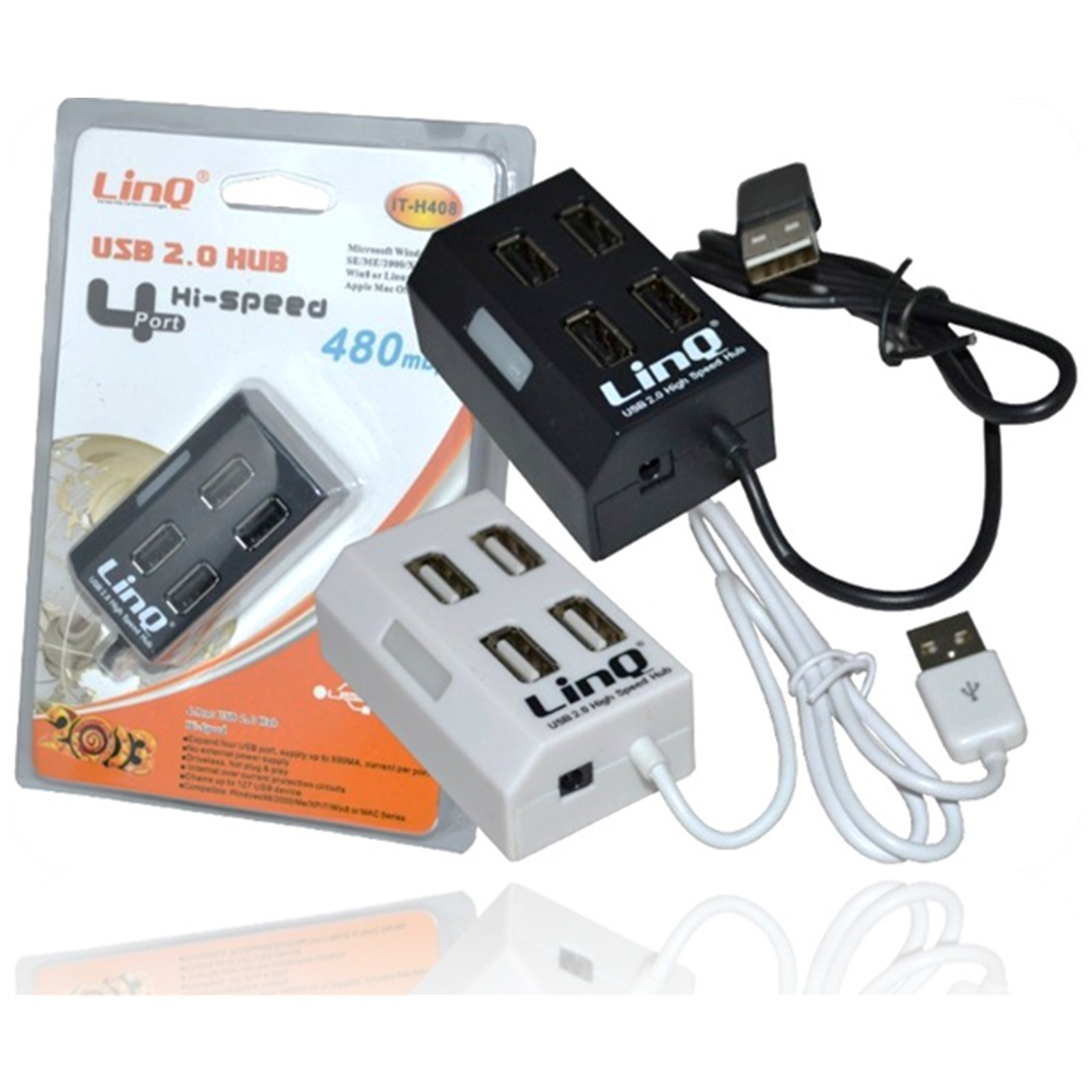
Figure 1: Linq IT-H408 4-Port USB 2.0 Hub. This image displays the hub's compact form factor, highlighting the four USB ports and their corresponding individual power switches, along with the integrated USB cable for connection to a host device.
Інструкцыя па наладзе
- Распакуйце хаб: Carefully remove the Linq IT-H408 USB Hub from its packaging.
- Падключыцеся да кампутара: Plug the integrated USB cable from the hub into an available USB 2.0 or USB 3.0 port on your computer.
- Ўстаноўка драйвера: The hub is plug-and-play and typically does not require additional driver installation for compatible operating systems (Windows 98/2000/ME/XP/7/8, Mac OS series). Your operating system should automatically detect and configure the device.
- Падключэнне перыферыйных прылад: Plug your USB devices (e.g., flash drives, keyboards, mice) into the available ports on the Linq IT-H408 hub.
Operating the Hub
- Powering On/Off Ports: Each USB port on the Linq IT-H408 has an independent on/off switch. Press the switch corresponding to the desired port to toggle its power state. An indicator light (if present) will illuminate when the port is active.
- Падключэнне прылад: Insert your USB device into an available port. Ensure the port is powered on using its individual switch.
- Перадача дадзеных: The hub supports USB 2.0 data transfer speeds up to 480 Mbps. Performance may vary based on the connected device and host system.
- Спажываная магутнасць: For high-power devices, ensure your computer's USB port can supply sufficient power. If multiple high-power devices are connected, an external power adapter (not included) might be required for optimal performance, if the hub supports it.
Тэхнічнае абслугоўванне
- Уборка: Use a soft, dry cloth to clean the exterior of the hub. Avoid using liquid cleaners or solvents.
- захоўванне: Калі хаб не выкарыстоўваецца, захоўвайце яго ў прахалодным, сухім месцы, удалечыні ад прамых сонечных прамянёў і экстрэмальных тэмператур.
- Апрацоўка: Пазбягайце падзення хаба і моцных удараў. Не спрабуйце разбіраць прыладу.
Ліквідацыю непаладак
Прылада не распазнаецца:
- Ensure the hub's USB cable is securely connected to your computer.
- Verify that the individual switch for the connected port is in the "on" position.
- Паспрабуйце падключыць канцэнтратар да іншага порта USB на вашым кампутары.
- Test the connected device by plugging it directly into your computer's USB port to rule out device issues.
- Перазагрузіце кампутар.
Павольная хуткасць перадачы дадзеных:
- Ensure both the hub and the connected device are USB 2.0 compatible for optimal USB 2.0 speeds.
- Пазбягайце адначасовага падключэння некалькіх прылад з высокай прапускной здольнасцю, калі ўзнікаюць запаволенні.
- Ensure the hub is connected to a USB 2.0 or higher port on your computer.
Перарывістае падключэнне:
- Праверце ўсе кабельныя злучэнні на наяўнасць няшчыльнасці.
- Ensure the hub is not placed near sources of strong electromagnetic interference.
- If using a desktop computer, try connecting the hub to a rear USB port directly on the motherboard.
Тэхнічныя характарыстыкі
| Нумар мадэлі | IT-H408 (Internal: 6950029010495) |
| Марка | Linq |
| Інтэрфейс | USB 2.0 |
| Колькасць партоў | 4 (with individual switches) |
| Хуткасць перадачы даных | Да 480 Мбіт/с |
| Сумяшчальныя аперацыйныя сістэмы | Windows 98 / 2000 / ME / XP / 7 / 8, Mac OS series |
| Колер | Белы, Чорны |
| Памеры (прыбл.) | 19 x 11.6 x 5 см (памеры ўпакоўкі) |
| Вага (прыбл.) | 80 грамаў |
| Патрабуюцца батарэі | няма |
Гарантыя і падтрымка
Specific warranty information for the Linq IT-H408 USB Hub is typically provided at the point of purchase or within the product packaging. Please refer to your purchase documentation for details regarding warranty coverage and duration.
For technical support or further assistance, please contact your retailer or visit the official Linq webсайт. Захоўвайце чэк аб куплі як пацвярджэнне пакупкі ў выпадку любых гарантыйных прэтэнзій.
Ask a question about this manual
Ask about setup, troubleshooting, compatibility, parts, safety, or missing instructions. Manuals+ will review the question and use this page’s manual context to help answer it.